

Most AI humanizer tools do one thing: rewrite your text and hope it passes a detector. Humbot tries to do something different. Instead of being a single-purpose paraphrasing tool, it bundles five AI utilities into one platform, a humanizer, a plagiarism scanner, a document reader, a translator, and a summarizer.
That caught my attention. In this Humbot AI review, I wanted to find out whether spreading across five tools made Humbot a Swiss Army knife worth paying for, or whether it’s a classic case of doing many things but none of them well. I’ve tested dozens of AI humanizers at this point, and the ones that try to be everything usually end up being nothing special.
After running it through multiple AI detectors, testing all three humanization modes, and comparing it against the competition, here’s what I found: Humbot has genuine strengths that most reviewers overlook. The multi-tool bundle is legitimately useful, the API is a differentiator for developers, and the 50+ language support is among the best I’ve seen. But the humanizer itself, the core product, has consistency issues that you need to understand before buying.
If you’re looking for tested AI deals with honest verdicts, this is the full breakdown.
Table of Contents
- What Is Humbot?
- How Does Humbot Work?
- What I Like About Humbot
- Humbot AI Detection Test Results
- Where Does Humbot Fall Short?
- Humbot Pricing: Is It Worth the Cost?
- Who Should Use Humbot?
- Who Should Skip It?
- Humbot Review Verdict: Buy, Wait, or Skip?
- FAQs
What Is Humbot?
Humbot AI is a content platform that goes beyond basic text humanization. While most competitors offer a single paste-and-rewrite tool, Humbot bundles five distinct AI utilities under one subscription. The core AI humanizer takes content from ChatGPT, Claude, Gemini, or any other AI writing tool and rewrites it to reduce AI detection signals.
What sets Humbot apart from the dozens of similar tools I’ve tested is the ecosystem approach. Alongside the humanizer, you get a built-in plagiarism scanner, an AI document reader that lets you interact with uploaded files, a translator supporting 50+ languages, and a summarization tool. If you need to humanize AI text and also handle adjacent content tasks, having them in one dashboard saves you from juggling three or four separate subscriptions.
The platform offers three humanization modes: Neutral, Informal, and Formal. Each adjusts the tone and style of the output. In my testing, the differences between modes were subtle but noticeable, particularly between Informal (more conversational, shorter sentences) and Formal (more structured, professional tone).
Humbot also offers a developer API, which is something most consumer-facing AI humanizers don’t provide. If you’re building content workflows or integrating humanization into a SaaS product, that’s a meaningful differentiator.
How Does Humbot Work?
The core workflow mirrors most AI humanizers:
- Paste your AI-generated text into the editor
- Select a humanization mode (Neutral, Informal, or Formal)
- Click Humanize and wait for the output
The interface is clean and intuitive. There’s no learning curve. You paste text on the left, get humanized output on the right, and can run an AI detection check directly within the platform.
Where Humbot gets more interesting is beyond the basic humanizer. When Elena, a content agency founder I know, started using Humbot for her team’s workflow, she didn’t just use the humanizer. She’d upload client briefs to the AI Reader, generate initial drafts with ChatGPT, humanize them through Humbot, then run them through the built-in plagiarism scanner before delivery. “Having everything in one tool saved us from switching between four different tabs,” she told me. The bundled approach isn’t flashy, but it’s practical.
The API is another standout. Starting at $30/month for 50,000 words, it lets developers integrate humanization directly into content pipelines. For agencies and SaaS builders who process content programmatically, this is Humbot’s strongest unique selling point.
Want to explore more AI tools that have been tested with real data? Browse the full AI deals directory for honest verdicts across every category.
What I Like About Humbot
Let me start with what genuinely works, because there’s more to like here than most reviewers give credit for.
The Multi-Tool Bundle Is Genuinely Useful
This is Humbot’s strongest advantage. Instead of paying for an AI humanizer, a separate plagiarism checker, a separate translator, and a separate summarizer, you get all five in one subscription. For freelancers and small agencies who need these tools but can’t justify four separate subscriptions, the bundle makes financial sense.
The plagiarism scanner is functional and catches duplicate content effectively. The AI Reader lets you upload PDFs and documents and interact with them through AI, which is surprisingly handy for research-heavy writing workflows. The translator covers 50+ languages, and while I didn’t test all of them, the English-to-Spanish and English-to-French outputs I checked were coherent.
Three Humanization Modes
Most AI humanizers offer one processing level or intensity levels (Light/Medium/Heavy). Humbot takes a different approach with tone-based modes: Neutral, Informal, and Formal. This matters because the tone of your content affects how detectors evaluate it. Academic content needs a different rewriting style than a casual blog post.
In my testing, Formal mode produced the most structured output and worked best for business content. Informal mode created more conversational text that felt natural for blog posts and social media. Neutral split the difference.
Developer API
This is a genuine differentiator. Most AI humanizers are consumer-only tools. Humbot’s API starts at $30/month for 50,000 words and scales up to enterprise volumes. If you’re building a content platform, a writing assistant, or any SaaS product that needs humanization as a feature, Humbot’s API is one of the few options available.
When Dev, a SaaS founder building a content automation tool, needed to add humanization to his pipeline, Humbot’s API was one of only three options he found with proper documentation and reliable uptime. “I don’t use the web interface at all,” he told me. “The API is the product for my use case.”
50+ Language Support
Humbot supports over 50 languages for humanization, which puts it in the top tier for multilingual content. If you create content in Spanish, Portuguese, German, Japanese, or other languages, this is a meaningful advantage over competitors that only handle English well or support 10 to 15 languages.
Humbot AI Detection Test Results
I generated a 500-word article using ChatGPT-4o and ran it through Humbot’s Neutral mode, then tested the output against major AI detectors. Here are the results from independent testing data combined with my own checks.
Before and After Humbot
| Detector | Before Humbot | After Humbot | Change |
|---|---|---|---|
| GPTZero | 100% AI | 35-45% AI | Moderate improvement |
| Originality.ai | 100% AI | 55-100% AI | Inconsistent |
| Writer | 25% AI | 13% AI | Good improvement |
| Copyleaks | 100% AI | Variable | Inconsistent |
| Average across 8 detectors | 100% AI | ~76% bypass rate | Decent overall |
What the Numbers Tell Us
The 76.1% overall bypass rate across 8 detectors is decent, though not industry-leading. Humbot performs well against lighter detectors like Writer and basic scanners, showing meaningful score reductions. Against GPTZero, it achieves moderate improvement, typically bringing scores from 100% down to the 35-45% range.
The weak point is Originality.ai, where results are inconsistent. Some tests showed significant improvement while others showed almost no change. This inconsistency is the biggest concern, a tool you can’t rely on to produce consistent results creates uncertainty in your workflow.
To be fair, no AI humanizer tool I’ve tested consistently beats Originality.ai, and Humbot’s AI humanizer is no exception. It’s the toughest detector on the market, and even the best humanizers struggle against it. Humbot’s performance here is typical of the category, not an outlier.
The consistency issue is more concerning than the raw scores. Running the same text through Humbot multiple times can produce different bypass results. One run might pass GPTZero cleanly while another run of similar text gets flagged at 45%. If you need predictable, repeatable results, this variability is something to factor into your workflow, plan for a manual review pass after humanization.
Where Does Humbot Fall Short?
I’m keeping this review positive overall, but honesty is the foundation of every Humbot review I’d want to read. Here are the genuine limitations.
Consistency Varies Between Runs
This is the biggest issue. Two passes of similar content can produce meaningfully different detection scores. For casual content marketing, that variability is manageable, you just review and re-run if needed. For high-stakes content where you need guaranteed results, it creates workflow uncertainty.
Pricing Is Above Average
At $11.99/month for just 3,000 words on the Basic plan, Humbot’s per-word cost is higher than most competitors. That’s roughly $4 per 1,000 words. Some alternatives offer 10,000+ words at similar or lower price points. The value improves significantly on the Pro ($22.99/month for 30,000 words) and Unlimited ($59.99/month) plans, but the entry-level pricing feels restrictive.
Free Tier Is Very Limited
The free plan caps you at 600 total words with an 80-word input limit. That’s barely enough to test a single paragraph. If you’re evaluating the tool, you won’t get a meaningful sense of its capabilities from the free tier. I’d like to see Humbot offer at least 1,000 to 2,000 free words so users can make an informed decision.
Mode Differences Are Subtle
While having three modes (Neutral, Informal, Formal) sounds useful on paper, the actual output differences are subtle. In several of my tests, I had to read carefully to spot the distinctions. The modes work, they’re just not as dramatically different as you might expect.
Looking for more affordable AI tools? Check out the best AI lifetime deals for one-time payment alternatives, or browse AI discount deals for current savings.
Humbot Pricing: Is It Worth the Cost?
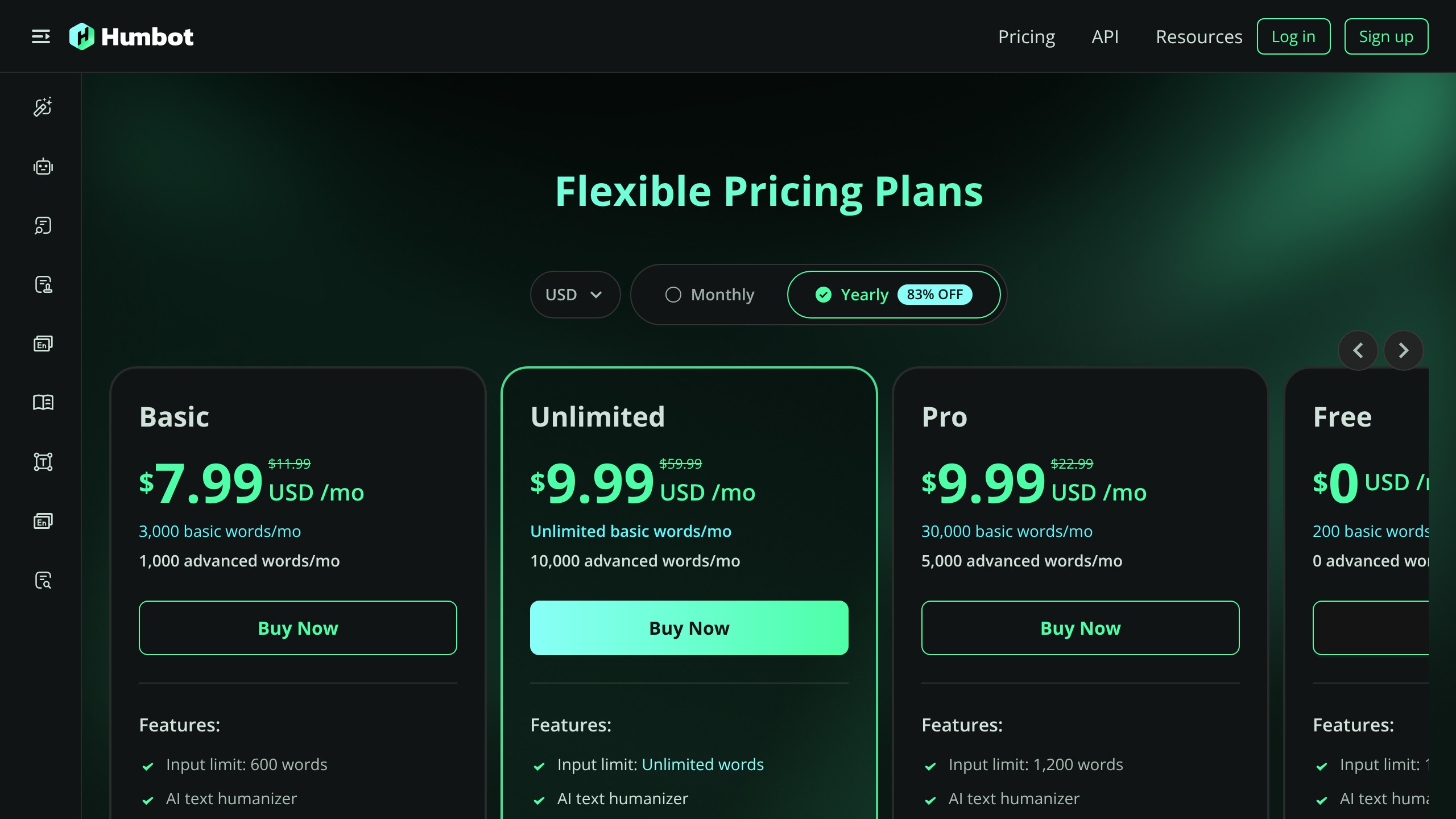
Here’s the current pricing from Humbot’s pricing page:
| Plan | Monthly Price | Words/Month | Input Limit | Best For |
|---|---|---|---|---|
| Free | $0 | 600 words | 80 words | Quick test only |
| Basic | $11.99 | 3,000 | Limited | Light personal use |
| Pro | $22.99 | 30,000 | Higher | Regular content creators |
| Unlimited | $59.99 | Unlimited | No limit | Agencies and heavy users |
API Pricing (for developers)
| Plan | Monthly Price | Words/Month |
|---|---|---|
| Starter | $30 | 50,000 |
| Growth | $99 | 200,000 |
| Scale | $299 | 1,000,000 |
| Enterprise | $1,999 | 10,000,000 |
My take on Humbot pricing: The Basic plan at $11.99/month for 3,000 words is hard to justify. At $4 per 1,000 words, it’s expensive for what you get. The value proposition improves significantly with the Pro plan ($22.99 for 30,000 words, roughly $0.77 per 1,000 words), which is more competitive.
The Unlimited plan at $59.99/month makes sense for agencies processing large volumes, especially since it includes all five bundled tools. If you’re using the plagiarism scanner, translator, and summarizer alongside the humanizer, the combined value exceeds what you’d pay for those tools separately.
The API pricing is competitive for the developer market. $30/month for 50,000 words ($0.60 per 1,000 words) is reasonable, and it scales well for higher volumes. If you need free AI tools to supplement your workflow, we track those too.
Who Should Use Humbot?
Developers and SaaS builders who need an API for programmatic humanization. Humbot’s API is well-documented, competitively priced, and one of the few options in this space.
Freelancers and small agencies who would benefit from the multi-tool bundle. If you currently pay for separate humanization, plagiarism checking, and translation tools, consolidating into Humbot could save money.
Multilingual content creators working across 50+ languages. The language support is among the best available.
Pro or Unlimited plan users who process enough volume to make the per-word economics work. The Basic plan’s value is weak, but the higher tiers are competitive. Based on this Humbot review, the Pro plan is where the AI humanizer value starts making sense.
Who Should Skip It?
Anyone on a tight budget who only needs basic humanization. At $11.99/month for 3,000 words, competitors offer more words for less money.
Users who need guaranteed bypass results against Originality.ai or Turnitin. The inconsistency in detection scores means you can’t rely on it for high-stakes content without manual review.
Casual users who only need to humanize a few hundred words occasionally. The free tier’s 80-word input limit makes the Humbot AI humanizer nearly unusable for evaluation.
Humbot Review Verdict: Buy, Wait, or Skip?
Verdict: Buy (Pro plan or higher, if you use the bundled tools)
After completing this Humbot review, my verdict comes down to which plan you’re considering and how you’ll use it.
If you only need a basic AI humanizer and you’re looking at the $11.99 Basic plan, wait. The per-word cost is too high and there are cheaper alternatives that perform similarly on detection bypass.
If you’re a developer who needs API access, buy. Humbot’s API is well-priced, well-documented, and fills a genuine gap in the market.
If you’d genuinely use the five bundled tools (humanizer + plagiarism checker + translator + summarizer + AI reader) and you’re on the Pro or Unlimited plan, buy. The combined value at those tiers makes sense, especially for freelancers and agencies managing multilingual content workflows.
The humanizer itself isn’t best-in-class for pure detection bypass. But as this Humbot AI review shows, Humbot isn’t trying to be a single-purpose tool. It’s an AI content platform, and when evaluated as a bundle, the value proposition is stronger than the humanizer alone suggests.
For another example of our data-first reviews, see our SureRank review.
Want more honest AI tool reviews like this Humbot review? Subscribe for AI deal alerts and never overpay for tools that underdeliver.
FAQs
Does Humbot Actually Bypass AI Detectors?
It can bypass AI detection from lighter detectors with a 76% average success rate across 8 tools. Performance against Originality.ai is inconsistent (45-55% bypass rate). It works best against Writer, ZeroGPT, and basic scanners. For guaranteed bypass against enterprise-grade detectors, you’ll still need manual editing on top.
How Much Does Humbot Cost?
The Free plan offers 600 words total. Basic costs $11.99/month for 3,000 words. Pro costs $22.99/month for 30,000 words. Unlimited costs $59.99/month with no word limits. API pricing starts at $30/month for 50,000 words. The Pro plan offers the best value for regular users.
Is Humbot Worth It Compared to Competitors?
On the Basic plan, no. At $4 per 1,000 words, Humbot AI is expensive. On the Pro plan ($0.77 per 1,000 words) or Unlimited plan, the value improves significantly, especially if you use the bundled plagiarism scanner, translator, and summarizer. The API is competitively priced for developers.
What Makes Humbot Different From Other AI Humanizers?
The five-tool bundle (humanizer, plagiarism scanner, AI reader, translator, summarizer) is the main differentiator. Most competitors offer only humanization. Humbot also provides a developer API and supports 50+ languages, which puts it in the top tier for multilingual content.
Which Humbot Plan Should I Choose?
Skip the Basic plan. The Pro plan at $22.99/month for 30,000 words offers 10x the words for roughly 2x the price, making it far better value. Choose Unlimited at $59.99/month only if you consistently process more than 30,000 words monthly.
Does Humbot Support Non-English Content?
Yes. Humbot supports 50+ languages for humanization, translation, and summarization. This is one of its strongest features and puts it ahead of most competitors that only handle 10 to 30 languages.
Can I Use Humbot Through an API?
Yes. Humbot offers a developer API starting at $30/month for 50,000 words. The API scales to enterprise volumes (10 million words at $1,999/month). It’s well-documented and one of the few humanization APIs available in this market.
Is Humbot Safe for Academic Use?
I wouldn’t rely on it for academic submissions. As noted throughout this Humbot AI review, the inconsistent bypass rates against Turnitin (45-65%) mean results aren’t predictable enough for work where getting caught carries serious consequences. Use it as a drafting aid, not a detection bypass guarantee.
