

If you’ve been searching for a Visby AI Appsumo Lifetime Deal Review that goes beyond hype and actually shows what the tool does inside the dashboard, you’re in the right place.
I’m going to walk you through the full flow of Visby AI—setup, tracking, competitor analysis, reporting, tasks, content gap briefs, reviews, and integrations—so you can decide whether this AppSumo lifetime deal is suited for your needs.
What Visby AI is (in plain English)
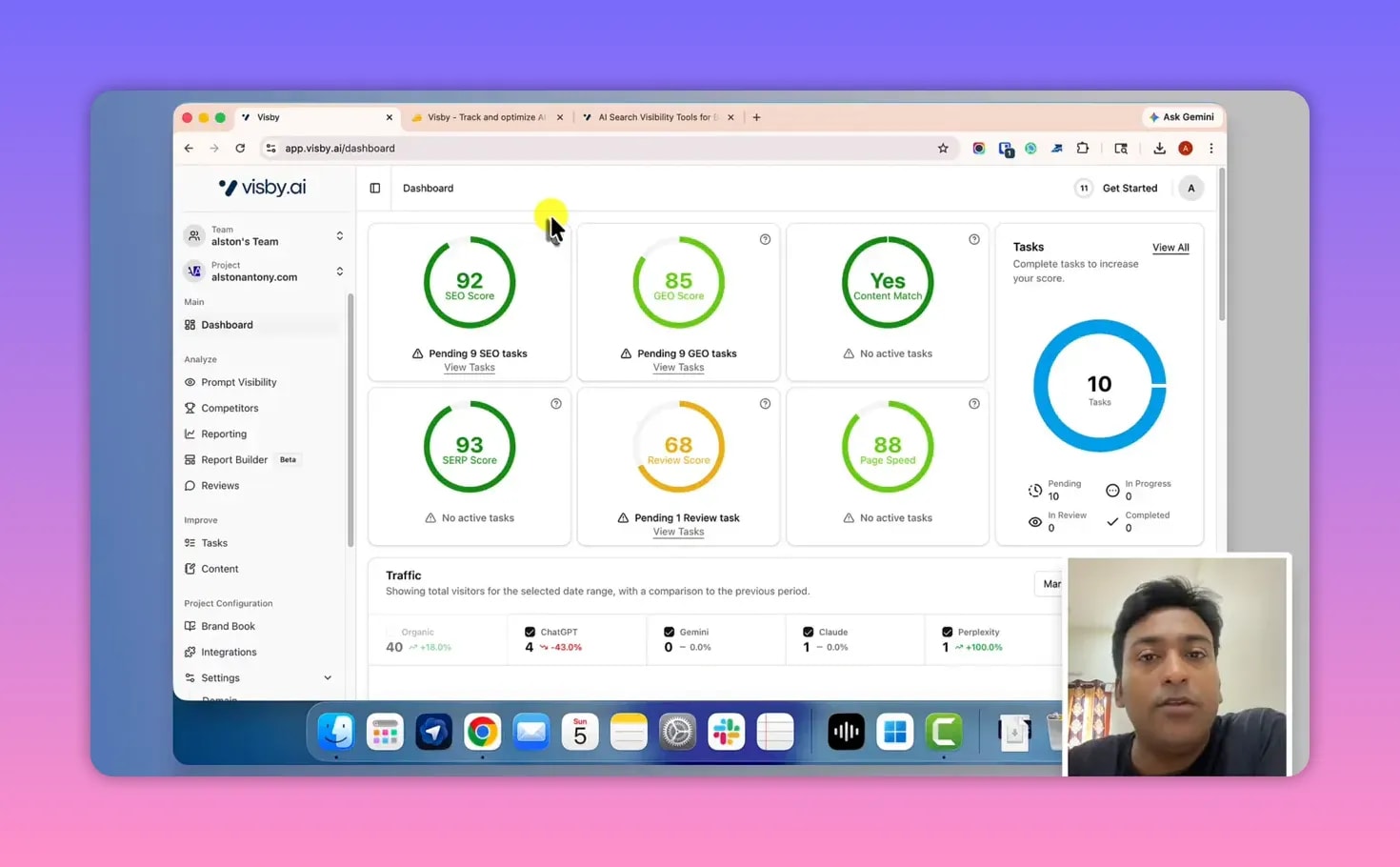
Visby AI is an AI SEO and GEO (Generative Engine Optimization) tool designed to help you understand how your brand/content appears across AI-driven search and answer experiences.
Instead of only tracking “classic” SEO rankings, Visby AI focuses on LLM prompt visibility: how often your brand is mentioned and cited by generative systems when people ask prompts related to your niche.
In practice, this means you can track visibility across multiple AI environments such as:
- ChatGPT
- Gemini
- Cloud (as shown in the interface)
- Perplexity
- Microsoft Copilot (via LLM traffic/source reporting)
And yes—Visby AI also brings more traditional data together, because it supports connecting Google Analytics (and it mentions connecting Google Search Console for visibility/keyword data).
Visby AI Appsumo Lifetime Deal Review: Setup Wizard & Dashboard Overview
When you sign up, Visby AI gives you an initial wizard-style setup.
During setup, you provide key basics like your site/domain. After that, the tool attempts to identify relevant information (including competitor/project-style data). The setup process is presented as straightforward and easy to complete.
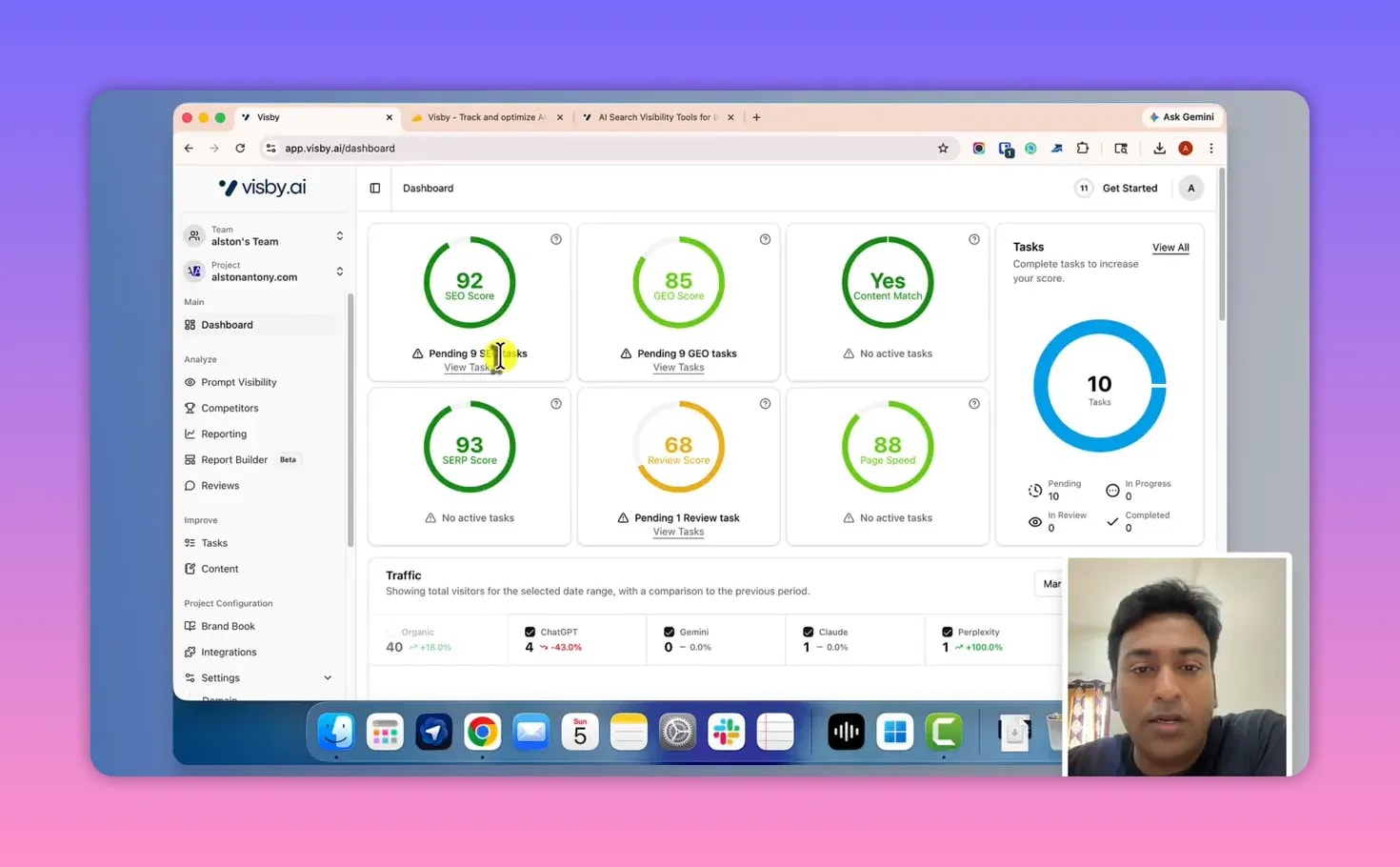
Once your setup is complete, you land on a dashboard that shows an SEO scope with actionable items broken into areas such as:
- SEO tasks
- Geo tasks
- Page speed tasks
Each area is clickable. When you click a task category, it takes you to the task section where you can work through what’s pending, in progress, and done.
Connecting Analytics: Seeing Organic LLM Traffic Sources
Scrolling further down in the dashboard, you’ll find an option to connect Google Analytics. Once connected, Visby AI displays data in one place.
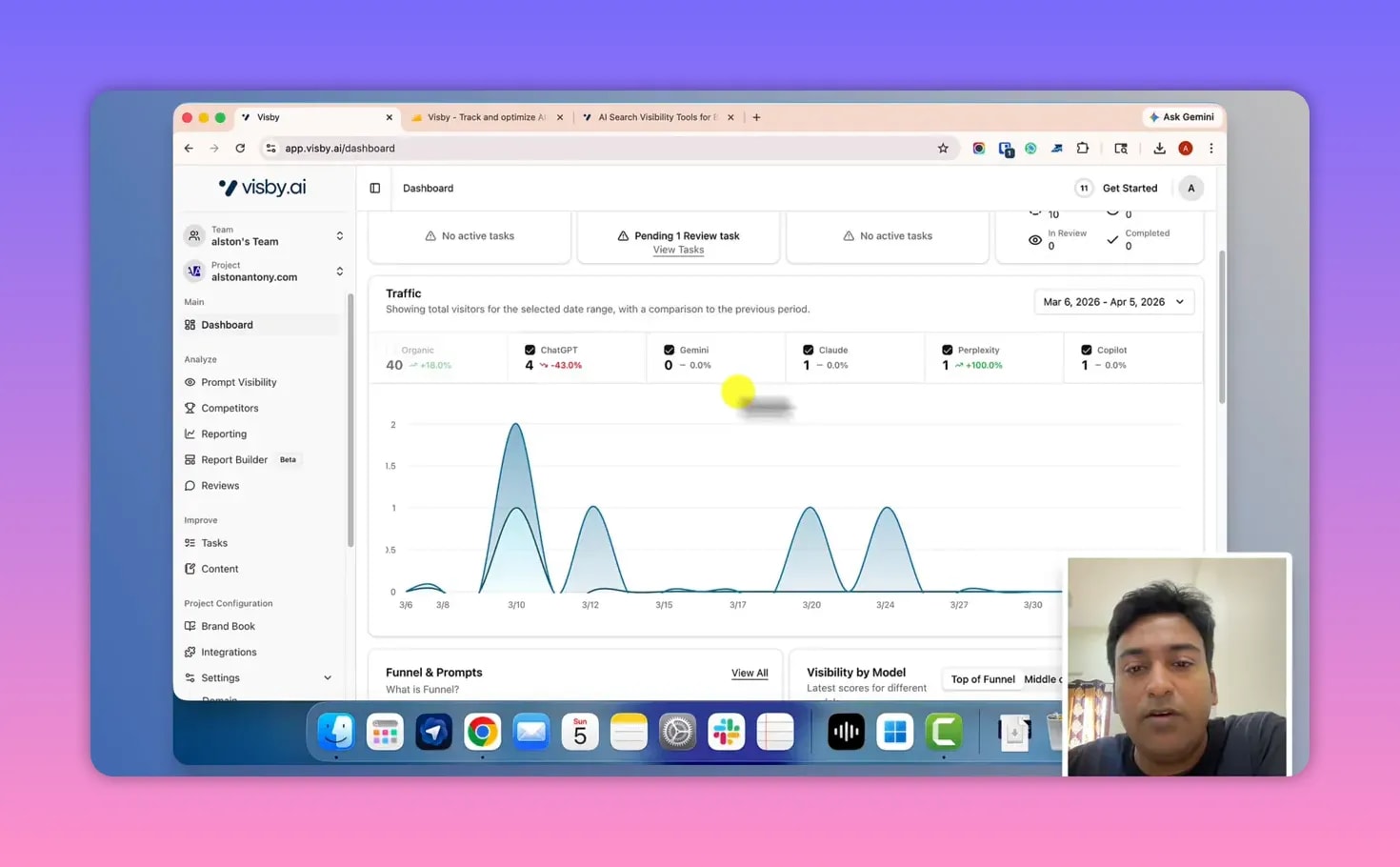
This includes visibility into organic AI-related traffic sources mentioned in the interface, such as:
- ChatGPT traffic
- Gemini
- Cloud
- Perplexity
- Copilot
The key benefit here is “one place” visibility—an eagle-eye overview so you don’t have to jump between multiple tools just to understand what’s happening across AI sources.
Funnel Visibility: Top, Middle, and Bottom of the AI Journey
Visby AI also provides funnel-style visibility. The interface groups prompts by stages:
- Top of funnel (awareness)
- Middle of funnel
- Bottom of funnel
In addition, the system shows things like:
- Visibility metrics for your tracked prompts
- Top keywords (powered by connected Google Search Console data)
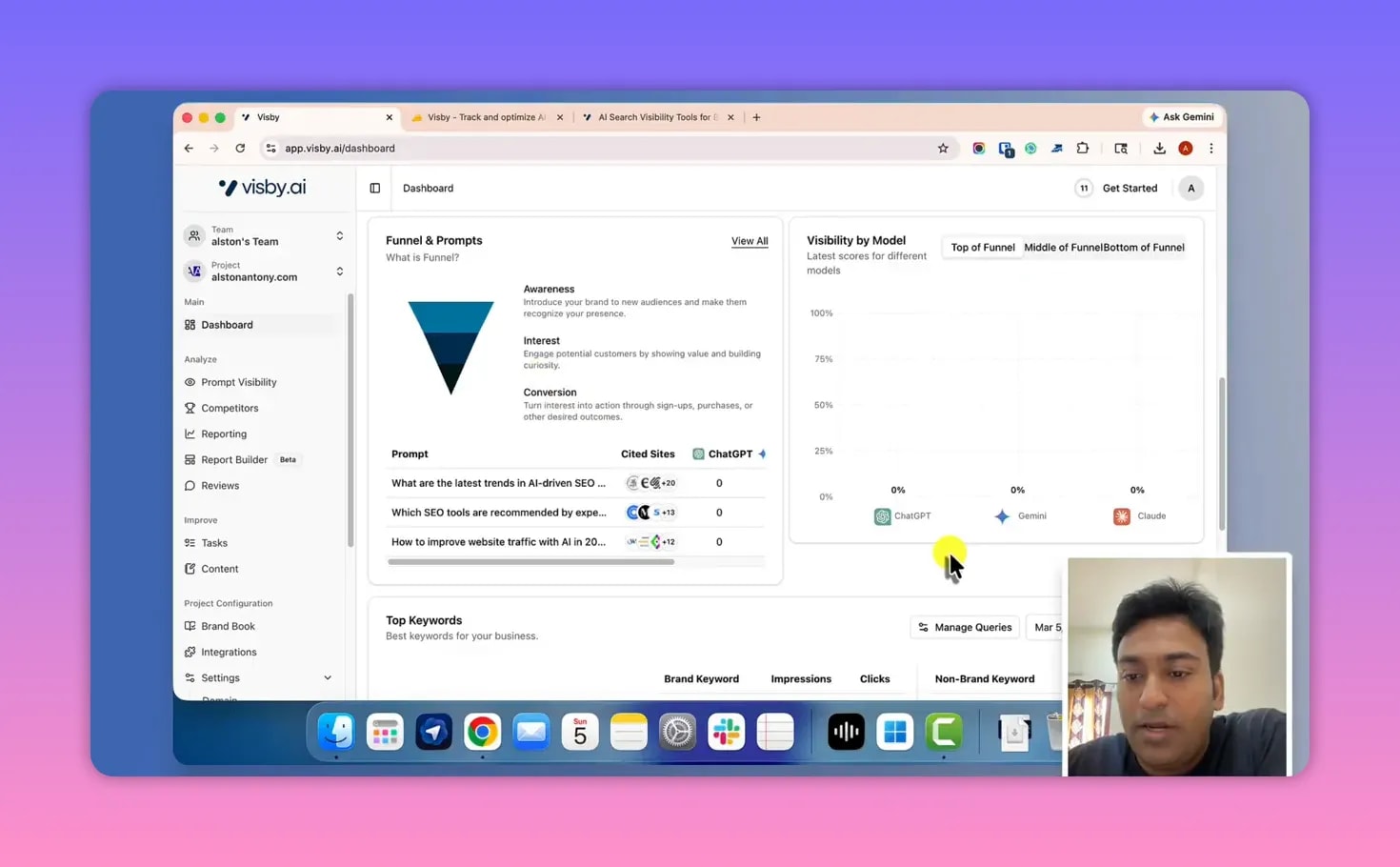
This matters because GEO strategy often isn’t only about “are we mentioned?”—it’s also about where in the buyer journey the mention happens.
Core Feature: LLM Prompt Visibility (Track Prompts + See Citations)
The heart of Visby AI is LLM Prompt Visibility.
The idea is simple:
- You track prompts relevant to your niche.
- Visby AI monitors visibility and identifies what types of outputs appear—such as whether you’re tagged/cited and which LLM sources mention you.
- You can click into prompts for deeper details, including the actual responses shown by each LLM and the citations and brands involved.
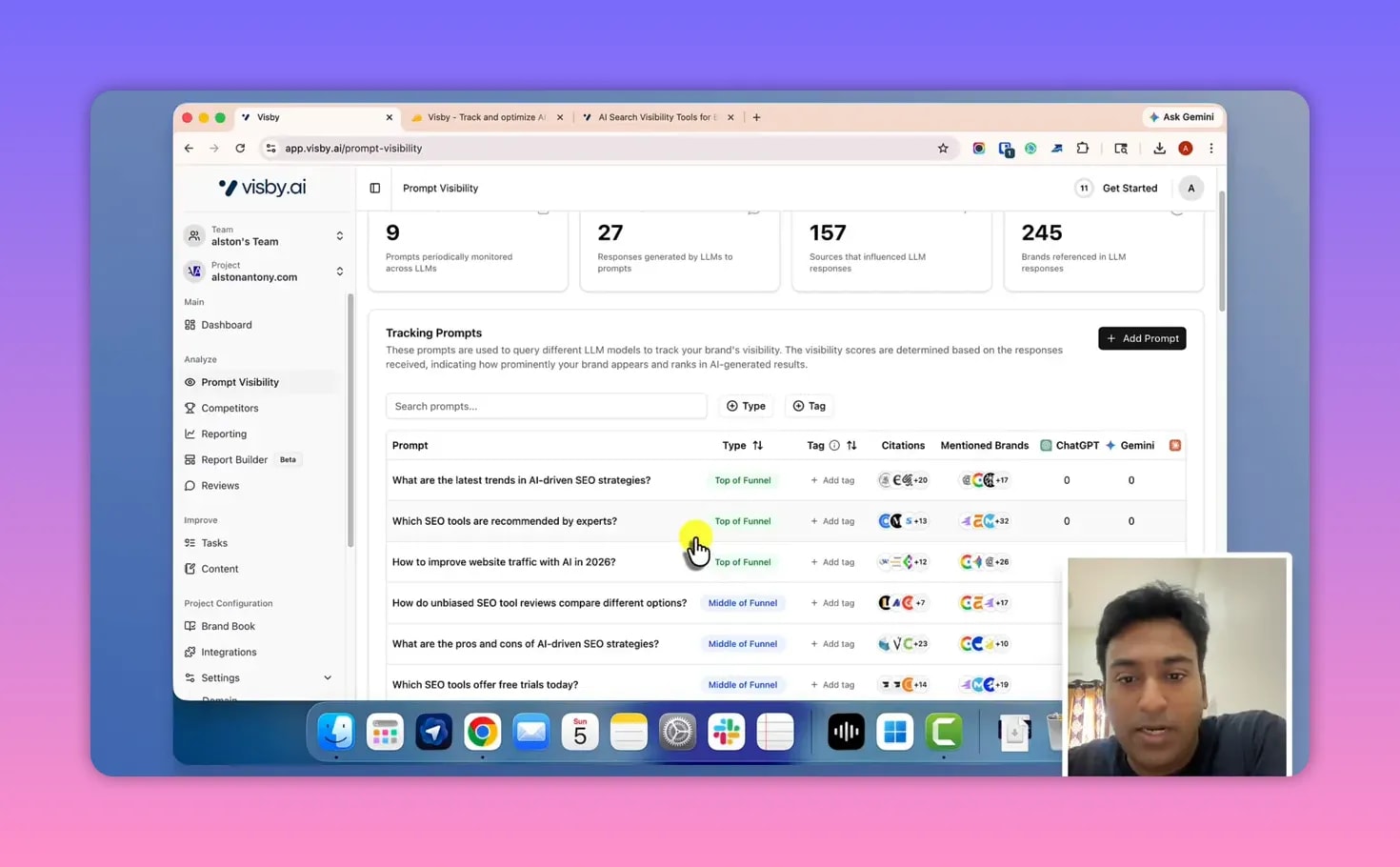
How prompt tracking works inside the tool
Visby AI can suggest prompts based on your website, and you can also add your own prompts.
Once prompts are tracked, Visby AI categorizes and displays information such as:
- Type of mentions (for example “citation mention” is referenced in the interface)
- Which LLMs provide responses (Gemini, Cloud, ChatGPT, etc.)
Clicking a prompt: response breakdown per LLM
When you click into a prompt, you can see what each LLM responded with. The interface supports a response comparison workflow like:
- Gemini response: what it said
- Cloud response: what it said
- ChatGPT response: what it said
Then, you can open the response itself. The interface also highlights:
- Citations the response used
- Brands that were mentioned
- Links provided as part of citations (as shown in the interface)
Update frequency (important limitation)
Visby AI updates prompt visibility data every 30 days depending on the subscription plan. The tool does this on a cadence that’s described as monthly.
If you were hoping for daily/weekly monitoring, this is one area that may feel slower than you want.
Prompt Visibility Summary by Funnel Stage
Beyond viewing single prompts, Visby AI includes a visibility summary by stage—top/middle/bottom funnel.
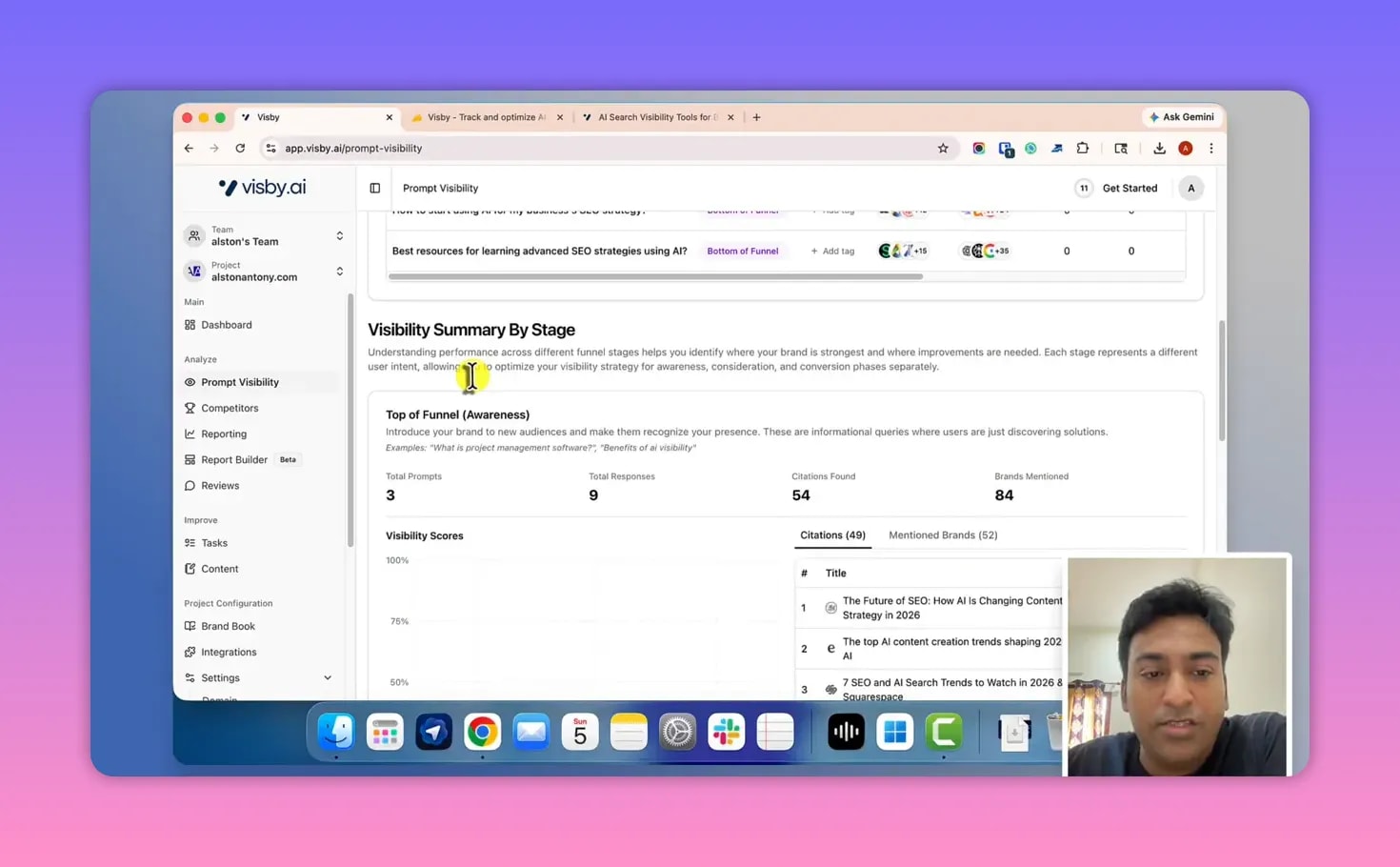
This is where the “GEO strategy” approach becomes clearer:
- If you start ranking on bottom-of-funnel prompts, you should see corresponding values for that stage.
- If you’re winning mentions mainly for top-of-funnel, the visibility summary reflects that too.
The practical outcome is that you can decide how you want to build content and internal targeting based on where your visibility is strongest (or weakest).
Competitor Analysis: Share of Voice Across Prompts
Visby AI includes a competitor module designed to help you understand how you compare against other sites/brands in AI responses for the prompts you track.
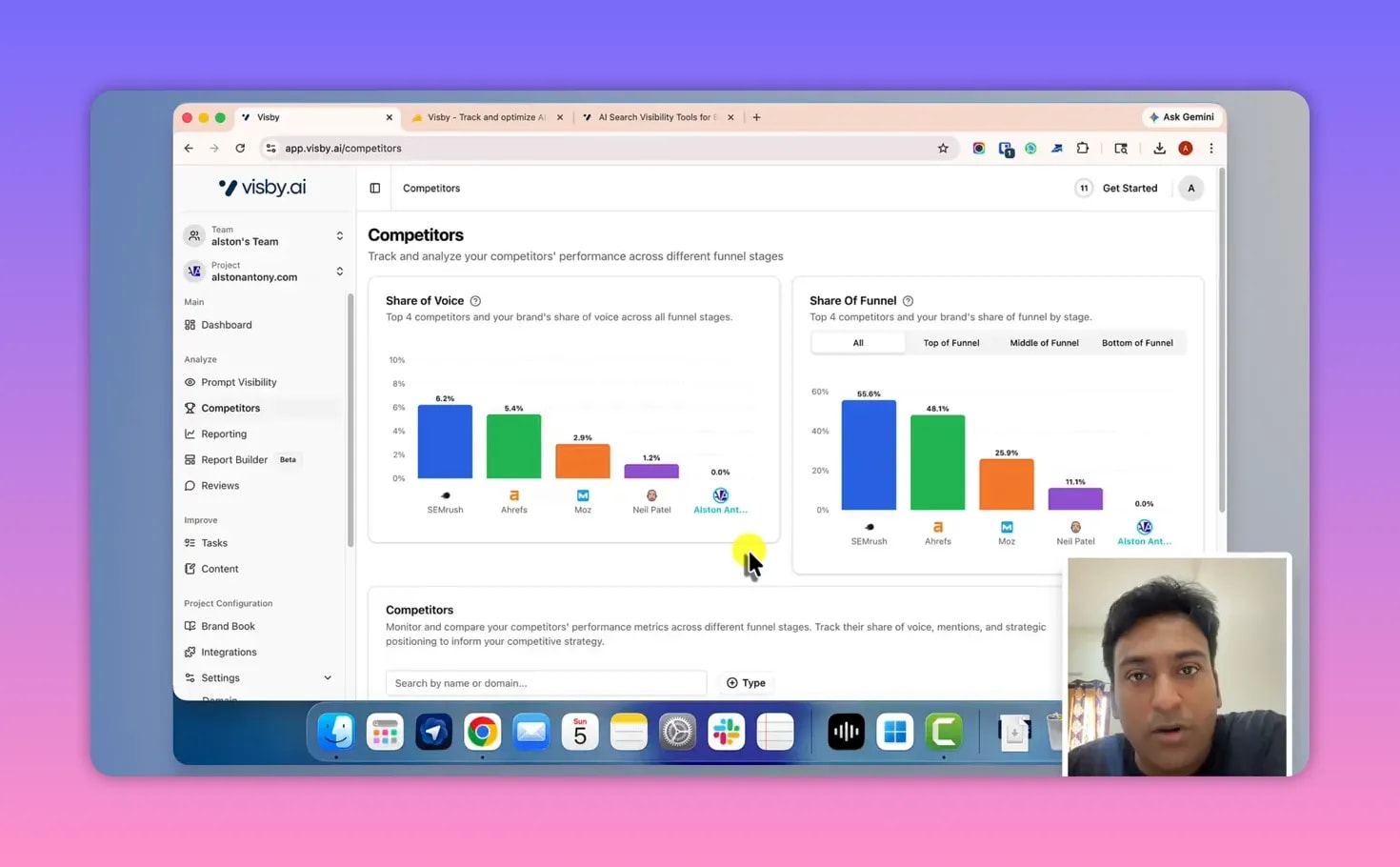
Inside competitor analysis, the interface provides an overview of:
- Share of voice (who is showing up more)
- Biggest competitors for your tracked prompts
- Competitor performance changes by funnel stage
The interface also supports competitor tracking categorization:
- Direct competitors
- Indirect competitors
- Competitors can also be tagged as “not a competitor” within the workflow described
You can view information in a table view as well as in an overview visualization.
Reporting Dashboard & Report Builder (Client-Friendly, but Beta)
Visby AI’s Reporting section pulls together connected data sources (based on what you integrated), including:
- Google Analytics
- Google Search Console
- Bing
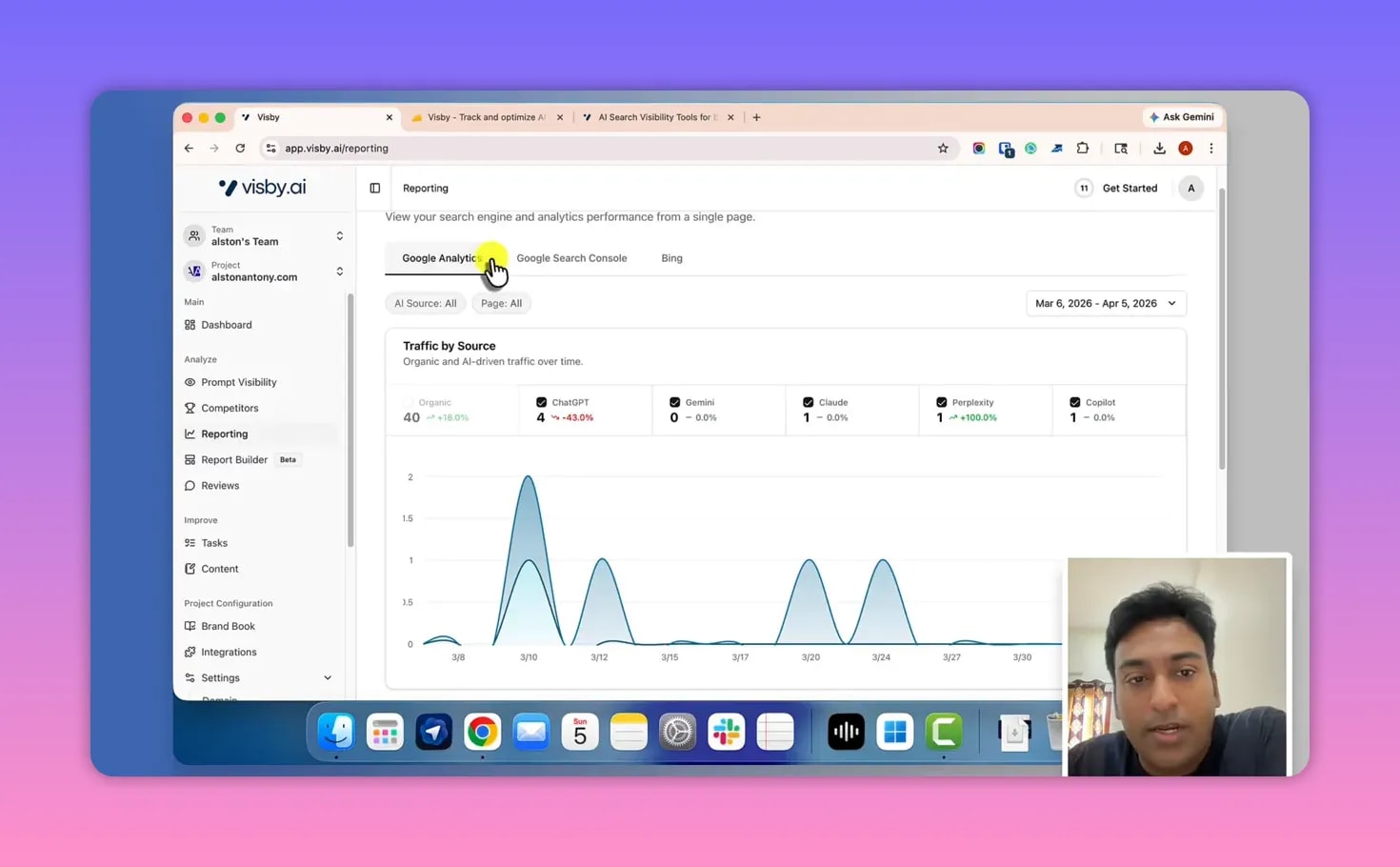
Reporting focuses on consolidating traffic sources, matrices, and performance widgets into one dashboard area.
Traffic sources matrix + LLM sources
One highlighted feature is a traffic sources matrix that can include LLM traffic sources and page-level information (described as useful for non-techies as well).
Report builder: create slide-style dashboards
The report builder is aimed particularly at people who work with clients.
It’s described as a beta feature, meaning not everything is available yet. For example, the interface mentions that some widgets and elements like brand logo/custom templates/competitor widgets may be missing depending on the current build.
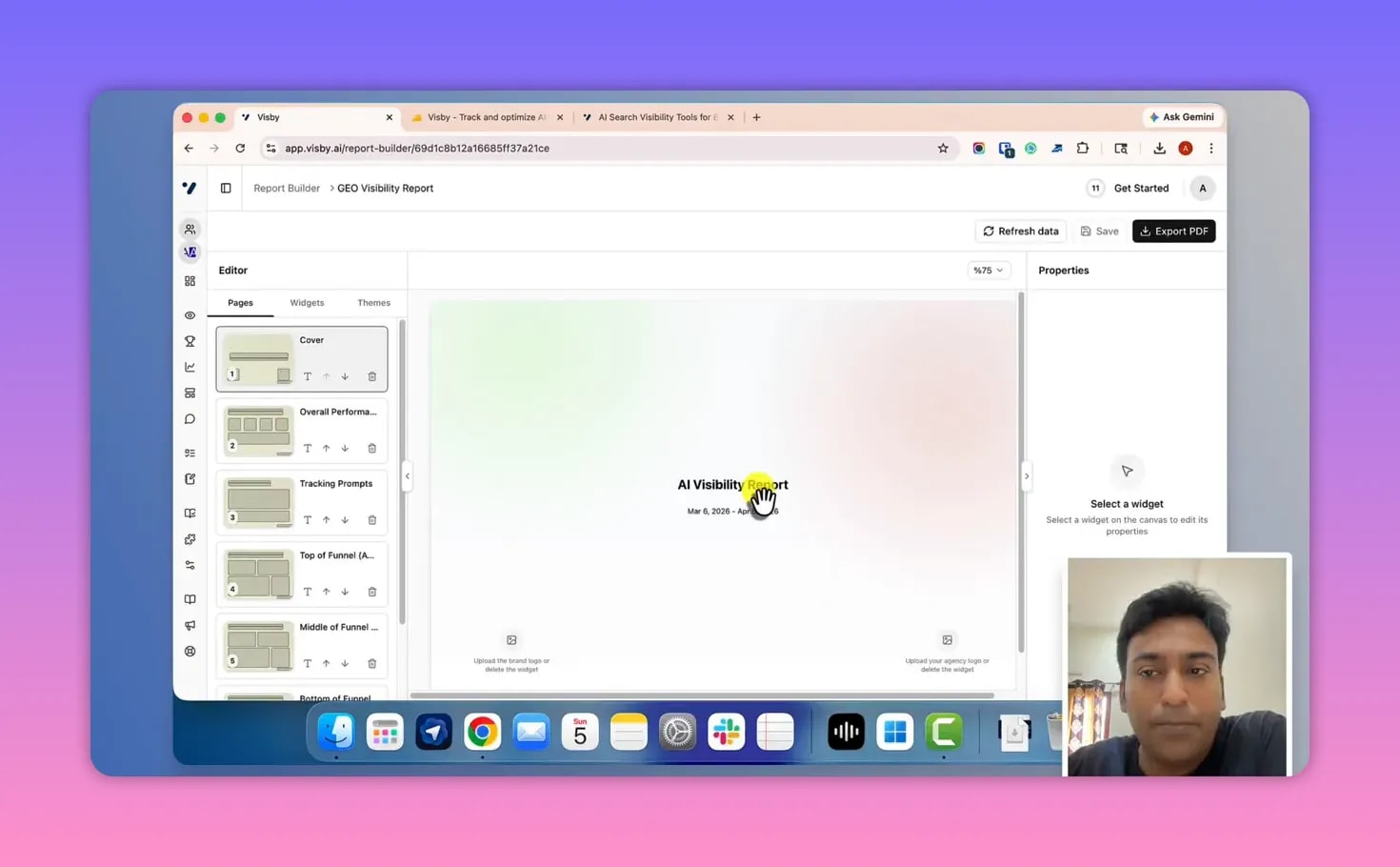
However, the part that works is meaningful:
- You can choose between a blank template or a full report template.
- The report builder feels like Google Slides / PowerPoint: you create slides and insert widgets.
- You can control the look and feel, add/edit text, and arrange components without the interface feeling bulky.
- You can connect data and refresh it.
- You can export the report, with options to manage elements like widgets and (as described) logo-related display.
Visby AI describes this as useful for client-facing reporting, especially if you’re a consultant/agency trying to avoid building slide decks manually.
Review Sentiment Analysis (How reviews affect visibility)
Visby AI also includes a Reviews module (sentiment analysis as described).
The concept is that the tool attempts to find reviews tied to your brand/product and categorize the sentiment into groups such as:
- Positive
- Negative
- Neutral
- Mixed
Then it aims to connect how those reviews influence visibility and citations in LLM outputs.
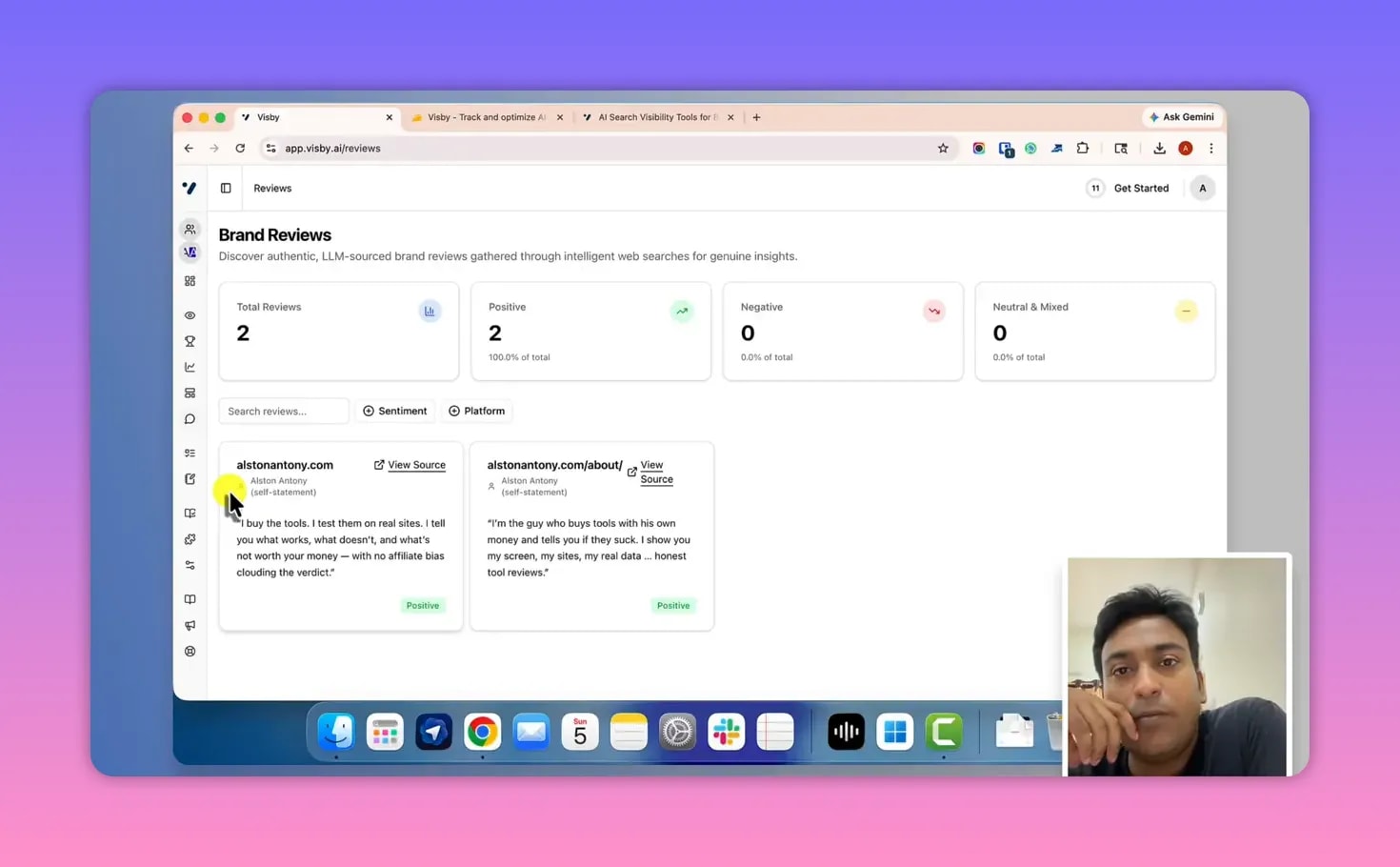
If your site/brand doesn’t have enough review data available in the places Visby AI expects to source it, the module may not show a strong demonstration in your own account—this was noted as a limitation for the example setup.
Tasks Board (Kanban): What you should do next
Visby AI’s Tasks section takes your SEO/GEO recommendations and turns them into an action board similar to a Kanban/Trello-style workflow.
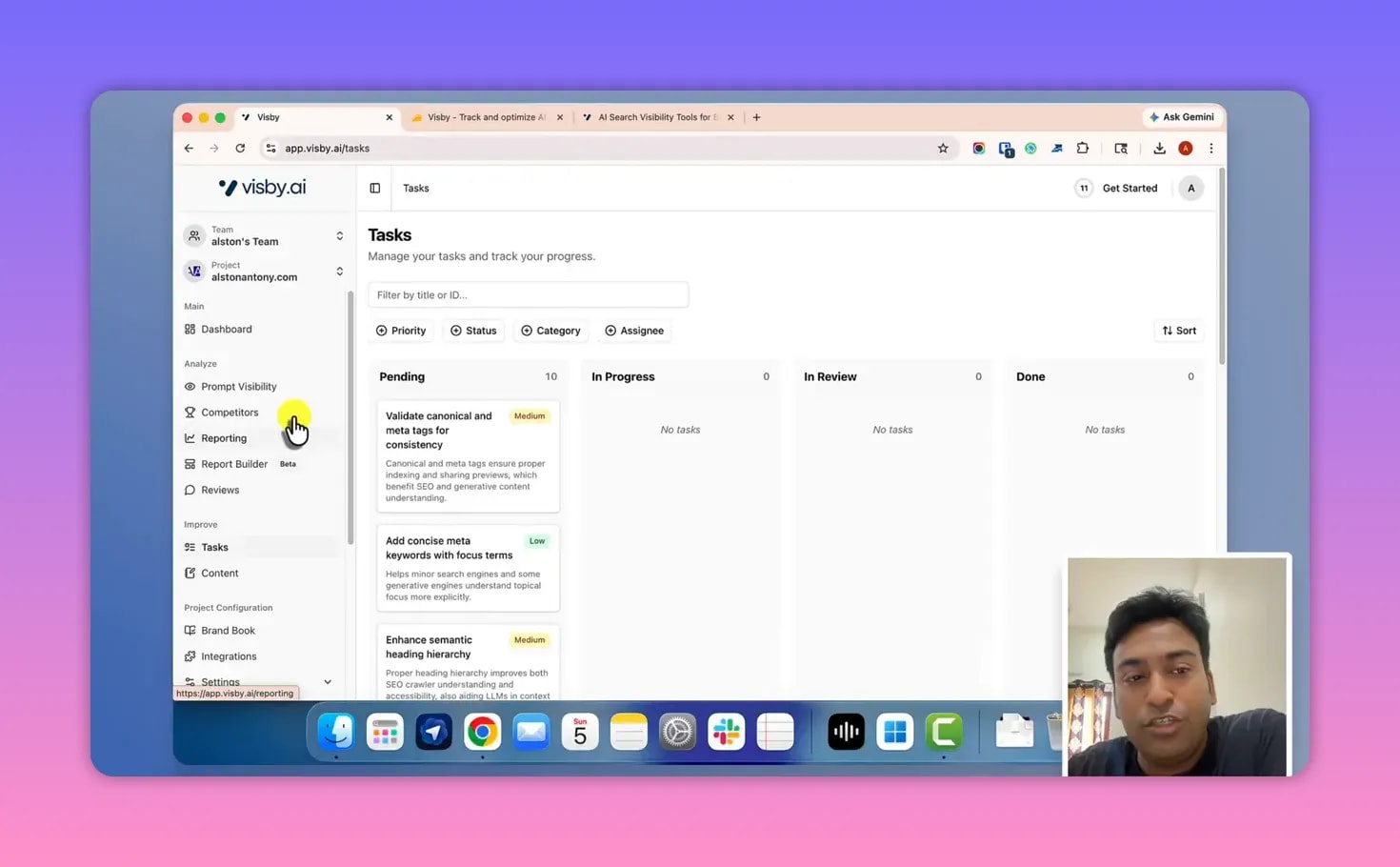
The board includes manual statuses:
- Pending
- In progress
- Review
- Done
Acceptance criteria vs. practical execution
Each task includes action items and “acceptance criteria” style guidance. The review notes a usability issue: tasks can be informative but may not provide enough “copy/paste” starting points for non-technical users.
For example, a task like implementing structured data/schema markup can be correct conceptually, but if the interface doesn’t include a draft template, example markup, or a clear starting copy, it can feel less actionable for beginners.
The review also suggests improvements such as:
- More context-driven instructions
- A better tutorial approach inside the app
- A “recheck” option to verify updates without manually reshuffling statuses
Content Gaps & AI Content Brief Generation
This is where Visby AI becomes more than tracking—it starts guiding your next content steps.
The content module is designed to find content gaps based on the prompts you’re tracking.
In other words, if your site is ranking/cited for certain prompts but missing for others, Visby AI helps identify what content you likely need to create to improve visibility.
Create a content brief (automatically)
When you select the option to generate a brief, Visby AI can create a content brief for the prompts you track.
The workflow described is:
- You give the tool the prompts you’re targeting (or it uses your tracked prompts).
- Visby AI proposes what content should exist on your site.
- You get an editable brief that you can implement.
Example of what the brief looks like
In the walkthrough, Visby AI generated a suggestion brief that recommended creating a page with a specific angle connected to:
- How AI is transforming SEO strategy
- 2026
The review frames this as a niche-aware content brief that helps you start writing from a GEO perspective (but it also notes that usefulness depends on your specific case and opinion).
How you know it’s “working”
Visby AI’s practical validation point is straightforward: when tracked prompts start citing/linking the sources your new content provides, you’ll know whether the brief led to improved LLM visibility.
Brand Book, Integrations, Settings
Visby AI includes additional areas that support consistent results and easier workflows.
Brand book
Brand book is connected to the setup wizard. It collects and shows the data the tool gathers during onboarding, and it can be editable.
Integrations
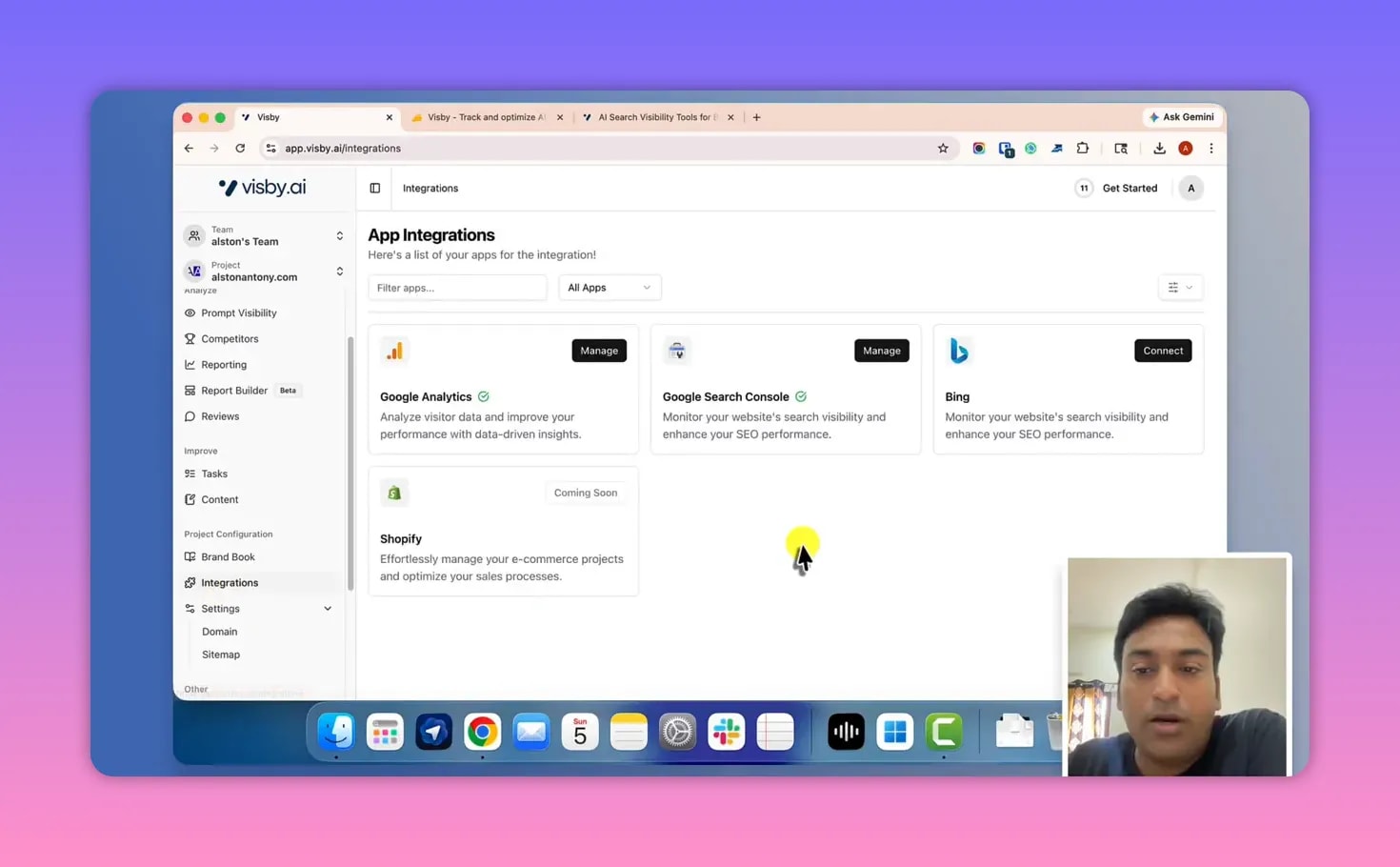
There’s an integration section where you manage connected tools.
The walkthrough notes Shopify is listed as “coming soon” (not available at the time), implying further ecommerce integration is expected later.
Settings: domain + sitemap
In settings, you:
- Set up your domain
- Optionally connect a sitemap plugin
The sitemap connection helps Visby AI understand your site structure better and update existing control more effectively (as described).
Documentation + changelog
Finally, the tool includes help/documentation and a change log so you can see tool improvements, bug fixes, and feature updates over time.
My honest verdict: Is the Visby AI Appsumo Lifetime Deal worth it?
This Visby AI Appsumo Lifetime Deal Review isn’t pretending Visby AI is perfect. The walkthrough calls out a few real limitations while still recognizing the overall value.
What feels strong
- Prompt visibility across AI environments (the core GEO value)
- Funnel stage visibility (top/middle/bottom)
- One dashboard approach to visibility + connected sources
- Content gap briefs that help you create next-step content
- The interface is described as fast and lightweight
- Setup is straightforward
What feels incomplete (based on the walkthrough)
- Prompt data refresh is every 30 days, which may be too infrequent for some teams
- Report builder is beta and some widgets/visual elements may be missing
- Tasks may lack practical execution detail (non-technical users may want copy/paste starting points or demos)
Who this lifetime deal is best for
From the walkthrough and the tool’s focus, Visby AI Appsumo Lifetime Deal makes the most sense if you are:
- A solo SEO consultant trying to expand into AI visibility
- A content creator who wants to know whether your site is cited by LLM answers
- A small agency wanting GEO tracking without a heavy monthly subscription
If you need enterprise-level reporting features or extremely frequent prompt refresh rates, the review suggests waiting for the tool to mature.
FAQ
What exactly does “LLM prompt visibility” mean in Visby AI?
It means Visby AI lets you track specific prompts relevant to your niche and monitors whether your brand/content is visible—such as whether you’re cited or mentioned—and shows deeper details including response text, citations, and the brands/links involved across different LLM environments.
Can I add my own prompts, or does Visby AI only suggest them?
You can do both. The tool can suggest prompts based on your website, and you can also add prompts manually.
How often does Visby AI update prompt visibility data?
Prompt data is updated every 30 days, depending on the plan/subscription.
Does Visby AI replace traditional SEO tools?
No. The tool focuses on GEO/LLM visibility, but it also connects analytics and provides reporting that can complement traditional SEO work—so you can view AI-sourced visibility alongside other data.
Is the report builder usable for client reporting?
It can help, but it is described as a beta feature. Some widgets/features may be missing, so it may not be fully professional-ready depending on what you need.
Are tasks automated inside Visby AI?
The tasks board uses manual statuses (pending/in progress/review/done). The walkthrough notes there are no automations involved in marking tasks.
Embed Visby AI walkthrough video
Final thoughts
For anyone looking for a practical Visby AI Appsumo Lifetime Deal Review grounded in what the dashboard actually shows, Visby AI’s strongest contribution is clear: it helps you see whether (and how) you appear in AI answers, not just where you rank in web search.
If you want, test it with a real set of prompts tied to your niche, connect your analytics, and then use content gap briefs to generate your next content plan—because visibility in GEO isn’t guesswork. It’s trackable.
