


- Deal status Expired
- Price $59 one-time
- Normally $249/mo
- Deal type Lifetime
- Refund window 60 days
- Tiers 3
On this page7 sections
Expired Get This Deal → Affiliate link - see our disclosure.
AI Context Flow deal terms
- Refund window
- 60-day money-back guarantee
- License tiers
- 3 available
What is AI Context Flow?
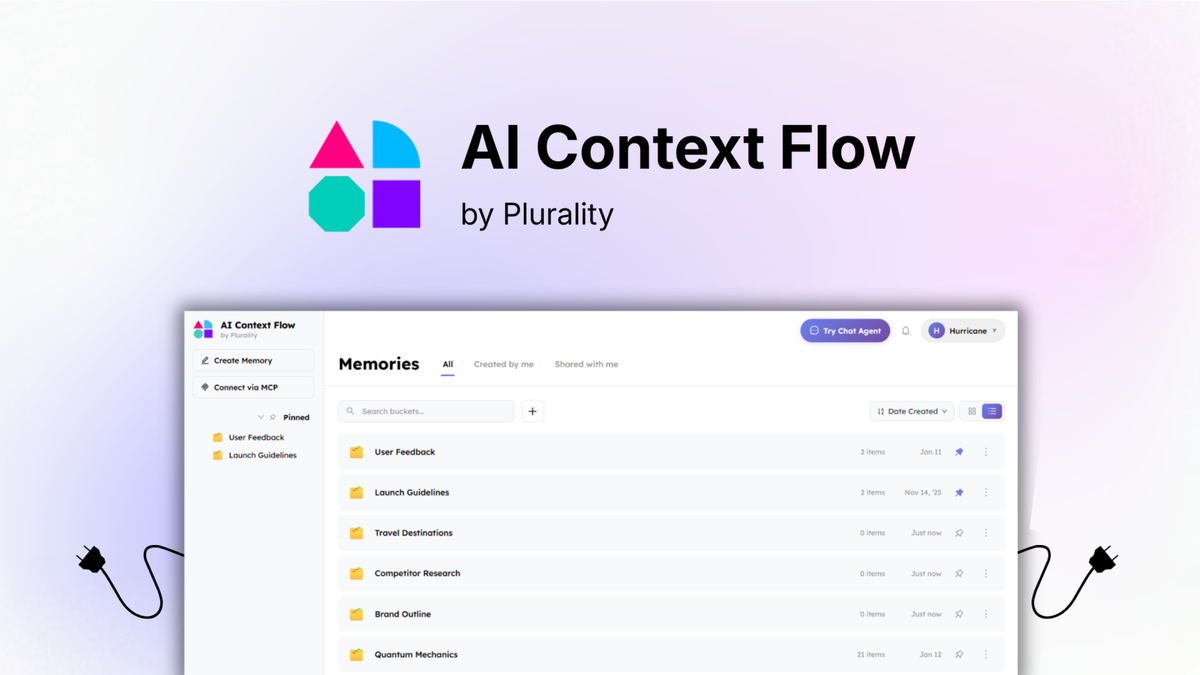
AI Context Flow is a Chrome extension that saves your context once and injects it across ChatGPT, Claude, Gemini, Perplexity, and Grok. AI Context Flow lifetime deal runs $59 to $339 one-time on AppSumo (Tier 1 starts at $59), with a 60-day money-back refund window and all future updates included.
The AI Context Flow lifetime deal lists at $59 one-time on AppSumo for Tier 1, with $149 and $339 tiers above it, replacing what would otherwise be a recurring AI memory subscription. It is a Chrome extension that saves your context once and injects it across ChatGPT, Claude, Gemini, Perplexity, and Grok using a Ctrl+i shortcut, plus MCP connections for coding tools. The most important limitation comes early: it is Chrome-only with no mobile app, so Firefox, Safari, Edge, and on-the-go users are shut out entirely. It also lacks the knowledge graph search, full-text document search, and PDF ingestion that Supermemory offers at $19 per month, which is the main reason a power user might pick a competitor instead. Premium models such as Claude Sonnet and Opus only unlock at the $339 Tier 3, and Plurality Network is a pre-seed startup founded in January 2024 with no public track record on lifetime deals. The 60-day AppSumo refund window keeps testing low-risk, so the deal suits Chrome-first users who mainly want to stop re-explaining brand voice and project context across AI chats.
Pros & Cons
Pros
- A $59 one-time Tier 1 price undercuts the monthly subscriptions charged by Mem0, Supermemory, and Letta, and the lifetime deal includes all future updates at no extra cost.
- Context injection genuinely works across the major chat tools (ChatGPT, Claude, Gemini, Perplexity, Grok) plus coding tools through MCP, covering most mainstream AI workflows.
- The 60-day AppSumo refund window is generous, letting you test the full workflow and request a no-questions refund if the Chrome-only setup does not fit.
- Team memory buckets and one-click web saving make it easy to standardize brand voice and project briefs across a small team without retyping context.
Cons
- The Chrome-only restriction and total absence of a mobile app are hard blockers for anyone working on Safari, Firefox, Edge, or across phones and tablets.
- The daily credit allocation is never clearly defined, with no published rules on rollover, expiry, fair-use throttling, or the cost of buying more credits.
- Compared to Supermemory it lacks knowledge graph search, document ingestion, and contradiction resolution, making it a narrow memory tool rather than a knowledge base.
- Plurality Network is a young pre-seed company with no review history on G2 or Capterra and no proven record of honoring lifetime deals long term.
What It Does
- Saves reusable context and injects it with Ctrl+i
- Works across ChatGPT, Claude, Gemini, Perplexity, Grok
- Connects to memory via MCP servers
- Saves web content into AI memory in one click
- Shares memory buckets across team members
- Chats with stored memories using multiple models
AI Context Flow Lifetime Deal Tiers Compared
| Plan | Price | Type |
|---|---|---|
| AI Context Flow Tier 1 | $59 one-time | ⭐ Best Value |
| AI Context Flow Tier 2 | $149 one-time | Lifetime Deal |
| AI Context Flow Tier 3 | $339 one-time | Lifetime Deal |
How It Compares to the Alternatives
| Plan | Price | Type |
|---|---|---|
| Mem0 Pro | $19 to $249/month | Subscription |
| Supermemory Pro | $19/month | Subscription |
| Letta Pro | $20/month | Subscription |
Who Should Buy This Lifetime Deal?
- Chrome users who switch between ChatGPT, Claude, and Gemini daily
- Writers and marketers who reuse brand voice and project briefs
- Solo founders who want to avoid re-explaining context every session
Who Should Use AI Context Flow but Not Buy This Deal?
- Firefox, Safari, Edge, or heavy mobile users should skip this and choose Supermemory, which works across browsers and captures content from more sources.
- Teams needing knowledge graph search or PDF and email ingestion will get more from Supermemory than from AI Context Flow's lighter memory buckets.
- Developers building autonomous agentic workflows should pick Letta, which offers a full agent runtime instead of a browser memory layer.
- Buyers who require a proven vendor track record should wait, since Plurality Network is a pre-seed startup with no public lifetime-deal history.
Lifetime Deal Savings Calculator
Work out whether a lifetime deal actually beats the subscription. Enter the monthly price of the tool you would replace and the one-time lifetime price. The single most important number is the break-even: how fast you recover the cost. Recovering it quickly is what protects you if the company shuts down later.
This lifetime deal pays for itself in 1 months and saves $14,881 over 5 years versus paying monthly.
Roughly 1 in 10 lifetime deal companies shut down within five years. Recovering your cost fast, and buying only tools you will use right away, is how you stay ahead of that risk. This is an estimate, not financial advice.
How AI Context Flow's price compares
AI Context Flow is the 41st-cheapest of 63AI Productivitylifetime deals we've reviewed. At $59 it is right at the $59 median for AI Productivity lifetime deals we've reviewed. It ranks 33rd by verdict score (5/10) among the same group.
Get alerted if AI Context Flow returns
Many lifetime deals come back around Black Friday or relaunch with new terms. We track them and email you the moment a verified re-launch goes live.
We only email you about this specific deal. Unsubscribe anytime.
Frequently Asked Questions
- At $59 one-time, AI Context Flow can pay for itself quickly against monthly memory subscriptions like Mem0 or Supermemory if you work mainly in Chrome and switch often between ChatGPT, Claude, and Gemini. The value case weakens fast if you use Firefox, Safari, Edge, or mobile devices, since the extension does not support them at all. It is also an early-stage product from a pre-seed startup with documented UX rough edges and an undefined credit model. The 60-day AppSumo refund window is the safest way to judge worth for your own workflow, because you can test the full feature set and reclaim your money if the Chrome-only limitation gets in the way.
- The AI Context Flow lifetime deal is sold through AppSumo, which applies its standard 60-day money-back guarantee. You can request a full refund for any reason within 60 days of purchase, which makes initial testing genuinely low-risk. After the 60-day window closes, the sale is final and no refunds or exchanges are offered, so you are locked in past that point. Because Plurality Network is a pre-seed startup founded in January 2024 with no public track record on lifetime deals, it is worth using the refund window deliberately to confirm the tool fits your browser, your AI platforms, and your daily credit needs before the guarantee expires.
- AI Context Flow and Supermemory both inject saved context into AI chat tools and both support MCP, but they target different depths of use. Supermemory is a fuller personal knowledge manager with knowledge graph search, full-text document search, PDF and email ingestion, and contradiction resolution, and it reports an 85.4% LongMemEval accuracy score. AI Context Flow is a lighter memory injection layer focused on reusing context across ChatGPT, Claude, and Gemini, and it works only in Chrome. The biggest practical split is pricing and reach: Supermemory runs about $19 per month and works across browsers, while AI Context Flow is a $59 one-time Chrome-only purchase. Choose Supermemory for a deeper cross-browser knowledge base and AI Context Flow for cheap, Chrome-based context reuse.
- The headline limitation is that AI Context Flow is a Chrome-only extension with no mobile app, so Firefox, Safari, Edge, and mobile users are completely excluded according to the deal listing. Independent write-ups on ChatGate and FunBlocks note UX friction, such as needing to click in and out of saved contexts, plus missing icons and incomplete integration UI that signal an early-stage build. The daily credit model (1,667 to 15,000 credits depending on tier) is never clearly defined for rollover, expiry, or overage cost. Premium models like Claude Sonnet and Opus only unlock at the $339 Tier 3. Finally, it lacks knowledge graph search and document ingestion that competitors like Supermemory provide, and there is little independent review data on G2 or Capterra.
- Skip AI Context Flow if you rely on Firefox, Safari, Edge, or mobile devices, because the tool is Chrome-only with no mobile access and Supermemory is a better cross-browser choice. Skip it if you need a real knowledge base with knowledge graph search, full-text document search, or PDF and email ingestion, since Supermemory handles those and AI Context Flow does not. Developers building autonomous agentic workflows should choose Letta instead, which offers a full agent runtime rather than a browser memory layer. Finally, buyers who require a proven vendor with a long support history should wait, because Plurality Network is a pre-seed startup founded in January 2024 with no public track record of honoring lifetime deals.
Is AI Context Flow worth the money?
What is the refund policy for AI Context Flow?
How does AI Context Flow compare to Supermemory?
What are the main limitations of AI Context Flow?
Who should NOT buy AI Context Flow?
Related tools & guides
Alternatives to AI Context Flow
Other active deals in AI Productivity
Deals That Pair Well With AI Context Flow
Pairs well with AI Automation and AI Writing and AI Customer Support tools

Comments
Loading comments...