


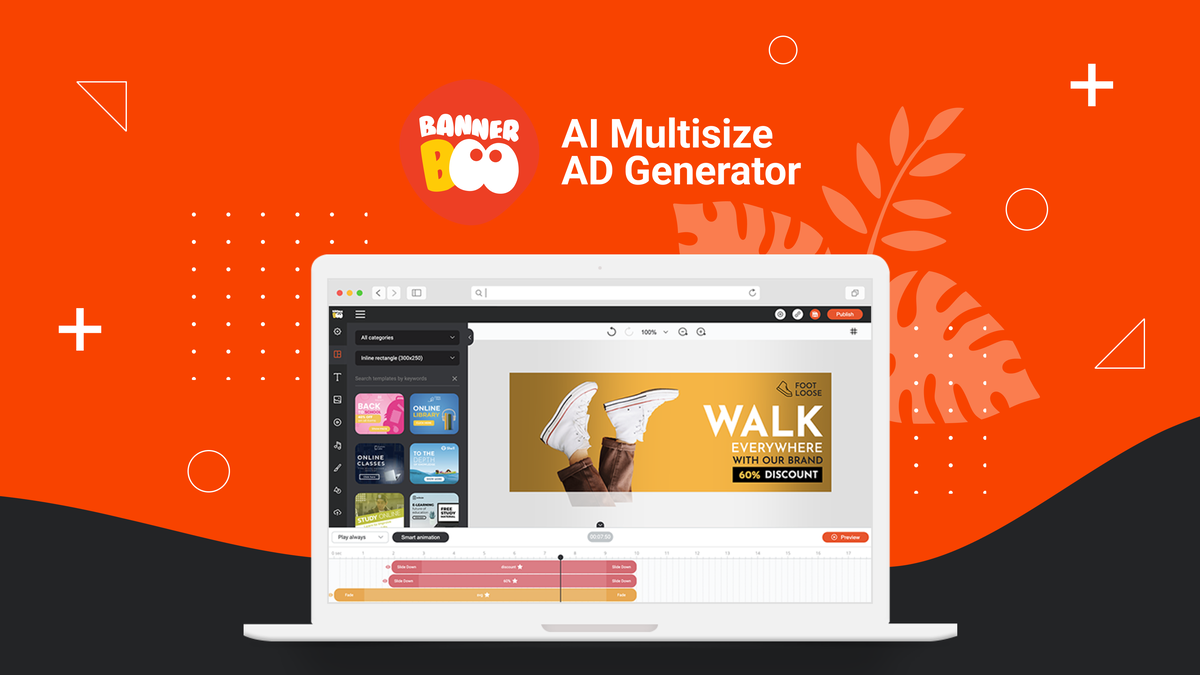
- Type Lifetime
- Verdict Buy
- Status Active
- Updated Jul 10, 2026
- Confidence Medium
- Score 7/10
Verdict: Buy
For ad creators who want code-free HTML5 banners, the $59 lifetime deal is solid value backed by a 60-day refund. Buy it for focused display ad work, but skip it if you need a broad design suite or offline stability.
BannerBoo deal: quick verdict
Buy 7/10- Verdict
- Buy (7/10)
- Price
- $59 one-time (normally $17/mo)
- Best for
- Performance marketers producing display ad sets quickly
- Skip if
- General graphic designers who need posters, presentations, and social posts should choose Canva, which covers far more use cases than BannerBoo's ad focus.
- Bottom line
- For ad creators who want code-free HTML5 banners, the $59 lifetime deal is solid value backed by a 60-day refund. Buy it for focused display ad work, but skip it if you need a broad design suite or offline stability.
Last verified Jul 10, 2026 by Alston Antony.
How we calculated this deal's 69/100 score
Every deal gets a score out of 100 built from five weighted factors, computed from the same research used to write this review. No factor is guessed: when data for a factor isn't available (for example, an older deal published before we started tracking vendor trust signals), that factor falls back to a neutral, non-penalizing score instead of being invented.
| Category | Points | What it measures |
|---|---|---|
| Verdict Strength | 28/40 | Based on our 1-10 editorial verdict score from hands-on research (or the BUY/WAIT/SKIP call itself when no numeric score was recorded). |
| Deal Value | 21/25 | How steep the confirmed discount is versus the regular price, when that price is available. |
| Feature Completeness | 5/15 | How the tool holds up against named competitors on the feature comparison table. |
| Vendor Trust | 7/10 | The vendor's domain authority, safety record, and how long the company has been operating. |
| Deal Terms & Risk | 8/10 | Refund window length, code-stacking policy, and how confident our research was overall. |
On this page8 sections
Get This Deal → Affiliate link - see our disclosure.
BannerBoo deal terms
- Refund window
- 60-day money-back guarantee
What is BannerBoo?
BannerBoo is a web-based platform for building animated HTML5, AMP, and GIF display ads without code. BannerBoo lifetime deal starts at $59 one-time on AppSumo, replacing the $204/year Pro subscription, backed by a 60-day money-back guarantee.
The BannerBoo lifetime deal starts at $59 one-time on AppSumo, replacing a Pro subscription that normally runs $17 per month billed annually, or $204 per year. BannerBoo is a web-based banner maker for building animated HTML5, AMP, and GIF display ads without code, and it adds an AI banner generator plus AI background removal. The catch shows up quickly: multiple user reports describe a browser app that loads slowly and an unreliable download flow where export links can vanish if you navigate away. The asset and template library is also smaller and less modern than Canva's, so if you want a deep catalog of premium images and broad design use cases, Canva Pro at $14.99 per month is the more flexible pick. BannerBoo earns its place for one job specifically: quick, template-driven display ad production for marketers and small agencies who would rather not touch code. It holds a strong 4.86 out of 5 across 274 AppSumo reviews, and the deal is covered by a 60-day money-back guarantee, which lowers the risk of trying it. Just go in knowing this is an ad-creation tool, not a general design suite.
Pros & Cons
Pros
- Genuine HTML5 and AMP banner export sets BannerBoo apart from Canva, which does not produce HTML5 ad units, making it useful for real display ad campaigns.
- A $59 one-time price replaces a $204-per-year Pro subscription, so the deal pays for itself in under four months versus paying monthly or annually.
- Smart auto-resize plus AI banner generation and AI background removal speed up producing a full ad set across many dimensions for non-designers.
- Strong user sentiment, with a 4.86 out of 5 rating across 274 AppSumo reviews praising ease of use, intuitive editing, and clean HTML5 export.
- AppSumo's 60-day money-back guarantee lets you test the editor, export quality, and performance thoroughly before committing to keeping the code.
Cons
- Performance is a recurring complaint, with users on subscribed.fyi reporting slow loading and a sluggish editor that undercuts the fast-workflow promise.
- The download experience is unreliable: exports can take minutes and links reportedly disappear if you switch tasks, per subscribed.fyi feedback.
- The template and asset library is limited and described as 'not cutting edge,' well behind Canva's catalog of premium images and layouts.
- Web-only access with no desktop or mobile app and no offline mode means every edit needs a live connection, which some users dislike.
- Key features are tier-gated: Pro caps MP4 exports at 30 per month and excludes team collaboration, pushing serious users toward the costlier Plus plan.
What It Does
- Builds HTML5, AMP, and GIF animated banner ads
- Generates banners with an AI banner generator
- Removes image backgrounds with AI tools
- Auto-resizes one design to many ad dimensions
- Exports MP4 video ads and optimized GIFs
- Publishes banners to HTML or WordPress sites
Who It's For
- Performance marketers producing display ad sets quickly
- Small agencies building client banners on a budget
- Solo founders and bloggers monetizing with display ads
- Non-designers who need template-driven ad creation
Pricing Comparison
| Plan | Price | Type |
|---|---|---|
| BannerBoo AppSumo Deal | $59 one-time | ⭐ Best Value |
| BannerBoo Pro (regular) | $17/mo annual ($204/yr) or $29/mo | Subscription |
| BannerBoo Plus (regular) | $34/mo annual ($408/yr) or $49/mo | Subscription |
| Canva Pro | $14.99/mo annual or $19.99/mo | Subscription |
| Figma Professional | $12/editor/mo annual | Subscription |
| Creatopy (The Brief) | Check pricing > | Subscription |
Feature Comparison
| Feature | BannerBoo | Canva | Creatopy |
|---|---|---|---|
| HTML5 / AMP banner export | ✅ | ❌ | ✅ |
| AI banner generator | ✅ | ✅ | ✅ |
| AI background removal | ✅ | ✅ | ✅ |
| Smart auto-resize to ad sizes | ✅ | ✅ | ✅ |
| MP4 video export | ✅ (30/mo on Pro) | ✅ | ✅ |
| Large template library (100k+) | ❌ | ✅ | ❌ |
| Premium stock image library | ❌ | ✅ | ✅ |
| Desktop and mobile apps | ❌ | ✅ | ❌ |
| Offline editing | ❌ | ✅ (app) | ❌ |
| Built-in campaign analytics | ❌ | ❌ | ✅ |
| Competitive ad research tools | ❌ | ❌ | ✅ |
| Team collaboration | ✅ (Plus tier only) | ✅ | ✅ |
| Lifetime deal available | ✅ | ❌ | ❌ |
Limitations
- Multiple user reviews on subscribed.fyi report the browser app loads slowly and feels sluggish during editing, which interrupts the fast workflow the tool advertises for ad creators.
- The download feature is unreliable per subscribed.fyi feedback: exports can take seconds to minutes, and download links reportedly disappear if you switch tasks or navigate away mid-export.
- An AppSumo reviewer titled their feedback 'too many bugs for me,' and subscribed.fyi notes minor bugs that disrupt workflow, a recurring theme rather than an isolated complaint.
- The asset and template library is described as limited and 'not cutting edge' on subscribed.fyi, noticeably smaller than Canva's catalog of premium images and layouts.
- Access is web-only with no desktop or mobile native apps, and several users on subscribed.fyi say they prefer a desktop build for stability and performance.
- There is no offline capability per subscribed.fyi, so every edit and export requires a live internet connection, a problem for travel or unstable networks.
- The Pro plan caps MP4 exports at 30 per month according to bannerboo.com/plans, and unlimited MP4 export is gated behind the pricier Plus tier, which can frustrate power users.
- Team collaboration tools sit only on the Plus plan per bannerboo.com/plans, so smaller Pro-tier buyers cannot share editing access without upgrading to a higher tier.
What's Missing vs Competitors
- Canva offers a far larger template library (100,000+ templates) and a premium stock photo and illustration library that BannerBoo's ad-focused catalog does not match.
- Canva ships native desktop and mobile apps with offline-friendly editing, while BannerBoo remains web-only with no app and no offline mode.
- Creatopy (The Brief) bundles built-in campaign analytics and performance tracking inside the design workflow, which BannerBoo does not provide.
- Creatopy also includes competitive ad research and campaign deployment automation, features absent from BannerBoo's banner-creation scope.
- Figma provides advanced vector design, component systems, and professional prototyping that BannerBoo's template-driven editor cannot replicate for precision design work.
Who Should Skip This Deal
- General graphic designers who need posters, presentations, and social posts should choose Canva, which covers far more use cases than BannerBoo's ad focus.
- Teams that need built-in analytics and campaign automation should look at Creatopy (The Brief), since BannerBoo offers no performance tracking.
- Designers who require precision vector work, components, and prototyping will be better served by Figma than by BannerBoo's template editor.
- Anyone who needs offline editing or a stable desktop app should avoid BannerBoo, which is web-only and reported as occasionally slow.
BannerBoo vendor check
- Domain Rating
- 49/100 Backlink authority
- In business since
- 2014
- Monthly visitors
- ~7K Est. organic
- Ranks for
- 1,291 keywords Organic search
- Traffic value
- ~$7K/mo Equivalent ad spend
- Security
- No known flags Google Safe Browsing
Domain Rating & traffic data by Ahrefs. Objective third-party data, not our opinion.
Lifetime Deal Savings Calculator
Work out whether a lifetime deal actually beats the subscription. Enter the monthly price of the tool you would replace and the one-time lifetime price. The single most important number is the break-even: how fast you recover the cost. Recovering it quickly is what protects you if the company shuts down later.
This lifetime deal pays for itself in 4 months and saves $961 over 5 years versus paying monthly.
Roughly 1 in 10 lifetime deal companies shut down within five years. Recovering your cost fast, and buying only tools you will use right away, is how you stay ahead of that risk. This is an estimate, not financial advice.
How BannerBoo's price compares
BannerBoo is the 10th-cheapest of 13AI Designlifetime deals we've reviewed. At $59 it is above the $49 median for AI Design lifetime deals we've reviewed. It ranks 2nd by verdict score (7/10) among the same group.
Frequently Asked Questions
- For marketers and small agencies who specifically need animated HTML5, AMP, and GIF display ads, the $59 lifetime deal is good value because it replaces a $204-per-year Pro subscription and pays for itself in under four months. The tool holds a 4.86 out of 5 rating across 274 AppSumo reviews, with users praising its ease of use and clean HTML5 export. It is less worth it if you want a broad design suite, since the template and asset library is smaller than Canva's and users report performance and download reliability issues. Treat it as a focused ad-creation tool, and use the 60-day refund window to confirm it fits your workflow before relying on it.
- The AppSumo lifetime deal is covered by a 60-day money-back guarantee, which is AppSumo's standard window. That means you can buy the code, test the editor, export quality, AI tools, and overall performance, and request a full refund within 60 days of purchase if it does not meet your needs. Because AppSumo processes the refund rather than BannerBoo directly, the risk of a denied request is low as long as you stay inside the window. Given the reported performance and download quirks, it is worth running a real ad project early in that 60-day period so you can decide with confidence rather than discovering problems after the refund window closes.
- BannerBoo and Canva serve different jobs. BannerBoo is purpose-built for display advertising and exports true HTML5 and AMP banner units, which Canva does not produce, and it offers a one-time lifetime deal at $59. Canva is a far broader design suite with a template library exceeding 100,000 designs, a premium stock photo and illustration catalog, native desktop and mobile apps, and offline-friendly editing, all for $14.99 per month on Pro. If your work is mostly display ad sets and you want to avoid a subscription, BannerBoo wins on focus and price. If you need posters, presentations, social posts, and a deep asset library, Canva is the more versatile and polished choice.
- The most consistent complaint is performance: users on subscribed.fyi report the browser app loads slowly and the editor can feel sluggish. The download flow is also unreliable, with exports taking seconds to minutes and download links reportedly disappearing if you navigate away. The template and asset library is limited and described as not cutting edge compared to Canva. Access is web-only, so there is no desktop or mobile app and no offline editing. Finally, features are tier-gated: the Pro plan caps MP4 exports at 30 per month and leaves team collaboration to the pricier Plus plan, so power users and teams may feel boxed in by the lower tier.
- Skip BannerBoo if you need a general-purpose design tool, since Canva covers posters, presentations, social content, and a much larger asset library that BannerBoo's ad-only focus does not. Teams that depend on built-in campaign analytics and deployment automation should look at Creatopy (The Brief) instead, because BannerBoo offers no performance tracking. Professional designers who need precise vector work, component systems, or prototyping will be better served by Figma. And anyone who needs offline editing, a stable desktop app, or rock-solid export reliability should be cautious, because BannerBoo is web-only and several users report slow loading and a flaky download experience that can interrupt deadline-driven work.
Is BannerBoo worth the money?
What is the refund policy for BannerBoo?
How does BannerBoo compare to Canva?
What are the main limitations of BannerBoo?
Who should NOT buy BannerBoo?
Sources
Related tools & guides
Alternatives to BannerBoo
Other active deals in AI Design
Deals That Pair Well With BannerBoo
Pairs well with AI Marketing and AI Website Builder and AI Image and AI Video tools

Comments
Loading comments...