

- Type Lifetime
- Verdict Skip
- Status Active
- Updated Jul 8, 2026
- Confidence High
- Score 3/10
Verdict: Skip
Blurweb App's $17 entry price is tempting, but documented license key activation failures, unresponsive founder support, and cheaper freemium alternatives like ContextBlur make this a risky purchase despite the 60-day refund window.
Blurweb App deal: quick verdict
Skip 3/10- Verdict
- Skip (3/10)
- Price
- $17 one-time (normally $28)
- Free option
- Yes, free tier available
- Best for
- Freelancers and consultants who screen-share client data with prospects regularly
- Skip if
- Users who need automatic detection of sensitive data like credit card numbers or emails should choose ContextBlur instead, since Blurweb only supports manual, click-to-select blurring for every element.
- Bottom line
- Blurweb App's $17 entry price is tempting, but documented license key activation failures, unresponsive founder support, and cheaper freemium alternatives like ContextBlur make this a risky purchase despite the 60-day refund window.
Last verified Jul 8, 2026 by Alston Antony.
How we calculated this deal's 49/100 score
Every deal gets a score out of 100 built from five weighted factors, computed from the same research used to write this review. No factor is guessed: when data for a factor isn't available (for example, an older deal published before we started tracking vendor trust signals), that factor falls back to a neutral, non-penalizing score instead of being invented.
| Category | Points | What it measures |
|---|---|---|
| Verdict Strength | 12/40 | Based on our 1-10 editorial verdict score from hands-on research (or the BUY/WAIT/SKIP call itself when no numeric score was recorded). |
| Deal Value | 15/25 | How steep the confirmed discount is versus the regular price, when that price is available. |
| Feature Completeness | 7/15 | How the tool holds up against named competitors on the feature comparison table. |
| Vendor Trust | 6/10 | The vendor's domain authority, safety record, and how long the company has been operating. |
| Deal Terms & Risk | 9/10 | Refund window length, code-stacking policy, and how confident our research was overall. |
On this page8 sections
Get This Deal → Affiliate link - see our disclosure.
Blurweb App pricing at a glance
- Free tier
- Yes
- Deal price
- $17 one-time
- Normally
- $28
Blurweb App deal terms
- Refund window
- 60-day money-back guarantee
- License tiers
- 2 available
What is Blurweb App?
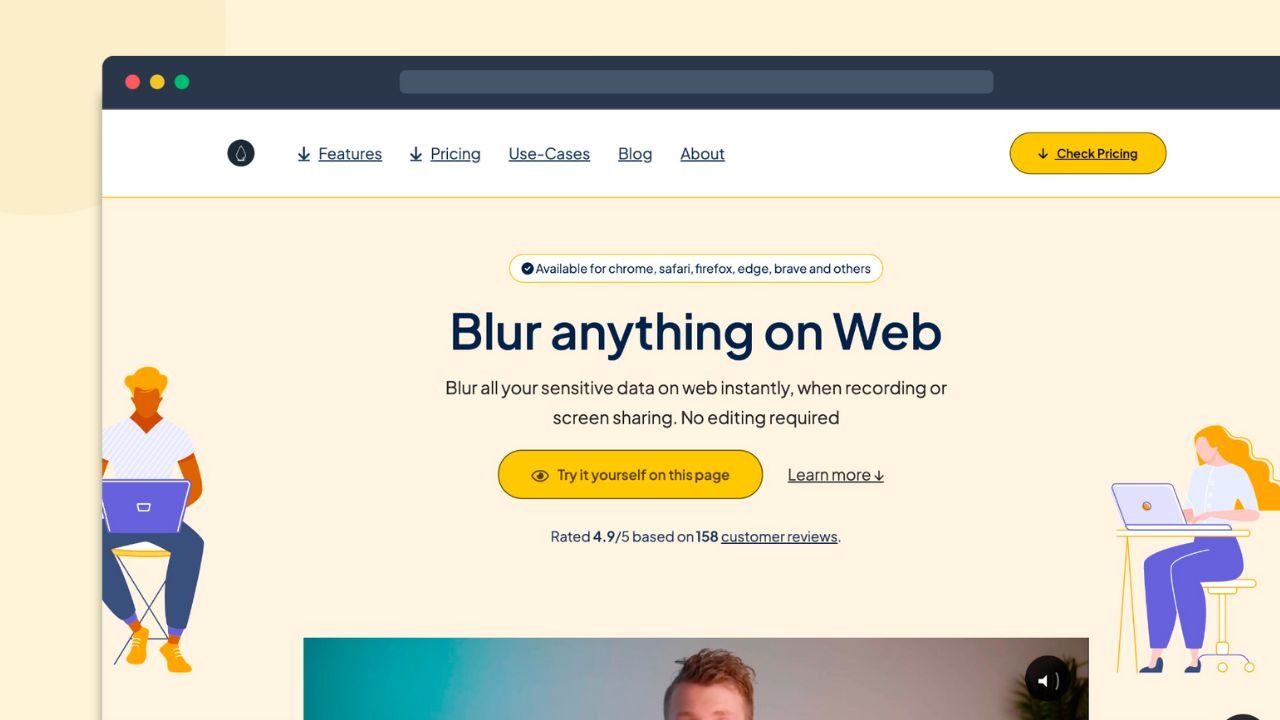
Blurweb App is a Chrome and Firefox extension that blurs sensitive webpage content with a single click, letting users share screens or record video without exposing confidential data. Blurweb App's AppSumo lifetime deal starts at $17 one-time for Tier 1 (3 devices), backed by a 60-day refund window, though verified AppSumo reviews report license key activation failures on Chrome.
Blurweb App is a Chrome and Firefox extension that hides sensitive information on webpages with a single click, and its AppSumo lifetime deal starts at $17 one-time for Tier 1's 3-device access, replacing what would otherwise be an estimated $28 per-license regular price. Before buying, know that multiple AppSumo reviewers report license keys that simply never activate, leaving the extension unusable right after payment, with founder support described as unresponsive to repeated emails about the issue over several weeks. The tool works well for basic click-to-blur tasks like hiding tab titles, blurring text and images, and keeping blur active after a page reload, though that Keep Blur persistence feature has also been reported as inconsistent on certain websites by independent reviewers. Anyone comparing options should look at ContextBlur, which offers a genuine free tier plus automatic detection of sensitive data patterns and unlimited devices for $15 per year, a meaningfully different value proposition than Blurweb's device-capped, manually-operated pricing model. For privacy-conscious screen recorders and support teams who screen-share client data, the low entry price is tempting, but the documented activation failures and lukewarm review sentiment warrant real caution before purchase.
Pros & Cons
Pros
- Low one-time entry price of $17 covers lifetime access to core blur features across Chrome and Firefox, appealing to budget-conscious freelancers and support agents who need occasional screen-sharing privacy without a recurring subscription.
- The Keep Blur feature persists blurred areas after a page reload on most sites, useful for repeated screen-sharing sessions where re-blurring the same fields every single time would be tedious and error-prone.
- Tier 2 and Tier 3 add native Google Meet and Zoom support plus higher device counts, giving small teams a path to scale coverage across more machines without buying entirely separate licenses.
- A 60-day money-back guarantee via AppSumo gives buyers a real safety net to test license activation and blur reliability before committing, a longer window than many competing lifetime deal refund policies offer.
Cons
- Documented license key activation failures on Chrome leave some buyers with a completely non-functional product after payment, and AppSumo reviewers report the founder never responded to support emails raised about it.
- There is no free tier at all; ContextBlur offers 5 free blurs per page while Blurweb requires a $17 minimum purchase just to try out the core blurring feature for the first time.
- Blur persistence and website compatibility are inconsistent according to independent review sites, with some pages blocking the extension entirely and Keep Blur failing to hold blur areas in place after a reload.
- Pricing scales with device count rather than offering unlimited access, so a 9-device Tier 3 buyer still pays $51 for a cap that ContextBlur beats with unlimited devices at only $15 per year.
- Customization options are limited, with reviewers noting few ways to adjust blur styling or interface appearance to match personal or brand workflow preferences across different use cases.
What It Does
- Blurs any webpage element with a single click
- Hides tab titles, tab icons, and selected text instantly
- Keeps blur active after page reloads via Keep Blur
- Blurs faces during live screen recording or sharing
- Adds Google Meet and Zoom blur support on Tier 2+
- Manages license keys through an online account dashboard
Who It's For
- Freelancers and consultants who screen-share client data with prospects regularly
- Support agents who record tutorial videos containing sensitive account information
- Remote teams presenting demos over Google Meet or Zoom that need quick redaction
- Content creators who publish screen recordings and need to hide personal data before uploading
Pricing Comparison
| Plan | Price | Type |
|---|---|---|
| Blurweb App Tier 1 (3 devices) | $17 one-time | ⭐ Best Value |
| Blurweb App Tier 2 (6 devices, Meet/Zoom) | $34 one-time | Lifetime Deal |
| Blurweb App Tier 3 (9 devices) | $51 one-time | Lifetime Deal |
| ContextBlur Pro | $15/year | Subscription (free tier available) |
| Blur by Abine (Blur It) | $4.99+/month (~$60/year) | Subscription |
| ZeroBlur | Free | Free Chrome Extension |
| PrivacyBlur | Free | Free, Open Source |
Feature Comparison
| Feature | Blurweb App | ContextBlur | Blur by Abine |
|---|---|---|---|
| Single-click element blur | ✅ | ✅ | ❌ |
| Blur persists after page reload | ✅ (reported inconsistent) | ❓ | ❌ |
| Free tier available | ❌ | ✅ | ❌ |
| Automatic sensitive-data detection | ❌ | ✅ | ❌ |
| Unlimited devices (no device cap) | ❌ (capped at 9) | ✅ | ❓ |
| Google Meet and Zoom blur support | ❌ (Tier 2+) | ✅ | ❌ |
| Masked email, phone, and card privacy suite | ❌ | ❌ | ✅ |
| Chrome and Firefox support | ✅ | ❓ | ❓ |
| One-time lifetime pricing option | ✅ | ❌ | ❌ |
| Local-only processing (no server data transfer) | ❓ | ✅ | ❌ |
Limitations
- Multiple verified AppSumo purchasers report that their license codes never activate, rendering the extension completely unusable after payment; one reviewer stated bluntly that none of several codes purchased worked, in a detailed AppSumo review titled about unresolved Chrome and account issues.
- Buyers who emailed the founder about broken license codes describe absolute silence with no response or acknowledgment for weeks, according to the same AppSumo review thread, suggesting no dedicated support team exists behind this indie extension to resolve activation failures promptly.
- Despite marketing full Chrome support across every pricing tier, users report persistent license key not valid errors specifically during Chrome installation according to AppSumo reviews, even though Chrome is the most commonly targeted browser for this exact type of extension.
- Independent review sites findfahim.com and thelifetimedeal.com both report that the Keep Blur feature, designed to preserve blurred areas after a page reload, fails intermittently on certain websites, undermining the core privacy promise that differentiates this tool from simpler alternatives.
- According to findfahim.com's review roundup, Blurweb does not function reliably across all websites and is restricted from loading on some copyrighted content pages, limiting its usefulness for users who need consistent blur coverage across every site they visit.
- The lifetimodeal.com features and pros-cons summary notes the extension can slow down or lag when handling multiple blur tasks simultaneously, an issue that matters most for users recording lengthy screen shares or hosting live streams with many blurred regions active at once.
- The same lifetimodeal.com review notes Blurweb offers few personalization options, so users cannot adjust the interface or blur styling to match their workflow preferences, a real gap compared to more mature and actively maintained privacy tools in this category.
- AppSumo review titles like Good Not Better and Its Ok reflect a pattern of tepid, unenthusiastic feedback rather than strong endorsement, suggesting the product meets only baseline expectations without exceeding them for the majority of lifetime deal buyers who left public reviews.
What's Missing vs Competitors
- ContextBlur offers a genuine free tier covering up to 5 blurs per page, while Blurweb requires a minimum $17 purchase just to access any blur feature at all, with no free trial mentioned.
- ContextBlur automatically detects sensitive data patterns like credit card numbers, emails, and SSNs, while Blurweb requires users to manually draw and select every single blur area by hand each time.
- ContextBlur charges $15 per year for unlimited devices, while Blurweb caps even its priciest $51 Tier 3 plan at 9 devices, tying total cost directly to device count instead of offering unlimited access.
- Blur by Abine bundles masked email addresses, phone numbers, and payment card protection into a broader privacy suite, a feature set entirely absent from Blurweb's narrower webpage-only blur focus and scope.
Who Should Skip This Deal
- Users who need automatic detection of sensitive data like credit card numbers or emails should choose ContextBlur instead, since Blurweb only supports manual, click-to-select blurring for every element.
- Budget-conscious users who just need occasional basic blurring should try the free ZeroBlur or PrivacyBlur extensions rather than paying $17 upfront for Blurweb's device-limited lifetime license.
- Teams that need guaranteed customer support and active bug fixes should be cautious, since founder responsiveness is documented as poor; ContextBlur's actively maintained roadmap is the safer pick for mission-critical privacy workflows.
- Users wanting a full identity-privacy suite including masked emails and phone numbers should pick Blur by Abine, which covers far more privacy surface area than Blurweb's webpage-blur-only scope and licensing model.
Blurweb App in action
Blurweb App vendor check
- Domain Rating
- 27/100 Backlink authority
- In business since
- 2018
- Monthly visitors
- ~327 Est. organic
- Ranks for
- 72 keywords Organic search
- Traffic value
- ~$210/mo Equivalent ad spend
- Security
- No known flags Google Safe Browsing
Domain Rating & traffic data by Ahrefs. Objective third-party data, not our opinion.
How Blurweb App's price compares
Blurweb App is the 2nd-cheapest of 48AI Productivitylifetime deals we've reviewed. At $17 it is below the $59 median for AI Productivity lifetime deals we've reviewed. It ranks 42nd by verdict score (3/10) among the same group.
- ProxiedMail
- Blurweb App(this deal)
- BreezeDoc
- Pixefy
- Viinyx
Frequently Asked Questions
- At $17 one-time for 3-device access, Blurweb App is inexpensive compared to most privacy tools, and the 60-day refund window reduces financial risk. However, multiple AppSumo reviewers report license keys that fail to activate on Chrome, leaving the extension completely unusable after purchase, and the founder has reportedly not responded to support emails about the issue for weeks. Given this documented activation risk plus the availability of ContextBlur's free tier with automatic sensitive-data detection, the overall value proposition is weaker than the low headline price suggests. Buyers should test activation immediately after purchase and be prepared to request a refund within the 60-day window if the license key does not work as advertised on their specific browser and device combination.
- Blurweb App is covered by a 60-day money-back guarantee through AppSumo, which applies if the product does not meet expectations or if the license key fails to function correctly after purchase. This window gives buyers over eight weeks to test blur persistence, browser compatibility, and license activation across their intended devices before the purchase becomes final and non-refundable. Given the documented pattern of activation failures reported in AppSumo reviews, buyers experiencing a non-functional key should request a refund promptly rather than waiting, since AppSumo cannot offer any remedy once the 60-day window has closed, and there is no evidence of an extended grace period beyond that standard policy.
- Blurweb App and ContextBlur take different approaches to the same core privacy problem. Blurweb charges a one-time fee starting at $17 with pricing tied to device count, capping out at 9 devices for $51, and blur areas must be selected manually on every page. ContextBlur instead offers a genuine free tier for up to 5 blurs per page, plus a $15 per year Pro plan that includes automatic detection of sensitive data like credit card numbers and emails, unlimited devices, and a local-only privacy model where data never leaves the user's machine. For users who want zero-cost entry or automated detection, ContextBlur is the stronger choice; Blurweb suits those who prefer a single upfront payment and don't mind manual blur selection.
- The most serious limitation is documented license key activation failures, with multiple AppSumo buyers reporting codes that never work on Chrome despite Chrome being explicitly supported, paired with founder support described as unresponsive to repeated emails. Beyond that critical issue, independent reviews note that the Keep Blur persistence feature does not reliably survive page reloads on all websites, some copyrighted content pages block the extension from loading at all, performance can lag during multi-task use, and customization options are limited. Pricing is also tied to device count rather than offering unlimited access, meaning heavier users pay significantly more without an uncapped tier option like several competitors provide at a lower annual cost.
- Users who need automatic detection of sensitive information like credit card numbers or email addresses should choose ContextBlur instead, since Blurweb requires fully manual blur selection for every single element on a page. Budget-focused users who only need occasional light blurring should try the free ZeroBlur or PrivacyBlur extensions rather than paying upfront for a device-capped license. Businesses that depend on responsive vendor support for mission-critical privacy workflows should also be cautious, given documented reports of unanswered support emails regarding non-functional license keys, and should weigh whether Blur by Abine's broader privacy suite with masked emails and phone numbers better fits an enterprise-grade compliance need.
Is Blurweb App worth the money?
What is the refund policy for Blurweb App?
How does Blurweb App compare to ContextBlur?
What are the main limitations of Blurweb App?
Who should NOT buy Blurweb App?
Sources
Related tools & guides
Alternatives to Blurweb App
Other active deals in AI Productivity
A Notion template dashboard by creator Matt Bio for organizing creator, freelancer, and marketing workflows in...

Peoplebox is a performance management and employee engagement platform that helps remote teams track OKRs, run...
Stepsy is a browser extension that records your clicks and turns them into step-by-step guides with auto-redac...

TidyCal is a booking and scheduling platform with unlimited bookings, calendar syncing, and Stripe/PayPal paym...
Deals That Pair Well With Blurweb App
Pairs well with AI Automation and AI Writing and AI Customer Support tools

RoboMotion RPA is a low-code, cloud-native robotic process automation platform that builds bots to automate we...

Prompt Architects is a prompt optimization tool that turns rough ideas into structured prompts for ChatGPT, Cl...

FeatureShift is a customer feedback and feature request management platform for collecting suggestions, buildi...
NoCodeBackend is a no-code platform that auto-generates REST APIs and database schemas in minutes without writ...
Comments
Loading comments...