

- Type Lifetime
- Verdict Skip
- Status Active
- Updated Jul 11, 2026
- Confidence High
- Score 3/10
Verdict: Skip
A $69 lifetime price is attractive on paper, but confirmed Claude integration errors, wrong-tab summaries, weak page scraping, and an unverified unlimited claim outweigh the savings for most buyers right now.
BrowserCopilot AI deal: quick verdict
Skip 3/10- Verdict
- Skip (3/10)
- Price
- $69 one-time (normally $9.99/mo)
- Best for
- Solo professionals who want quick page summaries without opening a separate AI chat tab
- Skip if
- Anyone who needs autonomous multi-site research should use Perplexity Comet instead, since BrowserCopilot AI cannot open and cross-reference multiple tabs on its own.
- Bottom line
- A $69 lifetime price is attractive on paper, but confirmed Claude integration errors, wrong-tab summaries, weak page scraping, and an unverified unlimited claim outweigh the savings for most buyers right now.
Last verified Jul 11, 2026 by Alston Antony.
How we calculated this deal's 50/100 score
Every deal gets a score out of 100 built from five weighted factors, computed from the same research used to write this review. No factor is guessed: when data for a factor isn't available (for example, an older deal published before we started tracking vendor trust signals), that factor falls back to a neutral, non-penalizing score instead of being invented.
| Category | Points | What it measures |
|---|---|---|
| Verdict Strength | 12/40 | Based on our 1-10 editorial verdict score from hands-on research (or the BUY/WAIT/SKIP call itself when no numeric score was recorded). |
| Deal Value | 16/25 | How steep the confirmed discount is versus the regular price, when that price is available. |
| Feature Completeness | 5/15 | How the tool holds up against named competitors on the feature comparison table. |
| Vendor Trust | 8/10 | The vendor's domain authority, safety record, and how long the company has been operating. |
| Deal Terms & Risk | 9/10 | Refund window length, code-stacking policy, and how confident our research was overall. |
On this page8 sections
Get This Deal → Affiliate link - see our disclosure.
BrowserCopilot AI deal terms
- Refund window
- 60-day money-back guarantee
What is BrowserCopilot AI?
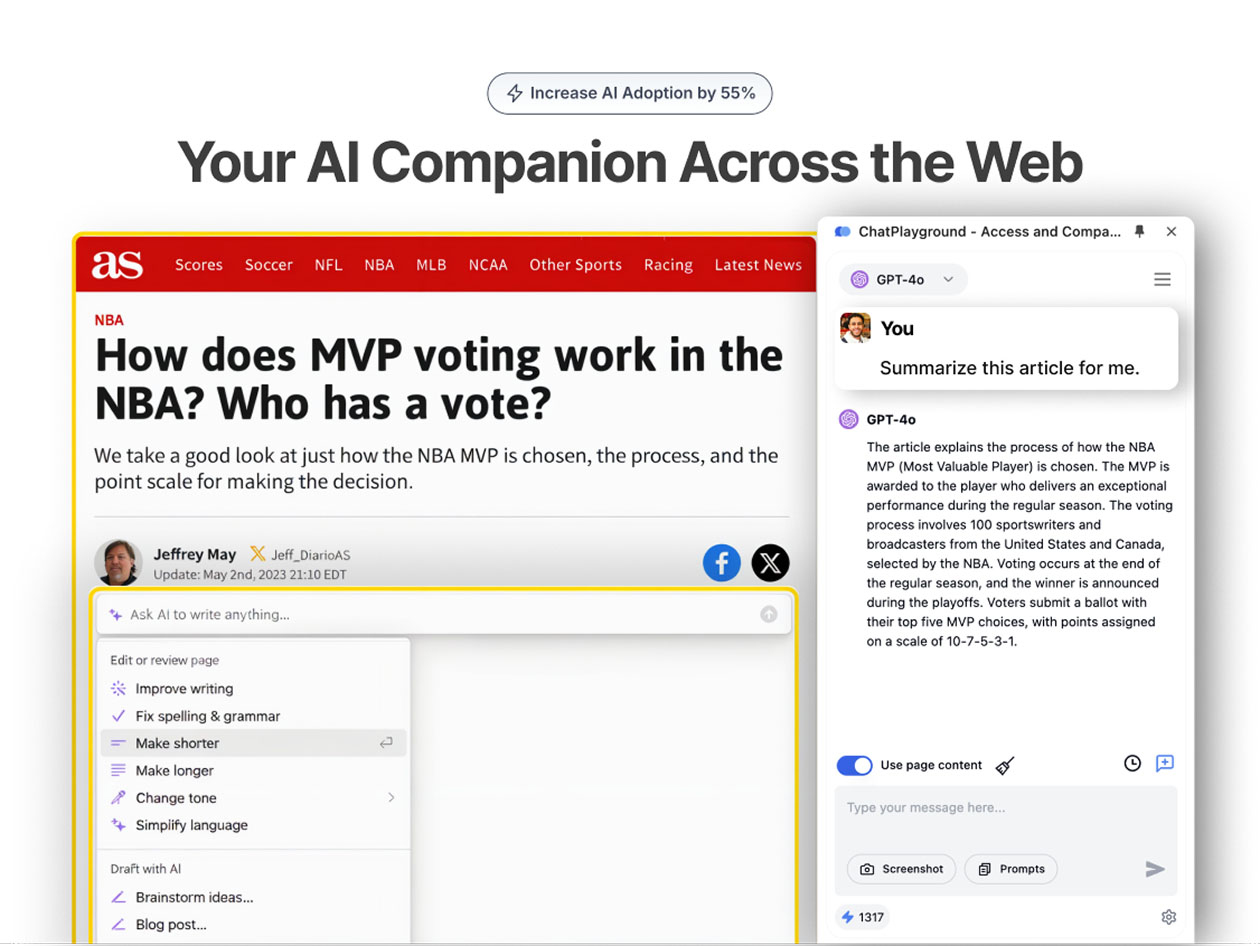
BrowserCopilot AI is a Chrome extension that reads webpage context to summarize, transform highlighted text, and automate replies without switching tabs. BrowserCopilot AI lifetime access costs $69 one-time on StackSocial, replacing the $9.99/month Pro plan, no verified discount code exists beyond this listed price, and StackSocial's standard 60-day refund policy applies.
The BrowserCopilot AI lifetime deal on StackSocial costs $69 one-time for unlimited monthly queries, positioned as a replacement for the tool's own $9.99 per month Pro subscription. Before buying, know that Chrome Web Store reviewers report the Claude backend integration throwing 502 Bad Gateway errors, and that the extension sometimes summarizes the wrong browser tab entirely. Page scraping is inconsistent enough that some users say they had to copy and paste text manually, which undercuts the core promise of tab-free automation. Competitors like Google Gemini and Perplexity Comet already offer multimodal input, deep research modes, and autonomous multi-site browsing that BrowserCopilot AI does not currently match, so anyone comparing browser AI copilots or hunting for an AI productivity lifetime deal should weigh those gaps against the $69 asking price. The deal itself is real and confirmed on StackSocial, but the underlying product shows signs of active instability rather than a mature, settled feature set.
Pros & Cons
Pros
- One-time $69 price replaces an ongoing $9.99/month subscription, which pays for itself in under seven months if the tool works as described.
- Privacy-first design claims no server-side data storage and no model training on user content, appealing to users wary of AI tools harvesting browsing data.
- Custom AI copilots can be trained on a user's own writing style, which is a differentiator versus generic one-size-fits-all browser assistants.
- Email integration with one-click replies saves time for inbox-heavy workflows without needing a separate email AI plugin.
Cons
- Claude backend integration is broken for some users with unresolved 502 errors, directly affecting a core promised feature (Chrome Web Store reviews).
- Page recognition failures mean the extension sometimes summarizes or replies to the wrong tab, undermining the core context-awareness pitch.
- Poor page scraping forces manual copy-paste in some cases, which defeats the tab-free automation premise the product is sold on.
- The "unlimited queries per month" claim is not independently verified and may carry hidden fair-use or rate limits not disclosed on the deal page.
What It Does
- Reads and summarizes the webpage you are currently viewing
- Transforms highlighted text using custom prompts
- Captures screenshots for AI Vision image and text analysis
- Builds custom AI copilots trained on your writing style
- Drafts one-click email replies inside your inbox
- Keeps data private with no server storage or model training on user content
Who It's For
- Solo professionals who want quick page summaries without opening a separate AI chat tab
- Email-heavy workers who want one-click reply drafts inside their existing inbox
- Chrome users testing lightweight AI browsing helpers before committing to paid subscriptions
Pricing Comparison
| Plan | Price | Type |
|---|---|---|
| BrowserCopilot AI Lifetime (StackSocial) | $69 one-time | ⭐ Best Value (if bugs get fixed) |
| BrowserCopilot AI Pro Plan | $9.99/month | Subscription |
| BrowserCopilot AI Free Plan | $0/month | Free (limited automation) |
| Google Gemini (Auto Browse) | Free tier, Premium required for Auto Browse | Subscription |
| Perplexity Comet | Check pricing > | Free + Premium subscription |
| ChatGPT with Operator | $20/month (Plus) | Subscription |
| Claude Cowork | $20/month (Pro) | Subscription |
Feature Comparison
| Feature | BrowserCopilot AI | Google Gemini | Perplexity Comet | ChatGPT (Operator) |
|---|---|---|---|---|
| Page context summarization | ✅ | ✅ | ✅ | ❌ |
| Custom prompts on highlighted text | ✅ | ✅ | ❓ | ✅ |
| Screenshot/image AI Vision analysis | ✅ | ✅ | ❓ | ✅ |
| Email one-click reply integration | ✅ | ❌ | ❌ | ❌ |
| No server-side data storage claim | ✅ | ❌ | ❌ | ❌ |
| Multimodal input (text, image, audio) | ❌ | ✅ | ❌ | ✅ (Tier 2+) |
| Autonomous multi-site browsing/research | ❌ | ✅ | ✅ | ✅ |
| Deep research mode | ❌ | ✅ | ✅ | ❌ |
| Native Workspace/OS-level automation | ❌ | ✅ | ❌ | ✅ |
| Reliable page/tab recognition (per user reports) | ❌ | ❓ | ❓ | ❓ |
Limitations
- Claude backend integration returns 502 Bad Gateway errors for some users, and Chrome Web Store support threads show the issue acknowledged but not resolved quickly (Chrome Web Store reviews).
- Recent product updates appear to use weaker underlying AI models than earlier versions, based on user comparisons in the Chrome Web Store review section (Chrome Web Store reviews).
- The extension frequently misidentifies which page the user is actively viewing, generating summaries or replies for the wrong tab (Chrome Web Store reviews).
- Page scraping is inconsistent enough that some reviewers say they had to manually copy and paste content instead of relying on automatic extraction (Chrome Web Store reviews).
- Several users describe the tool as functionally similar to pairing ChatGPT with manual text highlighting, not a meaningfully different workflow (Chrome Web Store reviews).
- The extension requires a stable internet connection at all times; there is no offline mode for summarization or reply drafting (aichief.com product analysis).
- The free front-end version carries daily usage caps with no published specifics on the exact limit, making it hard to evaluate before buying the lifetime tier (aichief.com product analysis).
- Only 20 reviews exist on the StackSocial deal page at the time of research, indicating a small user base and limited independent validation of long-term reliability (StackSocial deal page).
What's Missing vs Competitors
- Google Gemini offers a proven multimodal model (text, image, audio) plus a dedicated Deep Research mode; BrowserCopilot AI has neither confirmed.
- Perplexity Comet autonomously opens multiple tabs, reads several sites, and compiles a combined research result; BrowserCopilot AI only works on the single active page.
- ChatGPT's Operator feature completes multi-step browser tasks and supports Workspace Agents for team workflows, both absent from BrowserCopilot AI's confirmed feature set.
- Claude Cowork automates local files and desktop applications beyond the browser tab; BrowserCopilot AI is scoped strictly to in-browser page content.
- Yaseen AI, a direct alternative, reportedly reads and summarizes full URLs, articles, and email threads more reliably per third-party alternative listings, without the page-recognition complaints seen here.
Who Should Skip This Deal
- Anyone who needs autonomous multi-site research should use Perplexity Comet instead, since BrowserCopilot AI cannot open and cross-reference multiple tabs on its own.
- Teams needing shared workflow automation should look at ChatGPT's Workspace Agents, because BrowserCopilot AI has no confirmed team or collaboration features.
- Users who rely on Claude as their preferred backend should hold off, since the Claude integration currently throws 502 errors according to Chrome Web Store reviews.
- Buyers who need guaranteed offline access should choose a desktop-native assistant like Claude Cowork instead, since BrowserCopilot AI requires a constant internet connection.
BrowserCopilot AI vendor check
- Domain Rating
- 55/100 Backlink authority
- In business since
- 2018
- Security
- No known flags Google Safe Browsing
Domain Rating & traffic data by Ahrefs. Objective third-party data, not our opinion.
Lifetime Deal Savings Calculator
Work out whether a lifetime deal actually beats the subscription. Enter the monthly price of the tool you would replace and the one-time lifetime price. The single most important number is the break-even: how fast you recover the cost. Recovering it quickly is what protects you if the company shuts down later.
This lifetime deal pays for itself in 7 months and saves $530 over 5 years versus paying monthly.
Roughly 1 in 10 lifetime deal companies shut down within five years. Recovering your cost fast, and buying only tools you will use right away, is how you stay ahead of that risk. This is an estimate, not financial advice.
How BrowserCopilot AI's price compares
BrowserCopilot AI is the 48th-cheapest of 67AI Productivitylifetime deals we've reviewed. At $69 it is above the $59 median for AI Productivity lifetime deals we've reviewed. It ranks 64th by verdict score (3/10) among the same group.
Frequently Asked Questions
- At $69 one-time, BrowserCopilot AI is cheap compared to its own $9.99/month subscription, and it would pay for itself within seven months of regular use. However, Chrome Web Store reviews describe a broken Claude integration, inconsistent page recognition, and weak page scraping that require manual copy-paste. Given these confirmed functional bugs and a small 20-review user base on StackSocial, the deal price alone does not offset the reliability concerns for most buyers.
- StackSocial's standard 60-day refund window applies to this deal, since the product page itself does not state a separate policy. Within 60 days of purchase, buyers can typically request a refund through StackSocial's standard process if the extension fails to work as advertised. After the 60-day window closes, no refund is possible even if the confirmed Claude integration bugs or page recognition failures remain unresolved.
- Google Gemini offers multimodal input across text, image, and audio, plus a Deep Research mode and native Google Workspace integration that BrowserCopilot AI does not confirm having. Perplexity Comet can autonomously open multiple tabs, read several websites, and compile a combined result, while BrowserCopilot AI is limited to the single active page. Both competitors also come from companies with far larger track records, whereas BrowserCopilot AI has only 20 reviews on its StackSocial deal page and recent reports of AI model downgrades.
- The most serious limitation is a broken Claude backend integration that returns 502 Bad Gateway errors, acknowledged by support but not quickly resolved according to Chrome Web Store reviews. The extension also frequently misreads which tab the user is actively viewing, generating summaries for the wrong page, and its page scraping is weak enough that some users resort to manual copy-paste. On top of this, the "unlimited queries" claim on the lifetime deal has not been independently verified against actual backend rate limits.
- Anyone who needs reliable autonomous research across multiple websites should choose Perplexity Comet instead, since BrowserCopilot AI only works on one active tab at a time. Users who specifically want Claude as their AI backend should wait, because that integration currently throws server errors per Chrome Web Store reviews. Teams needing collaborative workflow automation are better served by ChatGPT's Workspace Agents, and anyone requiring offline functionality should look at a desktop-native tool like Claude Cowork instead.
Is BrowserCopilot AI worth the money?
What is the refund policy for BrowserCopilot AI?
How does BrowserCopilot AI compare to Google Gemini and Perplexity Comet?
What are the main limitations of BrowserCopilot AI?
Who should NOT buy BrowserCopilot AI?
Sources
Related tools & guides
Alternatives to BrowserCopilot AI
Other active deals in AI Productivity

My Notes AI is an AI powered voice note transcription and summarization app for iPhone, iPad, and Mac that als...

MacroSnap AI is a photo-based calorie tracker that uses AI food recognition to log meals and estimate macronut...
Vexp is a local-first context engine that builds a dependency graph of a codebase to feed precise, token-effic...
AgencyPro is a branded client portal and project management platform for agencies handling proposals, invoicin...
Deals That Pair Well With BrowserCopilot AI
Pairs well with AI Automation and AI Writing and AI Customer Support tools

RoboMotion RPA is a low-code, cloud-native robotic process automation platform that builds bots to automate we...

1min.AI is an all-in-one AI platform combining ChatGPT, Claude, Gemini, and other models for writing, image ge...

FeatureShift is a customer feedback and feature request management platform for collecting suggestions, buildi...
NoCodeBackend is a no-code platform that auto-generates REST APIs and database schemas in minutes without writ...
Comments
Loading comments...