

- Type Discount
- Verdict Wait
- Status Active
- Updated Jul 8, 2026
- Confidence High
- Score 5/10
Verdict: Wait
TextSniper is cheap and fast for simple, single-language Mac screenshot OCR, but slow support, documented accuracy bugs, no Windows or mobile version, and no confirmed update commitment add up to enough real risk that cautious buyers should wait and confirm it fits their exact use case first.
Grab the discount while it's live
Claim Discount →Limited-time offer. Pricing may change without notice.
TextSniper deal: quick verdict
Wait 5/10- Verdict
- Wait (5/10)
- Price
- From $3.99 (normally $6.99)
- Best for
- Mac users who frequently need to copy text from screenshots or video frames
- Skip if
- Windows or Linux users need a cross-platform OCR tool like NormCap, which is free and open-source, since TextSniper only runs on macOS and has no plans to expand.
- Bottom line
- TextSniper is cheap and fast for simple, single-language Mac screenshot OCR, but slow support, documented accuracy bugs, no Windows or mobile version, and no confirmed update commitment add up to enough real risk that cautious buyers should wait and confirm it fits their exact use case first.
Last verified Jul 8, 2026 by Alston Antony.
How we calculated this deal's 51/100 score
Every deal gets a score out of 100 built from five weighted factors, computed from the same research used to write this review. No factor is guessed: when data for a factor isn't available (for example, an older deal published before we started tracking vendor trust signals), that factor falls back to a neutral, non-penalizing score instead of being invented.
| Category | Points | What it measures |
|---|---|---|
| Verdict Strength | 20/40 | Based on our 1-10 editorial verdict score from hands-on research (or the BUY/WAIT/SKIP call itself when no numeric score was recorded). |
| Deal Value | 15/25 | How steep the confirmed discount is versus the regular price, when that price is available. |
| Feature Completeness | 4/15 | How the tool holds up against named competitors on the feature comparison table. |
| Vendor Trust | 7/10 | The vendor's domain authority, safety record, and how long the company has been operating. |
| Deal Terms & Risk | 5/10 | Refund window length, code-stacking policy, and how confident our research was overall. |
On this page8 sections
Get This Deal → Affiliate link - see our disclosure.
TextSniper deal terms
- Refund window
- 7-day money-back guarantee
What is TextSniper?
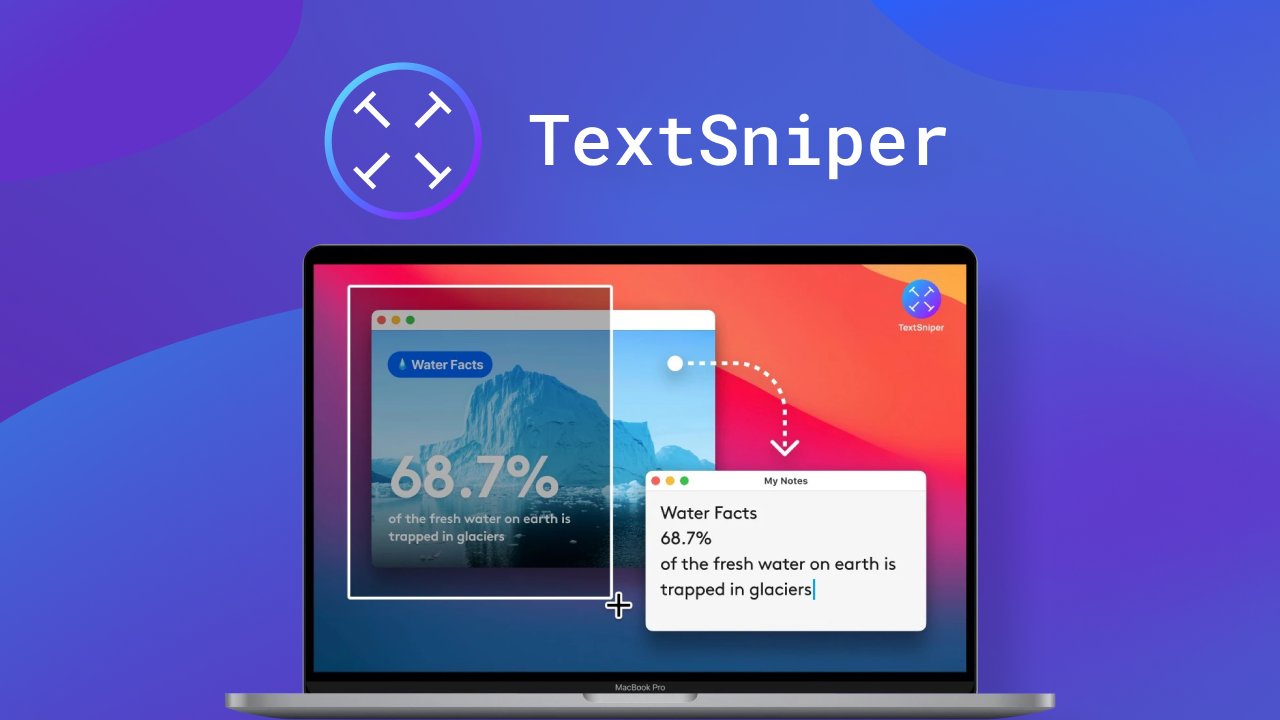
TextSniper is a Mac-only desktop app that extracts text from screenshots, images, PDFs, and videos using OCR technology. TextSniper's AppSumo deal starts at $3.99 one-time (verified), a discount off its regular $6.99 price, backed by AppSumo's 7-day refund policy.
TextSniper is a Mac-only OCR app on AppSumo priced from $3.99 for a one-time license, undercutting its own regular $6.99 Gumroad and Mac App Store price by roughly 40 percent. It extracts text from screenshots, PDFs, videos, and webpages in seconds, and also reads QR codes and barcodes and can read extracted text aloud. Multiple G2 reviewers report a line contamination bug where text from adjacent lines bleeds into the wrong block, and the app struggles badly with multi-column layouts, numbers, symbols, and emoji characters. It is macOS-only with no Windows or mobile app, so anyone working across platforms hits a wall immediately. ABBYY FineReader PDF is the natural upgrade path for buyers who need batch processing, multi-language support including Asian scripts and Arabic, and document layout preservation, though it costs roughly ten times more per year as a subscription. For simple, single-language screenshot capture on a Mac, TextSniper's price and speed are hard to beat; for anything more demanding, it falls short.
Pros & Cons
Pros
- At $3.99 to $6.99 one-time on AppSumo, TextSniper costs a fraction of the $69/year ABBYY FineReader PDF subscription, making it a low-risk purchase for casual Mac users who need occasional screenshot text extraction.
- The tool captures text from a wide range of sources, including YouTube videos, PDFs, webpages, and screencasts, going beyond simple screenshot OCR that many free tools only handle.
- Built-in QR code and barcode reading plus text-to-speech playback add utility beyond plain OCR, features that free alternatives like Shottr and NormCap do not offer.
- 89+ AppSumo reviews are largely positive, praising speed and simplicity, and the menu bar workflow with a customizable keyboard shortcut keeps the tool out of the way until needed.
Cons
- Accuracy noticeably degrades on multi-column layouts, symbol-heavy text, and emoji, with G2 reviewers documenting a line contamination bug that merges unrelated text blocks together.
- Customer support is slow to respond according to both AppSumo and G2 reviewers, which is a real risk if the OCR fails on content you need extracted quickly.
- The app is macOS-only with no Windows client and no iOS or Android companion, permanently excluding users on mixed-platform or non-Apple setups.
- As a one-time purchase, there is no stated commitment to future updates, so buyers risk being frozen on the current feature set if the indie developer moves on to other projects.
What It Does
- Extracts text from screenshots, images, PDFs, and videos instantly
- Reads QR codes and barcodes directly from the screen
- Converts extracted text to speech for playback
- Runs from the macOS menu bar with a keyboard shortcut
- Captures non-selectable text from YouTube videos and webpages
Who It's For
- Mac users who frequently need to copy text from screenshots or video frames
- Students and researchers pulling quotes from PDFs or recorded lectures
- Bloggers and marketers extracting text from competitor screenshots quickly
Pricing Comparison
| Plan | Price | Type |
|---|---|---|
| TextSniper AppSumo Tier 1 | $3.99 one-time | ⭐ Best Value |
| TextSniper AppSumo Tier 2 | $6.99 one-time | One-time |
| TextSniper Regular (Gumroad / App Store) | $6.99 one-time | One-time |
| ABBYY FineReader PDF | $69/year | Subscription |
| Adobe Acrobat Pro DC | $14.99 to $20.99/month | Subscription |
| Shottr | Free | Free (donation-based) |
| NormCap | Free | Free / open-source |
Feature Comparison
| Feature | TextSniper | ABBYY FineReader PDF | Adobe Acrobat Pro DC |
|---|---|---|---|
| Basic screenshot/image OCR text extraction | ✅ | ✅ | ✅ |
| QR code and barcode reading | ✅ | ❌ | ❌ |
| Text-to-speech playback of extracted text | ✅ | ❌ | ❌ |
| One-time purchase pricing (no subscription) | ✅ | ❌ | ❌ |
| Batch OCR processing across multiple files | ❌ | ✅ | ✅ |
| Multi-language support (Chinese, Japanese, Arabic, etc.) | ❌ | ✅ | ✅ |
| Document layout and formatting preservation | ❌ | ✅ | ✅ |
| Windows platform support | ❌ | ✅ | ✅ |
| Mobile app (iOS/Android) | ❌ | ❌ | ✅ |
| Enterprise licensing / team plans | ❌ | ✅ | ✅ |
Limitations
- Customer support response times are very slow, with users on AppSumo and G2 reporting near non-responsive email support when issues come up, which undermines confidence in getting help after purchase.
- Text extraction sometimes merges content from adjacent lines into the wrong text block, a line contamination bug documented on G2 that garbles multi-section screenshots.
- Accuracy drops sharply on images containing lots of numbers, symbols, or emoji; AppSumo reviewers note emoji characters are frequently skipped or misread entirely by the OCR engine.
- Multi-column layouts, like PDFs or web articles, confuse the OCR engine, which often merges left and right column text into one unreadable string, according to G2 user feedback.
- TextSniper runs on macOS only, with no Windows client, cutting out any user on a mixed-OS or Windows-primary setup, a repeated complaint found in AppSumo reviews.
- There is no iOS or Android companion app and no iCloud sync, so text captured on a phone cannot be pulled into the desktop app or shared across devices.
- Non-Latin scripts, including Chinese, Japanese, Korean, and Arabic, are poorly supported, making the tool unreliable for multilingual research, translation, or international document workflows.
- The app silently converts em dashes into hyphens during extraction, corrupting typography when pulling text from formally typeset documents or professional writing, per G2 reviews.
What's Missing vs Competitors
- ABBYY FineReader PDF offers batch OCR processing across hundreds of files at once; TextSniper only captures one screen region at a time with no batch mode.
- ABBYY FineReader PDF preserves document layout and formatting during conversion; TextSniper outputs plain unformatted text with no structure retained.
- Adobe Acrobat Pro DC includes a full PDF editing, e-signature, and cloud collaboration suite; TextSniper has no document editing capability at all.
- ABBYY FineReader PDF supports Windows, Mac, and web platforms with enterprise licensing; TextSniper is locked to macOS with no team or business plans.
- NormCap and Shottr run cross-platform, including Windows and Linux, for free; TextSniper requires a Mac and a paid license to do the same basic screen capture.
Who Should Skip This Deal
- Windows or Linux users need a cross-platform OCR tool like NormCap, which is free and open-source, since TextSniper only runs on macOS and has no plans to expand.
- Teams that process large batches of scanned documents should choose ABBYY FineReader PDF, which handles batch conversion and layout preservation that TextSniper simply lacks.
- Anyone regularly extracting text in Chinese, Japanese, Korean, or Arabic should look at ABBYY FineReader PDF instead, since TextSniper's non-Latin script recognition is unreliable per user reports.
- Users who need full PDF editing, e-signatures, or cloud document collaboration should pick Adobe Acrobat Pro DC rather than TextSniper, which is capture-only with no editing features.
TextSniper in action
TextSniper vendor check
- Domain Rating
- 47/100 Backlink authority
- In business since
- 2020
- Monthly visitors
- ~2K Est. organic
- Ranks for
- 87 keywords Organic search
- Traffic value
- ~$2K/mo Equivalent ad spend
- Security
- No known flags Google Safe Browsing
Domain Rating & traffic data by Ahrefs. Objective third-party data, not our opinion.
Get notified when the verdict changes
This deal currently has a "Wait" verdict. If pricing improves, limitations are fixed, or the verdict changes to Buy, we will email you.
We only email you about this specific deal. Unsubscribe anytime.
Frequently Asked Questions
- For the specific job of pulling text from screenshots, PDFs, or video frames on a Mac, TextSniper is worth the $3.99 to $6.99 AppSumo price. It performs fast, accurate OCR on clean, single-language images and includes useful extras like QR/barcode scanning and text-to-speech that most competing screenshot tools skip. It becomes a weaker value the moment your workflow involves multi-column PDFs, non-Latin languages, heavy symbols or emoji, or batch processing, since G2 and AppSumo reviewers report accuracy problems in exactly those scenarios. Given the low entry price and 7-day AppSumo refund window, the financial risk of trying it is minimal, but buyers with complex OCR needs should expect to eventually outgrow it.
- TextSniper deals purchased through AppSumo carry AppSumo's standard 7-day money-back guarantee, meaning buyers can request a full refund within seven days of purchase if the tool does not meet expectations. This policy is confirmed on the official TextSniper site and applies regardless of which AppSumo tier, $3.99 or $6.99, is purchased. There is no extended trial period beyond that window, and no information was found confirming whether refunds are available for direct purchases through Gumroad or the Mac App Store, so AppSumo remains the safer channel for guaranteed refund protection. Given the low price point, the refund window is generous relative to the financial risk involved.
- TextSniper and ABBYY FineReader PDF solve different problems at very different price points. TextSniper is a lightweight $3.99 to $6.99 one-time Mac app built for quick text capture from screenshots, videos, and webpages, while ABBYY FineReader PDF is a $69/year subscription document processing suite with batch OCR, multi-language recognition including Asian scripts and Arabic, and layout-preserving PDF conversion. TextSniper wins on price and simplicity for casual, single-language capture tasks; ABBYY wins decisively for professionals who need to process large document volumes, work across Windows and Mac, or handle non-Latin languages accurately. Someone doing occasional screenshot OCR should pick TextSniper; someone running a document-heavy workflow should pay for ABBYY instead.
- The most frequently cited limitations, based on G2 and AppSumo reviews, are accuracy problems on multi-column layouts, symbol-heavy or emoji-containing text, and a documented bug where text from adjacent lines bleeds into the wrong extracted block. The app is macOS-only with no Windows or mobile version, struggles with non-Latin scripts like Chinese, Japanese, Korean, and Arabic, and silently converts em dashes to hyphens during extraction. Customer support response times are also a recurring complaint across sources. Finally, because it is a one-time purchase rather than a subscription, there is no guarantee of future feature updates, so buyers should treat the current feature set as close to final.
- Windows and Linux users should skip TextSniper entirely and consider the free, cross-platform NormCap instead, since TextSniper only runs on macOS. Teams that need batch OCR processing across large document sets, or anyone regularly extracting text in Chinese, Japanese, Korean, or Arabic, will be better served by ABBYY FineReader PDF despite its higher $69/year cost. Users who need full PDF editing, e-signature workflows, or cloud-based document collaboration should choose Adobe Acrobat Pro DC rather than TextSniper, which only captures text and has no editing capability. Anyone who frequently screenshots code snippets or documents with unusual formatting should also be cautious, since reviewers report poor recognition accuracy in those cases.
Is TextSniper worth the money?
What is the refund policy for TextSniper?
How does TextSniper compare to ABBYY FineReader PDF?
What are the main limitations of TextSniper?
Who should NOT buy TextSniper?
Sources
Related tools & guides
Alternatives to TextSniper Discount
Other active deals in AI Productivity
All-in-one client portal and agency management software for service agencies to manage projects, billing, team...
HoneyBill is an AI-assisted invoicing platform that helps freelancers create, send, and get paid on branded in...
Invoiless is an all-in-one invoicing platform for creating, sending, tracking, and managing invoices, estimate...
Deals That Pair Well With TextSniper Discount
Pairs well with AI Automation and AI Writing and AI Customer Support tools
RoboMotion RPA is a low-code, cloud-native robotic process automation platform that builds bots to automate we...
Prompt Architects is a prompt optimization tool that turns rough ideas into structured prompts for ChatGPT, Cl...

FeatureShift is a customer feedback and feature request management platform for collecting suggestions, buildi...
NoCodeBackend is a no-code platform that auto-generates REST APIs and database schemas in minutes without writ...
Comments
Loading comments...