

- Type Lifetime
- Verdict Buy
- Status Active
- Updated Jul 8, 2026
- Confidence Medium
- Score 6/10
Verdict: Buy
FormDesigner's $59 lifetime price beats Typeform and Jotform's monthly fees for basic form building, but missing PDF export, field encryption, and A/B testing mean it only makes sense for simple, low-stakes forms, not advanced marketing or data-sensitive use cases.
FormDesigner deal: quick verdict
Buy 6/10- Verdict
- Buy (6/10)
- Price
- $59 one-time
- Best for
- Freelancers who need a cheap one-time form builder instead of another monthly subscription
- Skip if
- Agencies that need to export signed forms as PDF or JPG for client records should choose Jotform or Gravity Forms instead, since FormDesigner has no export-to-file feature at all.
- Bottom line
- FormDesigner's $59 lifetime price beats Typeform and Jotform's monthly fees for basic form building, but missing PDF export, field encryption, and A/B testing mean it only makes sense for simple, low-stakes forms, not advanced marketing or data-sensitive use cases.
Last verified Jul 8, 2026 by Alston Antony.
How we calculated this deal's 58/100 score
Every deal gets a score out of 100 built from five weighted factors, computed from the same research used to write this review. No factor is guessed: when data for a factor isn't available (for example, an older deal published before we started tracking vendor trust signals), that factor falls back to a neutral, non-penalizing score instead of being invented.
| Category | Points | What it measures |
|---|---|---|
| Verdict Strength | 24/40 | Based on our 1-10 editorial verdict score from hands-on research (or the BUY/WAIT/SKIP call itself when no numeric score was recorded). |
| Deal Value | 15/25 | How steep the confirmed discount is versus the regular price, when that price is available. |
| Feature Completeness | 2/15 | How the tool holds up against named competitors on the feature comparison table. |
| Vendor Trust | 9/10 | The vendor's domain authority, safety record, and how long the company has been operating. |
| Deal Terms & Risk | 8/10 | Refund window length, code-stacking policy, and how confident our research was overall. |
On this page8 sections
Get This Deal → Affiliate link - see our disclosure.
FormDesigner deal terms
- Refund window
- 60-day money-back guarantee
What is FormDesigner?
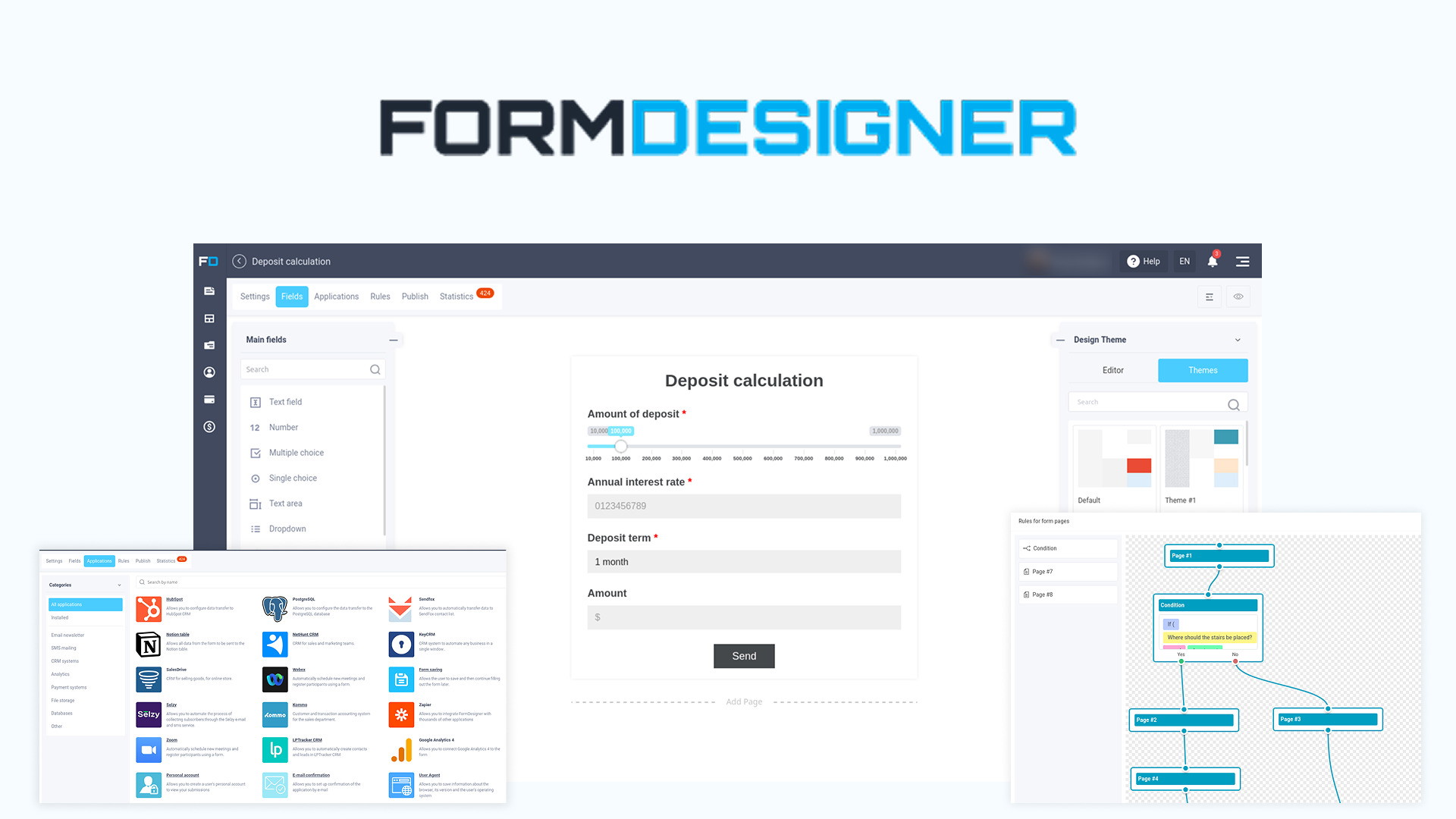
FormDesigner is a drag-and-drop form builder for surveys, appointment bookings, and lead-capture forms that requires no coding to set up. FormDesigner Lifetime Deal on AppSumo: $59 one-time (roughly 95% off), lifetime access to current features, but refund window and code-stacking limits were not confirmed so verify before buying.
FormDesigner is a drag-and-drop form builder currently listed on AppSumo as a $59 lifetime deal, replacing subscriptions that normally run $25 to $34 a month with competitors like Typeform and Jotform. The deal covers surveys, appointment booking forms, custom autoresponders, and integrations with Mailchimp, Google Sheets, Google Calendar, and Telegram, but it comes with real tradeoffs: FormDesigner cannot export completed forms as PDF or JPG, and it lacks field-level data encryption, both flagged repeatedly by Capterra reviewers. AppSumo reviewers also report a steep learning curve with confusing terminology, plus autoresponder emails that sometimes land in spam without manual SMTP configuration. Typeform remains the stronger pick for conversion-focused marketers who want a conversational format, A/B testing, and a more modern interface, though it costs $25 a month with no lifetime option. For simple internal forms, surveys, and bookings on a tight one-time budget, FormDesigner's $59 price is hard to beat, provided buyers accept its dated interface and missing enterprise features.
Pros & Cons
Pros
- One-time $59 price replaces ongoing subscriptions that run $25 to $34 per month at Jotform and Typeform, a meaningful long-term saving for budget-conscious freelancers and small agencies.
- Includes practical built-in features like UTM tracking, webhooks, online calculators, and basic analytics without requiring a separate paid add-on or plugin purchase.
- Holds a 4.8 out of 5 rating on AppSumo across multiple verified reviews, suggesting the core form-building workflow satisfies most everyday users.
- Covers common use cases out of the box, including surveys, appointment booking forms, GDPR-compliant data collection, and pre-made templates for faster setup.
Cons
- Cannot export completed forms as PDF or JPG, a basic capability that Jotform and Gravity Forms both offer, according to multiple Capterra reviews.
- No field-level data encryption, which Capterra reviewers flagged as a genuine security gap for anyone collecting sensitive personal or financial information.
- Autoresponder emails frequently land in spam folders per Capterra feedback, requiring manual SMTP setup that non-technical buyers may struggle to configure.
- Missing modern features like A/B testing and AI-powered form generation that competitors Typeform and Fillout already offer as standard functionality.
What It Does
- Builds drag-and-drop forms without any coding knowledge required
- Creates responsive forms that adapt to mobile, tablet, and desktop
- Sends custom autoresponder emails after each form submission
- Integrates with Mailchimp, Google Sheets, Google Calendar, and Telegram
- Includes GDPR-compliant data handling plus pre-made form templates
- Tracks submissions with UTM tracking, webhooks, and basic analytics
Who It's For
- Freelancers who need a cheap one-time form builder instead of another monthly subscription
- Small marketing agencies running simple surveys and appointment booking forms for clients
- Event organizers collecting RSVPs and registrations without hiring a developer
Pricing Comparison
| Plan | Price | Type |
|---|---|---|
| FormDesigner Lifetime Deal | $59 one-time | ⭐ Best Value |
| Jotform Premium | $34/month | Subscription |
| Typeform Business | $25/month (billed yearly) | Subscription |
| Gravity Forms | $59/year license | Subscription (License) |
| Fillout | Check pricing > | Subscription |
Feature Comparison
| Feature | FormDesigner | Jotform | Typeform | Gravity Forms | Fillout |
|---|---|---|---|---|---|
| Drag-and-drop form builder | ✅ | ✅ | ✅ (conversational) | ✅ | ✅ |
| PDF export of completed forms | ❌ | ✅ | ❌ | ✅ (add-on) | ✅ |
| Field-level data encryption | ❌ | ✅ | ✅ | ❌ | ❓ |
| A/B testing | ❌ | ✅ (Tier 2+) | ✅ | ❌ | ❓ |
| AI form generation from prompts or PDFs | ❌ | ❌ | ❌ | ❌ | ✅ |
| Built-in calendar/scheduling | ❌ (needs Calendly) | ✅ (Tier 2+) | ❌ | ❌ | ✅ |
| 50+ third-party integrations | ❌ (~5 major integrations) | ✅ | ✅ | ✅ (add-ons) | ✅ |
| WordPress-native admin integration | ❓ | ❌ | ❌ | ✅ | ❌ |
| Free tier available | ❌ (LTD only) | ✅ (100 responses/mo) | ✅ (10 responses) | ❌ | ❓ |
| Lifetime one-time pricing option | ✅ ($59) | ❌ | ❌ | ❌ | ❌ |
Limitations
- FormDesigner offers no field-level data encryption, which Capterra reviewers flagged as a real security shortfall for anyone collecting sensitive personal, health, or payment information through its forms, unlike encrypted competitors.
- The tool cannot export completed forms as PDF or JPG files, a basic capability that Jotform and Gravity Forms both include natively; Capterra reviewers repeatedly called this omission a dealbreaker for agencies needing signed or printable records.
- Multiple Capterra reviewers report that FormDesigner's autoresponder emails frequently land in recipients' spam folders, forcing manual SMTP server configuration as a workaround, which points to unresolved email deliverability infrastructure rather than a one-off bug.
- AppSumo reviewers describe recurring difficulty embedding FormDesigner forms into external websites, including broken layouts and script conflicts depending on the host platform, friction not commonly reported for Typeform or Jotform embed codes.
- New users on AppSumo describe a steep learning curve driven by confusing terminology and unclear menu labeling, meaning the promised no-code simplicity does not fully hold up during the first few sessions with the builder.
- Capterra reviewers say the interface feels dated and less polished than modern competitors like Typeform, noting the visual builder needs a redesign to match the design standards buyers now expect from SaaS tools.
- Developers cannot modify FormDesigner's underlying components or extend functionality with custom code, per Capterra feedback, which limits it to non-technical use cases and rules it out for teams needing the deep customization Gravity Forms allows.
- AppSumo reviewers note limited weekend customer support, which is especially frustrating during the first week of setup when new lifetime deal buyers most need onboarding help configuring integrations, templates, and autoresponders.
What's Missing vs Competitors
- Fillout can generate entire forms automatically from prompts, existing PDFs, or uploaded documents using AI, while FormDesigner requires manual field-by-field building with no AI generation assistance at all.
- Typeform offers a conversational one-question-at-a-time format optimized for completion rates and conversion-focused marketing funnels, a design philosophy FormDesigner's traditional multi-field layout does not replicate.
- Gravity Forms provides deep WordPress-native admin integration, multi-page workflows, user registration forms, and a large add-on ecosystem built over more than a decade, none of which FormDesigner currently matches.
- Jotform supports over 500 question types plus a free tier of 100 monthly submissions, giving new users a no-risk way to test capabilities that FormDesigner only offers behind its one-time paid tier.
- Fillout and Typeform both include built-in A/B testing for optimizing form conversion rates, a feature that does not appear anywhere in FormDesigner's confirmed feature set.
Who Should Skip This Deal
- Agencies that need to export signed forms as PDF or JPG for client records should choose Jotform or Gravity Forms instead, since FormDesigner has no export-to-file feature at all.
- Marketers running conversion-focused lead funnels should pick Typeform, whose conversational one-question format and A/B testing are purpose-built to optimize completion rates in ways FormDesigner cannot.
- Teams handling sensitive personal, health, or payment data should avoid FormDesigner and use a platform with field-level encryption, since Capterra reviewers confirmed FormDesigner lacks this protection entirely.
- Developers who need to customize form logic with custom code should use Gravity Forms, which supports a mature WordPress plugin ecosystem that FormDesigner's closed builder does not allow.
FormDesigner in action
FormDesigner vendor check
- Domain Rating
- 87/100 Backlink authority
- In business since
- 2001
- Monthly visitors
- ~217K Est. organic
- Ranks for
- 46,215 keywords Organic search
- Traffic value
- ~$675K/mo Equivalent ad spend
- Security
- No known flags Google Safe Browsing
Domain Rating & traffic data by Ahrefs. Objective third-party data, not our opinion.
How FormDesigner's price compares
FormDesigner is the 24th-cheapest of 48AI Productivitylifetime deals we've reviewed. At $59 it is right at the $59 median for AI Productivity lifetime deals we've reviewed. It ranks 13th by verdict score (6/10) among the same group.
Frequently Asked Questions
- At $59 one-time on AppSumo, FormDesigner is worth it for freelancers, small agencies, and event organizers who need a basic drag-and-drop form builder for surveys, bookings, and lead capture and want to avoid the $25 to $34 monthly subscriptions charged by Typeform and Jotform. It holds a 4.8 out of 5 rating on AppSumo across multiple verified reviews, which suggests the core building experience works for everyday use. However, it is not worth it for teams that need PDF export, field-level encryption, A/B testing, or a modern conversational interface, since Capterra reviewers confirmed these are all missing. Weigh the one-time savings against those confirmed gaps before buying.
- The exact refund window for FormDesigner's AppSumo listing was not explicitly confirmed in available sources at the time of this research. AppSumo's standard policy for most lifetime deals is a 30 to 60 day money-back guarantee, but buyers should verify the specific terms on the FormDesigner AppSumo product page before completing checkout, since policies can vary by deal and by campaign. Because FormDesigner is a newer or lower-profile vendor with limited public track record on honoring lifetime deals long-term, confirming the refund window directly on AppSumo is an important step to reduce risk before committing to the one-time $59 purchase.
- FormDesigner and Typeform both build no-code forms, but they target different priorities. FormDesigner costs $59 one-time for lifetime access and includes surveys, booking forms, autoresponders, and integrations with Mailchimp, Google Sheets, Google Calendar, and Telegram. Typeform costs $25 per month billed yearly and focuses on a conversational, one-question-at-a-time format built for conversion-optimized marketing funnels, plus A/B testing and a more modern interface that Capterra reviewers say FormDesigner's builder lacks. If budget and one-time pricing matter most, FormDesigner wins on cost. If design quality, conversion optimization, and ongoing feature development matter more, Typeform is the stronger long-term choice despite the recurring fee.
- FormDesigner's confirmed limitations include no PDF or JPG export for completed forms, no field-level data encryption, autoresponder emails that Capterra reviewers say frequently land in spam without manual SMTP setup, and embed code issues reported on AppSumo. It also lacks A/B testing, AI-powered form generation, and built-in calendar scheduling, features that competitors Typeform, Fillout, and Jotform all offer. AppSumo reviewers additionally describe a steep learning curve with confusing terminology, a dated interface compared to modern builders, limited weekend customer support, and restricted code-level customization for developers. These are repeated themes across multiple independent review sources, not isolated complaints.
- Skip FormDesigner if you handle sensitive personal, health, or payment data and need field-level encryption, since Capterra reviewers confirmed this protection is absent. Marketers focused on conversion-optimized funnels should choose Typeform instead for its conversational format and A/B testing. Agencies that need signed, exportable PDF or JPG records should pick Jotform or Gravity Forms, both of which support file export natively. Developers who need to extend form logic with custom code should use Gravity Forms' mature WordPress plugin ecosystem rather than FormDesigner's closed, non-extensible builder. Teams needing AI-generated forms from existing documents should look at Fillout instead.
Is FormDesigner worth the money?
What is the refund policy for FormDesigner?
How does FormDesigner compare to Typeform?
What are the main limitations of FormDesigner?
Who should NOT buy FormDesigner?
Sources
Related tools & guides
Alternatives to FormDesigner
Other active deals in AI Productivity

Vexp is a local-first context engine that builds dependency graphs for AI coding agents to reduce token waste ...

OkaySend is a document collection platform that lets you create secure client portals for uploading files, sig...
Formnx is a no-code, AI-powered drag-and-drop form builder that helps users create custom forms in minutes wit...

Deals That Pair Well With FormDesigner
Pairs well with AI Automation and AI Writing and AI Customer Support tools

RoboMotion RPA is a low-code, cloud-native robotic process automation platform that builds bots to automate we...
Prompt Architects is a prompt optimization tool that turns rough ideas into structured prompts for ChatGPT, Cl...

FeatureShift is a customer feedback and feature request management platform for collecting suggestions, buildi...
NoCodeBackend is a no-code platform that auto-generates REST APIs and database schemas in minutes without writ...
Comments
Loading comments...