

- Type Lifetime
- Verdict Buy
- Status Active
- Updated Jul 10, 2026
- Confidence Medium
- Score 6/10
Verdict: Buy
Reelify AI offers strong one-time value for Apple Silicon Mac creators who want unlimited local clipping and full privacy. The Mac-only constraint, missing B-roll, and limited caption controls mean Windows users and automation-focused agencies should pick a subscription cloud tool instead.
Reelify AI deal: quick verdict
Buy 6/10- Verdict
- Buy (6/10)
- Price
- $59 one-time (normally $15/mo)
- Best for
- Solo podcasters and YouTubers on Apple Silicon Macs needing unlimited clipping
- Skip if
- Windows, Linux, or Intel Mac users should skip Reelify and pick Opus Clip or Klap, which run in any browser and have no operating system restrictions
- Bottom line
- Reelify AI offers strong one-time value for Apple Silicon Mac creators who want unlimited local clipping and full privacy. The Mac-only constraint, missing B-roll, and limited caption controls mean Windows users and automation-focused agencies should pick a subscription cloud tool instead.
Last verified Jul 10, 2026 by Alston Antony.
How we calculated this deal's 61/100 score
Every deal gets a score out of 100 built from five weighted factors, computed from the same research used to write this review. No factor is guessed: when data for a factor isn't available (for example, an older deal published before we started tracking vendor trust signals), that factor falls back to a neutral, non-penalizing score instead of being invented.
| Category | Points | What it measures |
|---|---|---|
| Verdict Strength | 24/40 | Based on our 1-10 editorial verdict score from hands-on research (or the BUY/WAIT/SKIP call itself when no numeric score was recorded). |
| Deal Value | 20/25 | How steep the confirmed discount is versus the regular price, when that price is available. |
| Feature Completeness | 4/15 | How the tool holds up against named competitors on the feature comparison table. |
| Vendor Trust | 5/10 | The vendor's domain authority, safety record, and how long the company has been operating. |
| Deal Terms & Risk | 8/10 | Refund window length, code-stacking policy, and how confident our research was overall. |
On this page8 sections
Get This Deal → Affiliate link - see our disclosure.
Reelify AI pricing at a glance
- Credits / usage
- It replaces a $15 per month Viral Pro subscription, breaks even in about four months, and removes credit-based limits forever
- Deal price
- $59 one-time
- Normally
- $15/mo
Reelify AI deal terms
- Refund window
- 60-day money-back guarantee
What is Reelify AI?
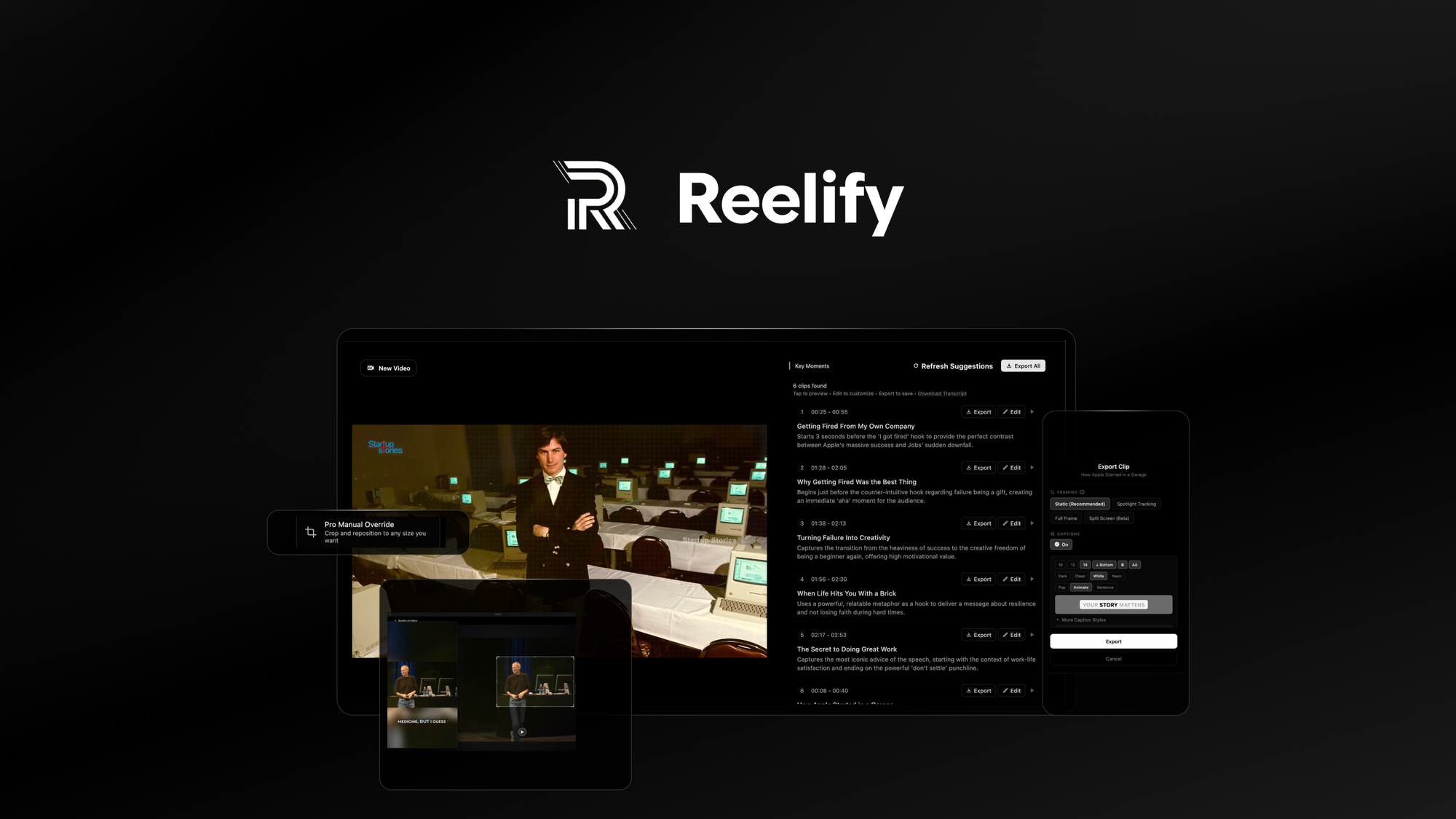
Reelify AI is a macOS-only desktop app that uses on-device Apple Silicon AI to clip long videos into vertical short-form content with auto-captions. Reelify AI lifetime deal starts at $59 one-time on AppSumo for 1 Mac, with team tiers up to $206 for 25 machines, all covered by AppSumo's 60-day refund guarantee.
The Reelify AI lifetime deal sells unlimited on-device AI video clipping on Apple Silicon Macs for $59 one-time on AppSumo, replacing what would otherwise be a $15 per month Viral Pro subscription. The pitch is straightforward: feed it a long podcast, webinar, or interview, and it cuts vertical short clips with word-level captions entirely on your Mac, with zero cloud uploads. The caveats land fast though. Reelify is macOS-only, requires Apple Silicon (M1 or newer), caps each video at roughly two hours, and ships without AI B-roll, social scheduling, transcript-based editing, or an API. Direct competitors like Opus Clip and Submagic run in any browser, work on Windows and Mac, and bundle the automation features Reelify currently lacks. If you live in the Apple ecosystem, value privacy from local processing, and want a true one-time payment, this lifetime offer is a fair fit for the right buyer. If you need cross-platform access or end-to-end short-form content automation, a monthly subscription to a cloud tool still wins.
Pros & Cons
Pros
- Genuine one-time payment for unlimited clipping with no credit caps, monthly fees, or word limits. Because processing happens on your own Mac, the vendor has no server cost to throttle, making the unlimited claim more defensible than the typical SaaS lifetime deal.
- All processing runs locally on Apple Silicon using the Neural Engine and Metal Performance Shaders, so raw footage never leaves the Mac. This is a strong fit for coaches, therapists, or executives clipping confidential interviews, NDA content, or unreleased product footage.
- Backed by Microsoft for Startups and NVIDIA Inception, with a public GitHub release repository for the Mac builds. These are modest credibility signals for a new product and slightly reduce the abandonment risk that haunts anonymous AppSumo launches with no third-party validation.
- Founder publicly confirmed current lifetime buyers get the future Windows version at no extra cost, recorded in the AppSumo Q&A thread. If honored, that commitment removes one of the bigger objections about the current Mac-only constraint over a multi-year horizon.
- Standard AppSumo 60-day refund window applies under the 'We Got Your Back' policy, giving buyers two months to test full output quality on real podcast or webinar footage before locking in. License activation must happen within those same 60 days.
Cons
- Mac-only with Apple Silicon required (M1 through M4) and macOS 15 or later. Intel Macs are explicitly excluded with no support plans, which rules out a large chunk of creators on Windows, Linux, older Intel hardware, or browser-based collaborative workflows.
- Per-video processing caps at roughly two hours, confirmed in independent reviews. Three-hour livestream replays and long webinars must be pre-split before clipping, which adds an extra step that cloud competitors like Klap Pro handle natively with longer source files.
- Missing AI B-roll, social scheduler, transcript-based editing, and API access, all of which appear on competitor mid-tier plans like Opus Clip Pro and Submagic Pro. Reelify is positioned as a clipper, not an end-to-end short-form content production and distribution pipeline.
- Caption positioning is limited to middle or bottom only and can overlap on-screen text or speakers' heads. Multiple verified buyers describe the interface as clunky, and the app cannot preview full clip appearance before export, which slows iteration on look and feel.
- Only 17 AppSumo reviews and no multi-year track record. Reelify launched recently, so there is no public proof yet that the founder will sustain updates, ship the promised Windows port, or honor lifetime access across multiple major macOS upgrades over time.
What It Does
- Detects hooks, emotional peaks, and quotable moments in long videos
- Generates word-level auto-captions with custom fonts and brand colors
- Exports ready-to-post 9:16 vertical clips for TikTok, Reels, Shorts
- Processes videos locally on Apple Silicon with no cloud uploads
- Reframes footage with smart cropping and pro manual override
- Handles two-speaker layouts using dual-crop vertical framing
Who It's For
- Solo podcasters and YouTubers on Apple Silicon Macs needing unlimited clipping
- Privacy-focused creators who refuse to upload raw footage to cloud servers
- Course creators repurposing long lessons into TikTok, Reels, and Shorts clips
- Coaches and consultants on M1 to M4 Macs producing a high weekly clip volume
Pricing Comparison
| Plan | Price | Type |
|---|---|---|
| Reelify AI Tier 1 (1 Mac) | $59 one-time | ⭐ Best Value |
| Reelify AI Tier 2 (3 Macs) | $108 one-time | Team Lifetime |
| Reelify AI Tier 3 (10 Macs) | $157 one-time | Team Lifetime |
| Reelify AI Viral Pro (regular) | $15/month or $99/year | Subscription |
| Opus Clip Pro | $29/month or $14.50/month annual | Subscription |
| Submagic Pro | $39/month | Subscription |
| Vizard Creator | $29/month or $14.50/month annual | Subscription |
| Klap Pro | $39/month annual | Subscription |
Feature Comparison
| Feature | Reelify AI | Opus Clip | Submagic |
|---|---|---|---|
| On-device local processing (no cloud) | ✅ | ❌ | ❌ |
| Lifetime one-time pricing | ✅ | ❌ | ❌ |
| Unlimited video processing | ✅ | ❌ | ❌ |
| Word-level auto-captions | ✅ | ✅ | ✅ |
| 9:16 vertical export | ✅ | ✅ | ✅ |
| Dual-crop two-speaker framing | ✅ | ❌ | ❌ |
| Windows compatibility | ❌ | ✅ | ✅ |
| Browser-based access (no install) | ❌ | ✅ | ✅ |
| AI B-roll auto-insertion | ❌ | ✅ | ✅ |
| Social media scheduler | ❌ | ✅ | ❌ |
| Multi-language transcription (20+) | ❌ | ✅ | ✅ |
| Eye contact correction | ❌ | ❌ | ✅ |
| API access | ❌ | ✅ (Business) | ✅ (Tier 2+) |
| AI dubbing across languages | ❌ | ❌ | ❌ |
Limitations
- Reelify AI runs only on macOS and requires Apple Silicon (M1 or newer) with macOS 15 or later, per the AppSumo product page. Intel Macs, Windows, Linux, iPad, and Android are not supported, which excludes the majority of computer users globally and rules out any cross-team rollout that includes non-Mac contributors.
- Each video file is capped at roughly two hours of processing, according to an independent katta.co hands-on test. Long podcasts, full webinars, or three-hour livestream replays must be pre-split with another tool before Reelify can clip them, which adds friction for power users repurposing very long recordings.
- There is no AI B-roll auto-insertion, confirmed missing on the AppSumo product page. Opus Clip and Submagic both include automated B-roll from stock libraries on their mid-tier plans, so creators who depend on visual variety in their shorts will need a second tool or manual editor alongside Reelify.
- Reelify does not include social media scheduling or direct publish to TikTok, Reels, or Shorts, per the AppSumo listing. Klap and Opus Clip ship one-click publishing on their paid plans, so Reelify users must manually drag exported files into a separate scheduling app like Buffer, Metricool, or Publer.
- Caption positioning is restricted to middle or bottom only and sometimes overlaps speakers' heads, according to a verified AppSumo buyer review published in May 2026. There is no free-position placement control, and the app cannot preview full clip appearance before export, slowing iteration cycles.
- Transcript-based editing is missing, while Vizard and Descript treat it as a core workflow. Reelify operates timeline-first only, so users cannot cut filler words or restructure clips by editing the text transcript, which slows down editors who think in words rather than waveforms or timecodes.
- AppSumo currently lists only 17 reviews for Reelify, a low sample size that makes long-term reliability hard to judge. Most category leaders carry hundreds of reviews on G2 or Capterra, so buyers are betting on a young product with thin public feedback and no multi-year track record yet.
- English audio performs best, with reduced accuracy in other languages per the AppSumo product page, and Portuguese is not currently supported per the founder Q&A. Creators working primarily in non-English content should test a free clip before locking in the lifetime tier.
What's Missing vs Competitors
- AI B-roll auto-insertion from stock libraries, which Opus Clip Pro and Submagic Pro include on their mid-tier plans
- Social media scheduling and one-click publishing to TikTok, Reels, and Shorts, which Klap and Opus Clip both ship
- Multi-language transcription strength with 20+ languages, which Vizard and Klap cover natively for global creators
- Transcript-based editing for cutting clips by editing text, which Vizard and Descript include as a default workflow
- Eye contact correction for on-camera shorts, which Submagic Pro offers as a built-in AI feature
Who Should Skip This Deal
- Windows, Linux, or Intel Mac users should skip Reelify and pick Opus Clip or Klap, which run in any browser and have no operating system restrictions
- Agencies needing automated B-roll plus a social scheduler in one app should pick Opus Clip Pro, which bundles B-roll, virality scoring, and direct publishing
- Creators publishing in many languages should pick Vizard or Klap, which support 20+ transcription languages and AI dubbing that Reelify does not currently offer
- Editors who rely on transcript-based cutting or filler word removal should pick Descript or Vizard, since Reelify is timeline-first with no text-driven editing yet
Reelify AI vendor check
- Domain Rating
- 27/100 Backlink authority
- In business since
- 2025
- Monthly visitors
- ~18 Est. organic
- Ranks for
- 3 keywords Organic search
- Traffic value
- ~$8/mo Equivalent ad spend
- Security
- No known flags Google Safe Browsing
Domain Rating & traffic data by Ahrefs. Objective third-party data, not our opinion.
Lifetime Deal Savings Calculator
Work out whether a lifetime deal actually beats the subscription. Enter the monthly price of the tool you would replace and the one-time lifetime price. The single most important number is the break-even: how fast you recover the cost. Recovering it quickly is what protects you if the company shuts down later.
This lifetime deal pays for itself in 4 months and saves $841 over 5 years versus paying monthly.
Roughly 1 in 10 lifetime deal companies shut down within five years. Recovering your cost fast, and buying only tools you will use right away, is how you stay ahead of that risk. This is an estimate, not financial advice.
How Reelify AI's price compares
Reelify AI is the 12th-cheapest of 20AI Videolifetime deals we've reviewed. At $59 it is above the $54 median for AI Video lifetime deals we've reviewed. It ranks 5th by verdict score (6/10) among the same group.
Frequently Asked Questions
- For Apple Silicon Mac creators who clip podcasts or webinars regularly, the $59 one-time deal is fair value. It replaces a $15 per month Viral Pro subscription, breaks even in about four months, and removes credit-based limits forever. The catch is the missing automation. There is no B-roll, no social scheduler, no transcript-based editor, and the AI can struggle to start and end clips cleanly. Buyers comfortable with a manual finishing pass and content with a Mac-only tool get a strong unit economics win. Anyone needing one app that handles clip generation, animated captions, B-roll, and direct publishing will spend less total time using Opus Clip or Submagic on a monthly plan.
- Reelify AI is covered by AppSumo's standard 60-day refund guarantee under the 'We Got Your Back' policy. Buyers have a full 60 days from purchase to test the app on real footage and request a no-questions-asked refund if it does not meet expectations. The license must also be activated within those same 60 days, so do not delay setup after purchase. This refund window is one of the strongest reasons to try the lifetime tier rather than the monthly Viral Pro plan, since the trial period costs nothing if the app fails to deliver for your specific workflow or hardware.
- Opus Clip is browser-based, runs on Windows or Mac, and ships AI B-roll, a social media scheduler, a virality score, team workspaces, and direct export to Adobe Premiere and DaVinci Resolve. Reelify AI runs only on Apple Silicon Macs, lacks B-roll and scheduling, but processes everything locally with zero cloud uploads and includes a true unlimited usage tier for $59 one-time. Opus Clip Pro costs $29 per month or $14.50 per month billed annually, so the Reelify lifetime payoff is roughly four months for a single user if the Mac-only constraint is acceptable. Pick Opus Clip for automation and team workflows, Reelify for privacy and one-time pricing.
- The main limitations are Mac-only and Apple Silicon only, with no Intel Mac, Windows, Linux, iPad, or Android support. Each video is capped at roughly two hours, so longer recordings must be pre-split with another tool. There is no AI B-roll, no social scheduler, no transcript-based editing, no API, and no filler word removal yet. Caption positioning is restricted to middle or bottom only and may overlap speakers' heads. English audio performs best, while other languages have reduced accuracy and Portuguese is not currently supported. AppSumo has only 17 reviews so far, making long-term reliability difficult to confirm independently.
- Skip Reelify if you use Windows, Linux, an Intel Mac, or work primarily inside a browser, since Klap, Vizard, and Opus Clip all run in any modern browser. Skip if you need automated B-roll insertion or eye contact correction, since Submagic Pro at $39 per month covers both natively. Skip if you publish in many languages at scale, because Vizard and Klap support broader transcription and AI dubbing across 20 or more languages. Skip if transcript-based editing or filler word removal is core to your weekly workflow. Finally, skip if you produce three-hour livestream replays and do not want to pre-split files before each clipping session.
Is Reelify AI worth the money?
What is the refund policy for Reelify AI?
How does Reelify AI compare to Opus Clip?
What are the main limitations of Reelify AI?
Who should NOT buy Reelify AI?
Sources
Related tools & guides
Alternatives to Reelify AI
Other active deals in AI Video

Deals That Pair Well With Reelify AI
Pairs well with AI Marketing and AI Design tools

Comments
Loading comments...