

Verdict: Buy
What AgainstData costs and what it deletes
| Field | Detail |
|---|---|
| Tool | AgainstData |
| Category | Gmail inbox cleanup with formal personal-data deletion requests, sent from your own Gmail account |
| Best use case | Bulk-unsubscribing a neglected Gmail account and then demanding companies erase the data they hold on you |
| Price | No permanent free tier, free trial only. Annual billing: Lite $39 per year ($3.30 per month, 1 inbox), Pro $58 per year ($4.80 per month, 3 inboxes), Max $99 per year ($8.30 per month, 7 inboxes). Monthly billing is $16, $24 and $38 for the same tiers. |
| Verdict | Buy Lite annually if you are on Gmail and want the privacy layer, skip it entirely on Outlook or Yahoo |
My Gmail inbox had 355 pages of emails. Not 355 emails: 355 pages. I connected that real account to AgainstData and recorded the whole test rather than describing it from the marketing page. You can watch me clean the inbox, send data deletion requests, and verify that the emails went out through Gmail:
What AgainstData does that unsubscribe apps do not
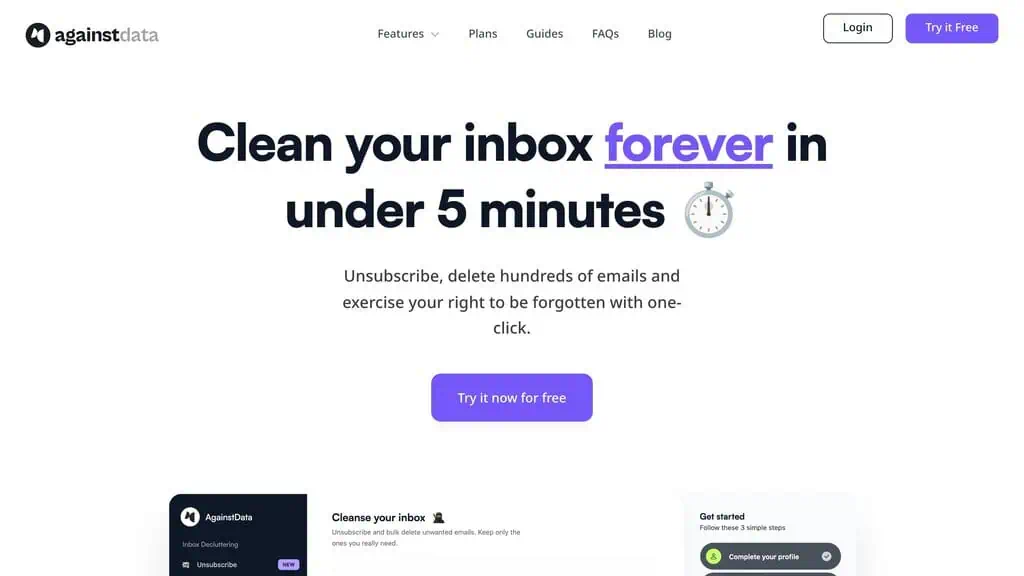
AgainstData is an email management tool built specifically for Gmail users who want to do two things: bulk unsubscribe from unwanted senders, and request that companies delete the personal data they hold on you. Most unsubscribe apps stop at the first. AgainstData identifies which companies have your personal data based on your email history and sends them formal deletion requests with one click, which is what makes it different from tools like Clean Email or Mailstrom.
The platform says it has 23,000-plus users and has given back 4,300 days of productivity, which is why it earns a spot among the best AI productivity tools we rank. Both figures are its own.
From Google sign-in to a tracked deletion request
AgainstData works through Google OAuth and your own Gmail account, which is both why it can do what it does and why the permission question is unavoidable. There are no configuration menus; you are looking at your inbox breakdown within two to three minutes of signing in.
- Sign-in and read access. You authorise with Google and grant read access so the tool can scan your mail. Enabling deletion requires a second, broader permission that lets it delete on your behalf. Both are revocable at any time from your Google account security settings.
- Personal details. You enter your name, address and contact information. This exists solely to populate the legal deletion requests, and it means the tool holds identity data as well as inbox access.
- Inbox scan. Within a couple of minutes it categorises senders into personal, promotional and notifications, showing sender name, addresses, total emails sent and the date of the most recent one.
- Bulk unsubscribe. One click per sender, with a prompt asking whether to keep existing emails or delete them too. Choosing delete removes the entire history from that sender in the same action.
- Data deletion requests. In the personal-data view it lists companies it believes hold your data, with industry, how many other users have already requested deletion, and a privacy score. Clicking through drafts a formal request referencing data protection law and sends it from your Gmail account, which you can verify in your own Sent folder.
- Request tracking. Each request shows pending, acknowledged or solved status, with an expected response window of 20 to 90 days under most data protection frameworks. Company replies land in your Gmail and can be answered from inside the app.
What happened on my 355-page inbox
The scan finished in a couple of minutes and the categorisation was accurate: Google AdSense, PayPal, Amazon Associates, and dozens of promotional lists I had signed up for at some point and forgotten, all with recognisable sender names and correct email counts per sender, the same accuracy I look for in our Reoon email verifier review.
One sender, 29 emails, one action
The bulk unsubscribe view shows every sender in the promotional category, and for each one you can unsubscribe, or unsubscribe and delete all their emails at once. I tested this on a sender I definitely did not want. One click, then a prompt asking whether to keep the existing emails or delete them too. I chose delete, and it confirmed 29 emails deleted in a single action.
The interface scrolls quickly and works how you expect. For an inbox with hundreds of promotional senders, this saves a significant amount of manual clicking compared to hunting each unsubscribe link individually, much like the Gmail cleanup in our cloudHQ Gmail tools review.
The deletion request, checked in my Sent folder
In the personal data section I selected a company I wanted to remove my data from, clicked “ask for deletion,” and confirmed. The tool drafted a formal deletion request, including the personal details I provided during setup, and sent it from my Gmail account. To verify, I checked my Gmail Sent folder. The email was there, written in a professional format that references data protection law.
Each request then sits in the app’s tracker, where you can see which are pending and which have been acknowledged, mark them solved when companies respond, and reply to those responses without leaving AgainstData. The 20 to 90 day response estimate shows on each request, which is useful for following up.
Is AgainstData safe to use?
AgainstData needs read access to scan and categorize your emails, and a second level of permission if you enable deletion. These are Google OAuth permissions, granted through Google’s own authorization system, so you can revoke them at any time from your Google account security settings. The permissions are standard for this category of email management tool, and the consent flow is transparent about what each permission level allows.
AgainstData states that it does not store your email content on its servers or share your data with third parties for advertising, and that the personal details you enter are used only to populate the deletion request emails. The business model is a subscription, not data monetization. That distinction matters when you are handing a tool access to your Gmail, the same scrutiny I apply in our RecoveryFox AI data-recovery review. If you are uncomfortable granting broad Gmail access to any tool, that discomfort is reasonable.
Is AgainstData free? Pricing, and why only annual makes sense
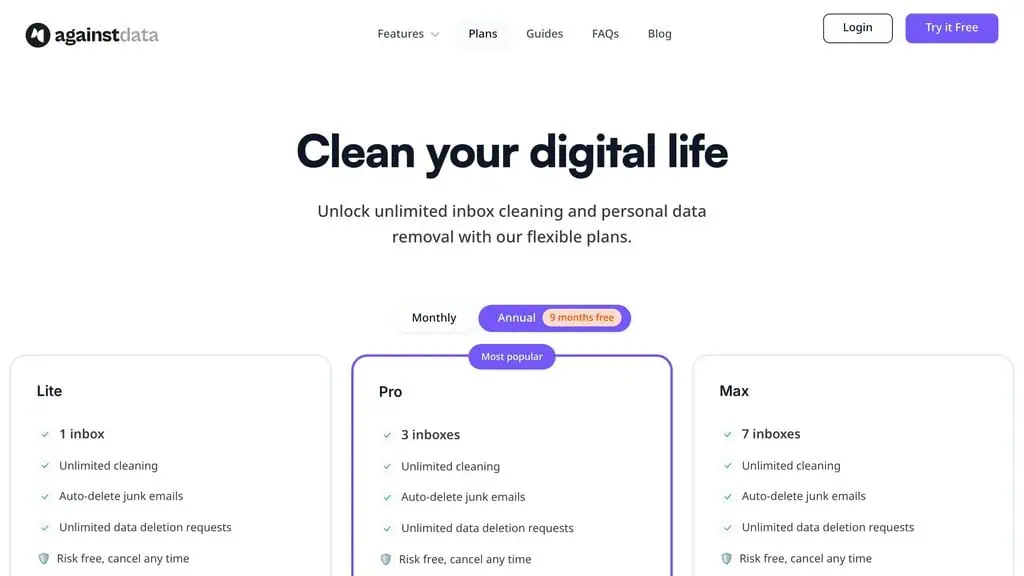
There is no permanently free tier, only a free trial to start. Three paid plans follow, all billed annually at a large discount over the monthly rate:
| Plan | Monthly | Annual (per month) | Annual Total | Inboxes |
|---|---|---|---|---|
| Lite | $16/mo | $3.3/mo | $39/year | 1 inbox |
| Pro | $24/mo | $4.8/mo | $58/year | 3 inboxes |
| Max | $38/mo | $8.3/mo | $99/year | 7 inboxes |
All plans include unlimited cleaning, auto-delete for junk emails, and unlimited data deletion requests. The only differentiator is how many inboxes you can connect. For most individual users, Lite at $39 per year covers everything. Pro makes sense for a personal inbox plus work accounts, and Max is for agencies or power users managing several client or team inboxes.
Monthly billing at $16 to $38 against $39 to $99 per year for the same product means the monthly option only makes sense as a very short test. If you want to avoid recurring costs entirely, check whether AgainstData turns up on AI lifetime deals platforms, which occasionally feature email management tools at one-time prices.
The Gmail users it suits, and who should pass
AgainstData is best for:
- Gmail users with years of accumulated clutter. Bulk unsubscribe plus delete-history in a single action is the fastest way through a promotional backlog.
- Anyone who wants data erased, not just email stopped. No other tool in this category files the deletion request for you.
- People cleaning up a long digital trail. Years of forgotten signups are exactly what the sender scan surfaces.
- Users who are comfortable with OAuth scopes and would rather revoke access later than click unsubscribe links by hand.
- Households or small teams on Gmail. Pro at $58 per year covers three inboxes, Max covers seven.
AgainstData is not for:
- Outlook, Yahoo or IMAP users. As of mid-2026 it is Gmail-only, full stop.
- Anyone unwilling to grant Gmail read and delete permissions. That discomfort is reasonable and there is no reduced-permission mode that keeps the useful features.
- Occasional unsubscribers. If you get a handful of unwanted emails, the unsubscribe link in the email is free.
- People wanting a free inbox organiser. There is a trial and then a subscription.
- Anyone expecting guaranteed erasure. The tool sends the request; compliance is the company’s decision.
What a filed request cannot guarantee, and other limits
- It cannot make anyone delete anything. The request is a properly formatted legal ask sent from your address. Whether a company acts on it, ignores it, or replies with a rejection is outside the tool’s control, and the 20 to 90 day window is a legal expectation rather than a promise.
- Gmail only. One provider, no roadmap stated for others, so a mixed-provider setup gets partial coverage at best.
- The permissions are broad by necessity. Read access to scan, delete access to clean. If either is a dealbreaker, the product does not work in a reduced mode.
- You hand over identity data. Name, address and contact details are required for the deletion requests, so you are trusting the tool with more than your inbox.
- Requests come from your own account. Any dispute, follow-up or unwanted correspondence arrives in your inbox with your name on the original request, not the vendor’s.
- No permanent free tier. Unlike most inbox cleaners, there is no ongoing free mode to fall back on.
- Privacy scores and adoption counts are the platform’s own numbers. The per-company privacy score, the “how many users requested deletion” figure, 23,000-plus users and 4,300 days of productivity returned are all self-reported, not audited.
- Spam that bypasses categorisation is still your provider’s job. Spam and unwanted promotional mail that lands in the promotional category can be bulk unsubscribed and deleted, but aggressive spam that bypasses the categories is left to your email provider’s built-in filter.
Clean Email, Unroll.Me or Gmail’s own filters?
| Alternative | Price | Pick it instead when |
|---|---|---|
| Clean Email | Around $29.99 per year for one account on mobile, or about $39.99 per year ($3.99 per month) on web | You need Outlook, Yahoo or IMAP support and only want inbox organisation, not deletion requests |
| Unroll.Me | Free | You want zero cost for bulk unsubscribing and accept that a free inbox tool’s business model is not a subscription, which is the opposite of the reason to buy AgainstData |
| Gmail’s own filters and unsubscribe | Free | Your volume is manageable and you would rather build filters once than grant a third party delete access |
Clean Email is the comparison most buyers make, and we round up more options in our AI tool alternatives hub. It focuses almost entirely on inbox organization and unsubscribing, supports Outlook, Yahoo and other IMAP accounts as well as Gmail, has a strong reputation for reliability, and has been around longer. AgainstData adds the one thing Clean Email does not have, the personal data deletion request layer:
| Feature | AgainstData | Clean Email |
|---|---|---|
| Gmail support | Yes | Yes |
| Outlook/Yahoo | No | Yes |
| Bulk unsubscribe | Yes | Yes |
| Bulk delete | Yes | Yes |
| Personal data deletion requests | Yes | No |
| Privacy score per sender | Yes | No |
| Annual pricing | From $39/year | From $29/year |
For straightforward inbox cleaning across several providers, Clean Email is the more mature organiser. For Gmail users who also want data erased, AgainstData is the only one of these that files the request for you.
Worth $39 a year, if your mail is on Gmail
The cleanup half did what it promised on 355 pages of mail: a fast, accurate scan and a one-click unsubscribe-and-delete that cleared 29 emails from one sender. The deletion-request half sent a real, properly worded request from my own account, which I found in my Sent folder.
What to weigh before buying is that the feature that makes this tool different is the one it cannot guarantee. A filed request is not the same as data being erased, the requests go out under your name so the follow-up conversation is yours, and you hand over your name and address as well as broad Gmail permissions to make it work. If you accept that trade, Lite on annual billing is cheap enough that the privacy layer is close to free on top of the cleanup. On any other provider, this is not the tool.
Related Posts

AI-Text-Humanizer.com took a 132-word ChatGPT paragraph from 100% AI to 0% on ZeroGPT but flattens your voice. Buy the $...

AIscan24 is a free, no-signup AI detector: it caught pure ChatGPT text at 100% but scored my handwritten paragraph 80%. ...

Honest Aithenticate review after hands-on testing. Does this AI disclosure badge tool meet EU AI Act requirements? Prici...
Allavsoft review: a Windows and Mac video and music downloader with batch queues, 8K support and format conversion, from...

My hands-on Answer Socrates review covering all features, free plan limits, pricing, and how it compares to AlsoAsked. I...

I’ve spent $4,200 on 118 AppSumo lifetime deals over 5 years. Here’s my honest review: what works, what fails, and wheth...