



Verdict: Buy
What I Like
- 800+ questions per search from a single seed keyword
- Recursive search doubles your question volume automatically
- Social media questions give you language real people actually use
- Keyword clustering organizes thousands of questions into usable topic groups
- CSV export available (with plan-based limits)
- Country and language targeting for local research
- Free to start with no credit card required
- Fast, results in seconds not minutes
What Is Missing
- No search volume or keyword difficulty at the individual keyword level
- Recursive questions section lacks filtering and table view
- Clustering view needs better in-tool navigation, CSV is the workaround
- Google Trends integration appears unreliable, did not load in test
- Free plan is 3 searches/day, serious users will need to upgrade
- Not a replacement for a full SEO suite
How much would you pay to see what questions real people are asking about your topic right now?
Most keyword research tools charge $99/month or more for that privilege. AnswerThePublic used to be free, then sold to Neil Patel and went behind a paywall. Neil Patel also runs Ubersuggest, which we break down in our Ubersuggest review. AlsoAsked makes you pay $29/month just to download your results as a CSV. So when a tool like Answer Socrates shows up offering 833+ keyword questions per search - for free - the right reaction is skepticism, not excitement.
I run zplatform.ai, I have tested 50+ SEO tools with my own money, and I have seen enough “free forever” tools get paywalled mid-use to know better than to trust the marketing page. So I ran Answer Socrates through a full hands-on test using a real keyword, measured the results against what I actually need in a workflow, and I am going to give you the honest verdict here.
What you are going to get from this review: how the tool actually works (not just what the homepage claims), whether the free plan is usable or just bait, how keyword clustering performs, and whether the paid plan is worth a cent compared to alternatives. It is the same lens we bring to all our AI tool reviews.
What Is Answer Socrates?
Answer Socrates is a web-based keyword research tool built around question-based keyword discovery. You enter a seed keyword, select a country and language, hit search, and it pulls questions from Google’s autocomplete and “People Also Ask” data across multiple angles - question words, prepositions, comparisons, letters, and more.
The core idea is simple: instead of giving you a keyword list with volume and difficulty, it gives you the actual questions real people are typing into Google around your topic. That makes it useful whether you are building a content plan, finding free content ideas people actually search for, filling out FAQ sections, or identifying long-tail keyword topics worth targeting. It pairs well with our free on-site SEO tools.
There is no desktop app to install. No browser extension. No proxy setup. You sign up, get a free account, and start searching immediately. That low friction is one of the genuine strengths here.
The tool was built by a small independent team and has been around long enough to build a real user base. It is legitimate, actively maintained, and used by content creators, SEO professionals, and agencies who need question-based keyword ideas without paying enterprise prices.
How Answer Socrates Works: A Hands-On Walkthrough
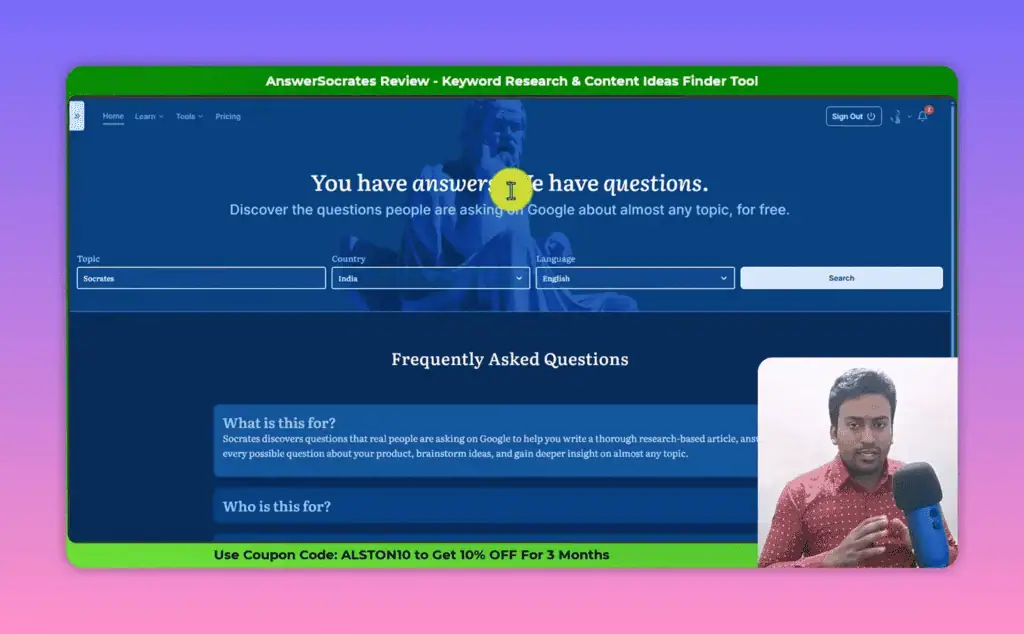
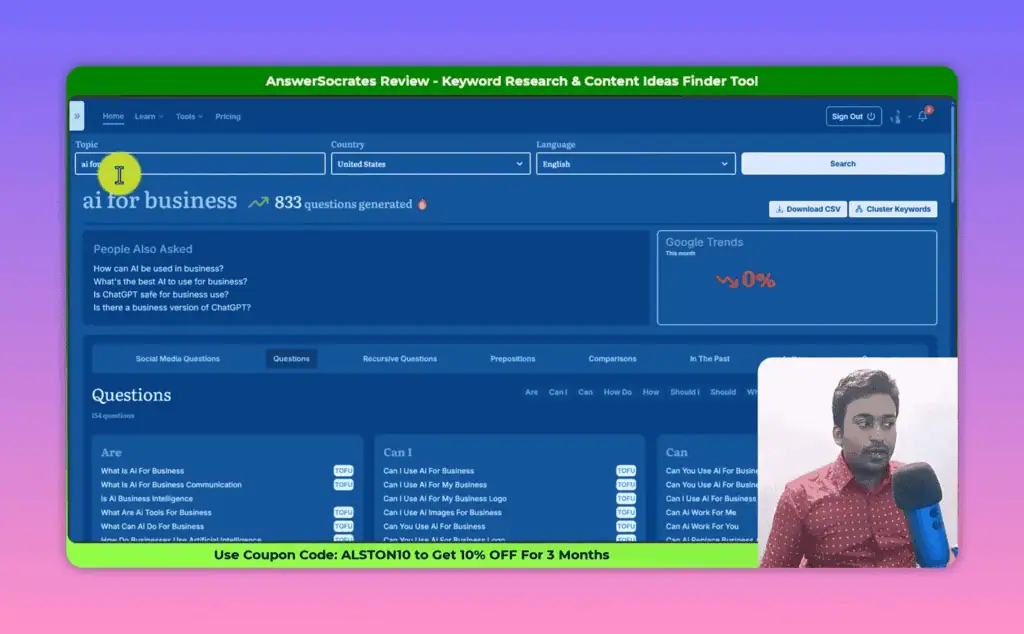
The interface is straightforward. You get a keyword search box labeled “Topic,” a country selector with every country listed, and a language filter. The country and language combination is particularly useful if you are doing local SEO research or targeting audiences in specific regions.
I ran my test with the seed keyword “AI for business” targeting United States, English. Here is what happened.
The Initial Results: 833 Questions in 4-5 Seconds
Hit search and you immediately see something impressive. Within 4 to 5 seconds - not minutes, seconds - Answer Socrates returns an initial batch of results. For “AI for business” that batch was 833 questions.
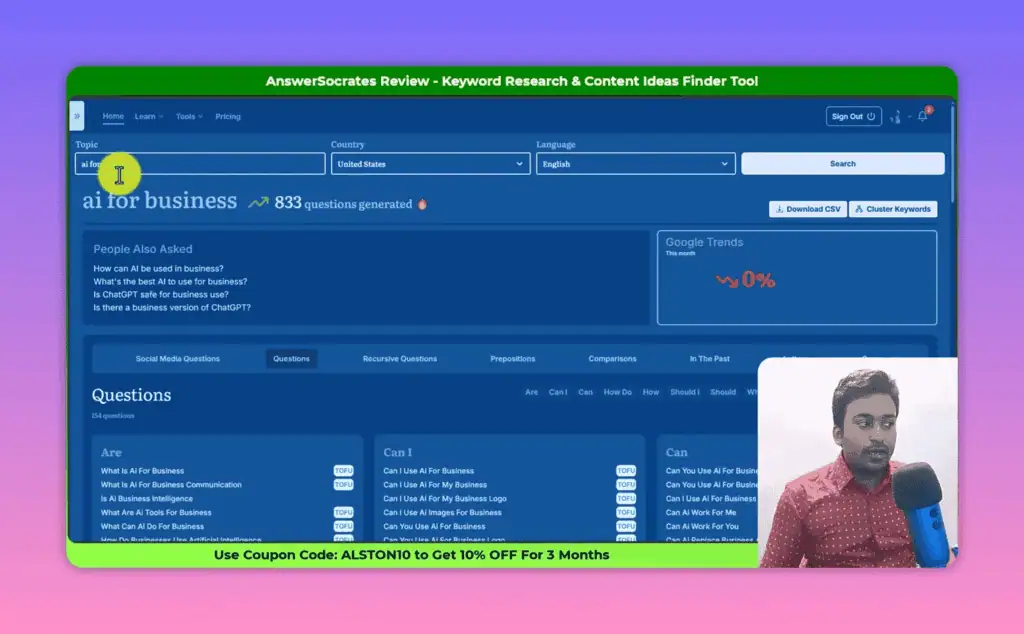
That is a lot of keyword material from a single search. But 833 is just the starting number, not the final count.
The results page organizes data into several distinct sections. At the top you see Google Trends data for your seed keyword - useful for spotting trending topics in your niche (this sometimes fails to load; I noticed it did not appear for my test run, though it works for other keywords). Below that is a “People Also Ask” snapshot showing what Google surfaces in the also asked box for your query.
Then the real meat of the tool kicks in.
The Questions Section
The Questions section generates results using different question-type prefixes: “are,” “can I,” “how do,” “what are,” and others that vary by keyword. For the “AI for business” query it produced 154 questions in this section alone.
Each question gets a funnel-intent label: TOFU (top of funnel), MOFU (middle of funnel), BOFU (bottom of funnel), Long Tail, or Local. The labeling comes from some form of pattern classification on their end. It is not 100% accurate - I spotted some long-tail queries tagged as TOFU that clearly had purchase intent - but it gives you a fast filter for content strategy decisions. The BOFU and Long Tail labels are the ones I watch most closely for content briefs.
This section is good. 154 question-based keywords from a single seed, organized by funnel stage, all downloadable as CSV. For a free tool, that alone is useful.
Recursive Questions: The Feature That Sets This Tool Apart
The recursive questions feature is the reason I keep Answer Socrates in my toolkit.
Here is what it does: it takes the popular questions from your initial search and runs each one back through Answer Socrates as a new seed keyword. It then returns the questions generated by those secondary searches. The result is a second layer of keyword discovery that goes far deeper than the initial batch.
In practice, this means a search that started at 833 questions jumped to roughly 1,300 after recursive search ran. That is approximately 500 additional questions generated automatically, with no extra effort on my part.
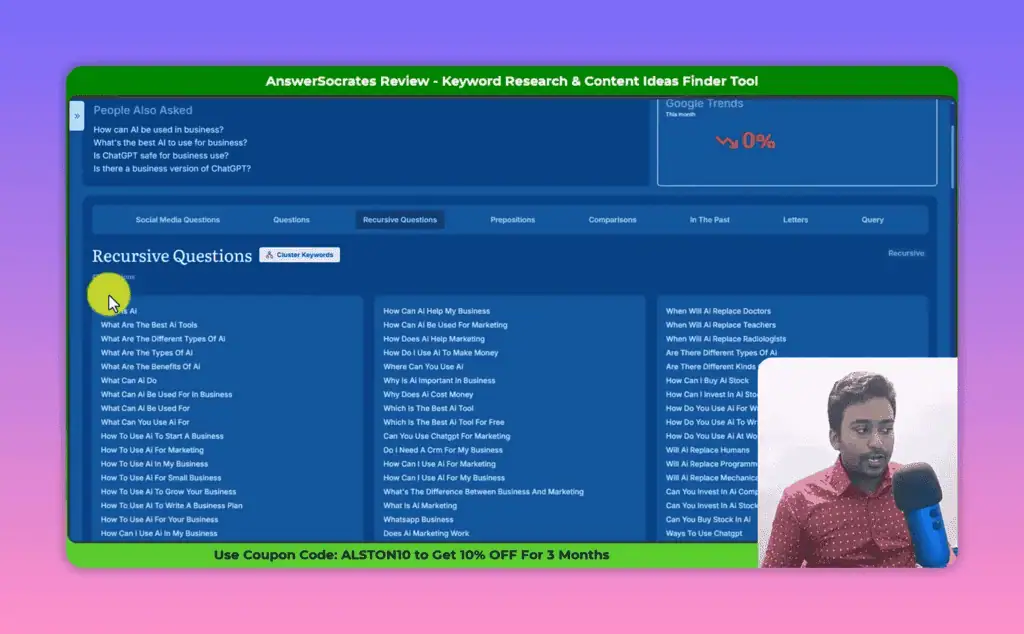
What you see in the recursive questions section is a grouped view - each main question from the initial results becomes a parent, and the questions it generated appear beneath it. So “what is AI for business” might have 12 child questions, “how to use AI for business” might have 8, and so on.
My one genuine criticism of this section: there is no filtering option. You cannot search within the results by keyword, filter by funnel stage, or switch to a table view. With hundreds of questions grouped in an accordion-style layout, navigating becomes tedious. A simple filter bar would make this feature significantly more powerful. The workaround is to export everything as CSV and filter in a spreadsheet or upload to an AI tool for analysis.
Social Media Questions
This is a separate feature from the regular question research. Click “Generate Social Media Questions” and Answer Socrates pulls questions from social platforms rather than search engine autocomplete data.
For the “AI for business” keyword, this added another 21 questions on top of everything else. These are real questions people actually posted or searched on social channels - which means they tend to be more conversational, more specific, and often more revealing about genuine pain points than Google autocomplete suggestions.
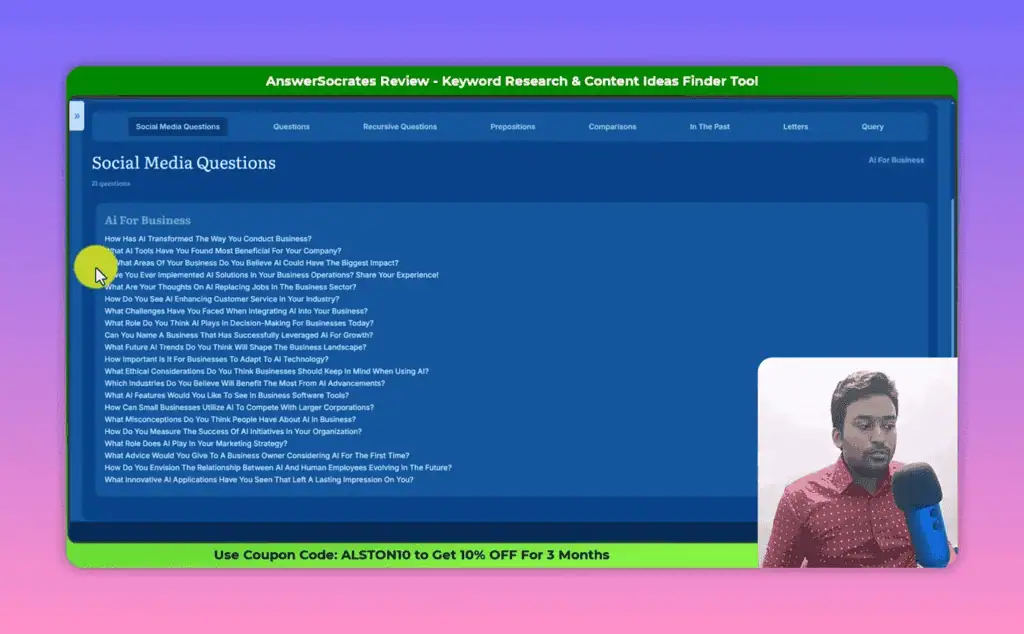
The social media questions section is not going to replace dedicated social listening tools, but for content creators trying to write in a voice that connects with real audience language, these are genuinely valuable inputs.
Every Section of Answer Socrates Explained
Beyond questions and recursive search, Answer Socrates gives you several additional research angles:
Prepositions: Appends common prepositions to your seed keyword and extracts autocomplete suggestions. The results show which preposition generated which keywords, giving you a structured view of modifier-based keyword variations.
Comparisons: Uses comparison words to surface what your keyword is being compared against. Results are organized by the comparison word used. For content targeting decision-stage searchers, this section is worth paying attention to.
In the Past: Pulls question patterns related to history, origins, or prior states of your keyword topic. Works well for historical, policy, or event-driven topics. Less useful for software tools or evergreen informational content.
Letters: Appends each letter of the alphabet to your keyword and pulls autocomplete suggestions for each. This is the same technique as tools like Keyword Researcher Pro - systematically expanding your seed keyword across A-Z to surface autocomplete suggestions Google would not normally show you on a single query. One of my favorite approaches for finding niche long-tail keywords.
Query: Shows related search suggestions from Google for your main keyword. These are different from questions - they are the “related searches” Google surfaces at the bottom of the SERP. Useful for identifying topic variations and subtopics worth exploring.
Answer Socrates Keyword Clustering Feature
The keyword clustering feature is available from the main results page. Once you have collected all your question data - questions, recursive questions, social media questions, and the rest - you can cluster the entire set into topic groups.
For my “AI for business” test, clustering ran on 1,326 keywords and organized 925 of them into 206 distinct topic clusters. That means roughly 70% of all the generated keywords mapped into identifiable topic buckets, with the remaining 30% left unclustered (typically because they were too unique or did not share enough tokens with other keywords).
Each cluster shows the parent topic and the keywords grouped under it. For example: “what is AI for business” as a cluster might contain 7 related keywords, while “AI for business plan” might contain 5. The cluster view also shows key metrics per group when you click the info icon: CPC, competition index, and total search volume. That metric data is what turns a raw question list into a prioritizable content plan.
My preferred workflow: run the clustering, then immediately download the CSV. The exported file opens in a color-coded spreadsheet format that is far easier to filter, sort, and work with than the on-screen accordion view. From there, I can upload to a Google Sheet and use Gemini or ChatGPT to do a deeper analysis across all 206 topic clusters.
The clustering feature is powerful. The in-tool visualization needs improvement. The CSV export saves it.
Answer Socrates Free Plan: What Are the Limitations?
The free plan gives you 3 searches per day. That is it.
Three searches sounds limiting, but in practice it is more workable than it appears. A single Answer Socrates search against a broad topic keyword can return 800-1,300+ questions. If you use your 3 daily searches on well-chosen seed keywords, you can realistically build a solid content plan for a week.
Where the free plan breaks down:
- CSV export is limited on free. You can export, but higher-volume exports and full clustering data may require a paid plan.
- Daily search cap is strict. If you are doing keyword research for multiple clients or topics in a single session, 3 searches runs out fast.
- Clustering credits are plan-based. The clustering feature shows you how many clusters are available based on your subscription tier.
Is the free plan sufficient for serious SEO work? It depends on your use case. For a blogger or solopreneur doing research once or twice a week, it can work. For an agency or anyone running regular content production across multiple sites or topics, you will hit the wall within days.
Answer Socrates Pricing: Is the Paid Plan Worth It?
Answer Socrates offers tiered paid plans that remove the daily search limit and increase clustering credits. The exact pricing tiers are available on their website.
What I can tell you from using it: the value calculation is not the same as for a tool like Ahrefs or Semrush. For an all-in-one suite instead, see our Semdash review. This is not a competitive analysis tool. It does not track rankings, pull backlink data, or give you accurate search volume at the individual keyword level. It is a question-based keyword generator and topic clustering tool.
If that specific function - finding what questions real people are asking about a topic - is something you use regularly, the paid plan pricing is reasonable for the volume of keyword data it produces. If you need volume, difficulty, and SERP analysis alongside questions, you need to combine it with something else. A gamified option is covered in our Morningscore review.
One thing worth noting: I have an exclusive discount code ALSTON10 that gives you 10% off for 3 months on paid plans. Use that if you decide to upgrade.
Answer Socrates vs AlsoAsked: Which Tool Wins?
The closest competitor to Answer Socrates is AlsoAsked. We compare more options in our keyword tool alternatives hub. Both tools extract question-based keyword data from Google’s “People Also Ask” feature. But they approach it differently and have very different pricing models.
AlsoAsked maps questions in a visual tree structure - you can see how questions branch from parent to child queries the way Google’s PAA box actually expands. The visualization is genuinely useful for understanding topic depth and question hierarchy.
The problem with AlsoAsked: to download your results as a CSV, you need to pay $29/month. Blocking CSV export behind a paywall is a policy choice that makes the tool actively frustrating to use for anyone who needs to work with keyword data in bulk. You end up staring at a visual tree and typing things out by hand.
Answer Socrates gives you CSV export on the free plan (with limits), generates significantly more questions per search through recursive search (which AlsoAsked does not have), and adds social media questions as a distinct data source. The clustering feature is also absent from AlsoAsked.
If you specifically need PAA tree visualization with question hierarchy, AlsoAsked has the edge on that presentation layer. For raw question volume, recursive expansion, clustering, and practical workflow integration via CSV, Answer Socrates wins.
Who Should Use Answer Socrates?
Use it if you:
- Create content regularly and need to find question-based keywords fast
- Want to build FAQ sections that match real user language
- Are working on a content plan and need topic clusters from a seed keyword
- Are on a budget and cannot justify $99/month SEO tools
- Do local keyword research and need country/language targeting
Skip it (or combine it with something else) if you:
- Need accurate search volume, keyword difficulty, or SERP analysis
- Are doing competitive research or tracking rankings
- Need to process dozens of topics daily (the free plan will frustrate you)
- Require real-time trend data as a core feature
Answer Socrates Pros and Cons
Pros:
- 800+ questions per search from a single seed keyword
- Recursive search doubles your question volume automatically
- Social media questions give you language real people actually use
- Keyword clustering organizes thousands of questions into usable topic groups
- CSV export available (with plan-based limits)
- Country and language targeting for local research
- Free to start with no credit card required
- Fast - results in seconds, not minutes
Cons:
- No search volume or keyword difficulty at the individual keyword level
- Recursive questions section lacks filtering and table view
- Clustering view needs better in-tool navigation (CSV is the workaround)
- Google Trends integration appears unreliable (did not load in my test)
- Free plan is 3 searches/day - serious users will need to upgrade
- Not a replacement for a full SEO suite
Frequently Asked Questions
Is Answer Socrates free? Yes, there is a free account with 3 searches per day. Paid plans remove the daily limit and increase clustering credits.
Is Answer Socrates legitimate? Yes. It is an actively maintained tool with a real user base in the SEO community. The data is pulled directly from Google autocomplete and PAA signals, not fabricated.
How accurate is the data? The question data comes from real Google autocomplete and PAA signals, so it reflects actual search behavior. The funnel intent labels (TOFU, MOFU, BOFU) are algorithmically assigned and not always accurate. Search volume data is not provided per keyword - you only see aggregate volume at the cluster level.
How does the keyword clustering feature work? After running a search, you can cluster all generated keywords into topic groups. The tool groups semantically related keywords together, shows the count per cluster, and provides CPC, competition, and total volume data per cluster. Results export as CSV.
Can Answer Socrates replace premium SEO tools? No. It is a focused question-keyword discovery tool. It does not track rankings, analyze backlinks, or pull SERP data. Use it alongside a tool that provides volume and competition metrics, not instead of one.
Is the free plan sufficient for serious SEO work? For occasional research or planning one or two content pieces per week, yes. For consistent content production across multiple topics or clients, the 3-searches-per-day cap will slow you down. Upgrade when you hit the wall.
How does Answer Socrates compare to AnswerThePublic? AnswerThePublic has a more polished visualization and longer brand history, but now requires a paid plan for most usage. Answer Socrates offers a more generous free plan, adds the recursive search feature that AnswerThePublic lacks, and includes keyword clustering. For budget-conscious users, Answer Socrates is the stronger option today.
Verdict: Is Answer Socrates Worth It?
My honest answer: yes, but know what you are buying.
Answer Socrates is not a keyword research tool in the Ahrefs or Semrush sense. It does not give you accurate volume, difficulty, or competitive analysis. What it does give you is an unusually deep well of question-based keyword ideas - 800 to 1,300+ per search, organized by research angle, with clustering that turns that data into an actionable content map.
The recursive search feature alone makes it worth using. The ability to go from a single seed keyword to 1,300+ related questions in under a minute, automatically clustered into 200+ topic groups, is genuinely useful for content planning. The CSV export makes it workflow-compatible.
The free plan is worth your time to test. Start with your core topic, run a recursive search, download the CSV, and see whether the data format fits your process. If it does, the paid plan is a reasonable upgrade.
If you want to explore other tested AI tools and free SEO tools, we have reviewed a full stack of free and budget keyword research options on ZPlatform.
Use code ALSTON10 for 10% off the first 3 months on any paid Answer Socrates plan.
-
Note: This article contains affiliate links. I only recommend tools I have personally tested.
Related Posts

I tested AgainstData on 355 pages of Gmail data. Here’s my honest review: bulk unsubscribe, personal data deletion reque...

Starting August 2, 2026, the EU AI Act’s transparency provisions become enforceable. That means if your website uses AI-...
“I’ve spent $4,200 on 118 AppSumo lifetime deals over 5 years. Here’s my honest review: what works, what fails, and whet...
I checked Aura++’s DR 69 backlink claim in Ahrefs (it’s really 71) and broke down every launch tier. Here is whether the...

Honest BlockGPTBot review covering RSL licensing, free vs Pro, and how it compares to free alternatives. Find out if it ...

TL;DR: Character AI is the best platform for creative roleplay and interactive storytelling with AI characters, but it h...