

Allavsoft at a glance
| Field | Detail |
|---|---|
| Tool | Allavsoft (allavsoft.com), desktop video and music downloader and converter for Windows and macOS |
| Category | Batch media downloader with a built-in format converter |
| Best for | People who save a lot of video and audio they are entitled to keep, such as their own uploads, Creative Commons footage, course material they have licensed for offline use, and clips for editing, and who want one queue-based app for download and conversion |
| Price | Free trial. Licences are $19.99 for 1 month, $29.99 for 1 year or $59.99 for a lifetime licence (1 to 3 PCs), the same on Windows and Mac. The site shows crossed-out list prices of $29.99, $49.99 and $99.99. 30-day money-back guarantee. Checked 2026-10-25. |
| Verdict | Try the free trial on a few of your own links first. If the queue, the quality settings and the converter fit how you work, the $59.99 lifetime licence is the sensible buy, because it costs about three times the one-month price and removes any renewal. |
What Allavsoft does
Allavsoft is a desktop app that downloads video, audio and subtitles from a long list of sites and converts the files to the format you need. The vendor says it supports 1000+ websites, naming YouTube, Vimeo, Facebook, Dailymotion, Twitter, SoundCloud, Deezer and many broadcaster sites. That count is the vendor’s own and I did not test it.
The workflow is short. You paste a link (or drag it in), pick a quality, optionally tick “Automatically Convert to” and choose a format, and press the big round Download button. Everything runs from one window with four tabs: Download, Activity, Convert and Merge.
I have not installed Allavsoft or downloaded anything with it. This review is built from what the vendor publishes: the homepage, licence pages, download page, support page, about page and its how-to guides, all read on 2026-10-25. Where a claim is the vendor’s, I say so.
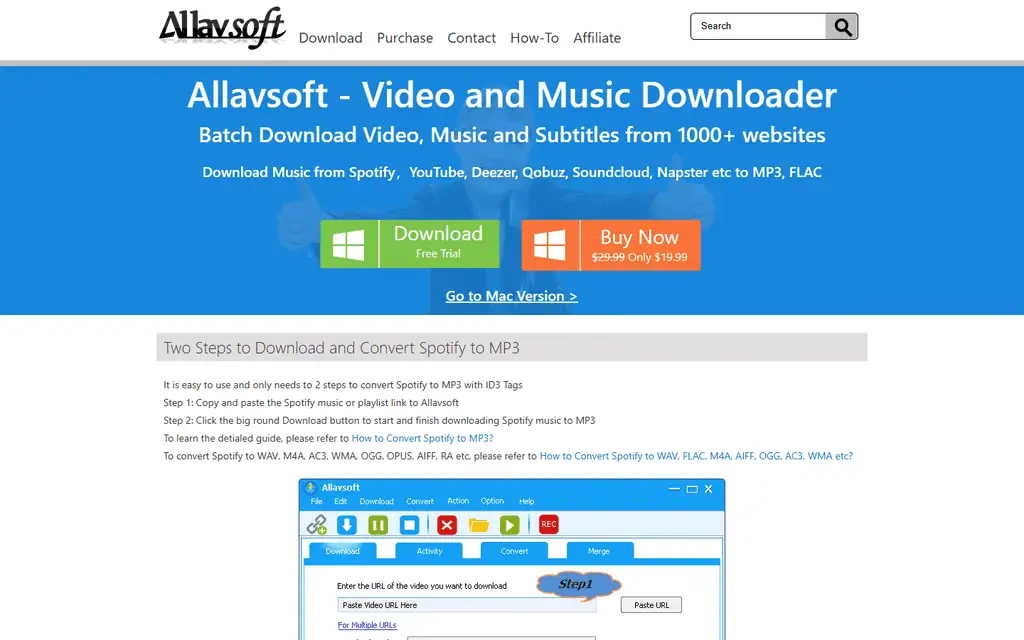
The homepage leads with two buttons, a Windows free trial and a Buy Now button, and a link across to the Mac version. The interface preview underneath shows the whole app: toolbar on top, a paste field, a quality menu, a save folder and the download button.
The interface: one window, four tabs
Allavsoft’s layout is plain on purpose. The toolbar carries the actions you use most: add links, download, pause, stop, open folder, play, and a REC button. Below it, the four tabs split the job cleanly.
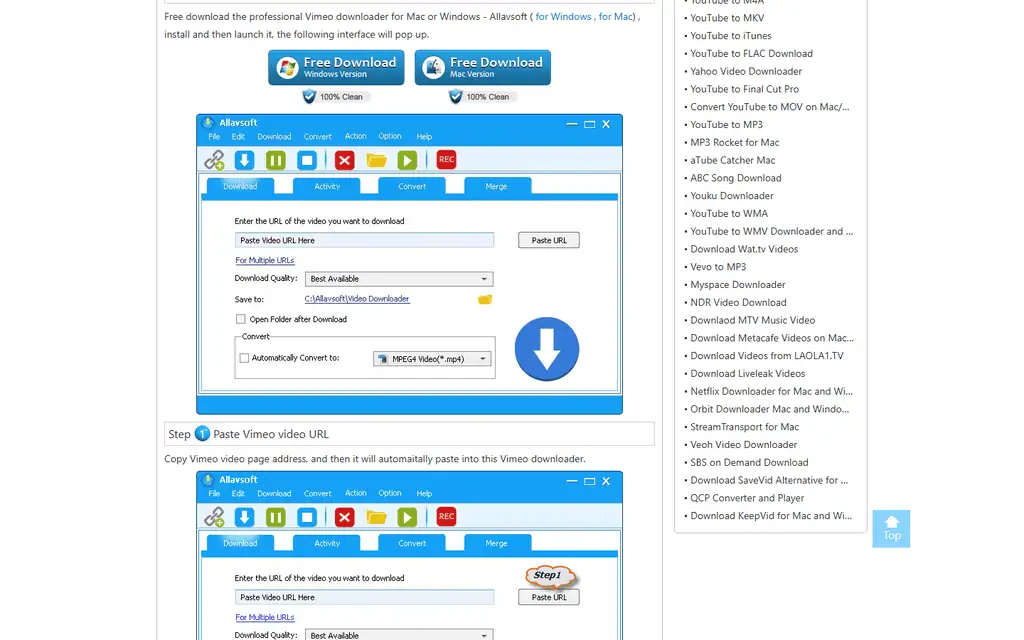
- Download. Paste a URL, choose the download quality (Best Available is the default), pick the save folder, and choose whether to convert on the fly.
- Activity. Watch the queue, pause or resume items, and see what finished.
- Convert. Add files you already have on disk and convert them without downloading anything. The vendor says this works for local video and audio, not only downloads.
- Merge. Join clips into one file.
One small touch: the vendor guides say that when you copy a link and hover over Allavsoft, it pastes the link in automatically, and there is a “For Multiple URLs” link beside the field for batches.
Batch downloading and one-step conversion
Batch work is where a desktop downloader earns its place. Allavsoft accepts several links at once and works through them as a queue, and the vendor says it detects advertisements in the stream and skips them rather than saving them.
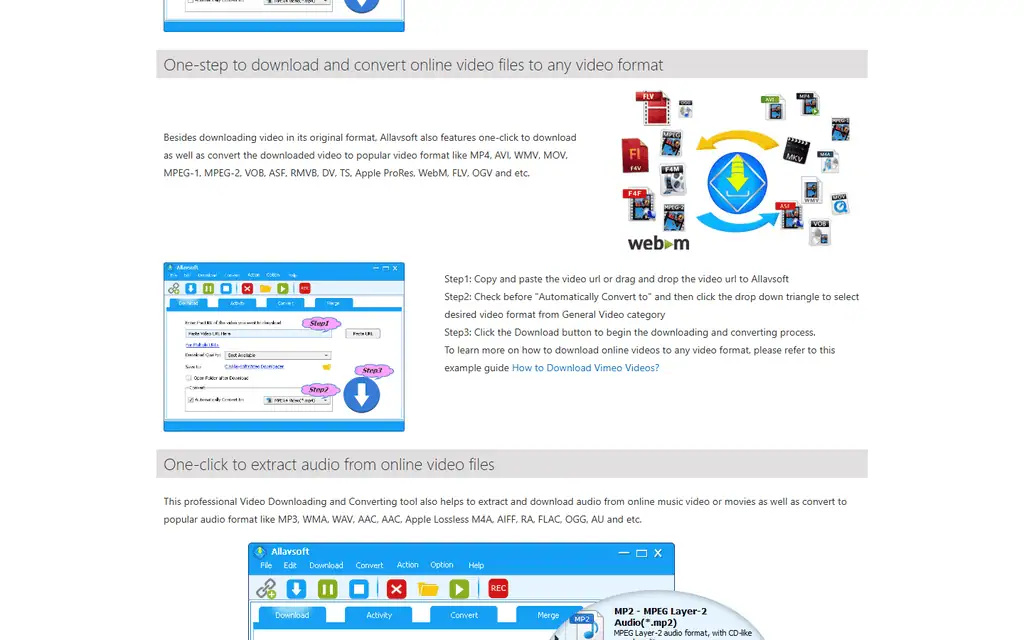
The conversion list is wide. The vendor names MP4, AVI, WMV, MOV, MPEG-1, MPEG-2, VOB, ASF, RMVB, DV, TS, Apple ProRes, WebM, FLV and OGV for video. Picking a format before you download means a clip arrives ready for your editor or player, with no second tool and no second pass.
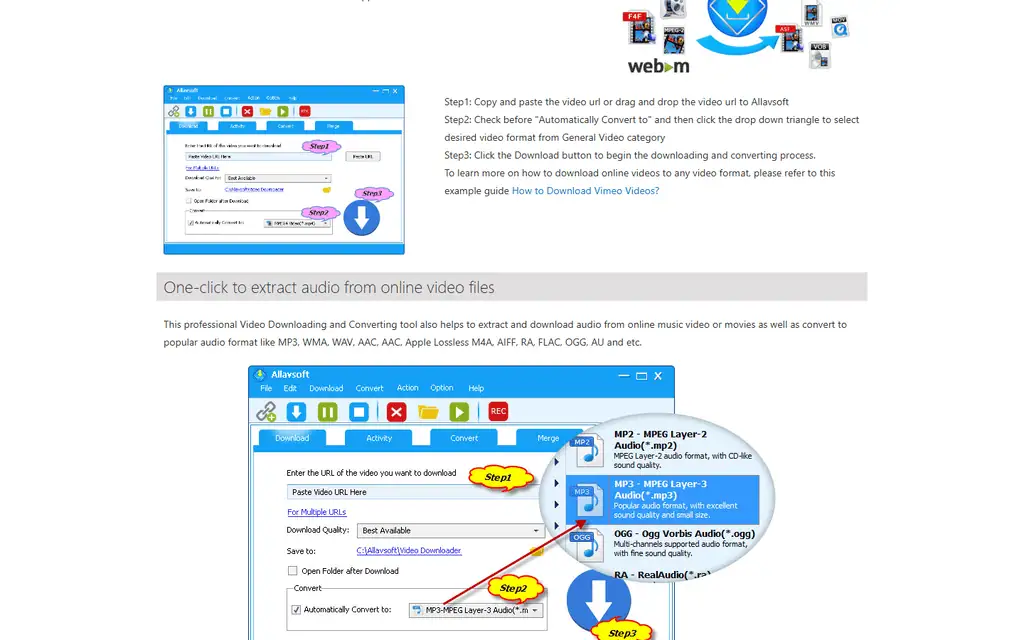
Audio works the same way. You can pull the audio track out of a video, or download audio-only sources, and save it as MP3, WMA, WAV, AAC, Apple Lossless M4A, AIFF, RA, FLAC, OGG or AU. The vendor also says downloaded music keeps its ID3 tags, thumbnail and cover art.
For video editors, the guides also cover importing downloaded footage into iMovie, Final Cut Pro and PowerPoint, which is a practical sign that the target user is someone who moves clips between apps.
Quality control: 1080p, 4K and 8K
You choose how much quality to take. The homepage says Allavsoft can download in 8K, 4K, 3D, 1080p, 720p, 480p, 360p and 240p, and it can download YouTube VR 360 video.
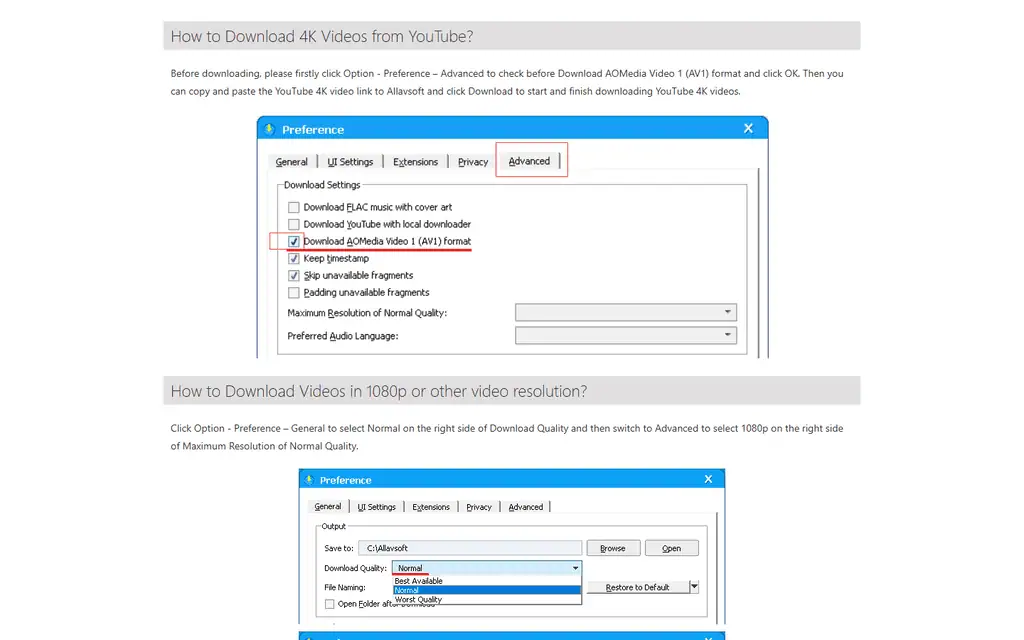
The settings are in Option, then Preference. Two details are worth knowing before you start:
- 4K from YouTube needs AV1 switched on. The vendor’s guide says to tick “Download AOMedia Video 1 (AV1) format” on the Advanced tab first.
- A resolution cap is a setting, not a surprise. Set Download Quality to Normal on the General tab, then choose Maximum Resolution of Normal Quality on the Advanced tab. This is useful if you want 1080p files and not 4K ones filling your disk.
The Advanced tab also has toggles for keeping timestamps, skipping unavailable fragments and downloading FLAC music with cover art. I count that as a good sign: the options exist, and they are documented with screenshots.
Features that save time on long queues
The feature list on the homepage reads as a set of small conveniences that add up when you run a large queue.
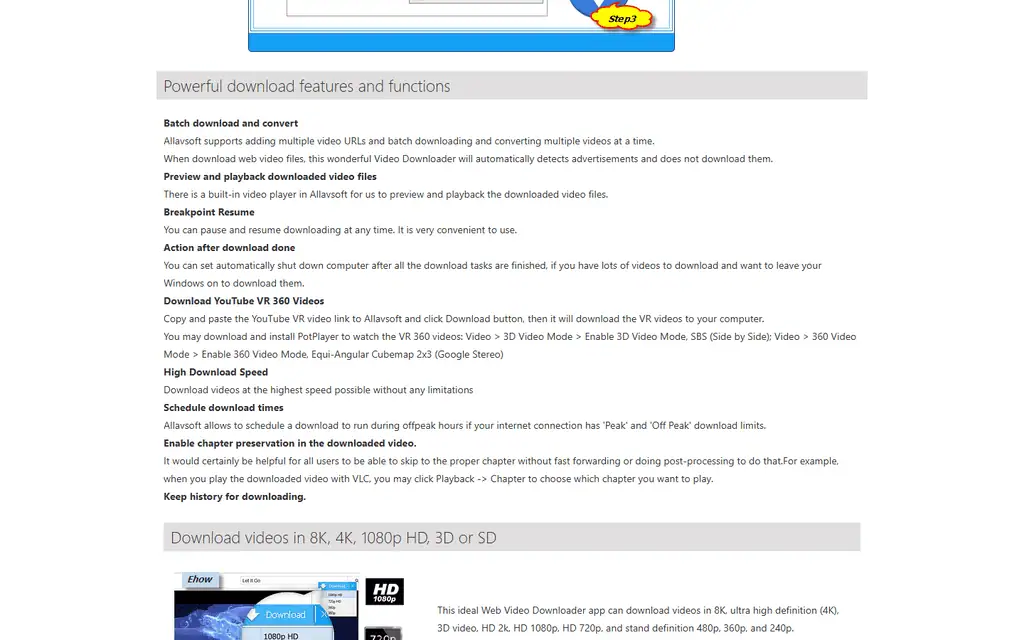
- Breakpoint resume. Pause a download and pick it up later.
- Scheduled downloads. Run the queue during off-peak hours if your connection has peak and off-peak limits.
- Shut down when finished. Leave a long queue running overnight and let the computer switch itself off.
- Chapter preservation. Keeps a video’s chapters, so a player such as VLC can jump between them.
- Built-in player. Preview downloaded files without leaving the app.
- Download history. A record of what you have already saved.
None of these is unusual on its own. Together, in a single app that also converts, they cover the whole loop of fetching, converting, checking and filing a batch of media.
Allavsoft pricing: three licences, one price list
Prices below are from the Allavsoft Windows purchase page, checked 2026-10-25. The Mac page shows the same figures.
| Licence | Price | Devices | List price shown |
|---|---|---|---|
| 1 month | $19.99 | 1 to 2 PCs | $29.99 |
| 1 year | $29.99 | 1 to 2 PCs | $49.99 |
| Lifetime | $59.99 | 1 to 3 PCs | $99.99 |
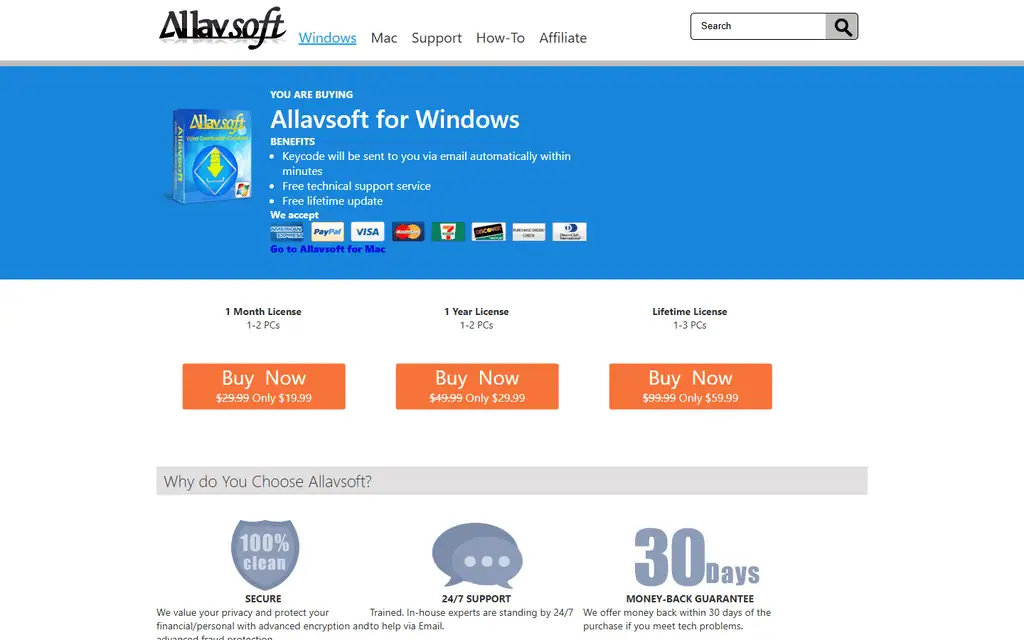
The lifetime licence is the one to buy if you keep it. A year costs half of lifetime and a month costs a third, so lifetime pays for itself against the yearly plan after two years and against monthly after three months. All three include the keycode by email within minutes, free technical support by email and free updates. Payment options on the page are card, PayPal and purchase order.
The crossed-out list prices are a sales device, and the discounted figure has been the displayed price on every page I read. Judge the product at $19.99, $29.99 and $59.99, and check the page again before you pay.
The vendor offers a 30-day money-back guarantee “if you meet tech problems”. That wording matters: it reads as a technical-fault guarantee, not a change-of-mind refund, so use the free trial first.
Who Allavsoft suits, and who should look elsewhere
Allavsoft is a good fit for:
- Video editors and creators who collect source clips. Download in the format your editor wants, or convert files you already have, in one app.
- People who want a one-time purchase. A $59.99 lifetime licence beats a subscription for a tool you open occasionally.
- Teachers and trainers saving material they have licensed. A queue with resume and scheduling suits long recordings and large files.
- Anyone archiving their own uploads or Creative Commons and public domain media. Batch queues and chapter preservation make this fast.
- Mac and Windows users who want the same tool on both. Both versions are sold at the same prices, and the three-PC lifetime licence covers a mixed household.
Look elsewhere if you:
- Want a free tool. The trial is free but the full version is paid. Free open-source options are covered below.
- Want a modern interface. The design is functional and dated, and the website reads the same way.
- Need a mobile app. I found no phone or tablet version.
- Want independent proof of safety and reliability. See the limitations below.
Using Allavsoft within the rules
A downloader is a neutral tool, and what matters is what you save with it. The vendor’s own materials advertise downloading from music streaming services and paid course platforms, and many of those services prohibit downloading in their terms of use. In many countries, bypassing copy protection on protected media can also be unlawful, whatever the tool’s marketing says.
Treat Allavsoft as a tool for content you are entitled to keep: your own uploads, Creative Commons and public domain material, content a rights holder has given you permission to save, and licensed material where the licence allows offline copies. Check a site’s terms and your local law before you save anything else. The vendor’s guides say Spotify downloads ask you to log in to a Spotify account, which is a reminder that the account’s terms still apply.
Where Allavsoft can let you down
- The free trial’s limits are not published. The trial button is prominent, but I found no page stating what the trial restricts, such as file length or number of downloads. Install it and test your own use before paying.
- Site support is a vendor count. The 1000+ websites figure is not independently verified, and sites change their players often. A downloader that works today can break after a site update, so keep the 30-day guarantee in mind.
- Safety claims are the vendor’s own. The site says the download is virus-free and shows security badges, but I did not scan an installer and I could not check third-party ratings: Trustpilot and Softpedia both showed a bot check when I tried to read them. Scan any installer yourself, as you would with any download.
- The system requirements look dated. Windows 2000 and XP are still listed on the requirements, and Mac OS X 10.4 is on the Mac list. That is a compatibility claim, not a sign the app is current, so check it runs on your version.
- Chapter and subtitle behaviour depends on the source. These features work when the source provides the data, so expect gaps on some sites.
- Refunds are for technical faults. See the pricing section.
- The interface and site are plain. Fine for a utility, but not for anyone who wants a polished app.
Allavsoft vs 4K Video Downloader Plus and yt-dlp
Prices are from each project’s own pages, checked 2026-10-25.
| Alternative | Price | Pick it instead when |
|---|---|---|
| 4K Video Downloader Plus | Free tier. Lite is €17.85 a year, Personal €29.75 lifetime for 3 devices and Pro about €47.60 lifetime on a 25% sale shown in euros for Germany. | You mostly download from YouTube and want playlists, channels, subscriptions, subtitles and AI audio tools in a more modern app |
| yt-dlp | Free and open source under the Unlicense. Latest release 2026.10.21. | You are comfortable with a command line and want the most frequently updated site support at no cost |
The trade is simple. yt-dlp costs nothing and updates often, but it has no window, no queue screen and no built-in converter. 4K Video Downloader Plus is more polished and strong on YouTube. Allavsoft’s case is breadth in one window: download, convert, merge and schedule, on Windows and Mac, for one payment. If you edit what you download, see our guide to the best video editors.
Frequently asked questions
Is Allavsoft free?
Allavsoft has a free trial for Windows and Mac, but the full version needs a licence. Licences start at $19.99 for one month, with $29.99 for a year and $59.99 for a lifetime licence.
Does Allavsoft work on Mac?
Yes. A Mac version is sold at the same prices, and the vendor lists macOS 14 Sonoma among the supported versions, going back to very old OS X releases.
Can Allavsoft convert videos I already have?
Yes. The Convert tab takes local files and converts them to other video or audio formats without downloading anything first.
What is Allavsoft’s refund policy?
The vendor offers money back within 30 days of purchase “if you meet tech problems”. Test the trial first, since the wording reads as a fault-based guarantee.
Transparency note: this review is based on Allavsoft’s public website, licence pages and how-to guides, plus the 4K Download pricing page and the yt-dlp repository, all read on 2026-10-25. I have not installed Allavsoft or downloaded anything with it, so I have not tested speed, site coverage or output quality, and vendor claims are labelled as such. The screenshots are captures of Allavsoft’s own web pages. None of the links here are affiliate links. If anything changes, tell me and I will update the review.
Related Posts

I tested AgainstData on 355 pages of Gmail data. Bulk unsubscribe, personal data deletion requests, pricing, and whether...

AI-Text-Humanizer.com took a 132-word ChatGPT paragraph from 100% AI to 0% on ZeroGPT but flattens your voice. Buy the $...
AIscan24 is a free, no-signup AI detector: it caught pure ChatGPT text at 100% but scored my handwritten paragraph 80%. ...
Honest Aithenticate review after hands-on testing. Does this AI disclosure badge tool meet EU AI Act requirements? Prici...

My hands-on Answer Socrates review covering all features, free plan limits, pricing, and how it compares to AlsoAsked. I...
I’ve spent $4,200 on 118 AppSumo lifetime deals over 5 years. Here’s my honest review: what works, what fails, and wheth...