


Verdict: Buy
What I Like
- Cloud-based, no proxy management, no IP rotation, no CAPTCHA solving
- Fast single-page interface with no buried settings
- Four-level location targeting (country to ZIP code)
- Exact Match filtering eliminates irrelevant category results
- Comprehensive enrichment: email, phone, WhatsApp, Trustpilot, company data
- Pre-confirmation modal prevents accidental credit burn
- Public download links for VA workflows
- Task scheduling for recurring scrapes
- Multiple export formats including Parquet and JSON
- Full API with Python and JavaScript SDKs
- Pay-as-you-go: no subscription lock-in
- Strong documentation and video tutorials
What Is Missing
- Credit-based pricing: no unlimited tier
- Speed depends on server load, not real-time
- Enrichment services add meaningful cost at scale
- Free tier is small (500 records for Maps, 25 for email verification)
- No native CRM integration (import/export workflow only)
- Email hit rate varies by industry and region (about 40% in test)
Outscraper Review Summary
| Field | Detail |
|---|---|
| Tool | Outscraper (Google Maps Scraper) |
| Category | Cloud-based Google Maps data extractor with contact enrichment |
| Best use case | Building validated, hyper-local B2B prospecting lists without running your own proxy infrastructure |
| Price | Free tier: yes. 500 Maps records, 500 email domain lookups, 25 email verifications. Then pay-as-you-go with no subscription: $3 per 1,000 records up to 100,000, $1 per 1,000 above that. Email scraper $3 per 1,000 domains, verifier $3 per 1,000 emails, phone lookup $5 per 1,000. |
| Verdict | Test it on the free 500 records for your industry, then scale, unless you are pulling millions of records per month |
Quick Answer: What Is Outscraper?
Outscraper is a cloud-based Google Maps scraper that extracts structured business data, names, addresses, phones, ratings, hours and coordinates, and optionally enriches it with discovered emails, email verification, phone lookup and WhatsApp checks. It runs on Outscraper’s servers, so proxy rotation, CAPTCHA solving and IP blocking are their problem rather than yours. Pricing is pay-as-you-go from $3 per 1,000 records with a free tier of 500. Verdict: the cleanest dedicated Google Maps scraper for agencies and sales teams, with an email hit rate near 40% that you should test before scaling.
How Does Outscraper Work for Google Maps Lead Generation?
Outscraper works by running the scrape on its own cloud infrastructure, which is the entire reason it exists: Google throttles automated Maps requests with CAPTCHAs and IP bans, and residential proxies that survive that cost real money and constant maintenance.
- Category selection. Pick from Outscraper’s database of Google Business categories, or type a custom query. Multiple categories can run in one job.
- Exact Match. Enable it. Without it Google serves adjacent categories, so a search for accountants returns tax consultants, bookkeepers and financial planners. Exact Match adds a subtype filter requiring the category to contain your term.
- Location targeting. Four levels deep: country, state or region, city, then ZIP or postal code. You can also upload a custom location list for multi-city campaigns.
- Enrichment stacking. Google Maps profiles contain no email addresses, so email data comes from the Email and Contact Scraper crawling each business’s website. Stack the Email Verifier on top and each address returns a valid, invalid or risky label with format, DNS, SMTP and blacklist results. Phone Lookup, WhatsApp Checker, Company Insights, Trustpilot and Yellow Pages enrichers work the same way.
- Advanced filters. Subtype include and exclude, postal code include and exclude, business status (operational, temporarily closed, permanently closed), verified status, rating thresholds, places per query, and drop duplicates.
- Confirmation step. Before spending credits, a modal shows the exact query with a live Google Maps link, the estimated result count, estimated credit usage and rough completion time. Clicking that link is the cheapest way to catch a misconfigured job.
- Delivery. Jobs run asynchronously and export as CSV, XLSX, Parquet or JSON. Templates rerun a saved configuration, schedules run weekly or monthly, and public download links share results without account access.
There is also a full REST API with official Python and JavaScript SDKs, using the same credit pool, so scrapes can be triggered from n8n, Make, Zapier or your own scripts.
Who Is Outscraper Best For (and Not For)?
Outscraper is best for:
- Local agencies building city-level prospect lists. ZIP-code targeting plus Exact Match is what makes hyper-local lists actually usable.
- B2B sales teams running cold outreach. Scrape a category, add email discovery and verification, export straight into your outreach platform.
- Reputation management agencies. The unverified-listing filter and rating data are ready-made prospecting signals.
- Competitive researchers. Ratings, review counts, photo counts and hours across an entire local market in one export.
- Local SEO consultants. Citation gaps, missing contact data and unverified listings all surface in the output.
- VA-assisted teams. Public download links hand over data without handing over account credentials.
Outscraper is not for:
- Anything needing real-time data. Jobs are queued and asynchronous, full stop.
- Million-record-per-month scraping. At that volume self-hosted infrastructure is cheaper, even counting maintenance.
- Teams wanting native CRM sync. The workflow is export and import, with no built-in CRM integration.
- Consumer-facing email campaigns. The compliance exposure under GDPR, CAN-SPAM, CASL and India’s DPDP Act is yours, not the vendor’s.
- Buyers who need a guaranteed email hit rate. Coverage varies by industry and region and has to be tested per niche.
What Are the Limitations of Outscraper?
- Email discovery found addresses for only 8 of 20 businesses in testing, and some of those came back invalid. A 40% hit rate is normal for this category, but it means the cost per usable contact is roughly 2.5 times the headline price.
- Speed depends on shared server load. A 20-record demo finished in 2 to 3 minutes, larger jobs take longer, and queue times rise when many users run jobs at once. The completion estimate is a rough guide.
- Enrichment costs compound. A validated 1,000-lead list is $9, not $3, because Maps data, email discovery and verification each bill separately.
- The free tier is small where it matters most. 500 Maps records is a real test, 25 email verifications is not.
- Exact Match is off by default. Leave it off and the export is padded with adjacent categories you will pay to clean up.
- Duplicates appear unless you enable Drop duplicates. A business listed under two categories exports twice and burns credits twice.
- No unlimited tier exists. Every record is billed, so broad exploratory queries have a direct cost, which is what the confirmation modal is protecting you from.
- Scraping Google Maps violates Google’s Terms of Service. That is a contractual matter rather than a criminal one, and using a cloud tool shifts the blocking risk to the vendor, but it does not make the ToS issue disappear.
- Personal email addresses raise the legal stakes. Generic info@ addresses are straightforward B2B territory, owner-name addresses are not, particularly under GDPR.
What Are Outscraper’s Alternatives?
| Alternative | Price | Pick it instead when |
|---|---|---|
| Apify | Free plan with $5 monthly credits; Starter $29 per month, Scale $199, Business $999 | You need a general-purpose scraping platform with workflow integration, and can accept a third-party-maintained Maps actor plus a steeper learning curve |
| Leads Sniper | One-time $149, $267 or $389 depending on installation count | You want unlimited raw Google Maps lists with no per-record billing and do not need enrichment depth |
| Lobstr.io | Free plan capped at 30 rows per export with 7-day retention and no scheduling; paid pricing quoted through their usage simulator | You need LinkedIn and Instagram scraping alongside Maps and can accept a less mature Maps module |
| DIY Python plus residential proxies | Roughly $200 per month for proxy infrastructure at 5,000 leads per week, plus engineering time | You are scraping at millions of records per month and have someone to maintain the stack as Google’s bot detection changes |
For the proxy layer a DIY build would need, see the Infatica proxy review. For cheaper bulk email validation than the built-in enricher, see the Reoon Email Verifier review.
My Outscraper Review Conclusion
I picked Outscraper up on AppSumo after losing real money on DIY scraping setups that Google shut down within hours, and I ran it against a market I actually know: accountants in Coimbatore, Tamil Nadu, drilled down through the country, state and city filters.
The concrete numbers from that testing. A 20-result job finished in 2 to 3 minutes. Email discovery returned addresses for 8 of the 20 businesses, a 40% hit rate, and the validation columns told me which of those were safe to contact rather than leaving me to find out by bouncing. Turning on Exact Match was the difference between a clean accountant list and one padded with tax consultants and financial planners. The confirmation modal caught a misconfigured query where I was about to pull 5,000-plus records for a job I wanted capped at 200, which on its own paid for the time I spent reading the docs. Full validated cost for a 1,000-business list works out to $9.
What I would tell anyone considering it: spend $20 to $30 on one city and one category you are genuinely prospecting, then check the email hit rate for that specific industry before you scale. The proxy problem is solved here. The contact coverage is the variable, and only your own niche can tell you what it is.
Most Google Maps scrapers promise clean, accurate data. What they deliver is blocked IPs, broken proxies, and half-empty spreadsheets.
I’ve been testing lead generation tools for years for our AI tool reviews, and I’ve lost real money on DIY scraping setups that Google shut down within hours. When Outscraper showed up as a cloud-based Google Maps data extractor that handles the proxy problem entirely, I picked it up on AppSumo and put it through real tests. Here’s what I actually found.
What Is Outscraper and How Does It Work?
Outscraper is a cloud-based Google Maps data extractor. You define what you want, a business category, a location, a results limit, and Outscraper scrapes Google Maps on their servers and returns a structured file.
The outputs: CSV, XLSX, Parquet, or JSON, containing business names, addresses, phones, ratings, working hours, coordinates, and more.
On top of the core Maps scrape, Outscraper offers optional enrichment services: email discovery, email verification, phone lookup, WhatsApp validation, company insights, and Trustpilot data. These cost extra and run as add-ons to any scraping job.
The platform is used primarily for lead generation, local SEO research, competitive intelligence, and agency prospecting. Anyone who needs structured data from Google Maps at scale is the target user.
The Problem With Scraping Google Maps (Why DIY Fails)
Before diving into features, it’s worth understanding why a cloud-based tool like this exists.
Google is aggressively anti-scraping. The moment your automated requests start hitting Maps too fast, you hit CAPTCHAs. Push through those and you get IP bans. To rotate past IP bans, you need residential proxies, data-center proxies get flagged immediately. Residential proxies are expensive, fragile, and require constant babysitting as Google updates its bot detection, as I found testing the residential IPs in my Infatica proxy review.
I’ve seen people spend $200/month on proxy infrastructure just to reliably scrape 5,000 leads a week. The ROI rarely makes sense for small to mid-size teams.
Outscraper takes a different approach: their cloud servers handle all the proxy rotation, CAPTCHA solving, and rate limiting. You get the results; they absorb the infrastructure complexity. That’s the core value proposition of using Outscraper, and for most lead generation use cases it works.
Outscraper Interface: What You’re Working With
The app lives at outscraper.com. The core scraper is a single page; everything you configure is visible without navigating away or opening sub-menus. That simplicity is a genuine strength. I’ve used scraping tools where just finding the right settings takes ten minutes. Outscraper’s interface is fast and self-explanatory.
There are also links to the pricing page, API docs, and tutorial documentation right at the top. The tutorial documentation is actually good, a long-form guide covering every parameter with examples. I read it before my first test and it answered most questions upfront.
Category Selection and Exact Match Filtering
The category field is the first thing you configure. Two options:
Predefined categories, Outscraper maintains a large database of Google Business categories. You start typing (“food,” “legal,” “accountant”) and get instant dropdown suggestions with category descriptions. You can select multiple categories at once.
Custom query, Type your own keyword as you’d type it into Google Maps. Useful for niche searches not in the predefined list.
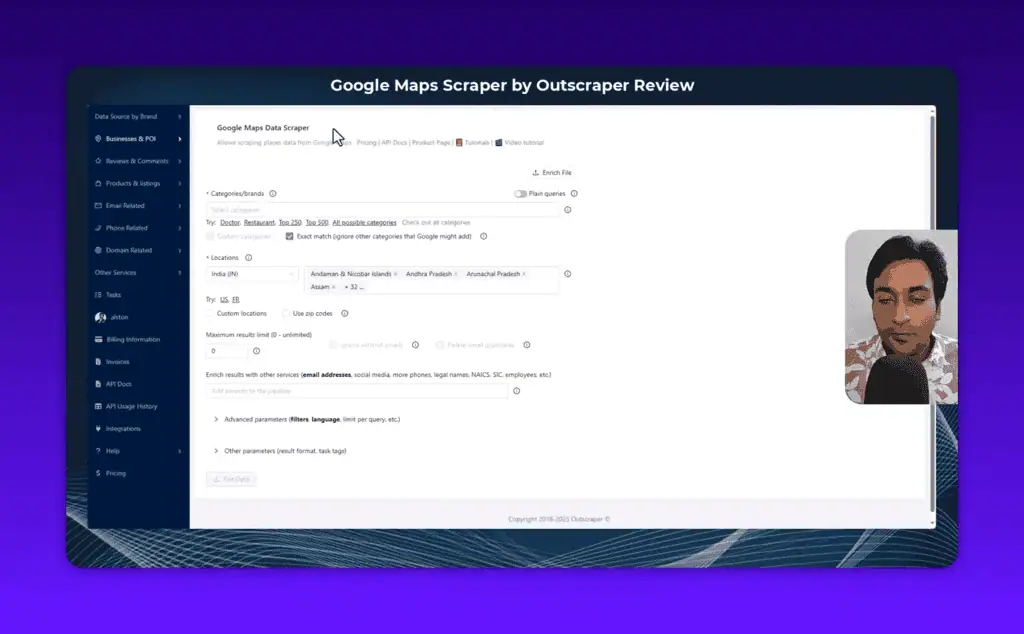
Always enable Exact Match. Without it, Google Maps includes loosely related businesses alongside your target category, I searched for accountants and got tax consulting firms, bookkeeping services, and a few financial planners I didn’t want. Outscraper explains this well: Google sometimes serves related results that it thinks are “useful” even when they don’t match your query exactly.
Enabling Exact Match adds a subtype filter that requires the business category to contain your search term. The results are tighter and the data quality is better.
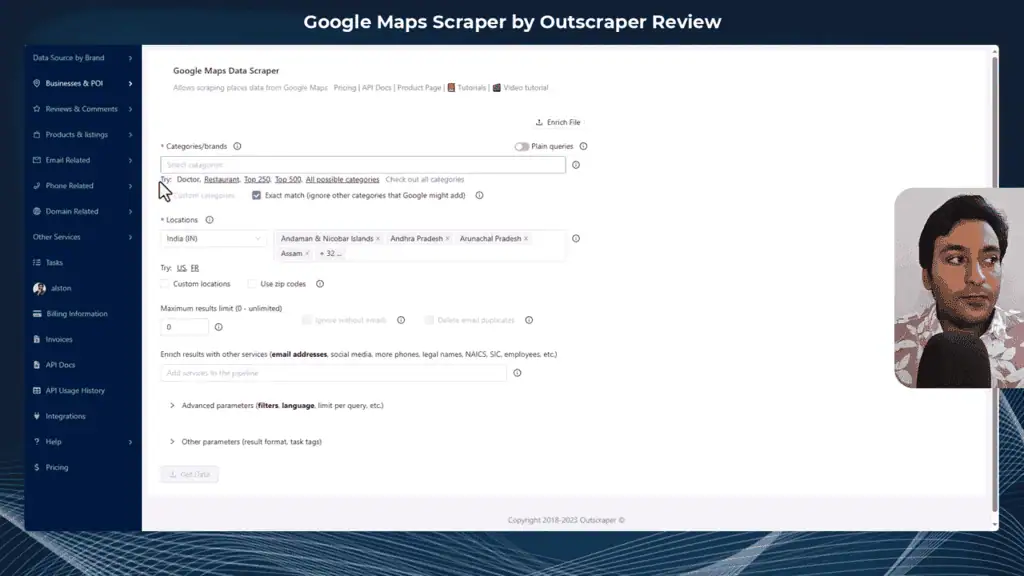
One extra resource worth knowing: Outscraper maintains a public page listing all Google Business categories with counts and an Excel download. Useful when you’re trying to figure out what category term to search, since the predefined list alone doesn’t show you everything.
Location Targeting: Country Down to ZIP Code
This is where Outscraper stands apart from most Google Maps scraping tools.
Most scrapers offer country or city targeting. Outscraper goes four levels deep:
- Country
- State / Region
- City
- ZIP / Postal code
For my India test, I selected India, drilled down to Tamil Nadu state, then selected Coimbatore as the city. The dropdowns update dynamically as you select each level. You can also upload a custom location list (city, ZIP, or “city + country” format) for bulk multi-location campaigns.
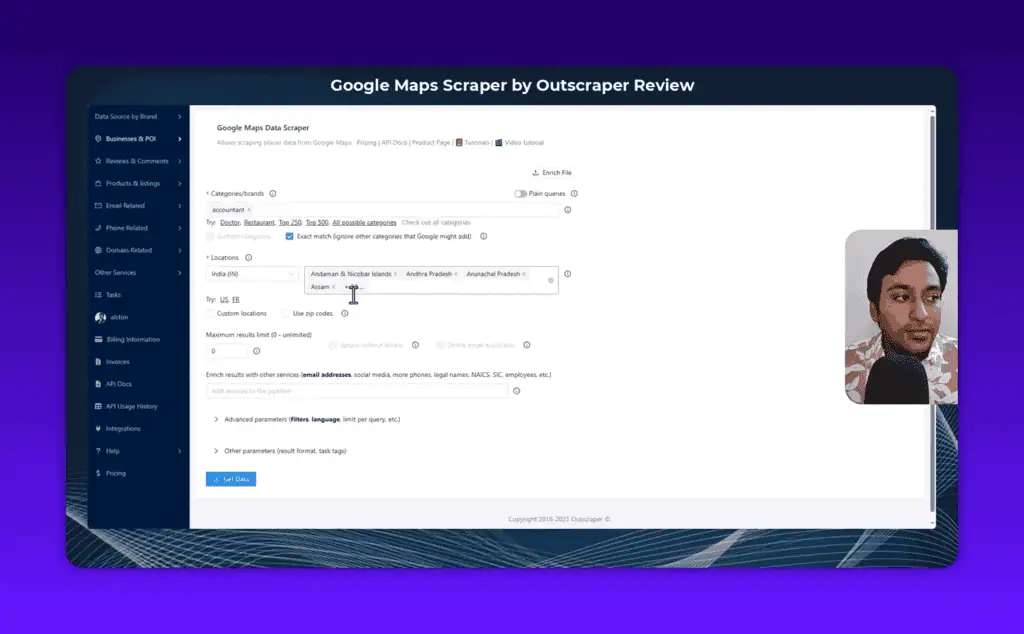
For lead generation, this granularity is actually important. Country-level targeting returns too many records to be actionable for outreach. ZIP-code targeting lets you build neighbourhood-specific lists, which is exactly what local agencies and city-focused outreach campaigns need.
Data Enrichment Services
The enrichment layer is what separates Outscraper from a basic google map extractor.
Core Google Maps data doesn’t include email addresses, businesses list phones, websites, and addresses, but emails aren’t in the standard GMB profile. If you want email contact data, you need enrichment.
The enrichment panel appears once you’ve configured your category and location. Options:
Email and Contact Scraper, scans each business’s website to discover email addresses. The first 500 domains are free; after that, $3 per 1,000 at medium scale. In my test of 20 accountants, it found emails for 8 of them (40% hit rate).
Email Verifier, validates discovered emails. Runs format checks, DNS verification, SMTP checks, and blacklist lookups. Returns a valid/invalid/risky classification per email.
Phone Number Lookup, returns carrier data and validates phone numbers for deliverability.
WhatsApp Checker, confirms whether a phone number is connected to WhatsApp. Useful for markets where WhatsApp outreach is the primary channel (most of Southeast Asia, Latin America, India).
Company Insights, revenue range, headcount, founding year, public/private status.
Trustpilot Scraper, pulls Trustpilot review data for any business that has a profile.
Yellow Pages Search, additional enrichment from Yellow Pages data.
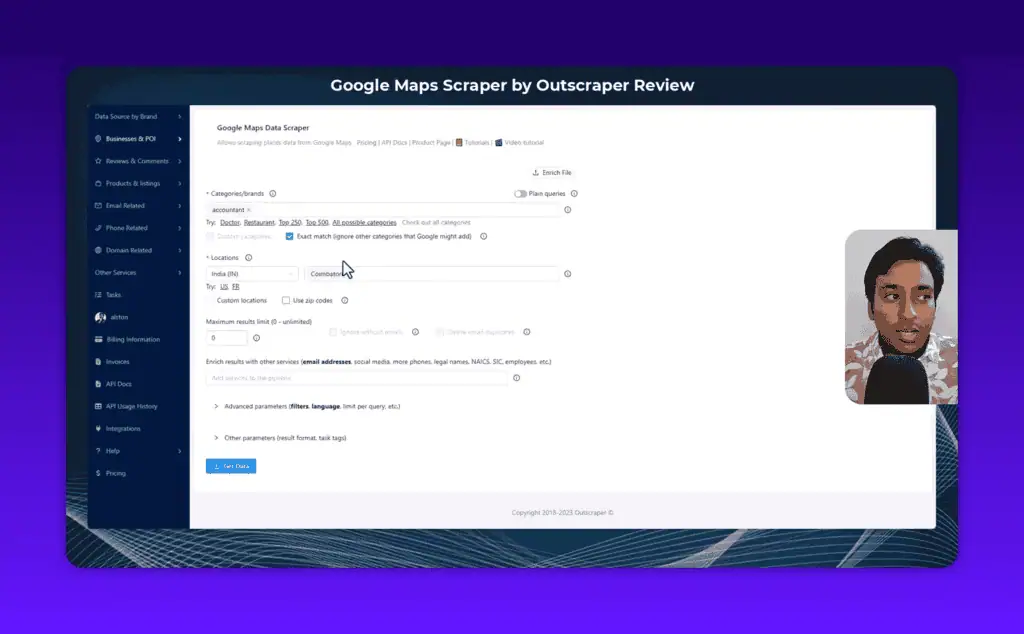
You can stack multiple enrichers on a single job and configure them independently. I typically stack Email Scraper + Email Verifier: it costs more, but the validated output goes directly into outreach without a separate cleaning step, though a dedicated tool like the one in my Reoon Email Verifier review validates lists more cheaply at scale.
A useful option inside the email enricher: “Delete entries without emails.” This removes rows where no email was found, so your export only contains records with actionable contact data. Much cleaner than filtering the spreadsheet yourself.
Advanced Parameters
Clicking “Advanced Parameters” opens a set of additional filters most users won’t need daily but that are genuinely valuable for targeted workflows:
Subtype filter, requires the business subtype to contain or not contain specific terms. Gives you control beyond what Exact Match provides.
Postal code filter, include or exclude specific postal codes.
Business status, filter by operational, temporarily closed, or permanently closed. If you’re prospecting unverified GMB listings for a GMB management service, the “verified: false” filter alone is a complete prospecting system.
Rating filter, target businesses above or below a rating threshold.
Places per query, limits how many results are pulled per individual search. Useful for managing credit consumption on broad queries.
Drop duplicates, removes businesses that appear under multiple category listings. Without this, a business listed under both “Accountant” and “Tax Advisor” appears twice in your output.
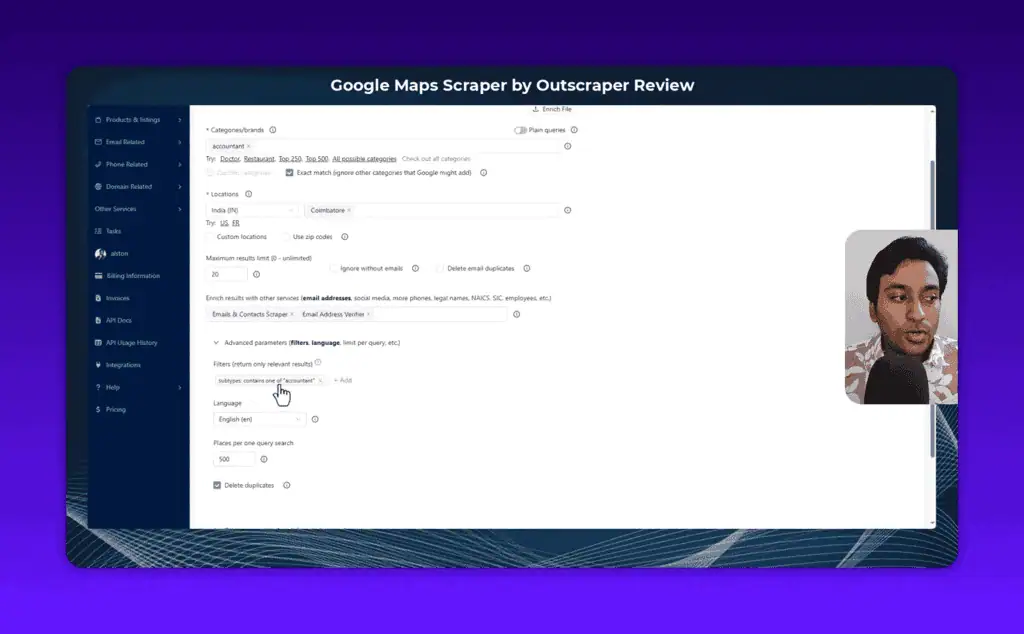
The combination of location targeting + exact match + subtype filters + status filters gives you a level of control over scraping Google Maps that I haven’t seen matched in competing tools.
Running a Task: The Confirmation Step
After hitting “Get Data,” Outscraper doesn’t execute immediately. It generates a confirmation modal, and this is one of the best design decisions in the tool.
The modal shows:
- The exact query it will run (with a live Google Maps hyperlink you can click to verify the results before spending credits)
- Estimated number of results
- Estimated credit usage
- Rough time to completion
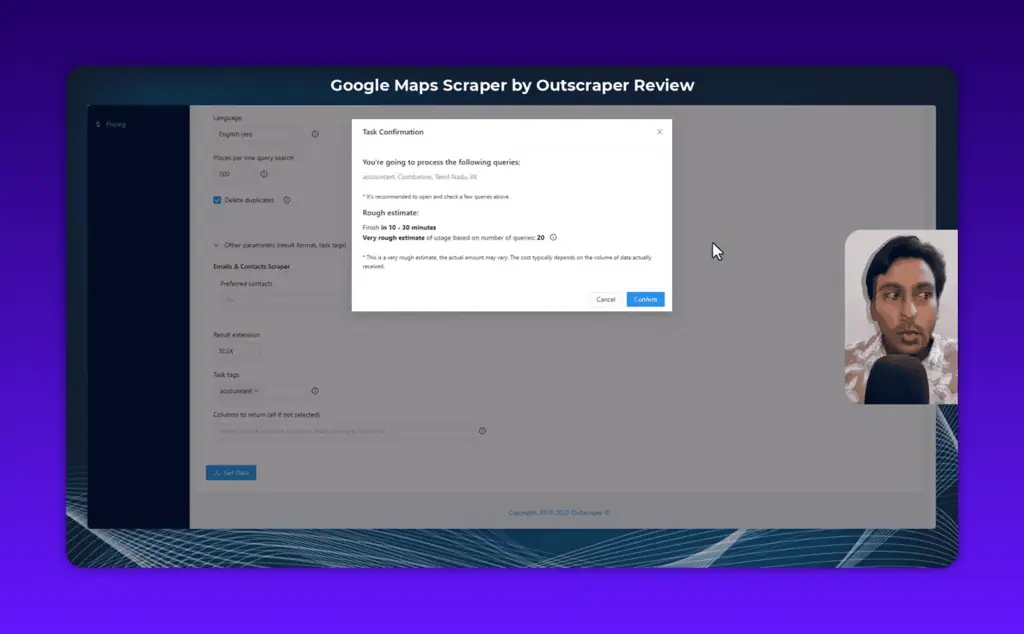
I’ve used this link check multiple times to catch configuration mistakes, I set up a broad query, saw the estimated result count was 5,000+ when I wanted 200, and went back to narrow the location before confirming.
On timing: the completion estimate is rough. My 20-result demo ran in about 2-3 minutes. Larger jobs take longer, and server load affects speed. This is the downside of a shared cloud scraper, when many users are running jobs simultaneously, queue times increase. It’s not a dealbreaker for async workflows, but it rules out Outscraper for any use case needing real-time data.
What Data Does Outscraper Actually Export?
This section is worth reading carefully because the data volume per record is substantial, and our AI guides explain how to put that data to work.
Standard scrape output (per business):
Name, website URL, category, subcategory, phone, full address, borough, street, city, postal code, state, country, country code, latitude, longitude, timezone, plus code, rating, review count, review link, photos count, photo link, street view link, working hours (JSON format), working hours (legacy format), popular times, business status, verified status.
Plus identifiers: about section, price range, logo link, description, owner ID, owner title, reservation link, appointment link, menu link, order link, Place ID, Google ID, CID.
That’s comprehensive public data for each google map entry, far more than you’d get from a simple CSV export.
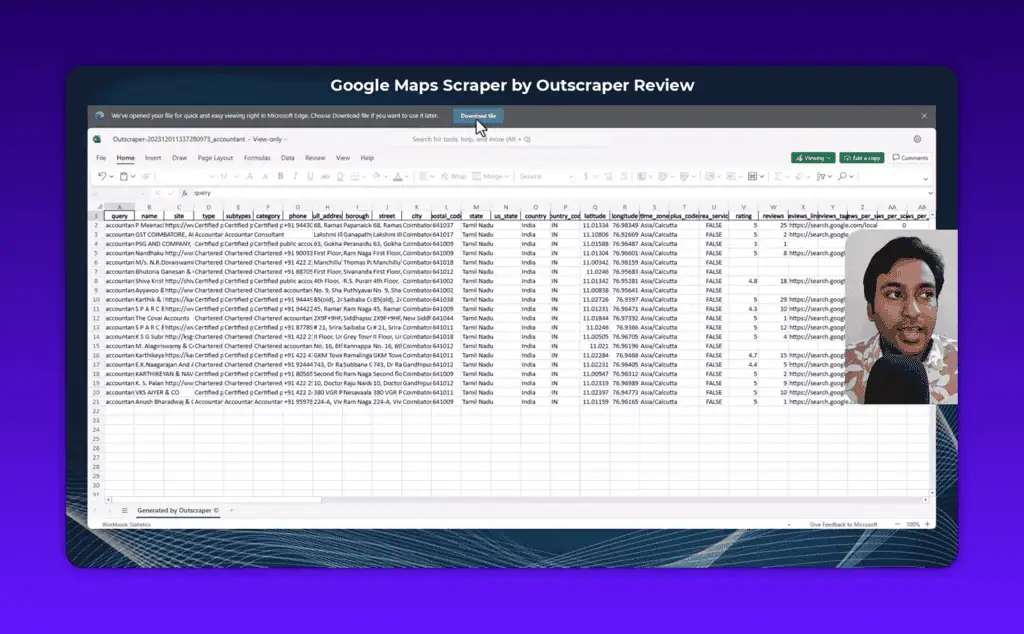
With email enrichment added:
Up to 3 discovered email addresses per business, each with validation status (valid/invalid/risky), format check flag, blacklist flag, DNS check result, SMTP check result. Plus social media profile links where discoverable.
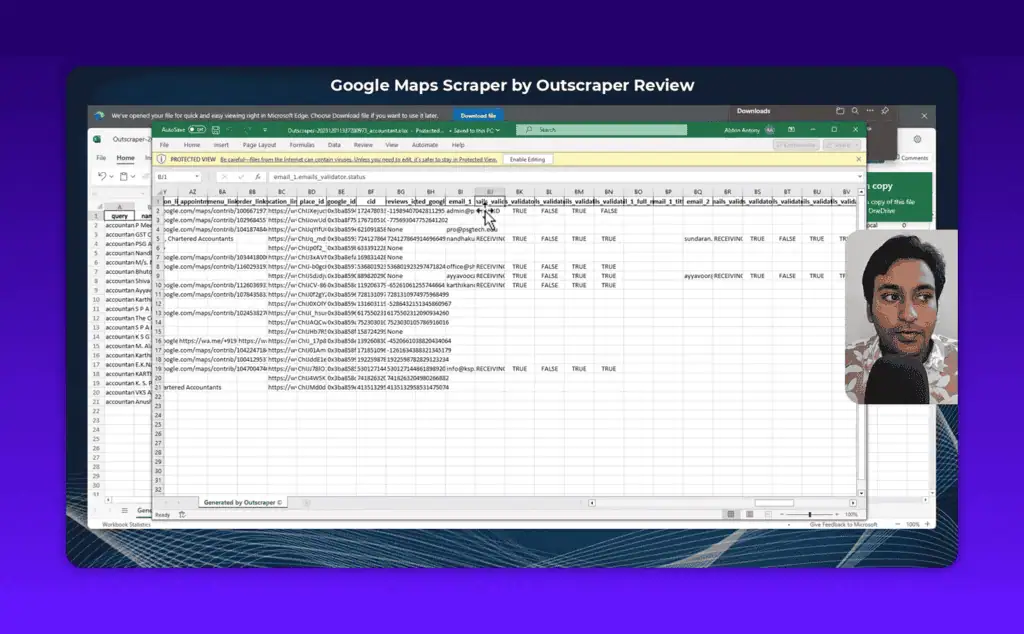
In my test, Outscraper found 8 emails from 20 businesses. Some came back invalid. The validation columns told me exactly which to use and which to skip, that’s the value of running email scraping and verification together rather than separately.
Task management features worth knowing:
- Save as template, rerun the same query configuration with one click
- Schedule recurring runs, set a task to run weekly or monthly automatically
- Public download link, share a link to download results without giving access to your account. Useful for VAs or clients who need the data but shouldn’t have your login credentials.
Outscraper Pricing 2026
Outscraper uses a pay-as-you-go model: no monthly subscription, no recurring billing. You pay for the records you process.
Google Maps Scraper
| Volume | Price per 1,000 records |
|---|---|
| First 500 (free tier) | $0 |
| 501 to 100,000 | $3 |
| 100,000+ | $1 |
Email and Contact Scraper
| Volume | Price per 1,000 domains |
|---|---|
| First 500 (free tier) | $0 |
| 501 to 100,000 | $3 |
| 100,000+ | $1 |
Email Verifier
| Volume | Price per 1,000 emails |
|---|---|
| First 25 (free tier) | $0 |
| 26 to 100,000 | $3 |
| 100,000+ | $1 |
Phone Number Lookup
| Volume | Price per 1,000 phones |
|---|---|
| First 25 (free tier) | $0 |
| 26 to 50,000 | $5 |
| 50,000+ | $3 |
Real cost example: Scrape 1,000 businesses with email discovery and verification = $3 (Maps) + $3 (Email Scraper) + $3 (Verifier) = $9 total for a validated, outreach-ready lead list. For targeted campaigns, that math works.
At high volume (100,000+ records/month), the Business tier brings the per-record cost down to $1/1,000 for Maps data, competitive with most alternatives.
The AppSumo lifetime deal for Outscraper offered a substantial credit allocation at a one-time price. If you’re looking for AI lifetime deals on data tools, check whether the Outscraper LTD is still available, it changes the economics significantly for smaller teams.
Outscraper vs Alternatives
Outscraper vs Apify
Apify is a general-purpose web scraping platform with a Google Maps actor. More flexible than Outscraper, you can build workflows, integrate with n8n or Make, and customise the scraper. But Apify has a steeper learning curve, the Google Maps actor is third-party maintained (quality varies), and costs on Apify Proxy escalate quickly. For users who only need Google Maps data, Outscraper is the more focused and reliable choice.
Outscraper vs Leads Sniper
Leads Sniper is purpose-built for Google Maps lead generation with a simpler interface aimed at non-technical users. Basic filtering works well. But it lacks Outscraper’s enrichment depth: no WhatsApp checker, limited email validation, no Trustpilot scraper. If you just need raw business lists, Leads Sniper competes. For enriched, validated outreach data, Outscraper wins.
Outscraper vs Lobstr.io
Lobstr.io is a cloud scraping suite covering LinkedIn, Instagram, and Google Maps. The Google Maps module is capable, but the platform’s primary focus is social media data. Outscraper’s google map features are more mature, more filter options, better enrichment coverage, a deeper output schema. For Google Maps-specific work, Outscraper is the stronger tool.
Outscraper API vs DIY Python Scraping
Outscraper has a full REST API with Python and JavaScript SDKs available on GitHub. The API uses the same credit system as the web interface, which means you can trigger scrapes programmatically from n8n, Zapier, Make, or your own Python scripts.
If you have strong Python skills and need unlimited scale, building your own scraper with rotating residential proxies gives you more control. But the setup time, proxy management, CAPTCHA handling, rate-limiting logic, maintenance as Google updates its bot detection, is substantial. The Outscraper API makes sense for teams that need reliable, repeatable results without a dedicated engineer maintaining infrastructure.
Is Scraping Google Maps Legal?
Worth addressing directly since this comes up constantly.
Scraping publicly available data is generally permitted under current US law. The 2022 US Court of Appeals ruling in hiQ Labs v. LinkedIn confirmed that automated access to publicly accessible web data does not violate the Computer Fraud and Abuse Act. Google Maps business data, names, addresses, phones, hours, is public information viewable by any user without authentication.
Three caveats:
Google’s Terms of Service prohibit automated scraping. Violating ToS is a contractual issue, not a criminal one, but Google can and does block accounts and IPs that violate it. This is why using a cloud-based tool like Outscraper (where their servers take the blocking risk) makes practical sense.
How you use the data matters. Bulk unsolicited email outreach may violate CAN-SPAM (US), GDPR (EU), Canada’s CASL, or India’s DPDP Act depending on your jurisdiction and targeting. B2B outreach to business email addresses with proper opt-out mechanisms is generally within legal territory. Consumer email is more regulated.
Personal data considerations. If scraped data includes personal email addresses, GDPR and similar regulations apply in relevant jurisdictions. Business contact pages that list personal emails (owner@) rather than generic info@ addresses are more complex territory.
For standard B2B prospecting, scraping Google Maps data with Outscraper sits within the mainstream of what lead generation teams do legally. As always, consult a lawyer for your specific situation.
Pros and Cons
Pros
- Cloud-based, no proxy management, no IP rotation, no CAPTCHA solving
- Fast single-page interface with no buried settings
- Four-level location targeting (country to ZIP code)
- Exact Match filtering eliminates irrelevant category results
- Comprehensive enrichment: email, phone, WhatsApp, Trustpilot, company data
- Pre-confirmation modal prevents accidental credit burn
- Public download links for VA workflows
- Task scheduling for recurring scrapes
- Multiple export formats including Parquet and JSON
- Full API with Python and JavaScript SDKs
- Pay-as-you-go: no subscription lock-in
- Strong documentation and video tutorials
Cons
- Credit-based pricing: no unlimited tier
- Speed depends on server load, not real-time
- Enrichment services add meaningful cost at scale
- Free tier is small (500 records for Maps, 25 for email verification)
- No native CRM integration (import/export workflow only)
- Email hit rate varies by industry and region (~40% in my test)
Frequently Asked Questions
Can I scrape Google Maps for free? Yes. Outscraper’s free tier includes 500 Google Maps business records, 500 email domain lookups, and 25 email verifications. After those limits, pay-as-you-go pricing applies.
How much does Outscraper cost per 1,000 leads? Google Maps data alone: $3 per 1,000 at medium scale (under 100,000 records), or $1 per 1,000 at Business scale. Add enrichment: Email Scraper is $3/1,000 and Email Verifier is $3/1,000 for a fully enriched, validated list.
Can I extract emails from Google Maps? Not directly, Google Maps profiles don’t include email addresses. Outscraper’s Email and Contact Scraper enrichment discovers emails by scanning each business’s linked website. In my test, it found emails for roughly 40% of businesses. Results vary by industry and region.
Does Outscraper validate emails? Yes. The Email Verifier enrichment checks format, DNS records, SMTP validity, and blacklist status. Each email gets a valid/invalid/risky label so you know what’s safe to contact.
Can I scrape Google reviews with Outscraper? Yes, separately. Outscraper has a Google Maps Reviews Scraper tool that pulls individual reviews for specific businesses. Pricing follows the same structure: $3 per 1,000 reviews at medium scale.
How does the Outscraper API work? Outscraper offers a full REST API with official Python and JavaScript SDKs on GitHub. The API uses the same credit system as the web interface, letting you trigger scrapes programmatically from automation tools or custom scripts. API documentation is thorough.
Is there an Outscraper alternative for specific use cases? For programmatic workflow integration: Apify. For simpler, no-code prospecting: Leads Sniper. For multi-platform scraping (LinkedIn + Maps): Lobstr.io. For pure Google Maps data with enrichment, Outscraper is the most capable dedicated option currently available.
Is scraping Google Maps legal? Scraping publicly available business data is generally permitted under current US case law. Outscraper violates Google’s Terms of Service (as all scrapers do), but ToS violation is a contractual issue, not a criminal one. The legality of how you use the data depends on your jurisdiction, outreach method, and whether you’re contacting businesses or individuals.
Final Verdict
Outscraper solves a real problem that anyone who’s tried DIY Google Maps scraping knows well. The proxy headache, the CAPTCHA grind, the constant maintenance, Outscraper removes all of that with a cloud-based workflow that just works.
The pay-as-you-go pricing is fair at low to medium volumes. The 500 free records are genuinely enough to test output quality on your specific industry and geography before committing money. The enrichment suite, especially Email Scraper plus Verifier together, makes this a complete lead generation data workflow, not just a raw data extractor.
At very high volumes (millions of records/month), building your own infrastructure starts making financial sense. But for agencies, growth teams, and sales teams doing focused outreach? Outscraper is the cleanest Google Maps scraping solution I’ve tested, and it earns a spot among our best AI tools for outreach.
My recommendation: Run a small test ($20-30) on a city and category you’re actually prospecting. Check the email hit rate for your target industry. If the quality meets your bar, scale from there.
Looking for similar tools at discounted pricing? Browse tested AI tools and lifetime deals for active AppSumo and LTD offers on data and lead generation tools.
Liked this review? Pin ZPlatform as your Preferred Source.
Pinning us tells Google to make our hands-on AI reviews, verified lifetime deals, and founder interviews more likely to appear prominently for you in Top Stories and eligible AI Search experiences (AI Mode, AI Overviews). Set it once, no account needed on our end.
- 500+ AI tools tested with real budgets
- Verified deals - no dead affiliate links
- Editor: Alston Antony, 15+ years in SaaS & SEO
 Opens Google · takes 2 seconds
Related Posts

I tested AgainstData on 355 pages of Gmail data. Here’s my honest review: bulk unsubscribe, personal data deletion reque...

I ran AI-Text-Humanizer.com through ZeroGPT and AIscan24 with real before and after scores. Here is what works, what it ...

I ran five text samples through AIscan24, including two I wrote by hand. One scored 80% AI. Here is what this free detec...

Starting August 2, 2026, the EU AI Act’s transparency provisions become enforceable. That means if your website uses AI-...

My hands-on Answer Socrates review covering all features, free plan limits, pricing, and how it compares to AlsoAsked. I...

“I’ve spent $4,200 on 118 AppSumo lifetime deals over 5 years. Here’s my honest review: what works, what fails, and whet...