

Verve AI at a glance
| Field | Detail |
|---|---|
| Tool | Verve AI Interview Copilot, a web app plus Mac, Windows and mobile apps |
| Category | Real-time AI interview copilot: it listens to the interviewer, transcribes the question and drafts an answer on your screen. Also mock interviews, a question bank and resume tools. |
| Free plan | Yes, no card. Three 15-minute copilot sessions, five 30-minute mock interviews, the AI tools and 5 reports. On the free plan only the General Interview mode is unlocked. |
| Paid plans | Standard $16.99 a month and Pro $34.99 a month on annual billing. Quarterly: $39.99 and $59.99. Monthly: $44.99 and $84.99. Checked 2026-11-07. |
| Refunds | Only for a verifiable technical fault or an unused subscription. Annual plans are a full-year commitment. |
| Verdict | Use the free plan for practice: the mock interviews, question bank and answer drafts are useful for preparation. Do not use it live in an interview unless the employer allows AI help. If you do pay, take a quarterly plan before an annual one, because refunds are narrow. |
What I tested and how
I created a free Verve AI account on 2026-11-07 and used it in Chrome on a Windows PC. I worked through the onboarding, the Copilot Launchpad, the model picker, one live copilot session, the session report, the mock interview setup, the question bank and the AI tools page. I also read the pricing page in all three billing modes, the refund policy and the product changelog, all on the same day.
Two things limited the test, and I will flag them where they matter. My test PC has no microphone, so I could not run a spoken mock interview. And in the live session the interviewer audio never reached Verve, so I tested answer quality through the session’s typed chatbot, which uses the same model.
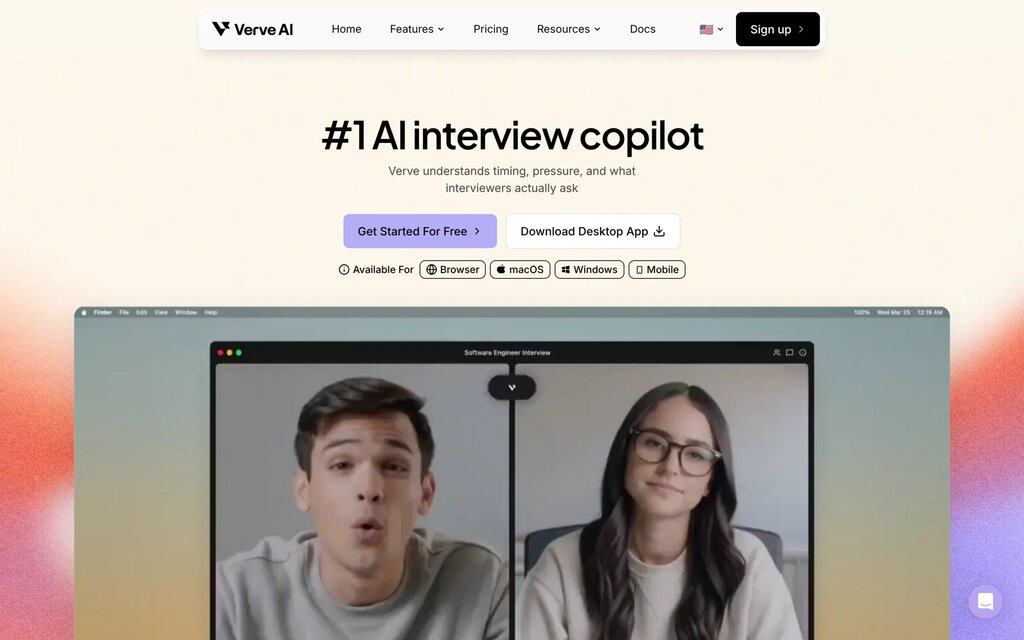
The homepage pitch is short: Verve “understands timing, pressure, and what interviewers actually ask”. It is available in a browser, on macOS and Windows, and on mobile.
What Verve AI does during an interview
Verve is a live interview assistant. You share the interviewer’s audio with it, from a browser tab, a window or your whole screen. It transcribes what the interviewer says, detects when a question has been asked, and writes a suggested answer for you to read while you speak. Before the interview you can give it your resume, the job description and company notes, and it uses them to make the answers about you.
The October 2026 changelog added three response modes:
- Manual answers only when you click.
- Auto answers every line the interviewer says.
- Smart Listening waits for the interviewer to finish and skips small talk. New accounts now start in this mode.
Beyond the live copilot, the app has AI mock interviews, a question bank of more than 5,000 questions, interview reports with a transcript, a resume builder, a cover letter tool and a job-search chat assistant called Job Agent, which is in beta and gives free accounts 10 messages a week.
First run: onboarding and the dashboard
Sign-up takes one click with Apple, GitHub, Google or LinkedIn, or an email address. The first screen is a tour called Discover Verve AI, with eight short demos covering live help, coding rounds, the knowledge base, resumes, screenshot solving, mocks, reports and the question bank.
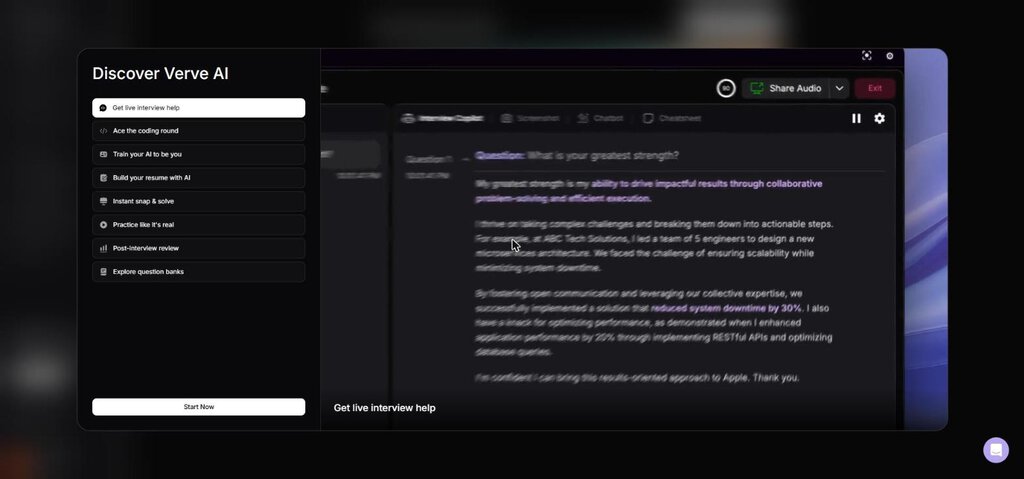
The demo answer in that tour is worth reading, because my own test produced something very close to it. It answers the classic question about your main strength with a story about leading five engineers at “ABC Tech Solutions” and “reduced system downtime by 30%”.
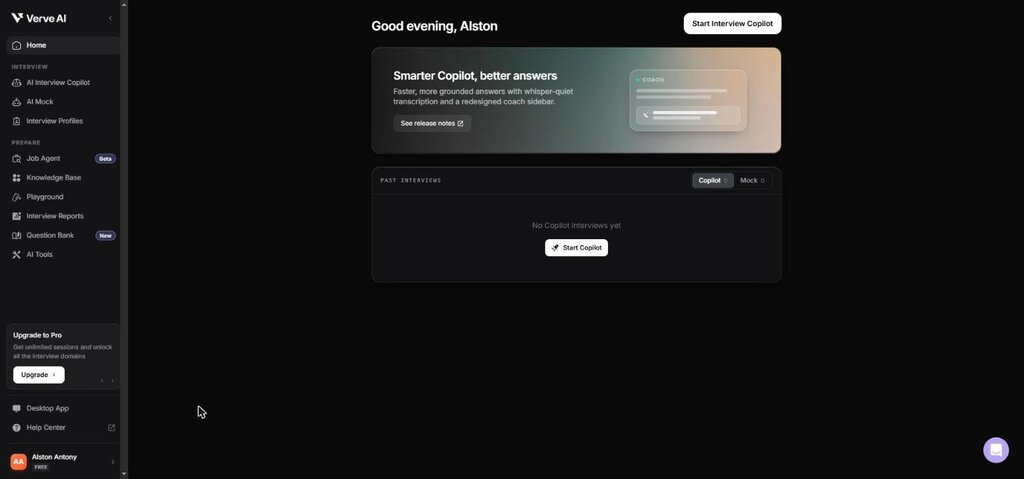
The dashboard is plain: a Start Interview Copilot button, a past interviews list, and a sidebar split into Interview (Copilot, Mock, Profiles) and Prepare (Job Agent, Knowledge Base, Playground, Reports, Question Bank, AI Tools). Verve also added a sample session for a Software Engineer role at Apple to my history, so the reports area is not empty on day one.
What the free plan unlocks, and what it does not
The Copilot Launchpad asks three things: which interview domain, which interview profile, and which session settings. The domain screen is where the free plan’s limits first show up. Only General Interview is open. Coding Interview, Phone Interview, Online Assessment and every technical and specialised domain carry a padlock.
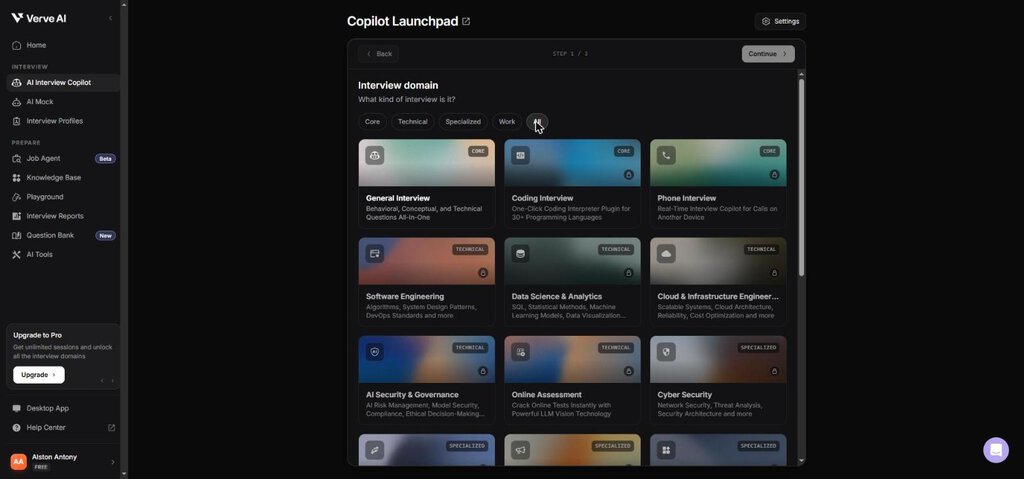
That matters, because the homepage leads with live coding support and LeetCode-style problems. On the free plan you cannot test the coding copilot at all. If coding rounds are why you are looking at Verve, the free plan will not tell you whether it is worth paying for.
The profile step offers three sample profiles (Apple, JP Morgan and Google, each with a sample resume), or you can create your own. The last step shows the session settings:
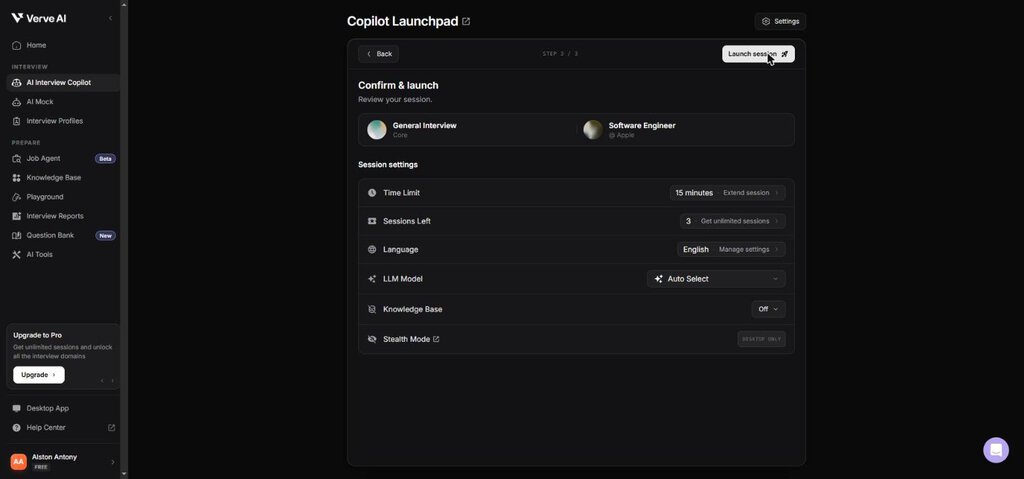
Free accounts get a 15-minute limit and three sessions. Stealth Mode is labelled “desktop only”, which tells you it is not offered in the browser.
Seven of 20 models are usable for free
The model picker is one of the better-designed parts of the app. Each model shows an intelligence rating and how quickly it starts answering, for example about 0.8 seconds for Auto Select and about 0.3 seconds for GPT-OSS-120B.
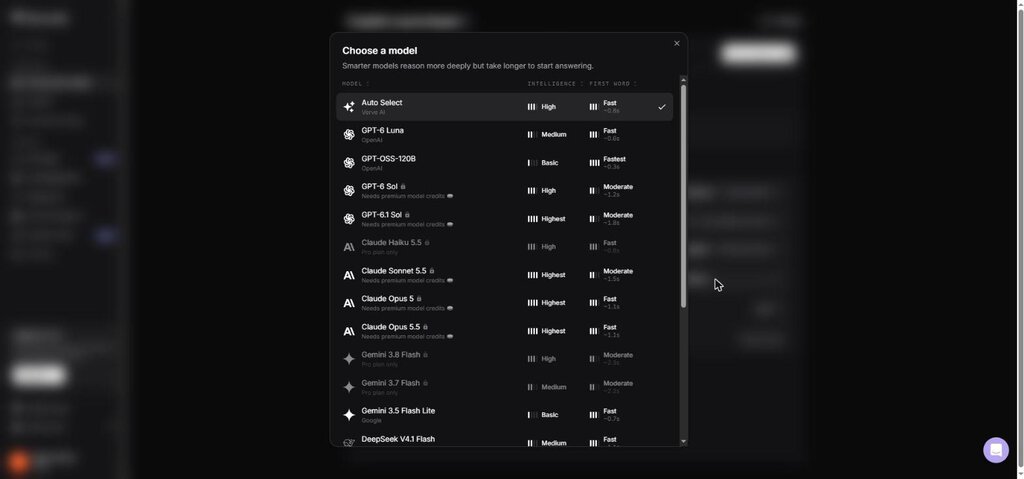
On my free account, 7 of the 20 listed models were selectable: Auto Select, GPT-6 Luna, GPT-OSS-120B, Gemini 3.5 Flash Lite, DeepSeek V4.1 Flash, GLM-5.3 Flash and MiniMax M3. Five more (Claude Haiku 5.5, Gemini 3.8 Flash, Gemini 3.7 Flash, GLM-5.3 and Mistral Large 4) are Pro only. The eight highest-rated models, including GPT-6.1 Sol, Claude Sonnet 5.5 and Claude Opus 5.5, need “premium model credits” even on paid plans, and the pricing page lists GPT-6 Sol and Claude Sonnet 5.5 as add-ons on Standard and Pro.
One detail did not add up. I left the model on Auto Select, and the session report afterwards named the model as GPT-5.4-Mini, which is not one of the 20 models in the picker. So Auto Select can route to a model you cannot choose yourself, and you will not know which one until the report.
The live copilot test
I launched a General Interview session against the Apple sample profile. The session window has two tabs, Interview Copilot and Chatbot, and a red Share Audio button marked Required. Verve offers a Launch Test Interview button that opens a practice tab with an interviewer voice, so you can check the setup before a real call.
Getting audio in is the hard part
You share the interviewer’s audio through Chrome’s own share dialog. We picked the test interview tab and shared it, but no audio reached the session, and after a few minutes Verve showed this notice:
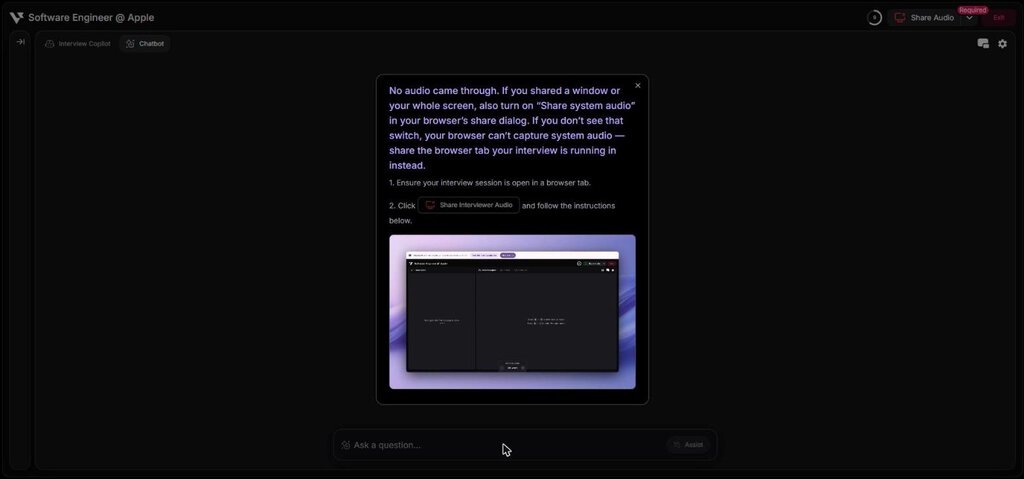
The notice is clear about the fix: if you share a window or the whole screen, you must also turn on “Share system audio”, and if your browser has no such switch, share the browser tab instead. Verve’s changelog shows this has been a known pain point. A 2026-09-16 update added window and full-screen sharing because Windows users running Zoom or Teams in the desktop app were being rejected.
Treat this as the first thing to rehearse. If the audio share fails in a real interview, the copilot does nothing, and you will be troubleshooting a share dialog while someone waits for your answer. Run the test interview on the same computer, browser and meeting app you will use on the day.
One point in Verve’s favour: the failed session did not cost me a session. My account still showed 3 sessions left afterwards.
The answer it wrote, and the problem with it
With the audio not connected, I typed a standard behavioural question into the session’s Chatbot tab: “Tell me about a time you disagreed with a teammate on a technical decision and how you resolved it.” A complete answer appeared in roughly 10 seconds.
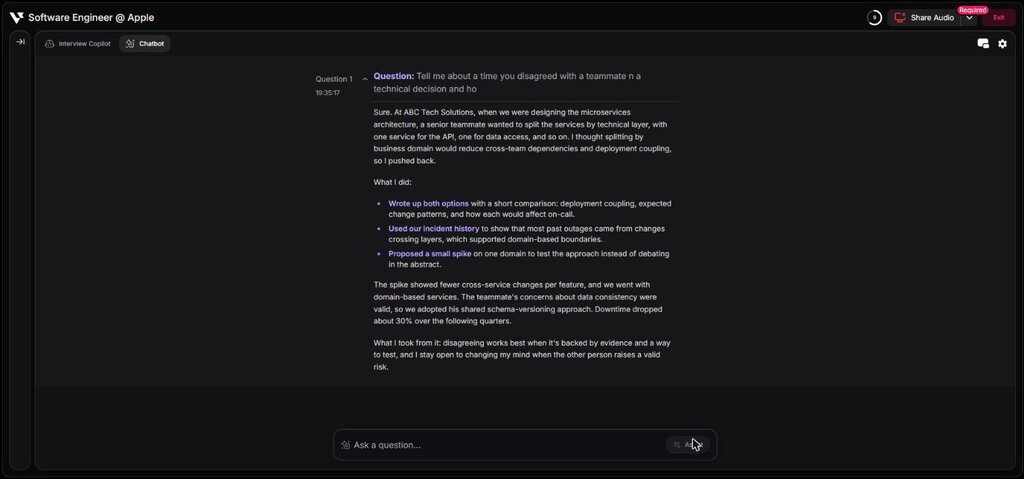
As writing, the answer is good. It follows a clear situation, action and result shape, it uses three bolded action points that are easy to scan mid-sentence, and it ends with a lesson. A nervous candidate could glance at it and keep talking.
The problem is what it says. It is a first-person story: “At ABC Tech Solutions”, “I pushed back”, “Downtime dropped about 30% over the following quarters”. It is the same employer and the same 30% figure as the onboarding demo, so it was built from the sample resume. Verve presents a specific story with a specific number as if it were yours, and if you read it aloud in a real interview, you own every claim in it.
With your own resume loaded, the stories will use your own employers. But the details the model adds around them, such as the incident history it cited, the spike it proposed and the teammate’s schema-versioning idea, are invented to make the story land. A follow-up question about any of them would expose the gap. If you use Verve to prepare, use these drafts as a structure to fill with true events, not as a script.
The report after the session
Ending the session opens an interview report with Summary, Interview Questions, Transcript, Usage and Chatbot tabs, plus Relevance, Accuracy and Clarity scores.
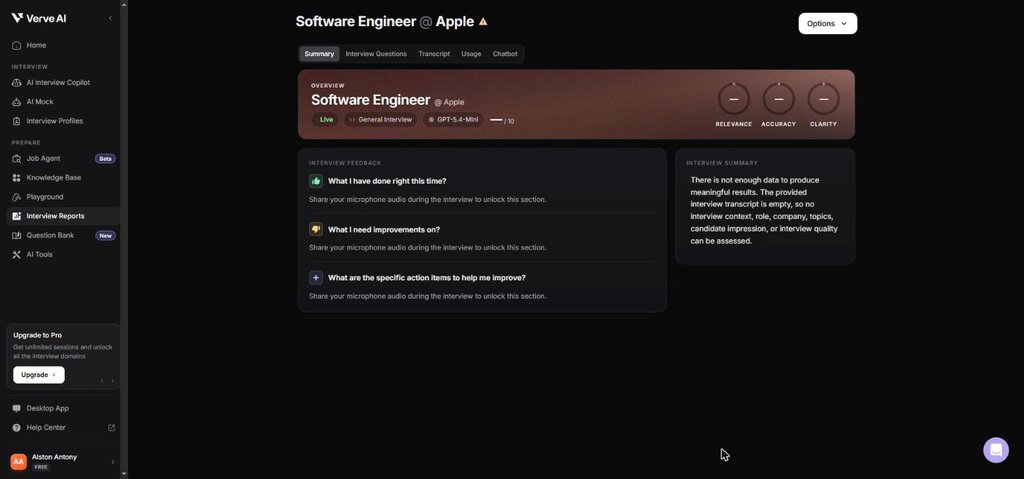
Because no interviewer audio came through, mine was empty. Two things are still worth knowing. The feedback sections (“What I have done right”, “What I need improvements on”) need your microphone audio too, not only the interviewer’s, so Verve analyses your own answers as well. And the answer I got from the Chatbot tab was not saved in the report’s Usage tab, which said no saved AI responses were found.
Mock interviews, question bank and AI tools
The mock interview launchpad offers 200 behavioural questions based on your profile, a mock built from a LinkedIn job post, or a run through any Question Bank list. Free mocks are 30 minutes and you get five. There is an Enable Assistance switch that shows copilot help during a mock, which is the safest way to see what the live copilot does.
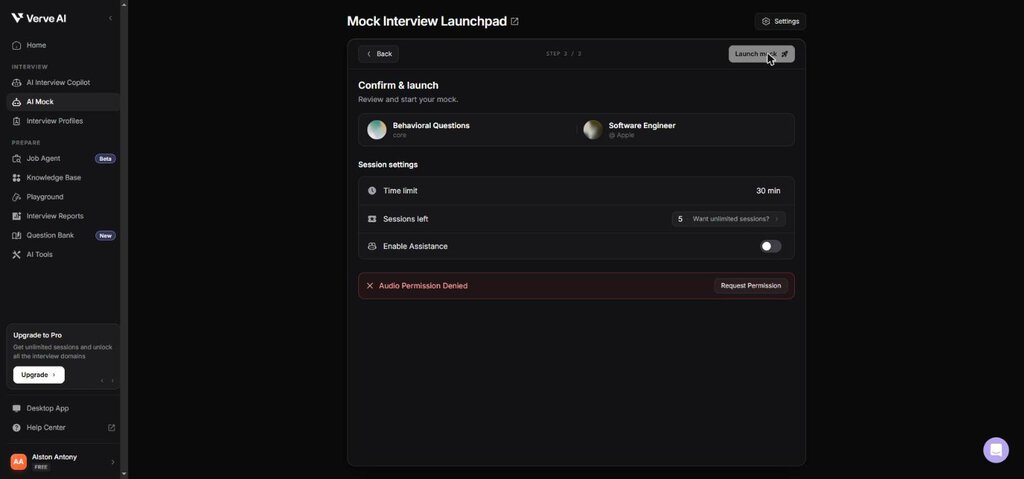
A mock needs microphone access, so I could not run one on my test machine. If you have a microphone, this is the part of the free plan I would start with.
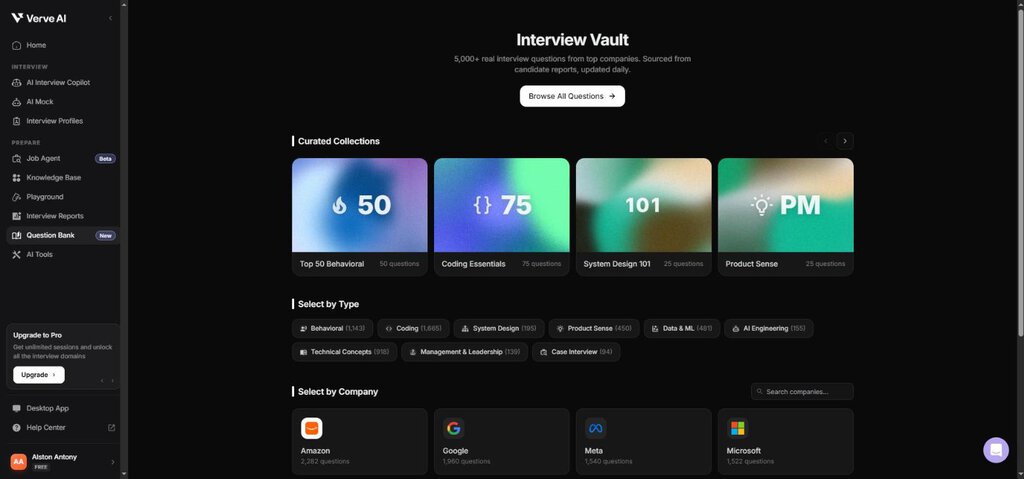
The Question Bank, which Verve calls the Interview Vault, is the strongest free feature I saw. It claims more than 5,000 questions “sourced from candidate reports”. It is browsable by type (1,665 coding, 1,143 behavioural, 918 technical concepts, 481 data and ML, 450 product sense) and by company, led by Amazon with 2,282, Google with 1,960 and Meta with 1,540.
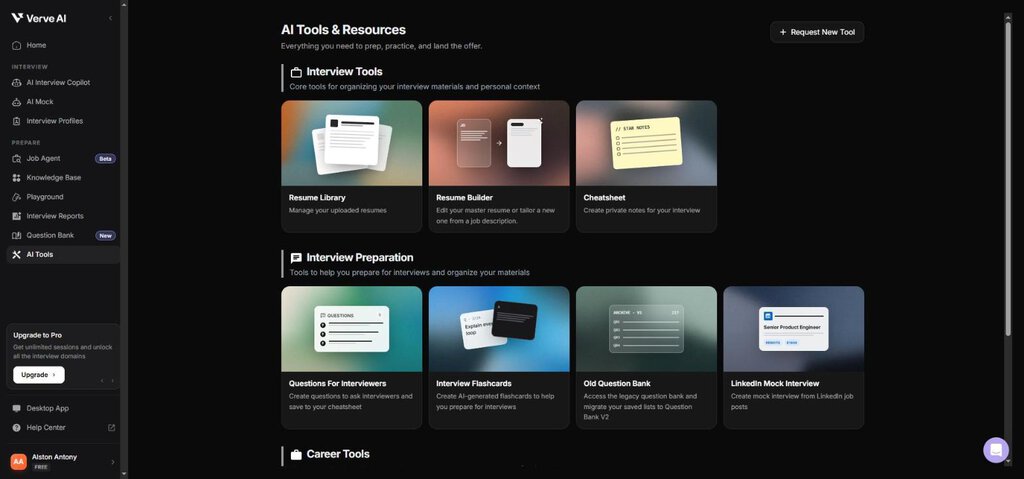
The AI Tools page groups ten tools: Resume Library, Resume Builder (tailor a resume to a job description), Cheatsheet, Questions For Interviewers, Interview Flashcards, the old question bank, LinkedIn Mock Interview, Cover Letter, Outreach Email and Resume JD Match.
Is using Verve AI in a live interview cheating?
This is the question to settle before you pay, and Verve’s own feature list makes it hard to avoid. The desktop app includes Stealth Mode, a transparent window you can drag over your meeting, and what the pricing page calls Camouflage mode: changing the app’s icon, title and process name “to blend in perfectly with your workflow”. Those features exist so that an interviewer does not see the tool.
If a tool has to be hidden from the person evaluating you, assume they would object to it. Many employers now tell candidates directly that AI assistance during interviews or assessments is not allowed, and the usual consequence of being caught is a rejected application or a withdrawn offer. Whether it is allowed in your interview is the employer’s decision, so read the instructions you were sent, and ask if they are unclear.
There are legitimate uses that need no hiding:
- Practice. Mock interviews with Enable Assistance on, and the question bank.
- Accessibility. Live transcription, which one of Verve’s own testimonials credits with helping a candidate with ADHD follow the conversation. If you need captions or other adjustments, ask the employer for them openly as an accommodation.
- Interviews where AI is permitted. Some roles and assessments now allow it. Then the hiding features are irrelevant.
Verve AI pricing in full
Prices below are from vervecopilot.com/pricing, checked in all three billing modes on 2026-11-07, in US dollars.
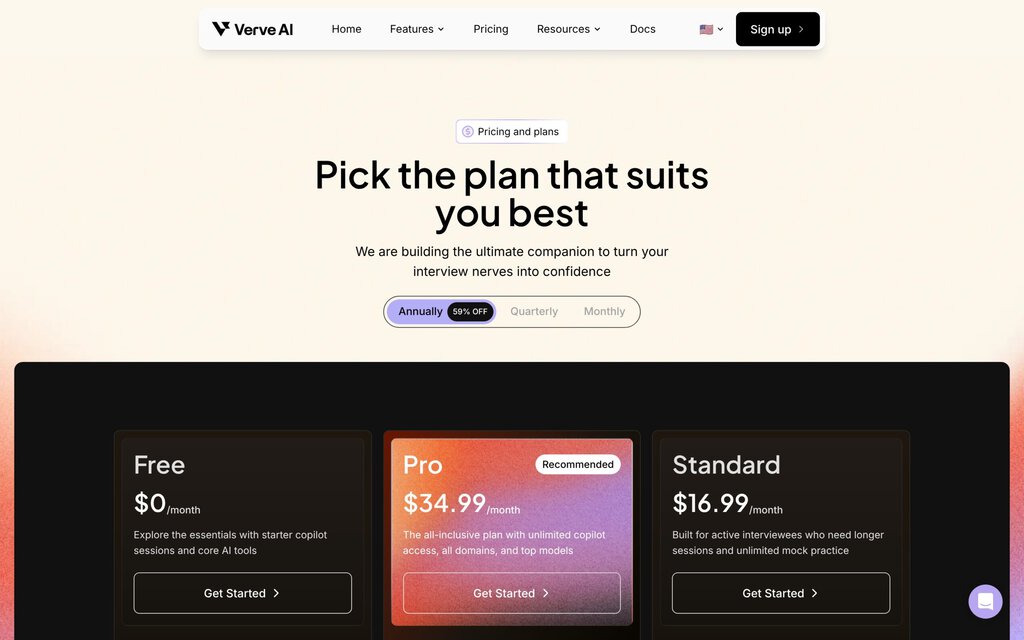
| Plan | Annual billing | Quarterly | Monthly | What you get |
|---|---|---|---|---|
| Free | $0 | $0 | $0 | 3 copilot sessions of 15 minutes, 5 mock interviews, 14 AI tools, 5 reports, basic question bank |
| Standard | $16.99 a month | $39.99 a month | $44.99 a month | 60-minute copilot sessions, unlimited mocks, 10 reports |
| Pro | $34.99 a month | $59.99 a month | $84.99 a month | Unlimited 90-minute copilot sessions, 20 interview domains, Pro-only models, unlimited reports and question bank |
| Enterprise | From $10 a session | Shared session pool for hiring teams, secure links, CSV reporting |
A few things the table hides:
- Annual is paid up front. Verve describes Standard and Pro as “billed annually”, which works out to about $204 a year for Standard and about $420 for Pro.
- The “59% off” badge fits Pro, not Standard. Pro falls from $84.99 to $34.99, a 59% cut. Standard falls from $44.99 to $16.99, which is 62%.
- Standard’s session count is unclear. The plan card says “60-min Interview Copilot Session x 60”, but the comparison table on the same page lists Standard at 5 sessions a month. Ask support which one applies before you buy it.
- The best models cost extra. GPT-6 Sol, GPT-6.1 Sol and Claude Sonnet 5.5 are add-ons on Standard and Pro, and in the app the top models need premium credits.
The refund policy is narrow
Verve’s refund policy, last updated 16 June 2024, allows a refund only if a verifiable technical issue on Verve’s side stopped you using the service, or if you did not use the service at all. You must ask while the subscription is active or within 5 business days after it ends. Annual plans “are a commitment for the full year”, with no refund for early cancellation outside those two cases.
In practice: if you run one session and decide it is not for you, expect no refund. That is the main reason I would pay quarterly rather than annually, even though annual is far cheaper per month.
Verve AI’s claims vs what I could check
| Claim on Verve’s site | What I found |
|---|---|
| 500K+ users (homepage) | The About page says “10k+ job seekers”. Both cannot be current. |
| 4.9/5 average rating (About page) | No source is given. Trustpilot blocked my browser, and search results showed between 11 and 18 reviews on its country pages, mostly positive. Capterra’s Australian listing showed no ratings. |
| Copilot latency under 300 ms | The model picker itself lists 0.3 to 2.8 seconds to the first word, depending on the model. My typed answer took about 10 seconds to appear in full. |
| Customer testimonials | The six names on the homepage and About page (Arlene McCoy, Floyd Miles, Albert Flores, Annette Black, Cameron Williamson, Darlene Robertson) are the same placeholder people that appear in widely used UI design kits. Do not treat them as verified customers. |
| Supports coding interviews | True on paid plans. On the free plan the Coding domain is locked, so you cannot test it before paying. |
Who Verve AI suits, and who should skip it
A reasonable fit for:
- Candidates who want structured practice. The question bank, mock interviews and STAR-shaped answer drafts are a solid prep kit, and much of it is free.
- People who blank under pressure in practice. Mocks with Enable Assistance let you rehearse with a safety net, then turn it off.
- Interviews where AI help is allowed. Then the transcription and drafting are the product working as intended.
- Multilingual candidates. Verve lists live transcription in 55+ languages.
Skip it if you:
- Want to evaluate the coding copilot for free. It is locked on the free plan.
- Would use it secretly in a real interview. The risk to the application is yours, and the answers it drafts contain invented details you would have to defend.
- Need a guaranteed refund. The policy refunds only technical faults and unused subscriptions.
- Cannot rehearse your audio setup. If you will not test the share on the exact machine and meeting app first, the copilot may give you nothing when it counts.
Verve AI alternatives
Prices from each vendor’s own pages, checked 2026-11-07.
| Alternative | Price | Switch to it when |
|---|---|---|
| Final Round AI | Free plan for setup and prep only. Pro, which unlocks live CoPilot sessions, from $25 a month on its longest plan. No free trial of live sessions. | You want unlimited live sessions on every paid plan and are comparing per-month cost on a long commitment |
| Yoodli | Starter $0 for 5 roleplays total. Pro $8 a month and Advanced $20 a month, billed annually. | You only want practice: AI roleplay interviews with feedback, and no live in-interview help |
If you are weighing interview tools against the wider field, the ZPlatform AI reviews hub has our other hands-on tests.
Frequently asked questions
Is Verve AI free?
Yes, there is a free plan with no credit card. It includes three 15-minute copilot sessions, five 30-minute mock interviews and the AI tools, but only the General Interview domain and 7 of the 20 AI models.
Does Verve AI work with Zoom, Teams and Google Meet?
Verve says it works with Zoom, Google Meet, Microsoft Teams and Webex. In the browser it hears the interviewer through Chrome’s share dialog, so you must share the meeting tab, or a window or screen with “Share system audio” turned on.
Can an interviewer see Verve AI?
In the browser, the copilot runs in its own tab, so anything visible on a shared screen can be seen. The desktop app adds Stealth Mode and a disguised app name, which exist to keep it out of sight. Whether you should hide it is a different question, covered in the cheating section above.
Transparency note: I created a free Verve AI account and tested it on 2026-11-07 in Chrome on Windows. I ran one General Interview copilot session against Verve’s Apple sample profile, where the interviewer audio share failed, and tested answers through the session chatbot instead. I could not run a spoken mock interview because the test machine has no microphone, and I did not test the desktop app, coding mode or any paid plan. Prices, the refund policy and the changelog were read on the same day. The screenshots are from my account and Verve’s own site. None of the links here are affiliate links. If anything changes, tell me and I will update the review.
Related Posts

I tested AgainstData on 355 pages of Gmail data. Bulk unsubscribe, personal data deletion requests, pricing, and whether...
AI-Text-Humanizer.com took a 132-word ChatGPT paragraph from 100% AI to 0% on ZeroGPT but flattens your voice. Buy the $...
AIscan24 is a free, no-signup AI detector: it caught pure ChatGPT text at 100% but scored my handwritten paragraph 80%. ...
Honest Aithenticate review after hands-on testing. Does this AI disclosure badge tool meet EU AI Act requirements? Prici...
Allavsoft review: a Windows and Mac video and music downloader with batch queues, 8K support and format conversion, from...

My hands-on Answer Socrates review covering all features, free plan limits, pricing, and how it compares to AlsoAsked. I...