

The best AI recruiting tools in 2026 depend on the job you need done. Manatal, Workable and Zoho Recruit suit small teams, Greenhouse and Ashby suit growing ones, and Juicebox, SeekOut and hireEZ handle sourcing. Prices run from free to about $500 a month for one recruiter, and one vendor on this list still publishes no price at all.
I’m Alston Antony. I’ve bought and tested 500+ AI and SaaS tools with my own money, but I have not run a hiring process through any of these nine, so this is a comparison of price, limits and design, not a test of who hires better. Everything below comes from each vendor’s own pages, checked on 2 November 2026, plus the rules and court cases that apply to AI in hiring. It isn’t legal advice.
No vendor paid for a place on this list, and every vendor link is a plain, non-affiliate link. I left out interview-scheduling bots and video-interview platforms that sell by quote only, because I couldn’t verify them to the same standard.
Which AI recruiting tools are worth comparing in 2026?
Nine AI recruiting platforms passed one test: a vendor page I could read myself. Three are applicant tracking systems for smaller teams, two are applicant tracking systems built to scale, and four handle sourcing and interview notes. The table shows what each costs and what its AI does.
| Tool | Job it does | What the AI does | Entry price | Free option | Best for |
|---|---|---|---|---|---|
| Manatal | ATS | CV parsing, match summaries, AI Interviewer add-on | $15/user/mo billed yearly, $19 monthly | 14-day trial | Small teams and agencies |
| Workable | ATS and HR | Sourcing, screening and engagement agents on credits | $299/mo billed yearly (1-20 employees) | Free trial | Teams that want agents on demand |
| Zoho Recruit | ATS | AI candidate matching on Enterprise | $25/recruiter/mo billed yearly | Free plan, 1 active job | Tight budgets |
| Greenhouse | ATS | AI Notetaker, talent matching, sourcing automation | Quote only | Demo | Structured hiring at scale |
| Ashby | All-in-one ATS | AI Notetaker (add-on), AI Assistant, custom agents | $400/mo at 11-25 employees | None listed | Growth-stage teams |
| Juicebox | Sourcing | AI-powered people search and agents | $99/seat/mo | Free plan | Recruiters who source |
| SeekOut | Sourcing | AI sourcing and screening, MCP access | $149/mo billed yearly, $179 monthly | 14-day trial | Technical and enterprise sourcing |
| hireEZ | Sourcing | AI sourcing, CRM and outreach | From $494/mo | 7-day trial | Solo recruiters who source daily |
| Metaview | Interview notes and sourcing | AI notetaker, sourcing agent, application review | $100/user/mo (sourcing Pro) | Free plan | Teams that interview a lot |
Prices checked 2 November 2026 on each vendor’s own site. Most plans are billed annually, and the monthly-billed price is higher. SeekOut’s and Manatal’s monthly figures are in the sections below.
What do AI recruiting tools actually do, and where does the AI sit?
AI recruiting tools do four jobs: find candidates, screen applications, talk to candidates, and record interviews. They help recruiters automate the repeatable parts of the recruitment process, and most of the “AI” sits in the first and last jobs. A tool that ranks resumes or writes outreach is still following your criteria, which is why a vague role brief gives vague results.
Here is how the four jobs show up on the vendor pages I read:
- Candidate sourcing. Juicebox, SeekOut and hireEZ search large profile databases to source candidates, and agents on Workable and Metaview run searches in the background against a profile of your ideal hire.
- Candidate screening. Workable’s Screening Agent scores a candidate against your ideal candidate profile. Manatal shows an AI summary of how a candidate matches your requirements. Zoho Recruit’s Enterprise plan adds AI candidate matching.
- Candidate engagement. Workable’s Engagement Agent runs a chat with a candidate, and Manatal sells an AI Interviewer that conducts video interviews.
- Interview records. Greenhouse (in its Core plan), Ashby (as a paid add-on) and Metaview record, transcribe and summarise interviews.
Two terms get mixed up. An “AI ATS” is an applicant tracking system that treats AI as the core product. An ATS with AI features adds a notetaker or a matching score to an older system. On these nine pages, every applicant tracking system is the second kind with an agent layer on top, and I’d treat “AI-native” as a marketing word until the vendor shows what the model decides. Two newer labels also appear: generative AI, which writes and summarises, and agentic AI, which acts in the background on instructions you’ve already given. Conversational AI mostly means the candidate-facing chat.
Budget picks: Manatal, Workable and Zoho Recruit
These three give small recruiting teams and hiring teams a full applicant tracking system for between $0 and $299 a month. They differ in how they charge: Manatal and Zoho Recruit charge per user, while Workable charges per company and meters its AI agents separately.
Manatal: low per-seat pricing with AI summaries
Manatal is the cheapest full ATS here that also sells AI features. It parses CVs, enriches candidate profiles and shows an AI summary of how each candidate matches your requirements. A newer AI Interviewer add-on runs video interviews around the clock.
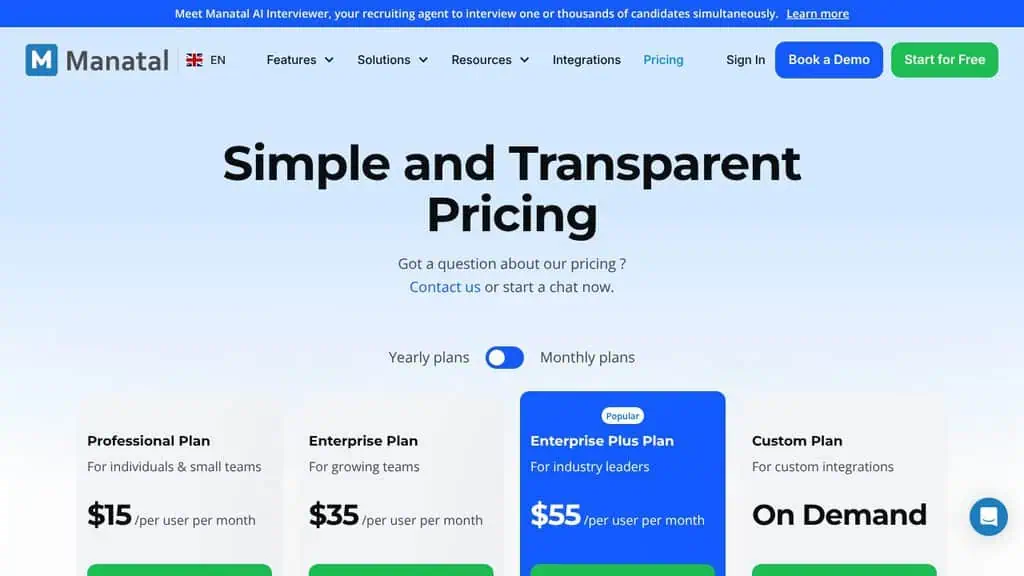
A realistic use is a three-person agency that wants one tool for candidates and clients, and tries it free for 14 days with no card.
The limits are the job cap and the add-on. Professional includes 15 jobs and up to 10,000 candidates, and automations arrive on Enterprise. I did not find a published price for the AI Interviewer.
- Pricing (checked 2 Nov): Professional $15 per user a month billed annually ($19 monthly). Enterprise $35 (unlimited jobs and candidates, workflow automations). Enterprise Plus $55 (SSO, API access, priority support). 14-day free trial.
- Best for: small teams and agencies that want an ATS before AI.
Workable: AI agents that you pay for by use
Workable pairs an ATS and sourcing suite with three AI agents: Sourcing, Screening and Engagement. The Job Brief Agent is included, and the other three use AI credits. Every paid plan starts with 3,000 credits.
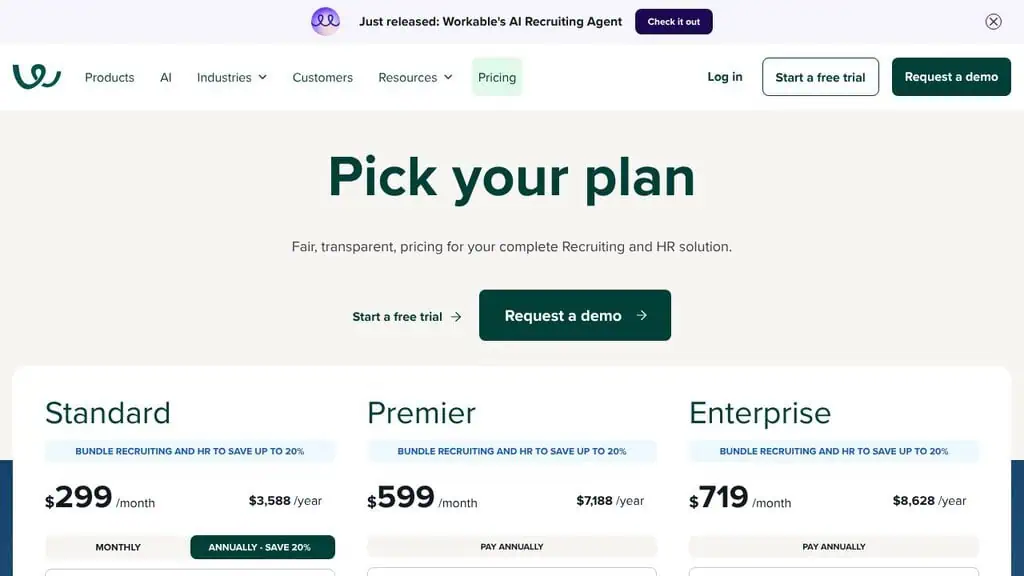
The credit rules are public, so you can do the sums. Screening a candidate against your ideal profile costs 1 credit, adding a passive candidate to your pipeline costs 2, and a candidate chat session that gets at least one answer costs 10. Extra credits cost $0.12 each. If you screen 1,000 applicants a month, the 3,000 free credits cover three such months, and a month beyond that costs about $120.
The catch is the base price. The page prices by company-size band, and the $299 Standard figure is the band for 1 to 20 employees. Texting, video interviews and assessments are paid add-ons.
- Pricing (checked 2 Nov): Standard $299 a month billed annually ($3,588 a year) for a 1-20 employee company. Premier $599 ($7,188 a year). Enterprise $719 ($8,628 a year). Add-ons: Texting+ $89, Video interviews+ $109, Assessments+ $59 a month. Extra AI credits $0.12 each.
- Best for: teams that want agents available but don’t want to pay for volume they don’t use.
Zoho Recruit: the free tier, with AI on the higher plans
Zoho Recruit is the cheapest way to try an ATS properly. Its Forever Free plan covers candidate management, email and interview scheduling for one active job per recruiter licence, and the Enterprise plan adds AI candidate matching.
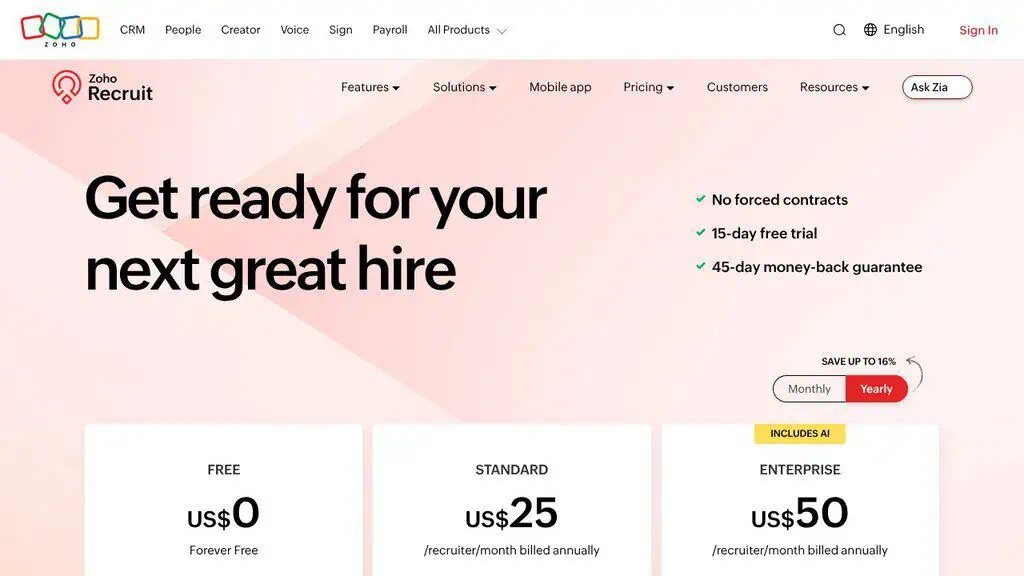
For example, a founder hiring their first two people can post one role on the free plan, then move up only when a second role opens.
The limit is where the AI sits. Matching is an Enterprise feature at $50 a recruiter a month, and that plan caps at 20 active jobs per recruiter licence.
- Pricing (checked 2 Nov): Free $0 (1 active job). Standard $25 per recruiter a month billed annually (10 active jobs). Enterprise $50 (20 active jobs, AI candidate matching). 15-day free trial of paid plans.
- Best for: a first hire, or a team that wants to keep software spend near zero.
Growth and enterprise picks: Greenhouse and Ashby
Both tools are built for teams that care about structured hiring more than a low entry price. Greenhouse sells by quote only, and Ashby publishes its entry price but not the rest.
Greenhouse: structured hiring with AI around the edges
Greenhouse sells three plans, Core, Plus and Pro. Core includes sourcing and CRM, structured interview kits and scorecards, scheduling, reporting, SSO, an AI Notetaker and talent matching. Plus adds AI-powered report filters, sourcing automation and texting. Greenhouse also lists voice AI interviews as a separate product. Pro adds audit logs, developer tools and enterprise data controls.
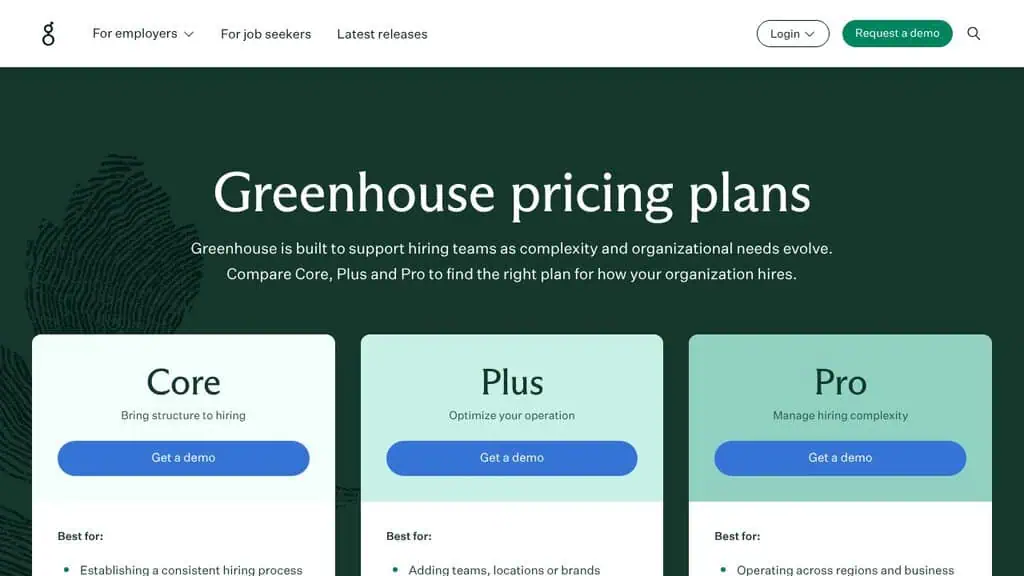
A realistic use is a company hiring across several teams that wants every interviewer scoring the same way, with notes recorded automatically.
The limit is transparency. The pricing page says the price is customised to your hiring needs, and every plan button leads to a demo form, so you cannot compare it with anything above before talking to sales.
- Pricing (checked 2 Nov): quote only. Core, Plus and Pro, each by demo.
- Best for: structured hiring across teams, where governance matters more than entry price.
Ashby: an all-in-one system with agents you can customise
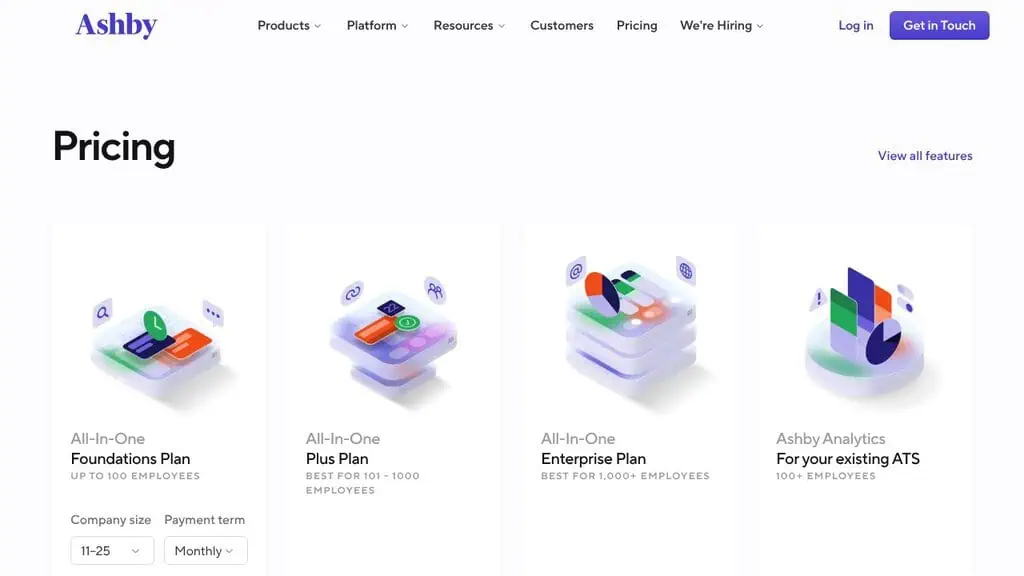
Ashby is an all-in-one recruiting product sold in three plans: Foundations, Plus and Enterprise. Its AI Assistant takes plain-language questions and acts across the system, and custom AI agents follow your own instructions.
For example, you could ask the assistant which open roles have no scheduled interviews this week, instead of building a report.
The limit is that the AI Notetaker, which records and summarises interviews, is a paid add-on on every plan. Plus and Enterprise are priced by company size, usage and commitment.
- Pricing (checked 2 Nov): Foundations (up to 100 employees) showed $400 a month for the 11-25 employee band on monthly billing, with 10% off for an annual commitment. Plus (101-1,000 employees) and Enterprise (1,000+) are priced by company size, usage and commitment. Ashby Analytics is sold separately for teams keeping their existing ATS.
- Best for: growth-stage teams that want one system instead of an ATS plus four tools.
Sourcing and interview-note tools: Juicebox, SeekOut, hireEZ and Metaview
Sourcing tools find top talent that hasn’t applied, and help you build a talent pipeline before a role opens. They charge by seat and by contact credit, and the credits are where the real limit sits. Metaview is the odd one: it began as an interview notetaker and now also sells a sourcing agent.
Juicebox: self-serve sourcing with a free tier
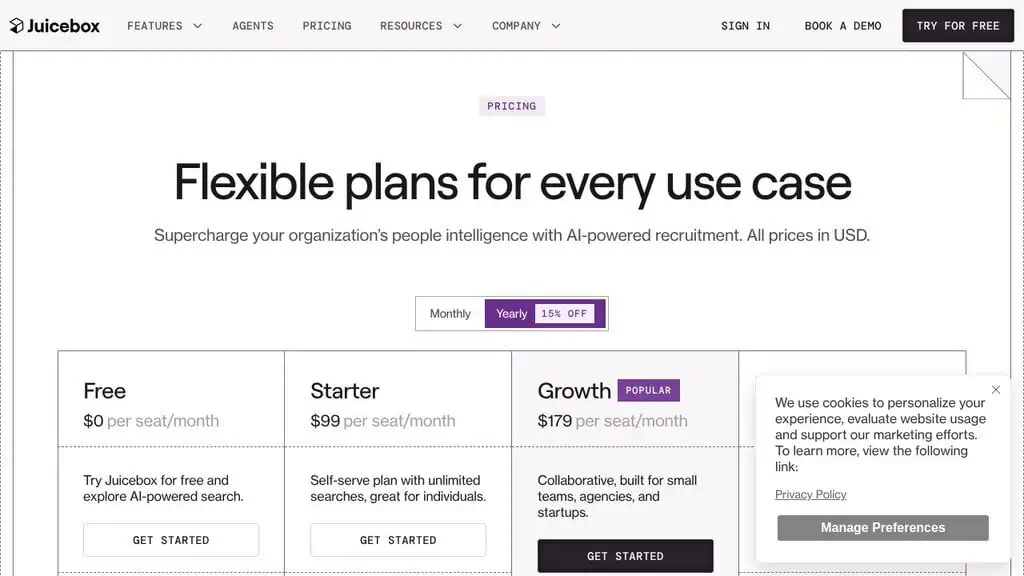
Juicebox is the easiest tool to try for anyone who wants to source candidates without a contract, because it has a free plan and a self-serve paid plan with unlimited searches. Paid plans include email outreach with AI templates, and agents are sold at $199 each a month.
A realistic use is a solo recruiter who needs to source candidates for a niche role, then exports a shortlist and emails it from the same tool.
The catch is credits. The $99 Starter plan includes 500 contact credits and 500 export credits a month, and the $179 Growth plan raises that to 1,500 of each. A recruiter who needs more contacts than that has to move up or talk to sales.
- Pricing (checked 2 Nov): Free $0. Starter $99 per seat a month. Growth $179 per seat (up to 5 seats). Enterprise custom. Agents $199 a month each. Yearly billing is 15% cheaper.
- Best for: individual recruiters and small teams who source for themselves.
SeekOut: deep technical sourcing, and an MCP server
SeekOut is a larger database and a larger commitment than Juicebox. It claims 1B+ candidate profiles and sells sourcing, applicant evaluation with AI screening, and an MCP integration that connects its data to Copilot, ChatGPT, Claude, Gemini and Amazon Quick.
The MCP piece is worth knowing about if you already work in an AI assistant. It lets you search candidates from a chat window, which is the same pattern covered in our report on the best MCP servers.
The limit is credits. The entry plan includes 500 contact credits and 1,000 exports a month, and the next tiers move to per-seat credits (750 contacts and 5,000 exports per seat) with custom pricing at the top.
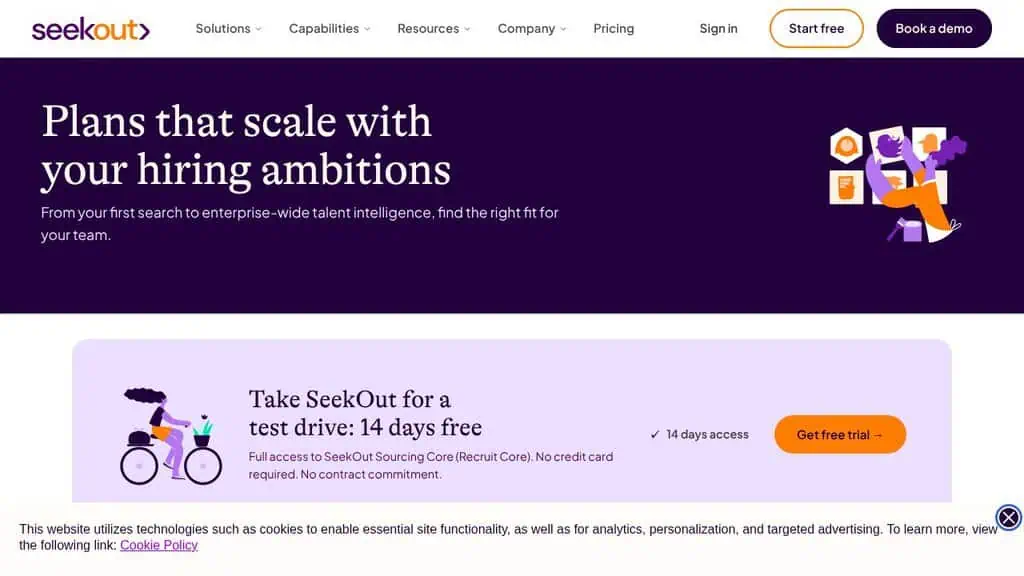
- Pricing (checked 2 Nov): $149 a month paid annually ($1,788 a year), or $179 billed monthly. 14-day free trial of SeekOut Sourcing Core, no card or contract. Team plans by quote.
- Best for: technical and enterprise sourcing at volume.
hireEZ: priced like a stack, not a seat
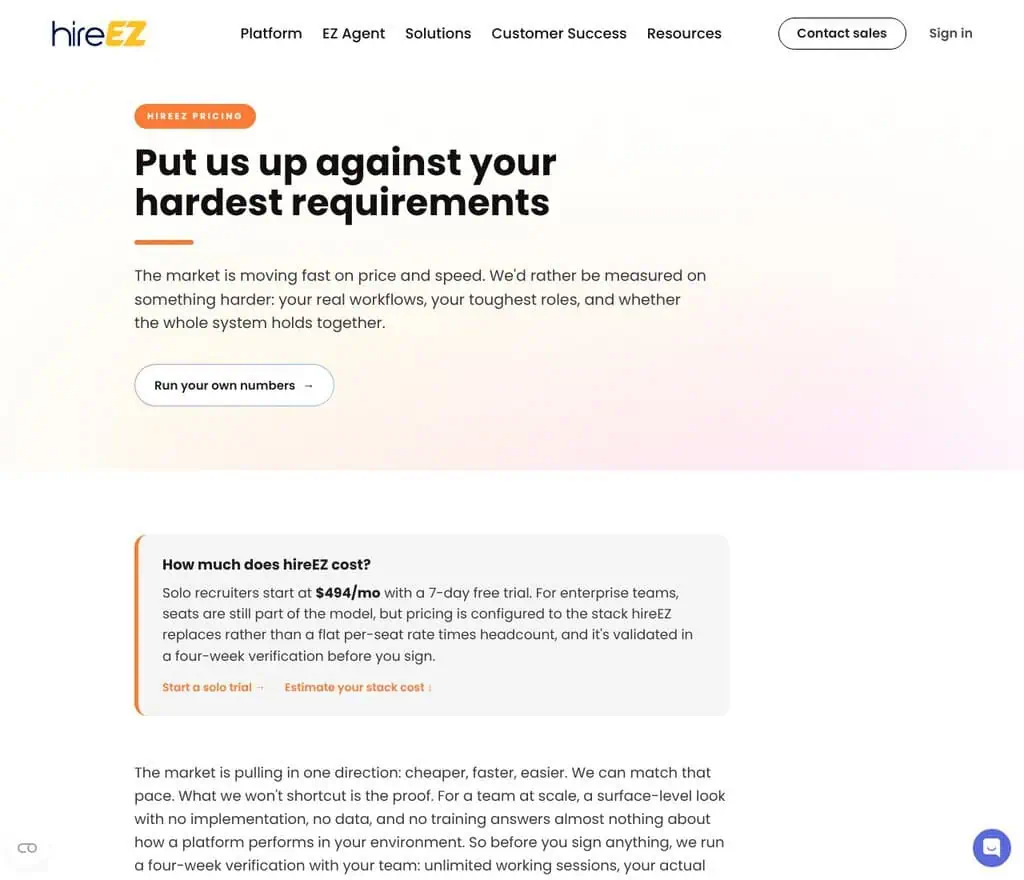
hireEZ sells sourcing, CRM, outreach and screening as one sourcing platform meant to replace four to six tools alongside your ATS. A solo recruiter starts at $494 a month with a 7-day free trial.
A realistic use is a recruiter who today pays separately for a database, an outreach tool and a scheduler, and wants one bill.
It is the most expensive entry point here. For teams, hireEZ says seats are still part of the model but pricing is set against the stack it replaces, and it runs a four-week verification before you sign. Its own page says it stopped publishing a flat per-seat rate.
- Pricing (checked 2 Nov): from $494 a month for a solo recruiter, 7-day free trial. Teams by quote after a four-week verification.
- Best for: a recruiter who would otherwise buy several tools.
Metaview: interview notes first, sourcing second
Metaview is an AI interview tool that records and summarises interviews, and it now sells separate agents for sourcing, application review and notes. Every user gets the whole platform, and you pay only for the agents you use.
For example, a team that already interviews heavily can start with the notetaker alone and leave sourcing off.
The prices I checked are for the sourcing agent, and that is the limit of my check: I did not find notetaker pricing on the same page. Sourcing is metered by profiles sourced per month.
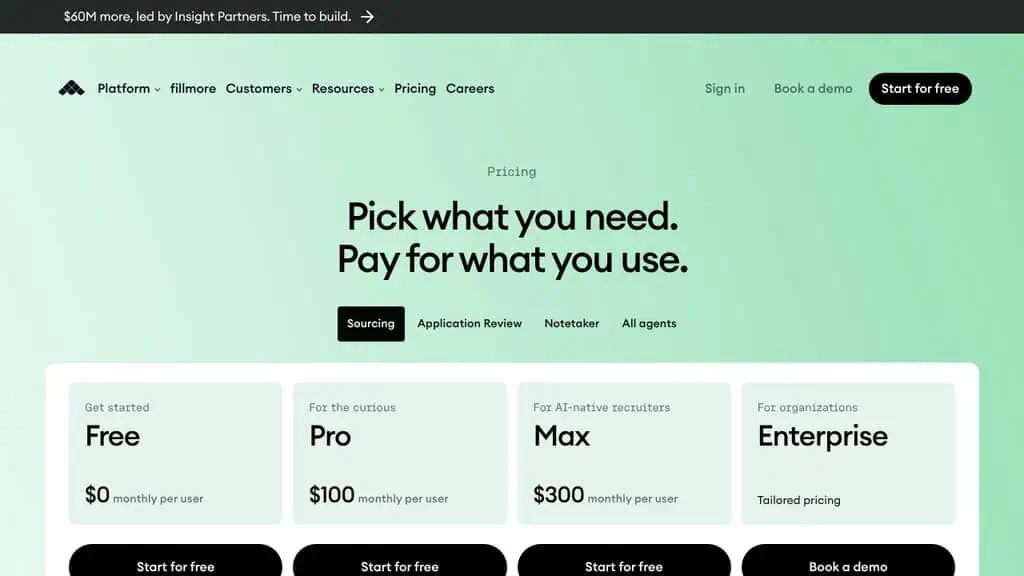
- Pricing (checked 2 Nov), sourcing agent: Free $0 (first 100 profiles). Pro $100 per user a month (200 profiles a month). Max $300 per user (unlimited profiles). Enterprise by quote.
- Best for: teams where interview notes are the bottleneck.
How much does AI recruiting software cost, and which vendors hide the price?
Eight of the nine tools publish an entry price, and one, Greenhouse, publishes none. Entry prices run from $0 to $494 a month, but they measure different things: a seat, a company or a stack. Comparing the headline numbers directly is how teams end up with the wrong budget.
| Tool | Published entry price | What the price covers | Price for a team |
|---|---|---|---|
| Zoho Recruit | $0 (Free), $25 Standard | One recruiter licence | Per recruiter |
| Manatal | $15 billed yearly | One user | Per user |
| Juicebox | $0 (Free), $99 Starter | One seat | Per seat, up to 5 seats on $179 |
| Metaview | $0 (Free), $100 Pro | One user, sourcing agent | Per user |
| SeekOut | $149 billed yearly | One user | Custom |
| Workable | $299 billed yearly | A company of 1-20 employees | Rises with employee count |
| Ashby | $400 | Foundations plan, 11-25 employees, billed monthly | Plus and Enterprise by size and usage |
| hireEZ | $494 | One solo recruiter | By quote after verification |
| Greenhouse | None | Not published | By quote |
The subscription is not the whole cost of recruitment tools. Workable’s agents bill by use, Juicebox and SeekOut cap contacts by credit, and Ashby and Workable sell their notetaker, texting and video features as add-ons. I once audited my own software stack and found overlapping tools, including an email platform I’d forgotten I was paying for. A recruiting stack grows the same way: an ATS, a database, an outreach tool and a notetaker each look cheap alone.
A fair way to compare is to price the whole stack for one recruiter over a year. Add the ATS, the sourcing tool, the notetaker and any credits you’ll use, then divide by roles filled. If a vendor won’t give you a price to do that sum, the missing price is itself information.
Can AI recruiting tools screen candidates without introducing bias?
Not automatically. An AI screening tool can repeat patterns in its training data, so the safe assumption is that it can be biased until the vendor shows audit results. Hiring law is moving toward requiring those audits, and the rules that apply depend on where you hire.
Three things to know before you switch screening on:
- New York City. Employers using an automated employment decision tool need a bias audit within one year of using it, public information about the audit, and notice to candidates ten business days beforehand, according to the city’s consumer and worker protection page. Enforcement began on 5 July 2023.
- The EU. Recruitment and candidate-evaluation tools are classed as high-risk under the AI Act. The Digital Omnibus moved the deadline for those obligations from 2 August 2026 to 2 December 2027, per Gibson Dunn’s summary. One summary reports the omnibus entered into force on 27 July 2026; check the Official Journal before you plan around the date.
- The courts. In May 2025 a federal judge granted preliminary certification of a nationwide collective action in Mobley v. Workday, which alleges that Workday’s AI screening tools disadvantaged applicants over 40. Workday says the case lacks merit and that certification is preliminary.
Also ask what the tool does to the candidate experience: slow replies and chatbots that can’t answer a question cost you applicants. The practical test for bias is the one on the vendor’s own page. SeekOut publishes a Responsible AI page, and Metaview’s pricing page says every plan includes ethical AI and data use commitments. Ask the vendor of any AI recruiting tool you shortlist four things: what the model decides, what data it was tested on, whether an independent party has audited it, and whether a human reviews every rejection.
I’d also keep AI away from final rejection decisions. Use it to surface candidates and summarise, and keep a person accountable for who gets turned away.
How do AI recruiting tools connect to the ATS you already run?
Most teams don’t replace their applicant tracking system. They add AI recruiting tools to the hiring workflow they already have, so the integration decides whether the tool helps or just adds a tab. Ask whether candidate data flows both ways, whether it syncs in real time, and whether it keeps the context your team has already built.
A short checklist of best practices for the demo, taken from a recruiting process you already run:
- Direction of sync. Does the new tool write back to your ATS, or does a recruiter copy and paste?
- Duplicate handling. If a sourced candidate already applied, does the tool know?
- Where notes live. Interview summaries should land on the candidate record, not in another dashboard.
- What data leaves. Check what candidate data the vendor stores and for how long.
- Exit. Ask how you export your data if you cancel.
If you’re running an ATS from the budget group above, tools like Juicebox or SeekOut add the most with the least overlap. If you’re on Ashby or Greenhouse, much of the notetaking and automation is already inside, so a separate notetaker mostly duplicates.
Will AI replace human recruiters?
No, not on the evidence of these tools. They take on search, summarising and scheduling, which are the repeatable parts of the job. The parts they leave are judgement calls: persuading a candidate, reading a team’s needs, and deciding who gets an offer.
Some vendors now pitch an “AI recruiter” that runs the whole pipeline, and the vendors’ own wording shows the limit of that. Manatal’s AI Interviewer is described as screening candidates so recruiters can focus on the most qualified. Workable’s agents act on a profile you define. Metaview says you can review, edit or override what the AI is looking for. All of that assumes a recruiter is still in charge.
What does change is the ratio, because AI-powered recruiting lets one person cover more roles. A recruiter with a sourcing agent and an automatic notetaker can handle more open roles than one without. That raises the bar for the human part of the work. It also means candidates are using AI on their side, which is why our Jobright review is worth a look: it shows the tools applicants now have on their side.
How should I choose, and what should I test first?
Choose by the job first, the team size second and the price third. If your bottleneck is finding people, start with a sourcing tool. If it’s tracking and consistency, start with an ATS. If it’s interview quality, start with a notetaker. Buying one AI recruiting platform for all three at once is how teams overpay.
| If you are… | Look at | Why |
|---|---|---|
| Hiring your first one or two people | Zoho Recruit Free | $0, one active job, nothing to cancel |
| A small agency or team on a tight budget | Manatal | $15 to $19 per user, 14-day trial |
| A small company that wants agents on demand | Workable | Agents bill by use, credits are public |
| A growth-stage team that wants one system | Ashby | ATS, scheduling and analytics in one |
| Hiring across teams with strict process | Greenhouse | Structured scorecards, governance, audit log on Pro |
| A recruiter who sources most days | Juicebox or SeekOut | Free tier or a 14-day trial first |
| Short of interview time | Metaview | Notetaker and sourcing sold by agent |
| Replacing several tools with one | hireEZ | Priced as a stack, so check the total |
Here is how I’d run a trial, and what you can automate first. Pick one live role, decide which steps you want to automate, run it in two tools at once for two weeks, and compare three numbers: hours spent per hire, how many candidates the tool surfaced that you wouldn’t have found, and how many it got wrong. A free plan or a trial exists for seven of the nine (every tool here except Greenhouse and Ashby), so you can do this without a contract.
Whichever of the best AI recruiting tools you pick, write down what you expect it to do before you start. A tool that can’t beat your current process on a real role isn’t worth the seat. Show the shortlists it produces to a hiring manager, and let them say whether they’re any good.
If you want the same price-and-limits treatment for the rest of your software, I publish tested AI tool reviews and a growing set of best AI tools lists. You can get new ones by email, and our affiliate disclosure explains how the site is funded.
Nothing here is legal or HR advice. Employment law differs by country and city, so check the rules where you hire before you switch on any automated screening.
Related Posts
The 30 best AI SEO tools in 2026, tested with real money: what each costs, which ones track AI visibility and AI Mode, a...
30 AI writing tools tested across free, freemium and paid tiers, every link checked, plus which AI beats ChatGPT for wri...

I tested 60 free and freemium AI image generators and ranked them by real traffic and hands-on quality. Free tiers, limi...

Which AI Chrome extension should you install? 132 ranked on real Web Store install, rating and review data, with a pick ...

What Firefox AI actually does, how to enable or disable it, and every one of the 95 AI Firefox add-ons ranked on real da...

30 social media scheduling tools tested for small business: real pricing, every tool link checked September 2026, and th...