

I audited nine live web pages on 2026-09-09 to find out what a page holds besides the words you can see. The median page carried 163 pieces of translatable text sitting outside its body copy: the title tag, the meta description, image alt text, button labels, and the strings a screen reader reads aloud.
Learning how to translate a whole page with AI starts there, because “whole” is the word almost every guide on this topic gets wrong.
I’ve tested more than 500 AI tools at ZPlatform, and I move work between Tamil and English most weeks, so I’ve watched machine translation succeed and fail on the same document.
The trouble is that one search phrase covers two unrelated jobs. Reading somebody else’s page takes 5 seconds in your browser and saves nothing.
Publishing your own page in another language is a build with an indexing layer attached. Every result on page one here is a localization vendor answering the second job while ranking for the wording of the first.
This guide covers both. You’ll get the exact browser steps for Chrome, Safari, iPhone, and Firefox, a measured list of what those tools skip, a four-step process for publishing a translated page that search engines can read, and what Google’s spam policy says about AI translation once you read past the headline.
What does it mean to translate a whole page?
Translating a whole page means converting two separate layers of text, not one. The visible layer is the body copy you read on screen.
The second layer holds the title tag, meta description, alt text, button labels, form placeholders, and the accessibility strings screen readers use. Browser translation rewrites the first layer and leaves the second alone.
That split decides which method you need.
If you want to read a page, the visible layer is the whole job, and your browser finishes it in one click. Nothing’s saved, nothing’s published, and reloading the page brings the original language back.
If you own the page and want other people to find it in their language, both layers matter, and so does telling search engines the two versions are the same page. Skip that last part and your translation competes against your own original, which isn’t what anyone wants.
I’ll call the second layer the attribute layer through the rest of this guide, because it needs a name and “the stuff a copy and paste misses” doesn’t fit in a sentence.
How do you translate a whole page in your browser?
Right-click the page and choose Translate, or click the translate icon in the address bar. Chrome and Edge send the text to Google’s translation service, and Safari uses Apple’s.
Firefox 118 and later runs the model on your own machine, so the text never leaves the device. All four finish in seconds and change nothing permanently.
The exact control differs by browser, and the iPhone path is the one most people search for.
| Browser | How to start it | Where the translation runs | Notes |
|---|---|---|---|
| Chrome, Edge | Right-click the page, then choose Translate | Google’s translation service | Widest language coverage |
| Safari on Mac | Click the Translate button in the address bar, then pick a language | Apple’s translation | You can also select text and translate just that |
| Safari on iPhone | Tap the page settings button in the address bar, then Translate | Apple’s translation | Availability varies by country and region |
| Firefox 118+ | Click the translate icon at the right of the address bar | Locally, on your machine | Fewer language pairs, nothing sent to a server |
Apple documents the Mac steps in its Safari user guide and notes that the number of available languages varies by country or region. If a language is missing, add it under Language and Region settings.
Firefox is the outlier worth knowing about. Mozilla’s 118.0 release notes state it plainly: “translation is done locally in Firefox, so that the text being translated does not leave your machine.” That makes it the browser I reach for on anything confidential. It supports fewer language pairs than Google’s service, so it trades coverage for privacy.
Chrome added a second, separate capability in version 138, matched by Edge 148: an on-device Translator API that developers can call from a page or extension without sending text to a server. It’s worth keeping those straight, because the right-click menu and that API are different pipelines. The menu uses the cloud; the API does not.
When the browser refuses a page, a PDF inside a viewer or a comic panel, an extension covers the gap. DeepL’s Firefox add-on holds 157,006 users against 4,870 for the next translation add-on in our best AI Firefox add-ons dataset (snapshot 2026-08-07), so the shortlist is short. The AI Chrome extensions report ranks the equivalents on Chrome.
What does browser translation leave untranslated?
Browser translation rewrites the text nodes it finds in the page and touches nothing else. On the nine pages I audited on 2026-09-09, that left a median of 163 strings in the original language: 30 alt text attributes, 18 title attributes, five JSON-LD fields, and the title tag and meta description on every single page.
Here’s what that looked like page by page.
| Page | Visible words | Attribute-layer strings | HTML to text |
|---|---|---|---|
| ja.wikipedia.org, 機械翻訳 | 2,791 | 1,057 | 7.8x |
| es.wikipedia.org, Traducción automática | 4,939 | 427 | 6.2x |
| spiegel.de/wirtschaft/ | 1,236 | 372 | 66.7x |
| deepl.com/en/translator | 1,002 | 163 | 38.6x |
| translatepress.com, position 1 for this query | 1,757 | 54 | 15.9x |
Japanese Wikipedia’s 1,057 is mostly 990 title attributes on its reference links, which makes it an outlier in kind rather than size.
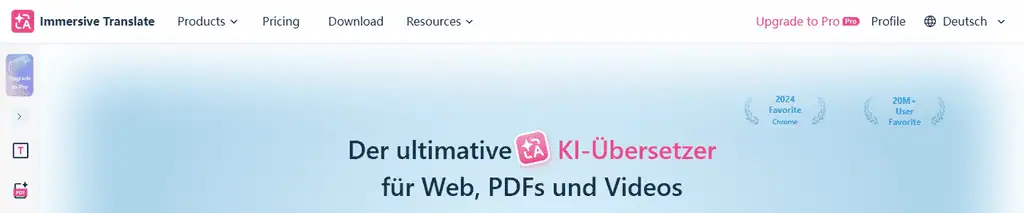
The clearest example of the gap comes from a company that sells AI page translation. Immersive Translate ranks on page one for this query.
Its own German homepage sets `html lang=”de”` and still serves all 14 of its `aria-label` strings in English, including “Toggle navigation menu” and “Go to slide 1”. The same 14 English strings ship on its Arabic and Simplified Chinese pages.
Its top navigation reads Products, Pricing, Download, and Resources above a fully German headline, while German labels for all four sit unused in the page’s own translation payload.
Text baked into an image is a separate problem. Spiegel served 125 images on 2026-09-09 and 87 carried no alt text at all, so no text pipeline can reach whatever those pictures say.
Can you paste a whole page into ChatGPT instead?
You can, and it’ll handle the prose, but it drops the attribute layer completely and wastes most of your context window. Across the same nine pages, the HTML ran a median 15.9 times the size of the visible text.
Paste the source and you spend the budget on markup. Paste the visible text and the second layer never arrives.
Spiegel’s business section is the extreme case at 66.7 times: 607 KB of markup wrapped around 1,236 words.
Neither approach translated a whole page, and both get described that way. An LLM earns its place later, at the step where you need consistent terminology across hundreds of strings.
How do you publish your own page in another language?
Publishing a translated page takes four steps: extract both layers of strings, translate them against a locked glossary, put each string back in its own slot, and declare the language pair with hreflang. AI handles step two. The other three are plumbing, and skipping the fourth is why so much translated content ends up competing with its own original.
Extraction comes first, and it decides whether the other three mean anything.
- Pull the strings, not the article. Export both layers into one file with a key beside each string: `meta.description`, `img[3].alt`, `h2[1]`, `jsonld.description`. Your string count is the unit of work here, not your word count. What you should see: your body paragraphs plus another 50 to 400 rows.
- Translate against a locked glossary. Product names, plan names, legal terms, and any label that also lives inside your app get a fixed translation the model isn’t allowed to reinvent. Term drift across a long document is the standard failure, and it ends with two names for the same button on one page. What you should see: each glossary term rendering identically everywhere.
- Put each string back in its own slot. Body prose into the body, meta description into the meta description, alt text into alt text. Half-finished is the normal state, which is exactly what the German page above demonstrates. What you should see: view source, search for your source language, and find nothing.
- Declare the result. Set `lang` on the `html` element, add a self-referencing hreflang plus one per alternate, and put every URL in the sitemap. Six of the nine pages I audited carried no hreflang link at all. What you should see: Search Console reporting the language pair with no return-tag error.
Past one page, that loop becomes a build rather than a task, and a platform starts earning its fee. Software localization is the same problem at product scale, and I put one of the aggregators through a full test in the MachineTranslation.com review.
Does Google penalize AI-translated pages?
No. Google’s spam policies never name machine translation as spam on its own. Translation appears once, as one route to bulk pages inside the scaled content abuse section, and the qualifier at the top of that section does the real work: the policy targets pages generated primarily to manipulate search rankings.
The scaled content abuse section reads, in part: “(including through automated transformations like synonymizing, translating, or other obfuscation techniques), where little value is provided to users” (checked 2026-09-09). The clause commentary keeps dropping sits directly above it, describing pages “generated for the primary purpose of manipulating search rankings and not helping users.”
The older instruction to block automatically translated pages with robots.txt is gone too. Google removed it from the robots meta tag documentation on 11 June 2025 and logged the edit as documentation-only, with no change in behavior.
Translate one page because a reader asked for it and you sit outside that policy. Translate 4,000 pages into nine languages nobody asked for and you sit inside it, whichever model did the typing.
Where AI page translation still breaks
Legal, medical, and literary text is where both jobs fail, and no amount of prompting fixes it. A 2024 EMNLP evaluation put four AI systems against human translators on literary excerpts, and trained bilingual annotators preferred the human version 86.7% to 95% of the time depending on the language pair. I went through that paper and the rest of the evidence in human translation vs AI translation.
Four more failure modes, roughly in the order they’ll bite you:
- Low-resource languages break earlier and much more quietly. Tamil output arrives confidently wrong in ways an English-only reviewer won’t catch.
- Right-to-left targets break the layout rather than the words. Arabic and Hebrew want mirrored padding, flipped icons, and a different reading order, and a string file carries none of that.
- Your app’s own messages break on their own schedule: validation errors, transactional email, invoices, and the checkout all sit outside the page, so a translated page in front of an English funnel is normal and nobody tests for it.
- Images stay in the source language, because text inside a picture isn’t text as far as any of these tools are concerned.
Which method fits which job
Use your browser for reading and a string pipeline for publishing. For reading, Firefox is the pick when the page is confidential because the text stays on your machine, and Chrome is the pick when you need an unusual language pair. For publishing, treat translation as a string management problem and budget for the attribute layer, not just the article.
Two conditions change the answer. If your page carries legal, medical, or literary weight, buy human review and use AI for the first draft only. If you’re publishing more than a handful of pages, a platform costs less than the hreflang and terminology bugs you’ll otherwise ship.
Run the audit on your own page before you start. Open the page, view source, and count the title tag, meta description, alt attributes, and JSON-LD fields. That number is your real scope, and it’s usually a surprise.
One honest caveat: none of this covers text inside images, and on an image-heavy page that can be most of what a reader needs.
Frequently Asked Questions
How much does it cost to translate a website?
Browser translation for reading costs nothing. For publishing, professional human translation runs roughly $0.10 to $0.30 per word, while a localization platform costs a subscription plus a per-word rate two orders of magnitude cheaper. The real cost sits in review and in the engineering time for hreflang and string management.
How long does it take to translate a website?
A single page through a browser takes 5 seconds. A single page done properly for publishing, with both layers extracted, a glossary locked, and hreflang declared, takes a few hours the first time and far less once the pipeline exists. A full site is a project measured in weeks, mostly spent on review rather than translation.
Can you translate a website without code?
Yes, for reading, and largely yes for publishing. Browser translation and extensions need no code at all. On the publishing side, a WordPress plugin or a hosted localization platform handles extraction, storage, and hreflang for you, which is the main thing you are paying for.
How do you translate a WordPress site or a WooCommerce checkout?
Use a translation plugin rather than a browser, because the checkout, emails, and validation messages live in WordPress and WooCommerce rather than in the page. A plugin registers those strings so they can be translated and served per locale. Translating only the visible page copy leaves customers in a bilingual funnel at the exact moment they are paying.
How do you translate a page on an iPhone?
Open the page in Safari, tap the page settings button in the address bar, and choose Translate. Apple notes that available languages vary by country and region, so if your target language isn’t there, add it under Language and Region settings first. The translation is temporary and disappears when you reload.
Does Google Translate still have a website widget?
The old embeddable Website Translator widget is no longer the recommended route for site owners, and pasting a URL into Google Translate produces a translated copy on Google’s domain rather than on yours. Neither approach gets your translated page indexed under your own URLs, which is the whole point of doing it properly.
Related Posts

Agentic AI pentesting tools replay the original exploit after a patch ships, then try mutated payloads. Eight platforms ...

AI adoption statistics, sourced: 78% of companies say they use AI and only 21% have redesigned a workflow. Here is the h...

A free, cited AI glossary covering 264 machine learning and generative AI terms, with plain-English definitions and cros...

Real examples of artificial intelligence in digital marketing across content, SEO, ads, email and analytics, with what e...

AI marketing on Reddit: I pulled 239 threads across 7 subreddits. Marketers use AI daily and mostly dislike the products...

The AI prompt manager I built for Chrome and Firefox: save, tag, version and export your prompts locally. Free, no accou...