

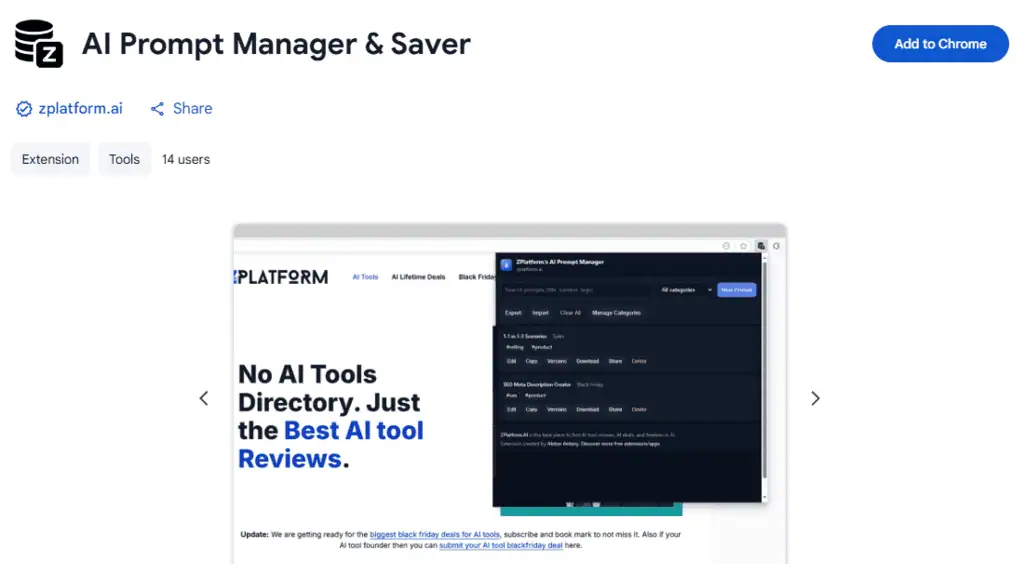
The ZPlatform AI Prompt Manager is a Chrome and Firefox extension I built to save, categorise, tag, version, and export AI prompts locally. Free, no account, no cloud sync.
Everything stays in your browser storage. It exists because scattered prompts across notes, Slack DMs, and a “prompts.txt” file on the desktop is how good prompts get lost. Install it, dump your prompts in once, and never lose one again.
Why I built it
I use AI daily and I lost the same three prompts about six different times before I got tired of it. The best prompts are the ones you refined over weeks. Losing them costs you the refinement, not just the text.
I looked at the SaaS options first. Every one wanted an account, sent my prompts to their server, and charged $5-15 a month for a feature list I already had.
I do not need a paid cloud service to hold a text file. So I shipped the extension I actually wanted: local storage, no account, no telemetry, JSON export, version history on every prompt.
The AI Prompt Generator is the companion tool for building the prompts you save.
What it does, in one screen
Save a prompt with a title, category, and comma-separated tags. Search across title, content, category, and tags in real time.
Filter by category dropdown or click any tag chip. Every save creates a new version, so you can revert, copy, or preview any older version.
Export everything as `zplatform-prompts.json` for backup or team sharing. Import replaces your current library, so export before you import if you want a rollback point. Clearing all data takes two confirmation dialogs.
Categories are flat, not nested. Use tags for the second axis. `#tone-formal` across a “Marketing” category and a “Documentation” category gives you the cross-cut without folders.
The features that matter
| Feature | Why it matters |
|---|---|
| Local-only storage (browser storage API) | No account, no server round-trip, no telemetry |
| Version history per prompt | Refine safely; revert to yesterday’s wording in one click |
| Category + tag dual axis | Flat categories beat nested folders once you have more than 50 prompts |
| JSON export / import | Backup, transfer between devices, share with a team |
| Search across title, content, category, tags | Works as-you-type, no click required |
| Individual .txt download | Grab one prompt to hand off outside the extension |
| Editor state persistence | Close the popup mid-edit, come back, keep going |
Chrome storage caps sit around 5-10 MB per extension. In practice that is thousands of prompts before you feel it. If you are hoarding 40-page prompts for image models, you will hit the ceiling faster.
How data privacy works
Everything the extension stores lives in `chrome.storage.local` on Chrome or `browser.storage.local` on Firefox. That storage is browser-specific. Data does not leave your device. No account. No login. No analytics. The only permission requested is storage. The extension cannot read the pages you visit.
If you uninstall, your data is deleted with it. Export first. If you use device encryption, the storage inherits that protection; there is no separate encryption layer inside the extension.
If you switch devices or browsers, export from one and import into the other. There is no cloud sync, and adding one would defeat the point of the extension.
Three workflows people actually run
Marketing. Categories: Social, Email, Blog. Tags: `#linkedin`, `#tone-formal`, `#subject-line`. Filter by “Social” to see every social prompt, then click `#linkedin` to narrow to LinkedIn.
Development. Categories: Code Review, Debugging, Documentation. Tags: `#javascript`, `#security`, `#best-practices`. The version history is the payoff here. Prompt refinement for code review takes six or seven iterations. Reverting to the version that worked last week is the killer feature.
Content. Categories: YouTube, Blog, Social. Tags for tone (`#tone-casual`, `#tone-formal`) and format (`#video-script`, `#blog-outline`). Cross-cut works because a `#tone-formal` script on YouTube and a `#tone-formal` LinkedIn post share the same voice constraint.
To fill any of these libraries with better prompts, our ChatGPT prompts for SEO keyword research is a starting pack, and how to make ChatGPT write like a human covers the prompt structure that survives model updates.
Installing
Chrome Web Store: AI Prompt Manager & Saver. Install, pin to toolbar, click the icon, hit “New Prompt”. First launch shows an empty state until you save your first one.
Firefox: install from the add-ons store, same flow. The extension uses standard WebExtension APIs, so behaviour matches between browsers except for storage location.
For other AI-forward browser extensions I have vetted, see the ranked list of AI Chrome extensions and AI Firefox add-ons.
The honest limits
Categories are flat. There is no folder tree. If you want two-level nesting, tags cover it, but it is not the same shape as a filesystem.
You cannot filter by multiple tags at once. One click, one tag. To combine two tags, use the search box with both terms.
There is no cloud sync between devices, on purpose. You export from one and import into the other. Import replaces the target library, so export the target first if you want to keep both.
There is no bulk delete. Individual delete or Clear All (with two confirmations). This is a deliberate safety choice, not an oversight.
Version history keeps every version by design. Deleting a prompt deletes all its versions with it. You cannot delete a single older version independently.
Who this is not for
If you need a paid SaaS with team seats, real-time collaboration, and a cloud dashboard, this is not it. Buy a paid tool. If you want prompts synced automatically across five devices without exporting anything, this is not it either.
This is for people who use AI daily, refine prompts, and want them saved locally in a place they control. That is the entire pitch.
Related Posts

Agentic AI pentesting tools replay the original exploit after a patch ships, then try mutated payloads. Eight platforms ...

AI adoption statistics, sourced: 78% of companies say they use AI and only 21% have redesigned a workflow. Here is the h...

A free, cited AI glossary covering 264 machine learning and generative AI terms, with plain-English definitions and cros...

Real examples of artificial intelligence in digital marketing across content, SEO, ads, email and analytics, with what e...

AI marketing on Reddit: I pulled 239 threads across 7 subreddits. Marketers use AI daily and mostly dislike the products...

An AI shopping assistant finds products and compares prices for you. Which to use across ChatGPT, Gemini, Rufus and Perp...