



Verdict: Buy
What I Like
- Most beginner-friendly interface of any SEO tool reviewed, with tooltips and plain explanations on nearly every metric
- Covers the full core SEO workflow (keyword research, rank tracking, audit, backlinks, content ideas) in one dashboard
- Cheapest entry into a real SEO platform, with a rare lifetime deal that pays for itself in under a year
- Reliable search volume and CPC data you can actually make decisions on
- Solid free Chrome extension and a genuinely responsive mobile experience
- Backed by Neil Patel's free training library, which helps beginners learn alongside the tool
What Is Missing
- Keyword difficulty scores underestimate real competition, the most decision-affecting flaw
- Backlink and referring domain counts run well below Ahrefs, Semrush, and Moz
- Organic traffic estimates tend to run high
- Free plan (3 to 5 searches per day) is too limited for real work
- Keyword tracking caps (125 on Individual) are restrictive for content sites
- Missing advanced features like keyword gap analysis and lost-backlink tracking
- Occasional loading hiccups, though a refresh clears them
Ubersuggest Review Summary
| Field | Detail |
|---|---|
| Tool | Ubersuggest |
| Category | All-in-one budget SEO platform: keyword research, rank tracking, site audit, backlinks, content ideas |
| Best use case | Beginners, freelancers and small businesses running one to three sites who need affordable keyword and rank data |
| Price | Free plan: yes, but capped at roughly 3 to 5 searches per day. Individual $29 per month or $290 one-time lifetime, Business $49 or $490, Enterprise/Agency $99 or $990. 7-day free trial on paid plans. |
| Verdict | Buy the lifetime tier if you run one small site for years, skip it entirely for agency or link-building work |
Quick Answer: Is Ubersuggest Worth It?
Ubersuggest is Neil Patel’s budget all-in-one SEO platform covering keyword research, rank tracking, site audits, backlinks and content ideas from $29 per month, with a rare one-time lifetime licence from $290. Its search volume, CPC and rank tracking are accurate enough to act on. Its keyword difficulty scores underestimate real competition and its backlink counts run well below Ahrefs, Semrush and Moz for the same domain. Verdict: excellent value for beginners and small sites, the wrong tool for anyone whose decisions depend on accurate difficulty or link data.
How Does Ubersuggest Work for Keyword Research?
Ubersuggest works from its own crawl index and clickstream estimates rather than live queries, which is why some of its numbers hold up and others do not.
- Seed expansion. You enter one topic and it returns related terms, questions and prepositions from its keyword database, each with volume, CPC and a difficulty score. Suggestion volume from a single seed is generous enough to plan a full content cluster.
- Volume and CPC. These come from estimation models similar to those the larger tools use, and in side-by-side testing they landed in the same ballpark as Ahrefs and Semrush. Not identical, close enough to decide whether a keyword is worth pursuing.
- Difficulty scoring. A 0 to 100 SEO Difficulty score is calculated from its own link index. Because that index is smaller than the enterprise tools’, the scores skew low, which is the single most consequential flaw in the product.
- Content Ideas. Instead of estimating difficulty, this report shows the articles already ranking for your topic with estimated traffic, backlinks and social shares, which is a more reliable way to judge competition inside the tool.
- Rank tracking. You connect a domain and optionally Google Search Console. Tracked positions are checked on a schedule and reported in the dashboard, capped at 125 keywords on Individual, 150 on Business, 300 on Agency.
- Site audit. A crawl returns a health score plus prioritised on-page issues in plain language: missing meta descriptions, slow pages, broken links, duplicate titles.
Connecting Search Console makes your own site’s data materially more accurate, at the cost of granting a third party access to your verified property. That is a judgement call to make before you connect it, not after.
Who Is Ubersuggest Best For (and Not For)?
Ubersuggest is best for:
- Complete SEO beginners. The most beginner-readable interface of any SEO tool I have reviewed, with tooltips and plain-language explanations on nearly every metric.
- Small business owners with one site they will keep for years. The $290 lifetime licence breaks even against monthly billing in about 10 months and costs nothing after that.
- Bloggers and freelancers tracking under 125 keywords. That is where the plan limits stop mattering.
- Local businesses targeting low-competition terms. The difficulty scoring inaccuracy does not bite when the real competition is thin.
- Anyone doing paid search alongside SEO. The CPC data is reliable enough to plan with.
Ubersuggest is not for:
- Agencies and client work. Wrong numbers in a client deck cost credibility, and the data ceiling arrives fast.
- Serious link builders. The backlink index is too shallow to base a link strategy on.
- Content sites with hundreds of pages. 125 tracked keywords on Individual runs out quickly and you end up choosing which rankings you are allowed to care about.
- Anyone needing keyword gap analysis or lost-backlink alerts. Neither exists in the product.
- People expecting a working free tool. Three to five searches a day is a sample, not a plan.
What Are the Limitations of Ubersuggest?
- Keyword difficulty scores underestimate real competition. In testing, the same terms scored lower here than in Ahrefs and Semrush. A keyword shown as “37, very doable” can in reality sit closer to 65, which means you write the article, wait, and never crack page two, having done exactly what the tool told you.
- Backlink and referring domain counts run well below Ahrefs, Semrush and Moz on every domain checked. You can conclude a competitor has 40 referring domains when they have 300, and build an entire link plan on a number that is wildly wrong.
- Organic traffic estimates run high. Usable for “is competitor A bigger than competitor B”, unusable for “how much traffic does this page get”.
- The free plan blocks you within minutes. Roughly three searches per day without an account, five with one, then a hard stop until tomorrow.
- Tracked keyword caps are restrictive. 125 on Individual, 150 on Business, 300 on Agency.
- No keyword gap analysis and no lost-backlink tracking. Two of the features experienced SEOs rely on most.
- The site audit gets shallow above a few hundred URLs. On a large site a dedicated crawler catches issues this misses entirely.
- Occasional loading hiccups, clearable with a refresh but noticeable.
- Search Console connection is a privacy tradeoff. Better accuracy for your own site in exchange for third-party access to verified data.
What Are Ubersuggest’s Alternatives?
| Alternative | Price | Pick it instead when |
|---|---|---|
| Ahrefs | From $129 per month, no lifetime option | Backlink depth and difficulty accuracy drive decisions worth more than the price difference |
| Semrush | From $139.95 per month, no lifetime option | You need keyword gap analysis, competitive research at depth, and a full marketing toolkit beyond SEO |
| Google Search Console | Free | You only need accurate position, impression and click data for sites you own, and can live without keyword research |
For other budget challengers tested the same way, see the Morningscore review and the Semdash review. For free question research specifically, see the Answer Socrates review.
My Ubersuggest Review Conclusion
I bought Ubersuggest and tested it against Ahrefs and Semrush on the same keywords and the same domains, which is the only way this question gets answered honestly.
What the side-by-side showed. Search volume and CPC came back in the same ballpark as both premium tools, close enough to make real decisions on. Rank tracking lined up with Google Search Console and Ahrefs, with only the normal variance you get between any two trackers. Those two results genuinely surprised me for a $29 tool.
Where it broke. I deliberately included broad terms like “cloud computing” that are obviously competitive, and Ubersuggest returned difficulty scores below what Ahrefs and Semrush reported for the same keywords, every time. Backlink counts came in lower than Ahrefs, Semrush and Moz on every domain I checked. Organic traffic estimates ran above what I knew to be true from actual analytics.
So my verdict splits by task, not by score. Use it for volume research, content ideas, rank tracking and basic audits. Validate difficulty by opening the actual Google results and looking at who ranks, and validate links with a second tool before betting work on them. The five-minute test I would run today: start the 7-day trial, put your three most important keywords through it, then check each one against the live SERP. That will tell you more than any review, including this one.
When I recorded my full Ubersuggest video, the comment that kept coming up from my community was the same one I had in my own head: “Is this actually free, and is the data any good?” Both halves of that question have a clear answer once you stop reading the marketing page and start clicking around inside the tool with a site you actually own.
So I did exactly that. I’ve tested more than 50 SEO and AI tools with my own money over 15 years, I run zplatform.ai, and my default setting with any tool is doubt. I don’t care how clean the dashboard looks if the numbers are wrong or the work doesn’t move rankings. This Ubersuggest review is the written version of that hands-on test: every feature, the pricing math, where the data held up against Ahrefs and Semrush, and where it fell apart.
By the end you’ll know whether Ubersuggest fits your skill level, your budget, and your goals, or whether you’re better off spending the same money somewhere else. If you only have two minutes, jump to the verdict. If you want the receipts, keep reading. Want the short version of where it sits against pricier tools first? Compare lifetime vs subscription deals here and come back.
Key Takeaways
- Ubersuggest is the most affordable entry into a full SEO platform, starting at $29/month, with a rare lifetime deal that almost no major competitor offers.
- The keyword search volume and CPC data are reliable enough for real decisions. The keyword difficulty scores and backlink counts are not, and that is the single biggest reason to be careful.
- The interface is the most beginner-friendly of any SEO tool I have reviewed. Tooltips and plain-language explanations sit on almost every metric.
- For beginners, freelancers, and small businesses running one to three sites, it covers about 80% of daily SEO work at roughly 20% of the cost of Ahrefs or Semrush.
- Skip it if you run an agency, track more than 125 keywords, or need deep backlink and keyword gap analysis. You will hit the ceiling fast.
The cheapest tool is only a bargain if its numbers are good enough to act on. Ubersuggest passes that test for some jobs and fails it for others. (Alston Antony)
What Is Ubersuggest and Who Is Neil Patel?
Ubersuggest is an all-in-one SEO tool owned by Neil Patel that bundles keyword research, rank tracking, a site audit, backlink analysis, and content ideas into one dashboard aimed at beginners and small businesses, and it appears in my roundup of the best AI SEO tools. It started life as a free keyword research tool, which is why so much old content online still calls it “free.” Today it runs a freemium model with a limited free plan and paid tiers.
That history matters because it shapes expectations. Neil Patel is one of the most visible digital marketers on the planet, and he acquired Ubersuggest and rebuilt it into a budget alternative to the enterprise tools. The pitch is simple: most people do not need a $129/month platform with millions of data points they will never open. They need search volume, a difficulty estimate, some content ideas, and a way to track whether their rankings are going up.
On that promise, Ubersuggest mostly delivers. The tool covers the core SEO workflow end to end, much like the gamified platform I put through the same test in my Morningscore review. You can research a keyword, see related suggestions, check what is ranking, audit your own pages, and watch your positions over time, all without leaving the dashboard. For someone who has never touched an SEO tool, that single-window simplicity removes a real barrier.
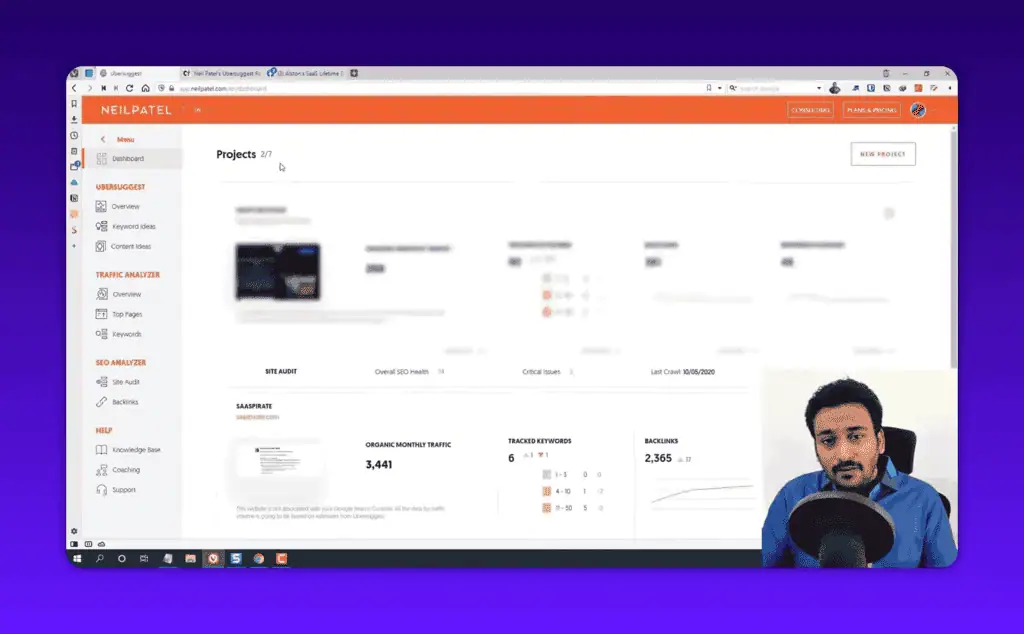
Here is the projects dashboard you land on, with traffic, tracked keywords, and backlinks summarized up top.
The thing to understand about Neil Patel as the face of this tool is that the brand cuts both ways. The name brings trust and a huge free training library, which genuinely helps beginners. It also brings skeptics who assume anything with a marketing guru’s name attached is hype. My job here is to ignore both reactions and look at what the tool actually does on a real site.
Want the honest filter before you buy any SEO tool? That is the whole reason I publish these tests. See how I evaluate tools before spending a dollar.
How Much Does Ubersuggest Cost in 2026?
Ubersuggest costs $29/month for Individual, $49/month for Business, and $99/month for Enterprise/Agency, with one-time lifetime deals at $290, $490, and $990 for the same three tiers. There is a 7-day free trial on the paid plans and a permanent but heavily limited free plan.
The pricing is genuinely the headline feature, so it deserves a clear table. I verified these figures against the current Ubersuggest pricing page.
[TABLE: Ubersuggest 2026 pricing]
| Plan | Monthly | Lifetime (one-time) | Websites | Tracked keywords |
|---|---|---|---|---|
| Individual | $29/mo | $290 | 1 | 125 |
| Business | $49/mo | $490 | 2 to 7 | 150 |
| Enterprise / Agency | $99/mo | $990 | 8 to 15 | 300 |
The lifetime deal is the part most reviews underplay. Almost no serious SEO platform sells a one-time license anymore. Ahrefs and Semrush are subscription-only, and they start far higher. If you take the Individual lifetime deal at $290 and compare it against $29/month, you break even in about 10 months and then use the tool for years at no extra cost. For a small business owner who plans to keep one site for the long haul, that math is hard to argue with.
The free plan is where people get confused. Without an account you get roughly three searches per day. Create a free account and you get around five per day before the tool blocks you and asks you to upgrade or wait until tomorrow. That is not a working free tool, it is a sample. If your plan is to do real SEO entirely for free, Ubersuggest will frustrate you within ten minutes, and I would point you toward free AI and SEO tools that actually let you work instead.
Is the Lifetime Deal Actually Worth It?
The lifetime deal is worth it if you are confident you will use the tool for more than a year and you can live with its data limitations. It is not worth it if you are still tool-shopping or expect to outgrow it.
Run the numbers on the user this is built for: one local site, two blog posts a month, around 40 tracked keywords. At $290 once, 14 months later the total spend is still $290, while the same 14 months on Semrush would have cost over $1,800. At that scale the data accuracy problems I cover below barely bite, because low-competition local terms are exactly where being roughly right is good enough.
That is the honest framing for the lifetime deal. It is excellent value for a specific, narrow user. It is a trap if you buy it expecting Ahrefs-level depth and then need to switch tools anyway.
Ubersuggest Keyword Research Tool: Accurate Enough?
Ubersuggest’s keyword research tool is solid for search volume and CPC, generates a healthy list of keyword suggestions, but its keyword difficulty scores consistently underestimate real competition. That last point is the most important finding in this entire review, so I want to be specific about it.
When I research a keyword, I look at four things: search volume, keyword difficulty, CPC, and how many keyword suggestions the tool can generate from one seed term. To test Ubersuggest fairly, I ran the same keywords through it and through Ahrefs and Semrush side by side. I deliberately picked a mix, including broad two-word terms like “cloud computing” that you can safely assume are highly competitive, plus longer phrases.
Here is the keyword overview screen, which is clean and beginner-readable.
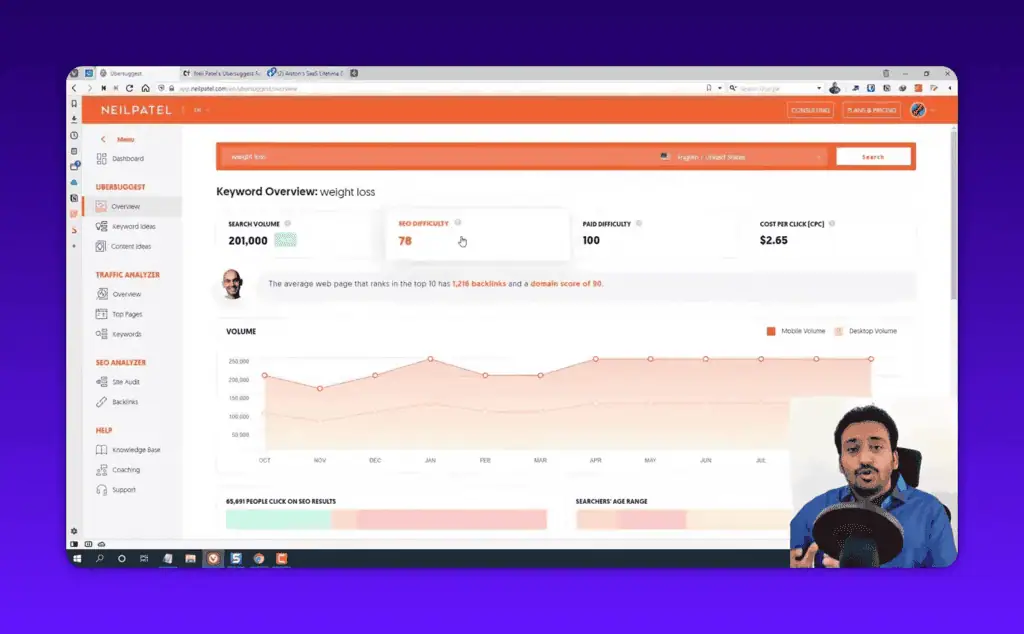
The search volume numbers came back in the same ballpark as the other tools. Not identical, because every tool estimates volume differently, but close enough that I would trust them to decide whether a keyword is worth pursuing. The CPC data was also reliable, which matters if you do any paid search alongside SEO. For a budget tool, getting these two right is a real achievement.
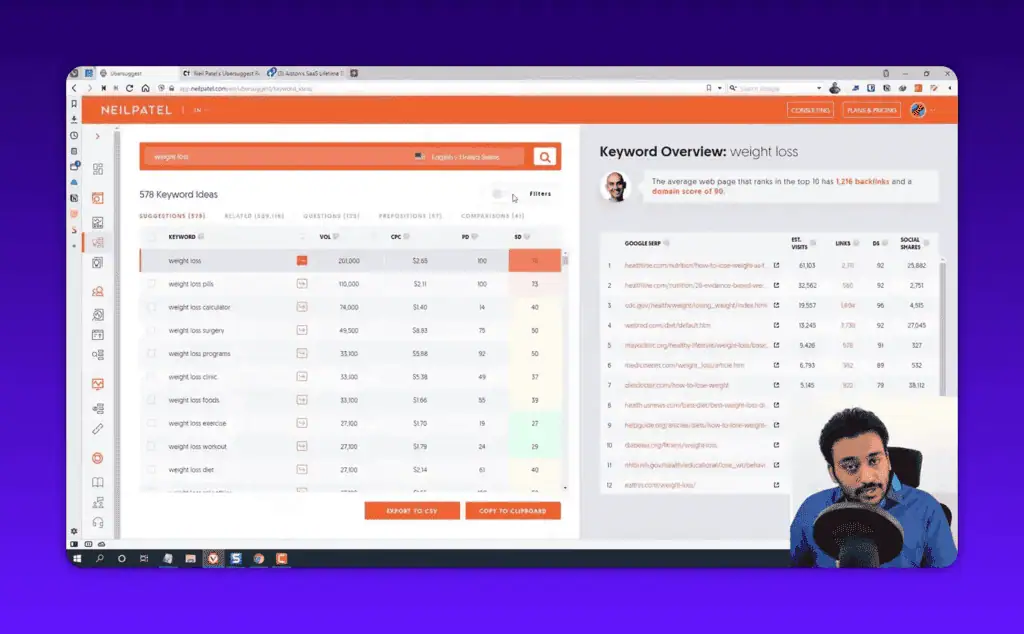
The keyword ideas table is where Ubersuggest earns its keep for content planning.
Why the SEO Difficulty Scores Are the Weak Point
The keyword difficulty score is the metric you use to decide whether you can realistically rank, and it is the one Ubersuggest gets least right. In my testing, the difficulty numbers it returned were lower than what Ahrefs and Semrush reported for the same terms, which means the tool was quietly telling me that competitive keywords were easier than they actually are.
That is a dangerous error for a beginner, because the whole point of checking difficulty is to avoid pouring months of work into a keyword you cannot win, which is exactly what my SEO how-to guides help you sidestep. If your tool says a term is “37 difficulty, very doable” when the reality is closer to 65, you will write the article, wait, and watch it never crack page two. You did the work the tool told you to do, and the tool was wrong.
My fix is simple and I recommend it regardless of which budget tool you use: never trust a single difficulty score. Pull up the actual Google results for your target keyword and look at who is ranking. If the first page is wall-to-wall big brands with thousands of backlinks, the keyword is hard no matter what number your tool shows. Use the difficulty score as a rough filter, then validate manually. Google’s own guidance on how Search ranks results is a better reality check than any third-party difficulty number.
Keyword Suggestions and Content Ideas
The volume of keyword suggestions Ubersuggest generates from a single seed term is genuinely good, easily enough to plan a content cluster. This is the feature I would actually use day to day. You type one topic and get a long list of related terms, questions, and prepositions, each with its own volume and difficulty, and for a free question-focused alternative see my Answer Socrates review.
The Content Ideas tool is a quiet standout. It shows you the articles already ranking and performing for your topic, along with estimated traffic, backlinks, and social shares for each one.
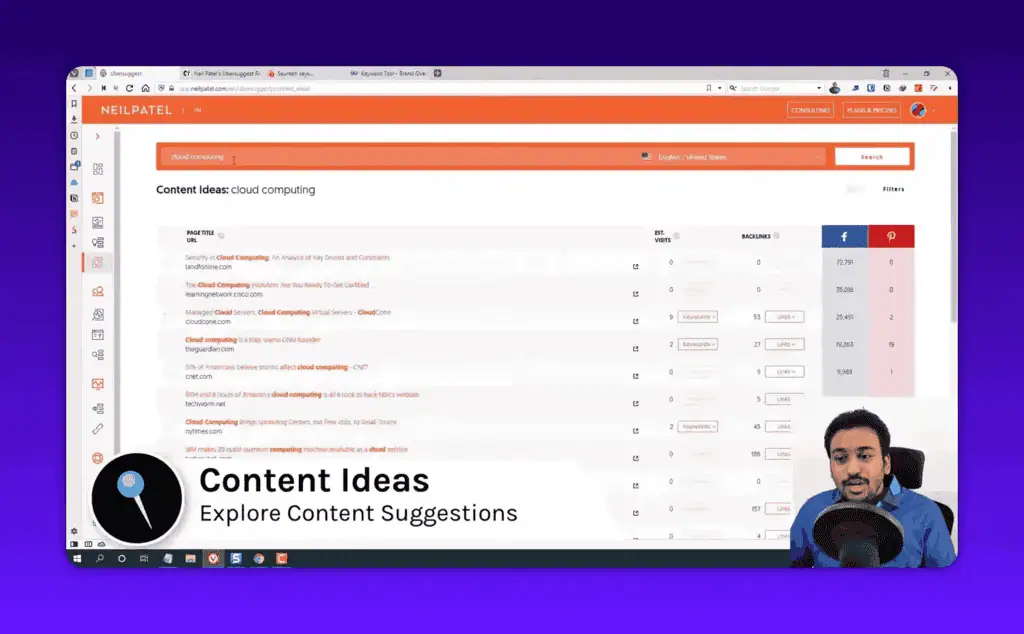
For a content marketer, that is a fast way to see what is working before you write a single word. The traffic estimates are directional rather than exact, but as a starting point for “what should I write about,” it does the job well.
Ubersuggest Rank Tracking and Position Monitoring
Ubersuggest’s rank tracker compares favorably to Google Search Console and Ahrefs in my testing, which is a pleasant surprise for a budget tool. Position tracking is one of those features where accuracy is easy to verify, because you can simply check your own rankings against what Search Console reports.
I tracked a set of keywords for one of my sites across Ubersuggest, GSC, and Ahrefs at the same time. The positions Ubersuggest reported lined up well with the others. There was the usual small variance you get between any two rank trackers, since they check from different locations and at different moments, but nothing that would lead me to a wrong decision.
Here is the position tracking dashboard.
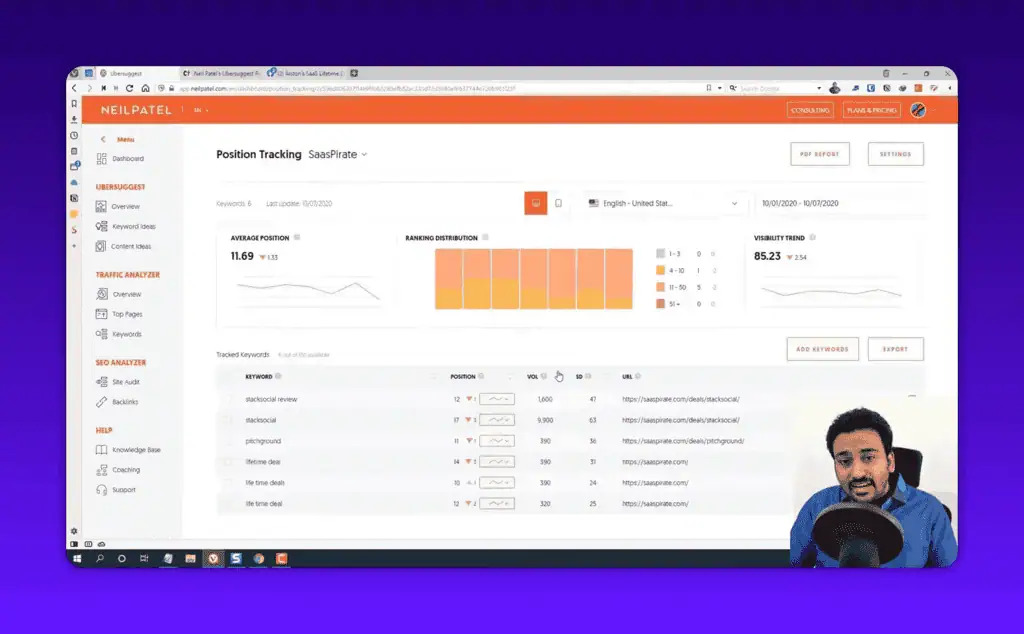
The real constraint on rank tracking is not accuracy, it is the keyword limit. The Individual plan tracks 125 keywords. That sounds like a lot until you are running a content site with a few hundred published pages, each targeting its own primary and secondary terms. You will run out of slots and start having to choose which keywords you are allowed to care about, which is a frustrating place to be.
For a small site or a local business tracking its money keywords, 125 is plenty. For anyone with ambitions beyond a couple of dozen pages, it is the first wall you hit. This is worth weighing against tools built for scale, and it is exactly the kind of tradeoff I map out when comparing tested SEO and AI deals for different user types.
Ubersuggest Traffic Analyzer and Competitor Analysis
The traffic analyzer is useful for quick competitor analysis, but its organic traffic estimates tend to run high and its backlink view lacks depth. This is the section where you punch in a competitor’s domain and see their estimated traffic, top pages, top keywords, and backlinks.
The domain overview gives you a fast read on a competitor.
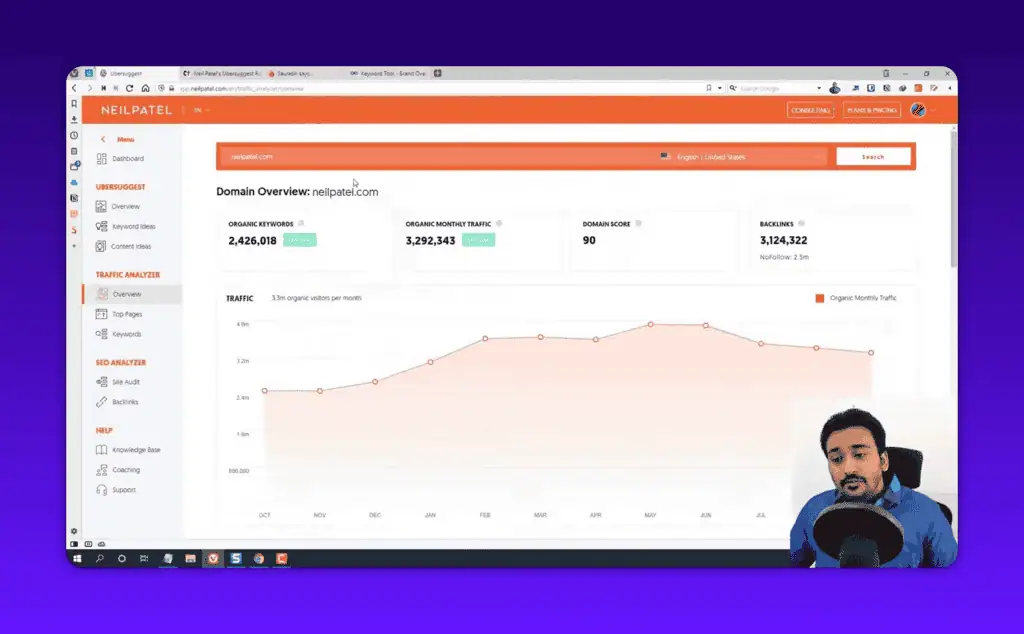
When I compared the organic traffic estimates against what I knew to be true from actual analytics, Ubersuggest tended to overestimate. This is the opposite problem from the difficulty scores, and it is less dangerous, but it still means you should treat the traffic numbers as a relative signal, not an absolute. They are fine for “is competitor A bigger than competitor B,” and unreliable for “exactly how much traffic does this page get.”
The Top Pages and Top Keywords reports are the genuinely useful part of competitor analysis here. Seeing which of a competitor’s pages pull the most traffic, and which keywords those pages rank for, gives you a clear map of where their SEO strength lives. For competitive research at a strategic level, this works.
Where it falls short is depth. There is no real keyword gap analysis comparing your site against a competitor’s, and no lost-backlink tracking. Those are the features experienced SEOs lean on, and their absence is a clear marker that Ubersuggest is built for the early stages of the journey, not the advanced ones.
Ubersuggest Site Audit and On-Page SEO
The site audit covers the basics well for small sites under a few hundred pages, flagging the common on-page issues a beginner needs to fix. You run the audit on your domain and it returns a health score plus a prioritized list of problems: missing meta descriptions, slow pages, broken links, duplicate titles, and so on.
For a small business site, this is exactly the right level. It tells you what is wrong in plain language and ranks the issues by how much they matter, so you are not left guessing where to start. A beginner can work down that list and meaningfully improve their site’s technical health without needing to understand the underlying detail of every flag.
The honest limit is scale and depth. On a large site with thousands of URLs, the audit is shallower than a dedicated crawler like Screaming Frog, and it will not catch the subtle technical issues those tools surface. But here is the thing: if you have a large complex site, you are not the person buying a $29/month tool anyway. For the audience Ubersuggest is built for, the audit does what it needs to.
A typical first audit on a small services site turns up a batch of pages with missing meta descriptions and a handful of broken internal links nobody knew existed. An afternoon of fixes later, pages that used to show no description in Google show a written one, and search click-through moves. That is the quiet, basic win this audit is good at surfacing, and it is worth real money to anyone who did not know those problems were there.
Ubersuggest Backlinks: The Biggest Accuracy Problem
Ubersuggest’s backlink data is its weakest feature, consistently reporting far fewer backlinks and referring domains than Ahrefs, Semrush, or Moz for the same site. If you take one warning from this review, take this one.
Backlink data quality comes down to the size and freshness of a tool’s link index, and this is exactly where the enterprise tools spend their money. Ahrefs and Semrush crawl the web aggressively and maintain enormous link databases. Ubersuggest’s index is smaller, and it shows. When I checked the same domains across all of them, Ubersuggest reported noticeably lower backlink and referring domain counts every time.
Here is the backlinks report.
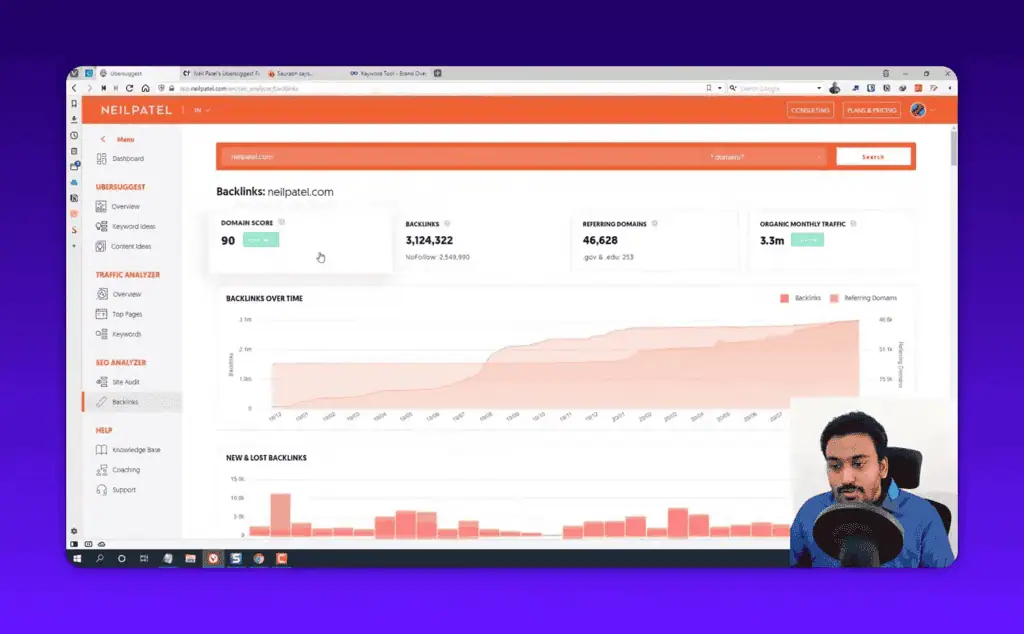
Why does this matter so much? Because backlink analysis is how you understand why a competitor outranks you and where you could earn links yourself. If your tool only sees a fraction of the real link picture, your competitive analysis is built on missing information. You might conclude a competitor has 40 referring domains when they actually have 300, and plan your entire link strategy around a number that is wildly off.
For light, directional use, knowing roughly which competitors have more authority than others, the backlink data is passable. For any serious link building or competitive backlink research, it is not enough, and you should use a dedicated tool for that part of your workflow. This is the clearest example of the budget tradeoff: you save a lot of money, and the place you pay for it is backlink depth.
Ubersuggest Chrome Extension and Mobile Access
The free Chrome extension is a genuinely handy add-on that surfaces keyword and traffic data directly in Google search results and on any site you visit. It is one of the better free pieces of the Ubersuggest ecosystem.
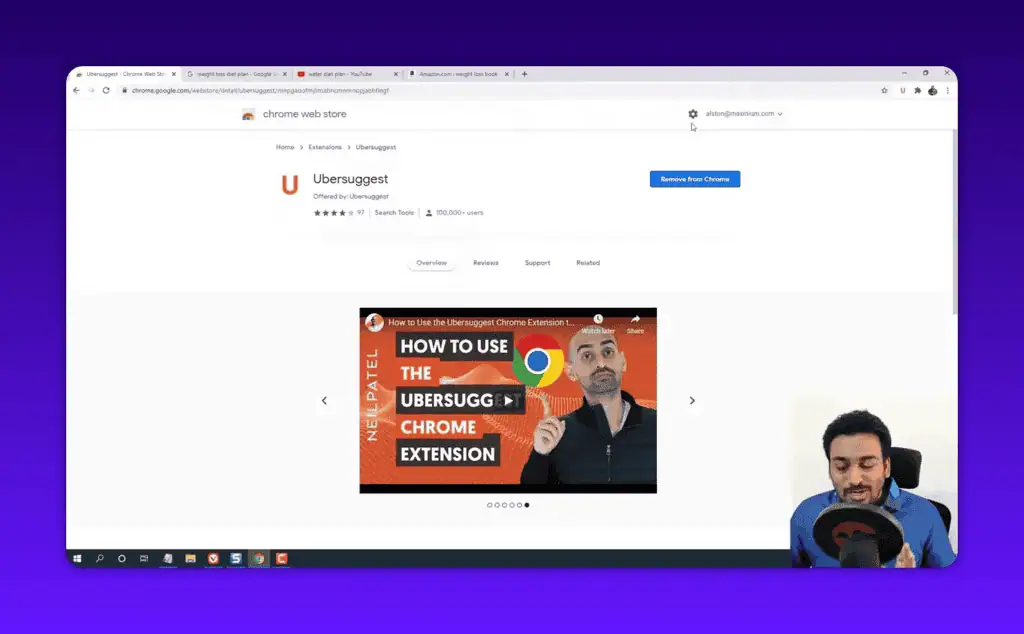
With the extension installed, you can search Google normally and see volume and CPC right under the results, or visit any website and pull up its traffic and top keywords without opening the main dashboard. For quick, in-the-moment research while you are browsing, it removes friction. The data carries the same accuracy caveats as the main tool, but as a free convenience layer it is a nice touch.
One detail I appreciated during testing: the web app is fully responsive on mobile. I checked it in a mobile browser view and the dashboard stayed clean and usable rather than breaking into an unreadable mess. Most SEO tools treat mobile as an afterthought, so a budget tool getting it right is worth noting for anyone who works from a phone or tablet.
Customer support is another quiet strength. When I needed help during testing, the responses were quick and actually useful, which is not something I can say about every budget tool. For beginners who will inevitably have questions, that responsive customer support matters more than it sounds.
It is also worth flagging a privacy consideration. Connecting your Google Search Console account lets Ubersuggest pull in your verified data, which makes the tool more accurate for your own site. If you’re cautious about granting third-party access to your Search Console, that’s a personal call to make before you connect it.
Ubersuggest vs Ahrefs vs Semrush: Honest Comparison
Ubersuggest wins on price and ease of use, while Ahrefs and Semrush win decisively on data accuracy, depth, and scale, though a cheaper challenger like the one in my Semdash review targets that same gap. There is no single “best” answer here, only the right tool for your stage and budget.
[TABLE: Ubersuggest vs Ahrefs vs Semrush]
| Factor | Ubersuggest | Ahrefs | Semrush |
|---|---|---|---|
| Starting price | $29/mo | $129/mo | $139.95/mo |
| Lifetime deal | Yes ($290+) | No | No |
| Ease of use | Excellent for beginners | Moderate | Steep learning curve |
| Search volume accuracy | Good | Excellent | Excellent |
| Keyword difficulty accuracy | Weak | Excellent | Strong |
| Backlink index depth | Shallow | Best in class | Very deep |
| Keyword gap analysis | No | Yes | Yes |
| Best for | Beginners, small sites | SEO pros, agencies | Marketers, agencies |
The way I explain it to my community is this. Ubersuggest is the tool you learn on and run a small site with. Ahrefs and Semrush are the tools you graduate to when SEO becomes core to your business and wrong data starts costing you real money. Paying five times more for Ahrefs is absolutely worth it when accurate backlink and difficulty data drives decisions worth thousands. It is wasted money when you have one site, ten blog posts, and a budget that matters.
If you are weighing these against each other seriously, I keep updated breakdowns of where each tool’s pricing and value land across the best tested SEO and AI tool deals, because the right pick genuinely changes depending on whether you are a hobbyist, a freelancer, or an agency.
Pros and Cons of Ubersuggest
After testing every feature, here is the honest balance sheet.
Pros:
- The most beginner-friendly interface of any SEO tool I have reviewed, with tooltips and plain explanations on nearly every metric.
- Covers the full core SEO workflow (keyword research, rank tracking, audit, backlinks, content ideas) in one dashboard.
- The cheapest entry into a real SEO platform, with a rare lifetime deal that pays for itself in under a year.
- Reliable search volume and CPC data you can actually make decisions on.
- A solid free Chrome extension and a genuinely responsive mobile experience.
- Backed by Neil Patel’s free training library, which helps beginners learn alongside the tool.
Cons:
- Keyword difficulty scores underestimate real competition, the most decision-affecting flaw.
- Backlink and referring domain counts run well below Ahrefs, Semrush, and Moz.
- Organic traffic estimates tend to run high.
- The free plan (3 to 5 searches per day) is too limited for real work.
- Keyword tracking caps (125 on Individual) are restrictive for content sites.
- Missing advanced features like keyword gap analysis and lost-backlink tracking.
- Occasional loading hiccups, though a refresh clears them.
Final Verdict: Is Ubersuggest Worth It in 2026?
Ubersuggest is worth it for the right person and a poor fit for the wrong one, and the dividing line is data accuracy. For beginners and small businesses on a budget, especially through the lifetime deal, it is one of the smartest SEO purchases you can make, because it removes the cost and complexity barriers that stop people from doing SEO at all. The interface alone makes it the tool I would put in front of someone touching SEO for the first time.
But I will not pretend the data problems do not exist. The keyword difficulty scores and the backlink counts are the least accurate I have seen, and those are not minor metrics. They are the exact numbers you use to decide what to target and how to compete. My honest recommendation is to use Ubersuggest for what it does well (volume research, content ideas, rank tracking, basic audits) and to validate difficulty and backlinks manually or with a second tool before you bet real work on them.
If those limitations improve, and I hope they do, this becomes a genuinely complete all-in-one SEO tool that could remove the need for anything else at the small-business level. Until then, go in clear-eyed. The concrete first step I would take today: start the 7-day trial, run your three most important keywords through it, then open the actual Google results for each and see whether the difficulty score matches reality. That five-minute test will tell you more about whether Ubersuggest fits your work than any review, including this one, and you can browse the rest of my tested verdicts in the review library.
For more tested verdicts like this one, where I buy the tool, run it on real sites, and tell you plainly whether to buy, wait, or skip, browse the full library of SEO and AI tool reviews, and subscribe for weekly deal alerts so you catch the lifetime offers before they expire.
Frequently Asked Questions
How accurate is Ubersuggest?
Ubersuggest is accurate for search volume, CPC, and rank tracking, but inaccurate for keyword difficulty and backlink data. In my testing the difficulty scores underestimated real competition and the backlink counts came in well below Ahrefs and Semrush. Use it for volume and tracking, and validate difficulty and links elsewhere.
Is Ubersuggest free?
Not really. Ubersuggest has a free plan, but it limits you to roughly three to five searches per day before blocking you. Older articles calling it “fully free” are outdated, since it switched to a freemium model. For real work you need a paid plan or the lifetime deal.
How much does Ubersuggest cost in 2026?
Ubersuggest costs $29/month for Individual, $49/month for Business, and $99/month for Enterprise/Agency. Lifetime deals are available at $290, $490, and $990 respectively. A 7-day free trial is included on the paid plans.
Does Ubersuggest have a lifetime deal?
Yes. Ubersuggest is one of the very few major SEO tools that still sells a one-time lifetime license, starting at $290 for the Individual tier. For a user who will keep one site for more than a year, it pays for itself in under 10 months versus the monthly plan.
Is Ubersuggest better than Ahrefs or Semrush?
No, not on data quality. Ahrefs and Semrush beat Ubersuggest decisively on backlink depth, keyword difficulty accuracy, and advanced features. Ubersuggest wins only on price and ease of use. Choose Ubersuggest if you are a beginner on a budget, and the premium tools if accurate data drives your decisions.
Can you use Ubersuggest for WordPress sites?
Yes. Ubersuggest works with any website including WordPress. You connect your domain and Google Search Console to run audits, track rankings, and analyze keywords. It does not slow your site down, since the analysis runs on Ubersuggest’s servers, not on your WordPress install.
Who should use Ubersuggest?
Beginners, freelancers, bloggers, and small businesses running one to three sites who want affordable, beginner-friendly SEO. It is not suited to agencies, advanced SEOs, or anyone who needs accurate backlink and keyword gap data for high-stakes decisions.
Liked this review? Pin ZPlatform as your Preferred Source.
Pinning us tells Google to make our hands-on AI reviews, verified lifetime deals, and founder interviews more likely to appear prominently for you in Top Stories and eligible AI Search experiences (AI Mode, AI Overviews). Set it once, no account needed on our end.
- 500+ AI tools tested with real budgets
- Verified deals - no dead affiliate links
- Editor: Alston Antony, 15+ years in SaaS & SEO
 Opens Google · takes 2 seconds
Related Posts

I tested AgainstData on 355 pages of Gmail data. Here’s my honest review: bulk unsubscribe, personal data deletion reque...

I ran AI-Text-Humanizer.com through ZeroGPT and AIscan24 with real before and after scores. Here is what works, what it ...

I ran five text samples through AIscan24, including two I wrote by hand. One scored 80% AI. Here is what this free detec...

Starting August 2, 2026, the EU AI Act’s transparency provisions become enforceable. That means if your website uses AI-...

My hands-on Answer Socrates review covering all features, free plan limits, pricing, and how it compares to AlsoAsked. I...

“I’ve spent $4,200 on 118 AppSumo lifetime deals over 5 years. Here’s my honest review: what works, what fails, and whet...