

| Tool | Decloak (decloak.dev), operated by Sparrow Technology Ltd, registered in England and Wales, company number 15676284 |
| Category | External web security scanner with an AI investigation agent, active testing (DAST) and sandboxed pentest tools, pitched at apps built with Lovable, Supabase, Bubble, Base44 and Next.js |
| Price | Free plan: one page per scan, 5 scans a day without an account, 10 signed in. Monthly: Starter £29, Pro £79, Enterprise £99. AppSumo lifetime: Starter $49, Pro $158, Enterprise $198, refundable for 60 days. All checked 2026-09-24. |
| Best for | Founders who shipped an AI-built app and have never had anyone look at its security |
| Not for | Teams that need a mature, fully documented vendor for an audit, and pentesters who need a client-grade report today |
| Tested | Free scan of zplatform.ai on 2026-09-24: 64/100, grade C, 25 findings in 10 seconds. The one High finding was a false positive, and most of the lost points came from vendors we added on purpose. |
| Verdict | Run the free scan on your own app, then check every finding it gives you. Buy the $198 Enterprise lifetime tier only if you will test DAST and pentesting inside the 60-day refund window. Skip the $158 Pro tier: it costs $40 less and has none of the active testing. |
I ran Decloak‘s free scan against zplatform.ai on 2026-09-24 and checked each finding against the site’s own code and headers. I did not buy a paid tier. What I say about the AI agent, DAST and pentesting comes from Decloak’s documentation and the AppSumo listing, and where those sources contradict each other, I say so.
What Decloak checks when you paste a URL
The free scan looks at one page from the outside, the way a visitor’s browser sees it, and grades it A to F in about 15 seconds. No account and no browser extension needed.
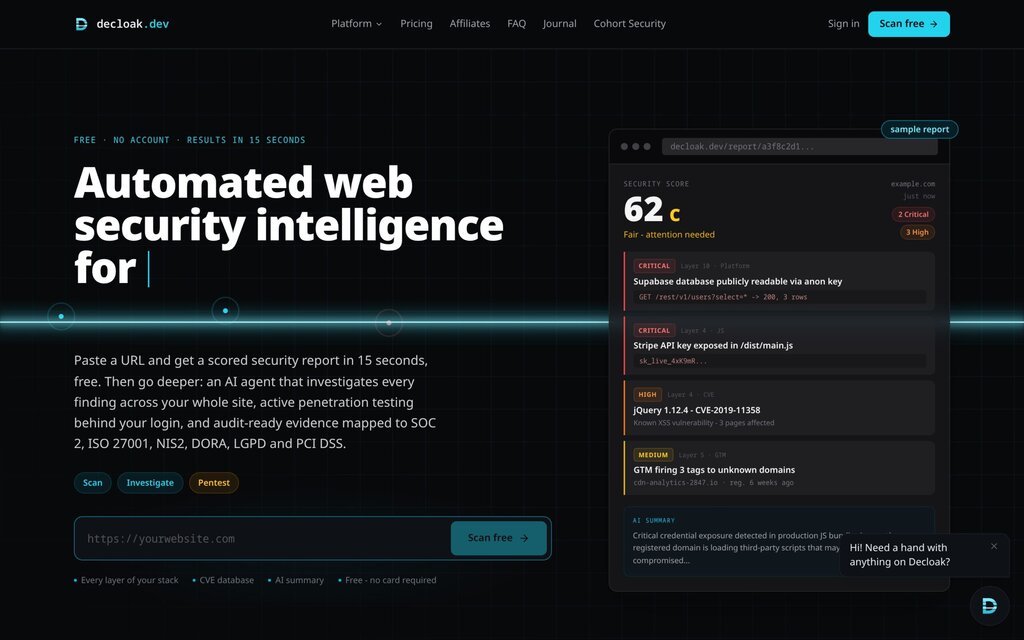
The sample report on the right of that page is the product in miniature. A leaked Stripe key, an outdated jQuery with a known CVE, a tag manager firing to a domain registered six weeks ago, and a Supabase table anyone can read.
The free scan runs eight checks on that one page:
- HTTP and TLS. HTTPS enforcement, HSTS, redirect chains, security headers, cookie flags, CORS, and CMS fingerprinting for WordPress, Shopify, Magento and others, matched against the National Vulnerability Database.
- Static HTML. External scripts, hidden iframes, 1×1 tracking pixels, and HTML comments that leak credentials or internal paths.
- Rendered page and network. A headless browser records every request the page makes on load.
- JavaScript. Library versions checked against Retire.js and the OSV database, plus hardcoded secrets and API keys in the bundle.
- Tag managers. Every Google Tag Manager container is fetched and parsed, and each tag’s destination domains are listed.
- Third-party domains. Each external domain is sorted by purpose, with WHOIS registration age and threat intelligence signals.
- AI summary. An LLM reads the findings and writes a plain-English executive summary.
- AI app builder checks. Decloak detects Supabase, Lovable, Base44, Bubble and Next.js, then checks for the mistakes each one is known for.
The numbering on Decloak’s own site does not agree on this list. The How it works page calls the AI app builder check “Layer 10” and puts DAST at 8 and DNS at 9. The FAQ says Enterprise “adds a ninth layer” of DAST and Starter “a tenth layer” for DNS. The sample findings in the screenshot use the first scheme. It is cosmetic, but it is the first of several places where the docs have drifted apart, and I come back to that below.
The Supabase check is the reason to run it
The eighth check is the one that makes Decloak worth fifteen seconds of your time if you built on Supabase.
A Supabase project’s anon key is public by design. It ships in your site’s JavaScript, and Row Level Security is the only thing stopping that key from reading every row in a table. Decloak takes the anon key and project URL your own site already exposes, then tries a short list of common table names, read-only. If a table answers, RLS is not doing its job.
Two details from the FAQ matter here:
- The report does not copy your data. A readable table shows its name, how many rows came back, and the field names present (for example “email, password_hash”). It never stores the values.
- It also looks for the service_role key in your client code. That key bypasses RLS entirely, so finding it in a public bundle is a worse result than an open table.
The same scan also checks for named platform CVEs such as the Next.js middleware authorization bypass, CVE-2025-29927. On a site with no AI app builder, the check reports a clean informational result and does not touch the score.
What the free scan found on zplatform.ai
I pasted zplatform.ai into the free scanner on 2026-09-24, with no account. The report came back in 10 seconds: 64 out of 100, a C, from 25 findings grouped into 17 fixes. The breakdown was 0 critical, 1 high, 7 medium, 3 low and 14 informational.
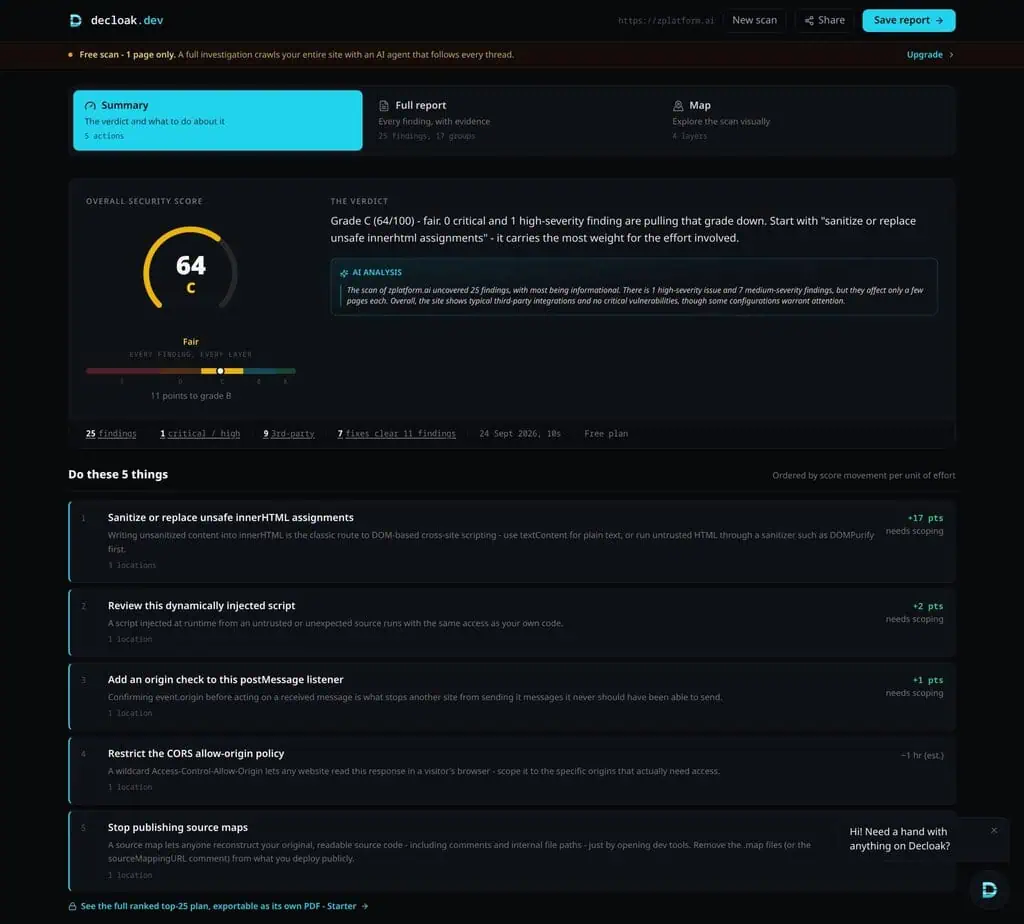
zplatform.ai is a static Astro site on Cloudflare Pages with a headless WordPress backend, no logins and no Supabase. That makes it a fair test of how much noise the scanner produces on a site that has already been hardened. I checked each finding against the site’s source code and live response headers.
| Finding | Severity | What it turned out to be | Accurate? |
|---|---|---|---|
| innerHTML fed by URL data, 3 locations | High | Our search box writes the q parameter from the URL into the page, but only after passing it through an escape function. I loaded the page with an image tag carrying an onerror handler in that parameter, and it rendered as plain text, with the handler never firing. The other two locations were Trustpilot’s widget loader and Astro’s own page router. | False positive for our code |
| Wildcard CORS header | Medium | Set on purpose in our Cloudflare headers file. The site has no cookies, sessions or private data for another site to read. | True, low risk here |
| Scripts injected after page load, 3 | Medium | Ahrefs Web Analytics, the Trustpilot widget and Cloudflare’s own Web Analytics script | Noise |
| “Unknown” third-party domains, 2 | Medium | analytics.ahrefs.com and widget.trustpilot.com, both listed by name in our Content-Security-Policy | Noise |
| Public source map | Medium | Trustpilot’s file on widget.trustpilot.com, not ours. The fix plan still told us to “stop publishing source maps”. | True, but not ours to fix |
| postMessage listener | Low | The report itself says the listener checks the sender’s origin, then deducts a point anyway | Contradicts itself |
The report’s own plan says fixing its top five actions would take the site from 64 to 89. Four of those five point at code we do not own or scripts we added deliberately, and the fifth is the CORS header we set on purpose. On a site like this one, the grade measures how many third-party vendors Decloak fails to recognise more than how exposed the site is.
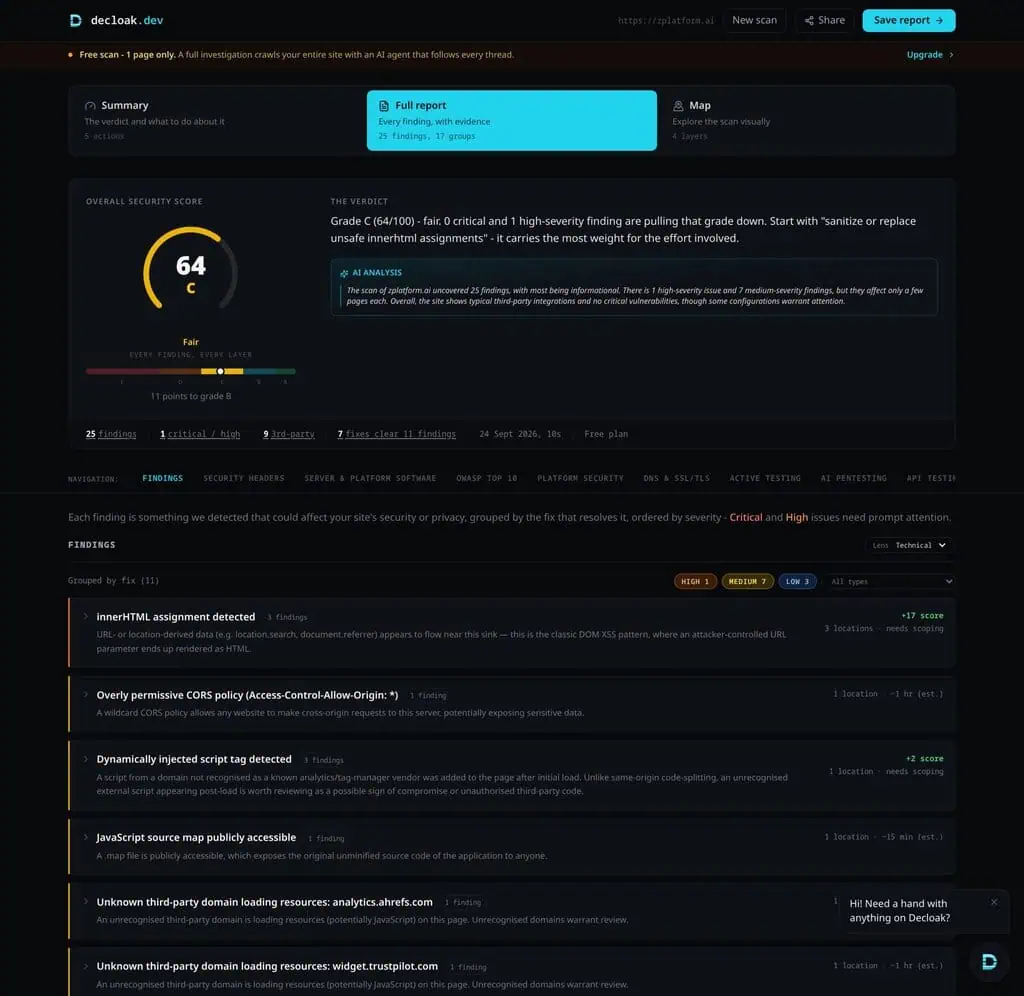
What it got right is worth stating too. It confirmed all six security headers were present, found no exposed .env or .git files, found no CORS origin reflection, and correctly reported that no AI app builder was in use. It also counted 47 network requests to 9 third-party domains, a useful inventory for anyone who has not audited their tags recently.
It missed the weakness I would have wanted flagged. Our Content-Security-Policy allows unsafe-inline scripts, which weakens the XSS protection a CSP exists to provide. The free report marked the header “present” and said nothing more, so the free tier checks whether a header exists, not whether it is any good. Two smaller defects showed up as well. The summary page and the full report swap the labels for “Known vulnerabilities” and “Server and platform software”, one calling a check “Not checked” that the other calls clean. And the scan fingerprinted the site as WordPress because the images load from our WordPress backend, when the pages themselves are served by Astro.
This was one page on a site with nothing built in Lovable or Supabase. It says nothing about the check Decloak is built around, a readable Supabase table, which I had no app to test. What it does show is that you should read every finding before acting on the grade.
Decloak pricing: monthly plans against the AppSumo lifetime deal
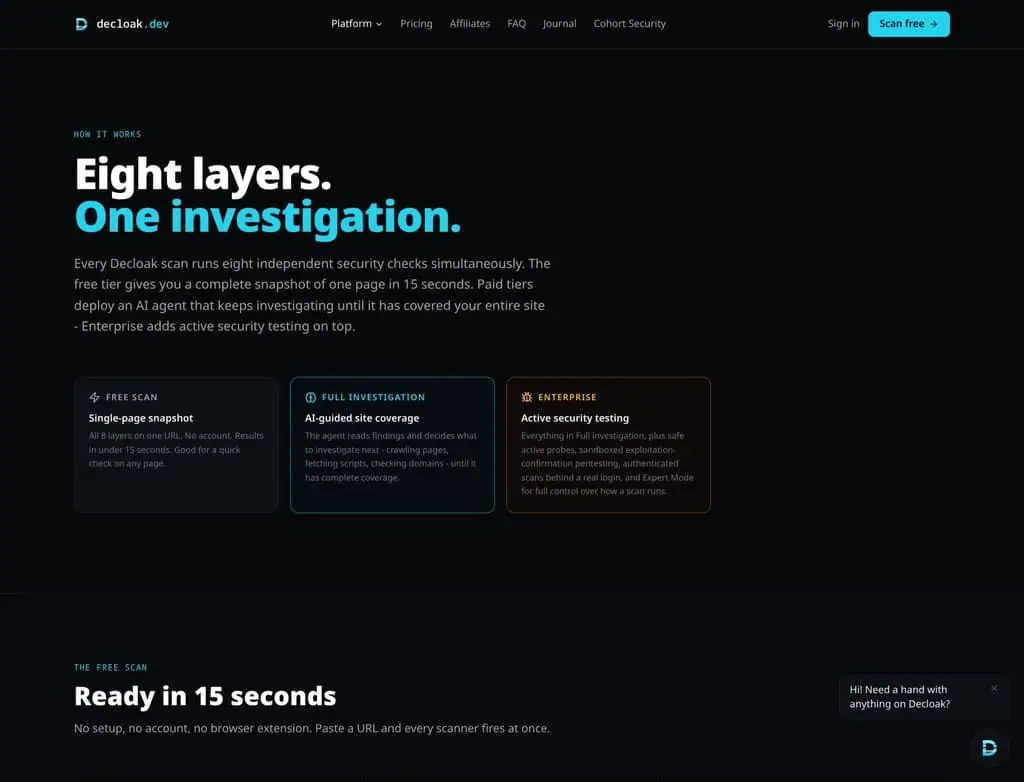
Decloak sells monthly plans in pounds on its own site and a one-time license in dollars on AppSumo. The product splits into three levels: the free one-page scan, the AI agent investigation on Starter and Pro, and active testing on Enterprise.
Here is what each tier gets you.
| Plan | Monthly on decloak.dev | Lifetime on AppSumo | Pages per scan | Agent scans per domain per day | What the tier adds |
|---|---|---|---|---|---|
| Free | £0 | n/a | 1 | 5 per IP without an account, 10 signed in | The eight checks, AI summary, OWASP Top 10 checklist, public report link |
| Starter | £29 | $49 | 50 | 5 | AI agent investigation, DNS and TLS analysis, subdomain takeover detection, priority fix list, PDF export, scheduled scans |
| Pro | £79 | $158 | 200 | 10 | Compliance mapping to six frameworks, team seats, API and MCP access, webhooks, white-label PDFs |
| Enterprise | £99 | $198 | 200 | 15 | DAST (3 a day per domain), AI pentesting (1 a day per domain), API endpoint testing, authenticated scans, Expert Mode, priority support |
Prices checked 2026-09-24 on the decloak.dev pricing section and the AppSumo plan table.
AppSumo lists the Starter tier’s value as $474, which is twelve months of £29 at about $1.36 to the pound. On that same conversion, every lifetime tier costs between 1.2 and 1.5 months of the equivalent subscription. That is a short payback. As I say about every lifetime deal, the maths only works if the company is still running the servers in year two.
The tier worth looking at is the gap between Pro and Enterprise. It is $40 on AppSumo. For that $40 you get everything that separates an active tester from a passive scanner: DAST, the sandboxed pentest tools, API endpoint testing and scans behind a login. Pro at $158 is the tier I would skip. If you only want passive coverage, Starter at $49 does that, and if you want active testing, Pro does not.
The AppSumo terms are short. You must activate the license within 60 days, you can move between the three tiers, and there is no code stacking. The listing sits in AppSumo’s Radar section, which means AppSumo checked the basics but did not vet the product. Its “We Got Your Back” guarantee does not apply, and the standard 60-day refund does. If you have not bought from AppSumo before, my AppSumo review covers how the refund window works in practice.
Who Decloak suits, and who should look elsewhere
Decloak suits:
- Solo builders on Lovable, Supabase, Bubble or Base44. The free scan checks for their most common failures, and it costs nothing to find out.
- Agencies watching many client sites. Scan limits are per domain rather than a shared pool, and Pro adds white-label PDFs and team seats.
- Small teams that want scheduled external scans. Starter reruns the Supabase check on every scheduled scan, so a table that reopens after a deploy gets flagged.
- Developers who work inside an AI coding agent. Pro and above expose a REST API and an MCP server, so Claude or Cursor can trigger a scan and read the result. If that is how you work, the best MCP servers report ranks the wider set of servers you can connect.
Look elsewhere if you are:
- Preparing for a SOC 2 or ISO 27001 audit. The compliance mapping is useful evidence, but the vendor is under three months into its public record, and its subprocessor list leaves one processor unnamed (more on that below).
- A professional pentester. The one buyer on AppSumo who works in pentesting found the tool promising and not yet client-ready. See the timeline below.
- Hoping to scan sites you do not own. Decloak’s terms require the owner’s explicit authorisation for any target, and they can close accounts that scan without it. A competitor’s site is off limits.
- Expecting a pentest replacement. Decloak’s own FAQ says a low grade is a signal for prioritising fixes and not a substitute for a full penetration test.
How the security score is calculated, and why it stops moving
Decloak publishes its scoring formula in the FAQ. It is worth reading before you buy, because it decides how the product feels after your first fix.
Every scan starts at 100. Each finding deducts points by severity. The first finding in a severity costs full weight, and each further one costs 60% of the one before it, up to a cap per severity.
| Severity | First finding | Cap | Deducted after 1, 2, 3 findings | Where it stops |
|---|---|---|---|---|
| Critical | 30 | 50 | 30, 48, 50 | 3 findings |
| High | 15 | 35 | 15, 24, 29.4 | 6 findings |
| Medium | 7 | 20 | 7, 11.2, 13.7 | Never reaches 20; tends to 17.5 |
| Low | 2 | 10 | 2, 3.2, 3.9 | Never reaches 10; tends to 5 |
Info findings never count. The grades are A at 90 and above, B at 75, C at 55, D at 35 and F below that.
The formula holds up against a real report. The zplatform.ai scan had 1 high, 7 medium and 3 low findings. On the published weights that deducts 15, 17.0 and 3.9 points, 35.9 in total, which leaves exactly the 64 Decloak reported.
Three things follow from that table:
- Three critical findings score the same as thirty. If your first scan finds six criticals and you fix three, your score does not move. The FAQ admits this directly and tells you to get a bucket below its cap.
- Two criticals alone put you on a D. 100 minus 48 is 52, one point under a C.
- The Medium and Low caps can never be reached. The deductions form a series that tends to 17.5 for Medium and 5 for Low, below the published caps of 20 and 10. Our seven medium findings already cost 17.0 of a possible 17.5, so an eighth would have cost 0.3 points. The FAQ says Medium and Low buckets “max out” when findings run into the hundreds. On the published formula they cannot. Either the formula or the FAQ is wrong, and for a product whose output is a number, one of them needs correcting.
Marking a finding False Positive or Accepted Risk removes it from the next score, which is the practical way to get a grade that reflects what is left.
What a pentester reported in week one, and what shipped after
The most useful thing on the AppSumo listing is a long review from a buyer who works in penetration testing and digital forensics. They bought Enterprise on 29 August 2026, two days after AI pentesting launched, and wrote down everything that fell short. Their summary line was “The report is the deliverable.”
Decloak’s journal is dated, so each request can be checked against what appeared next.
| Requested on 29 August | What Decloak’s journal and docs show since |
|---|---|
| Rate limits, scan profiles and per-tool control, to get through a WAF | Expert Mode and Scan Profiles, 4 September. Enterprise only. |
| One finding per issue: their scan crawled 76 pages and returned 1,706 findings in 103 groups | A 3 September post titled with those same two numbers, grouping each issue into one card |
| A client-ready PDF, not a printed webpage | The scan report was rebuilt on 9 September and the PDF on 12 September |
| Testing behind a login, including recorded sessions | A Session Capture browser extension for Chrome and Firefox, and a guide to scanning behind passkey logins on 11 September |
| A public roadmap with voting | A members-only roadmap, per the founder’s reply to the other review on 6 September |
| Enterprise promises 15 scans a day, but a second scan was refused | The FAQ now separates the caps: 15 agent scans, plus 3 DAST runs and 1 AI pentest per domain per day |
The journal does not credit the review, so read the table as a sequence and not as proof of cause. The pattern still matters for a lifetime buyer. Five of the six requests saw a matching release or documentation change within two weeks. That is the best evidence available that the team is working on the product, which is the thing a lifetime deal depends on.
What the table cannot tell you is whether the new PDF meets a pentester’s standard. That reviewer benchmarked against Pentest-Tools.com, and the only way to judge the gap is to export a report yourself.
Where Decloak falls short
These are the conditions under which Decloak gives you a bad result or a false sense of safety.
- It only sees what a browser sees. Every report carries an OWASP Top 10:2025 checklist, and four categories are marked “not tested” by default: Insecure Design, Authentication Failures, Logging and Alerting Failures, and Mishandling of Exceptional Conditions. A clean grade says nothing about those four.
- Free reports are public by design. An anonymous scan gets a shareable public link. If the scan finds your exposed service_role key, that finding lives on a link anyone holding it can open. Sign in with a free account first, so the scan sits in your history and you can delete it.
- Behavioural findings can be wrong, and they move the grade. The FAQ says behavioural findings, such as a script pattern that looks risky, can be false positives because Decloak lacks context. On zplatform.ai that described most of the report: a High that did not reproduce, and six Medium findings about Ahrefs, Trustpilot and Cloudflare that our own CSP already names. Until you mark them False Positive, they count in full.
- The free header check only looks for presence. A CSP that allows unsafe-inline scripts passed as “present”, so a clean headers panel does not mean the headers are strong.
- The documentation contradicts itself. Beyond the layer numbering and the scoring caps, the FAQ answer on scanning other sites says Decloak “does not attempt exploitation”, while AI pentesting does exactly that with separate consent. The How it works page lists compliance mapping, team access and white-label PDFs under Starter, while the pricing table puts them on Pro. The terms describe paid plans as “Starter, Pro” and never mention a lifetime license. None of this breaks a scan, but it means you should check a feature on the pricing table and the AppSumo plan list before relying on it.
- One subprocessor is unnamed. The privacy policy names Supabase, Stripe, Browserless and NVD, then lists “an AI model provider” without saying which. Your scan findings go to that provider to write summaries and remediation advice. A SOC 2 vendor review will ask for the name.
- The track record is short. The first journal post is dated 2 July 2026. AppSumo’s 5.0 rating is two reviews: one first impression, and the pentester’s critique, which they rerated to five stars after the founder replied.
- Liability is capped at what you paid in the last 12 months. That is section 6 of the terms. Read literally, a lifetime buyer who paid AppSumo once, more than a year before a claim, has paid Decloak nothing in that window.
Decloak alternatives, with prices
Decloak compares itself with AppCheck and Qualys. Neither publishes a price, so I have left them out rather than guess. These three do publish prices.
| Alternative | Price (checked 2026-09-24) | Pick it instead when |
|---|---|---|
| Lovable’s built-in security scans | Free. Quick and Deep scans cost no credits; AI fixes past 10 free ones use credits | Your app lives in Lovable. It reads your source code, so it catches access-control and payment-logic bugs no outside scanner can see |
| Pentest-Tools.com | WebNetSec from $140 a month for 5 assets, billed monthly; Pentest Suite from $190 | You deliver pentest reports to clients and need scan control and evidence that is already mature |
| Intruder | Free for 5 infrastructure targets, with no web-app testing; Cloud plan $239 a month | You want continuous external scanning from an established vendor to show a procurement team |
Lovable’s scan and Decloak work well together. Lovable reads the code from the inside, and Decloak checks what the deployed site leaks from the outside. If you built on Lovable, run both.
How to test the lifetime deal inside the 60-day refund window
A $198 license is only a bargain if the Enterprise features work on your stack, and you have 60 days to find out. This is the order I would test it in.
- Scan your own site on the free plan first, signed in. Note the grade and the Supabase result. If the free scan finds nothing useful, the paid tiers are unlikely to change your mind.
- Activate the license the day you buy. Activation and refund both run on a 60-day clock from purchase, so do not let one run out while you wait on the other.
- Plant a known problem on a staging project. A throwaway Supabase table with RLS switched off is ideal. If the agent scan does not flag it, you have your answer.
- Run DAST and AI pentesting on staging, not production. Each has its own consent checkbox. AI pentesting is limited to one run per domain per day, so plan your test days around that.
- Export the PDF and the evidence package. Ask yourself whether you would send it to a client or an auditor as it is. That was the pentester’s main complaint, and it is the part that changed most recently.
- Set a scheduled scan and wait for it. Check that it runs on time and the alert email arrives.
- Decide before day 60. If any step failed, refund through AppSumo.
Decloak is one of the lifetime deals I would test first this month, because the free scan lets you judge it before you pay. For more one-time software buys, see our list of AI lifetime deals.
Related Posts

I tested AgainstData on 355 pages of Gmail data. Bulk unsubscribe, personal data deletion requests, pricing, and whether...
AI-Text-Humanizer.com took a 132-word ChatGPT paragraph from 100% AI to 0% on ZeroGPT but flattens your voice. Buy the $...
AIscan24 is a free, no-signup AI detector: it caught pure ChatGPT text at 100% but scored my handwritten paragraph 80%. ...
Honest Aithenticate review after hands-on testing. Does this AI disclosure badge tool meet EU AI Act requirements? Prici...

My hands-on Answer Socrates review covering all features, free plan limits, pricing, and how it compares to AlsoAsked. I...

I’ve spent $4,200 on 118 AppSumo lifetime deals over 5 years. Here’s my honest review: what works, what fails, and wheth...