

AI tools have become part of everyday software development, but using more tools does not automatically lead to better software. The 2025 Stack Overflow Developer Survey on AI found that 84% of respondents were already using or planning to use AI tools in their development process. At the same time, 87% were concerned about their accuracy and 81% had security or privacy concerns.
That tension matches my own experience. AI can remove hours of repetitive work, but only when I give each tool a clear responsibility and review what it produces. It is the same standard I apply in every hands-on AI tool review I publish: what happened on a real project, not what the demo promised.
To find a practical combination, I used five AI tools while working on a full-stack project-management application. The application needed authentication, a responsive dashboard, project and task management, a backend API, a database, validation, and a production deployment.
I wanted a small stack that covered the path from an interface idea to a deployed application. Here is where each tool helped and where it created extra work.
The project I started with
My idea was a lightweight marketing reachouts management application for small marketing agencies. A user would be able to create a workspace, add projects, create and assign tasks, invite collaborators, and track progress from one dashboard.
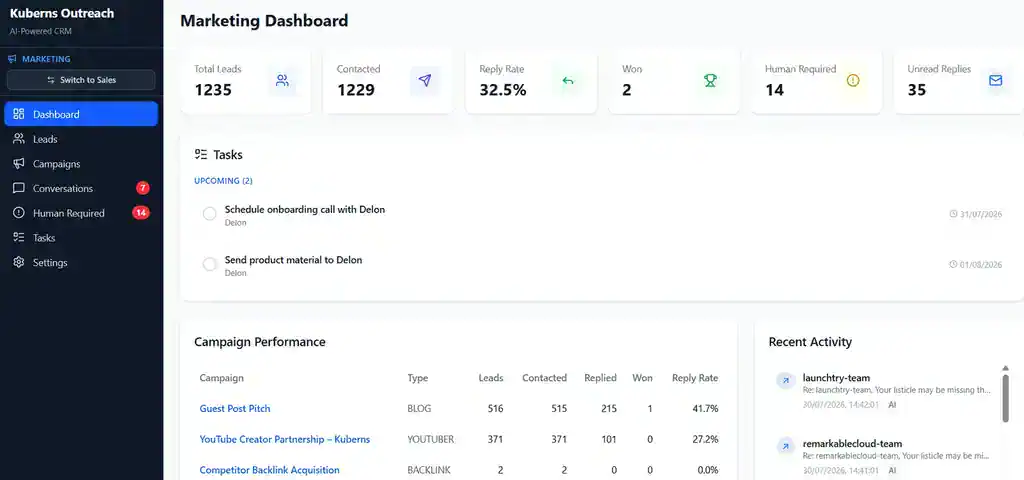
The first version needed:
- A responsive dashboard
- User authentication
- Project and task creation
- Task status and assignment
- Team invitations
- A backend API and database
- Input validation and useful error messages
- Environment variables for secrets
- A production deployment
The main limitation was the work surrounding the code. Designing screens, connecting the backend, checking edge cases, reviewing dependencies, and configuring production could easily turn one application into several disconnected jobs.
I therefore gave every tool one role. That made the test more useful than asking five assistants to generate the same function.
| Tool | Role in my project | What I wanted to learn |
|---|---|---|
| v0 | UI creation | Could it turn written requirements into a usable interface? |
| Cursor | Active development | Could it work effectively with the complete repository? |
| Codex | Delegated engineering | Could it complete and verify a multi-file feature? |
| Snyk | Security | Could it find risks before deployment? |
| Kuberns | Deployment | Could it deploy the full-stack project with less infrastructure work? |
1. I used v0 to get past the blank screen
[tool-card id=”v0″]
I knew what the application needed to do, but I did not want to spend the first part of the project adjusting card layouts, navigation, empty states, and responsive breakpoints.
I gave v0 a description of the dashboard and asked for a layout containing a sidebar, summary cards, a project list, task statuses, and a form for creating a project. I also specified that the layout needed to work on mobile.
The prompt I used was:
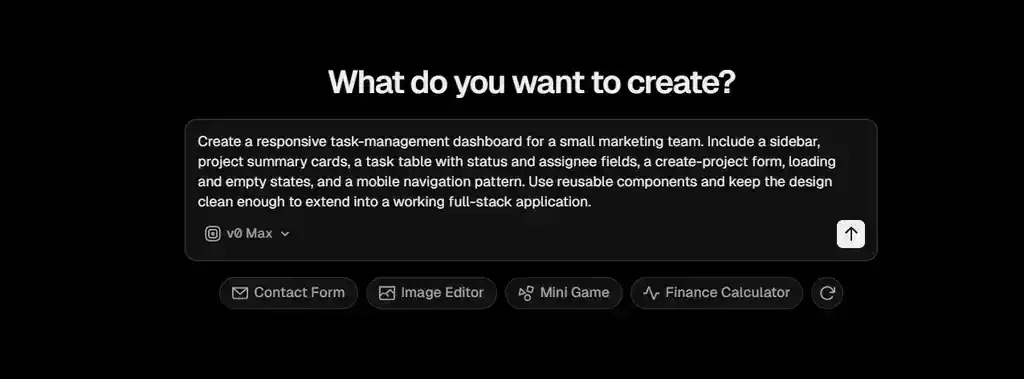
The first output gave me something much more useful than a static mockup. It provided an editable interface and code that I could bring into the project.
This is consistent with the official v0 documentation, which describes v0 as a pair programmer that generates both UI and code from natural-language instructions. It can produce projects ranging from landing pages to full-stack applications.
The biggest advantage was momentum. I had a visible application to inspect and improve. Seeing the dashboard also made missing requirements around empty states, long project names, mobile navigation, and loading behavior easier to identify.
The result was not finished, however. Some parts were visually convincing without being functionally complete. I still needed to connect forms to real data, review accessibility, remove anything the application did not need, and make the interface consistent with the rest of the project.
My verdict on v0:
v0 was most useful at the beginning, when the cost of a blank screen was high and the cost of changing direction was low. I would use it again for prototypes, dashboards, forms, and early interface exploration.
The generated interface still needed product decisions, accessibility review, and integration with actual application behavior. For me, v0 replaced the slow first draft, not the design and frontend review process.
2. I used Cursor for everyday development
Once I had the initial interface, I needed to turn it into a functioning application. This meant connecting components to the backend, adding authentication, saving projects and tasks, validating input, and handling failed requests.
This was where I used Cursor most actively.
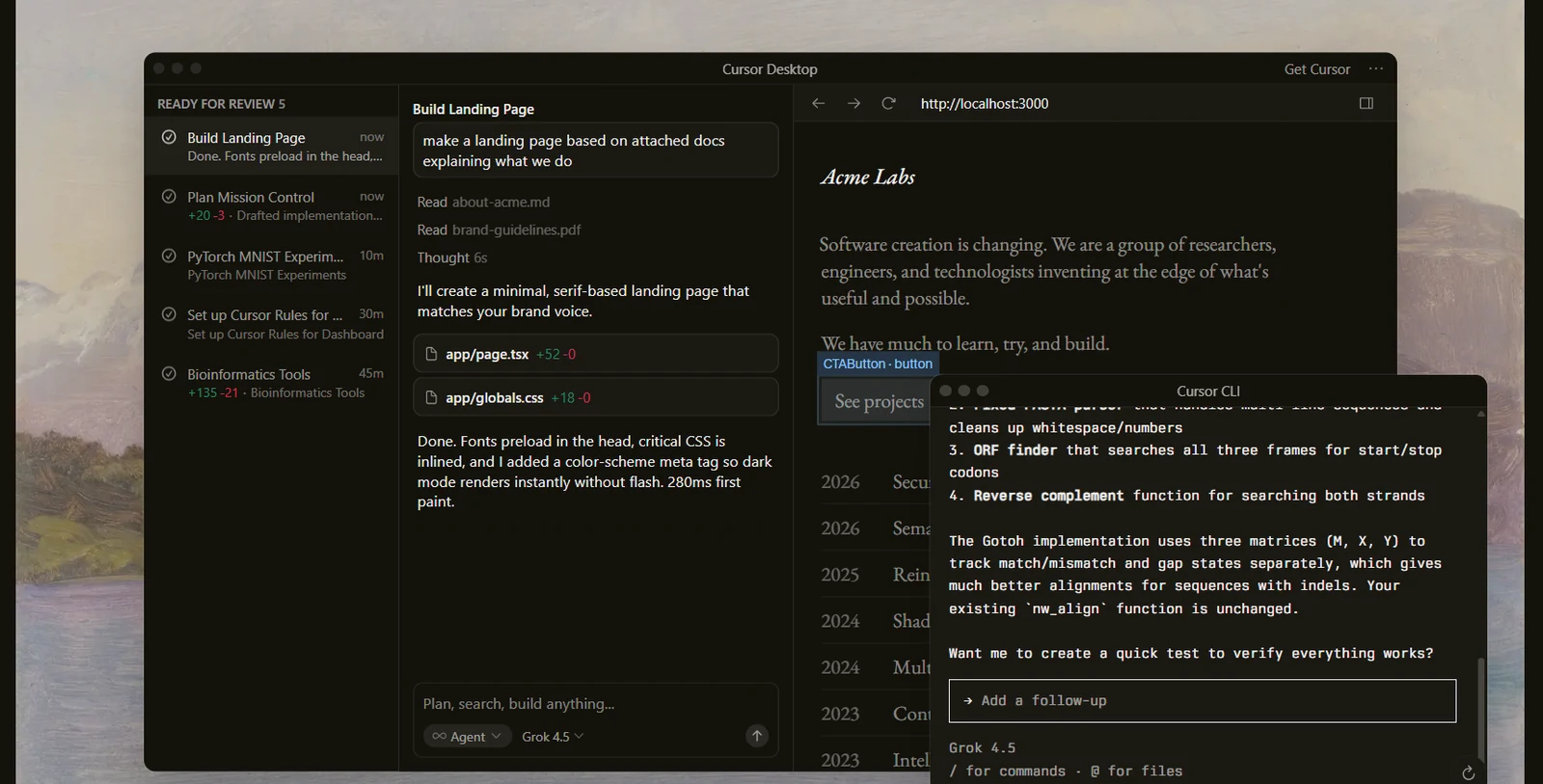
I opened the complete repository and first asked Cursor to explain the project structure. I then worked feature by feature rather than giving it one broad instruction to “finish the app.” For example, I asked it to connect the create-project form to the API, add server-side validation, and update the dashboard after a successful response.
One representative prompt was:
Connect the create-project form to the existing API and database layer. Require a project name, prevent an empty submission, return a useful error when creation fails, and update the dashboard after a successful response. Follow the patterns already used in this repository, do not introduce a new state-management library, and show me the files you intend to change before editing them.
Cursor’s strongest advantage was context. That mattered because even a small feature touched the form component, API route, validation logic, database layer, and UI state.
When I needed context from outside the repository, I connected it through the Model Context Protocol. That is the same standard behind the tools in this MCP server directory.
The experience was fastest when my request included clear acceptance criteria. “Add project creation” left too much room for interpretation. A request specifying required fields, duplicate-name behavior, error responses, and the expected dashboard update produced a much more reviewable result.
It still needed close review. The first implementation focused on whether the submitted data was valid, but validation alone was not enough.
The backend also needed to confirm that the authenticated user was allowed to create a project in the selected workspace. I added that authorization requirement explicitly and reviewed the API path again before treating the feature as complete.
This was a useful reminder that AI-generated code can be syntactically correct while missing a business rule. I caught the gap by reviewing the request path from the interface to the database rather than accepting the generated change because the form appeared to work.
My verdict on Cursor:
Cursor worked best as an active development environment. It reduced the time spent finding files, repeating familiar patterns, and writing routine glue code.
It did not remove the need to understand the architecture. In fact, the more context I gave it about the architecture, the more useful it became.
3. I gave Codex a complete engineering task
Using both Cursor and Codex may look redundant, but I used them differently. I used Cursor while I was actively coding. I used Codex when I wanted to hand over a bounded engineering task and review the result after it had inspected the repository, made changes, and run the relevant checks.
The task I chose was project invitations. It required more than one isolated edit:
- A database change
- A backend endpoint
- Input validation
- Permission checks
- An interface for inviting a collaborator
- Success and error states
- Tests
I wrote the acceptance criteria before assigning the task. This was important because an agent can automate implementation steps, but it cannot infer every product decision correctly.
The task I gave Codex was:
Add project invitations to this application. An authenticated workspace member with the correct permission should be able to invite a collaborator by email. Add the necessary database change, API endpoint, validation, permission checks, interface state, duplicate-invitation handling, and tests. Follow the existing repository patterns, keep the change limited to this feature, run the relevant checks, and summarize any assumptions that still need my decision.
Codex first needed to understand how authentication, projects, and database access already worked. It traced the existing patterns before touching the invitation flow, then worked across the data model, server route, validation, interface, and tests as one bounded task.
The value was not any single generated function. It was keeping the related changes together and checking them against one definition of done.
The most revealing part was not whether it generated code. It was what happened when the implementation met a failure.
The first important edge case was a repeated invitation for the same email address and workspace. Without an explicit rule, the application could create duplicate pending invitations.
I added the expected behavior to the acceptance criteria: return the existing pending state instead of creating another record. Codex then adjusted the validation path and the relevant test around that rule.
That correction shows both the value and the boundary of the tool. Codex could trace the change across multiple files and verify the implementation, but it could not decide the product rule until I stated it. I still needed to choose the expected behavior and review the final change.
This is also where I saw the limit of the phrase “AI automates the work.” Codex can automate many steps inside a well-defined task, but I still owned the requirement, the permissions model, the review, and the decision to accept the change. Automation reduced execution effort. It did not transfer responsibility.
My verdict on Codex:
Codex was most useful for work with a clear finish line: implement a feature, repair a failing test, refactor a defined area, or review a set of changes.
I would not give it a vague instruction and assume the result was correct. I would give it an explicit outcome, constraints, and verification steps. Used that way, it complemented Cursor rather than duplicating it.
Cursor helped me while I worked. Codex helped me delegate a defined block of work.
4. I used Snyk before treating the application as deployable
Passing tests does not prove that an application is secure. Code review also does not reliably reveal every vulnerable dependency.
I used Snyk as a dedicated check before deployment. I scanned the source code and dependencies rather than relying only on the suggestions from coding tools.
The Snyk Code documentation describes it as a static application security testing tool that analyzes source code and can surface issues inside IDEs, repositories, pull requests, and CI/CD workflows. Snyk Open Source also provides software composition analysis for open-source dependencies.
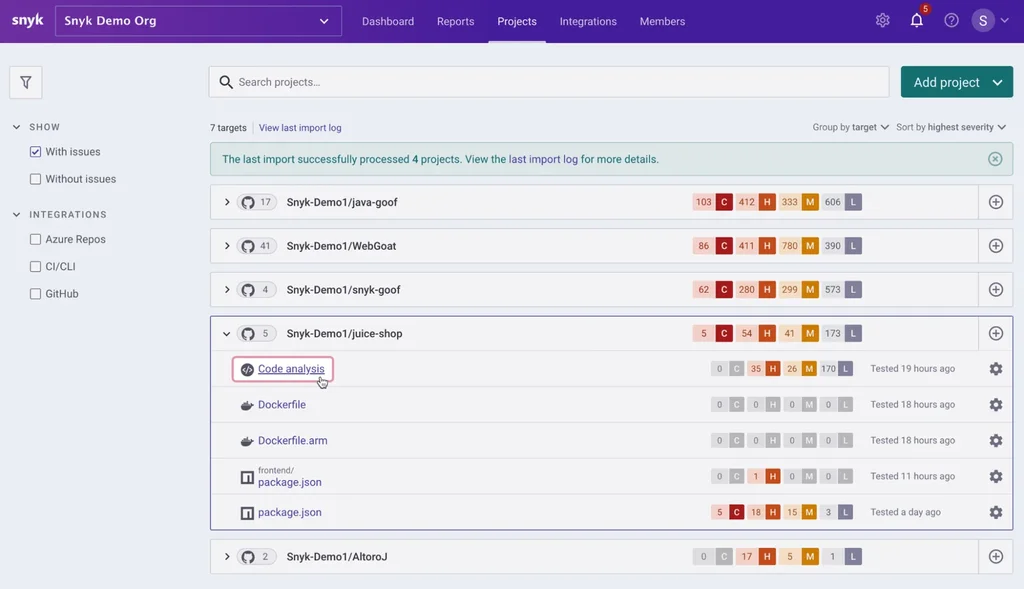
The useful part was not simply receiving a list of warnings. It was being able to inspect why an issue mattered and whether it was reachable in my application.
The scan made me review two different kinds of risk separately: issues in my own code and issues inherited through packages. I prioritized findings that affected runtime dependencies and reachable application paths instead of treating every warning as equally urgent. For each proposed package update, I reran the relevant application checks because removing a known vulnerability is not useful if the update silently breaks the product.
My verdict on Snyk:
Snyk added a responsibility that neither v0 nor Cursor was designed to own. Codex could help review a change for security problems, but a dedicated scan provided a different type of evidence, particularly for third-party dependencies.
I would keep this step in a production workflow. I would also avoid describing a clean scan as proof that an application is secure. It is one layer of security review, not the entire process.
5. I used Kuberns to deploy the finished project
Local success was not the end of the project. The application needed a production environment with a backend process, environment variables, a database connection, a public URL, and a repeatable update workflow.
Deployment was also the stage where hidden assumptions became visible. A missing variable or an incorrect start command may not appear in a local environment that has already been configured over several days.
I used Kuberns for this final stage. Kuberns is an Agentic AI platform for deployment, designed for full-stack and complex backend projects. The deployment starts with connecting a GitHub repository, selecting the repository and branch, adding environment variables, and starting the deployment. The platform then handles environment setup, repository cloning, deployment configuration, and provides build information and runtime logs.
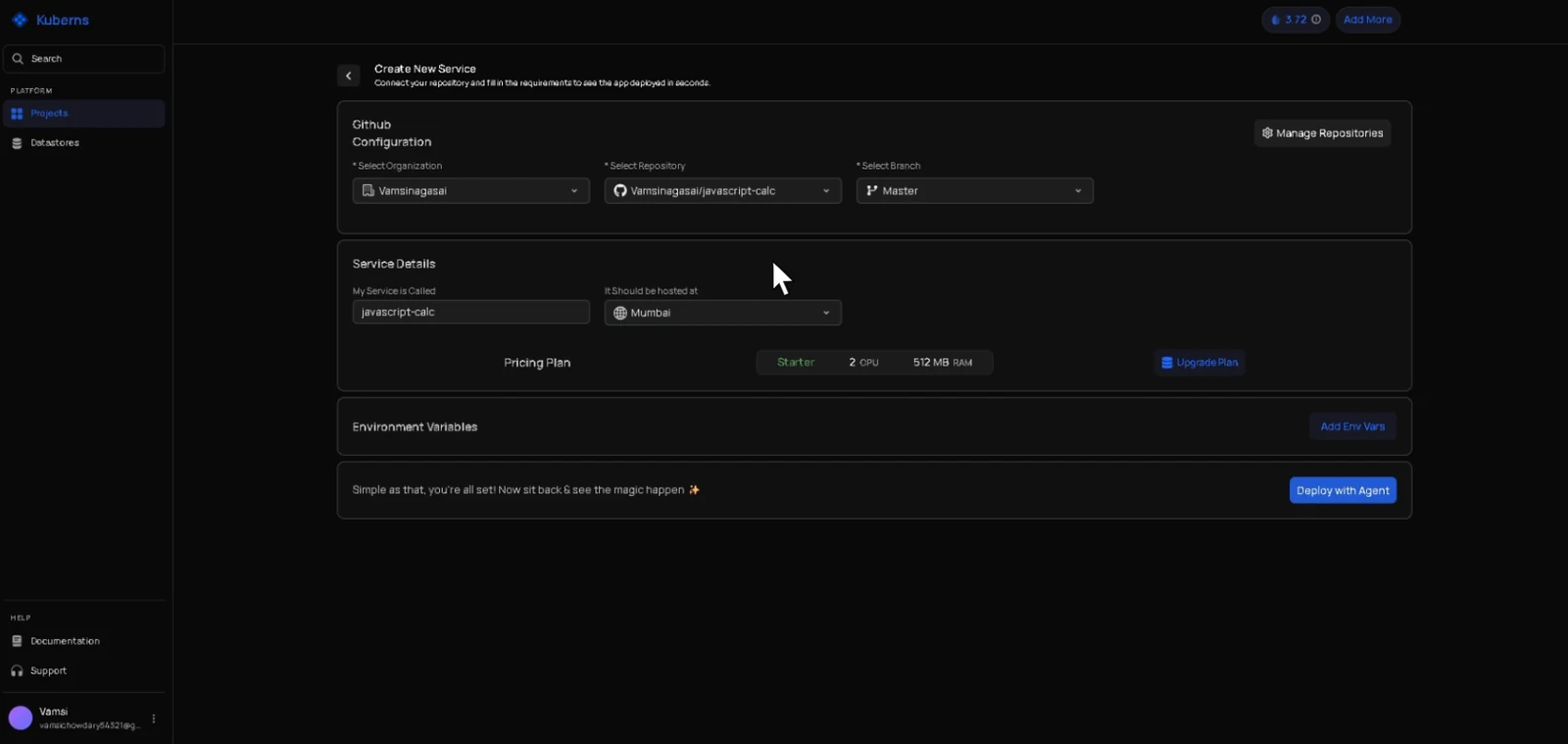
For my project, I needed it to handle:
- The application build
- The backend process
- Environment variables
- The database connection
- HTTPS
- A production URL
- Redeployment after a code change
I connected the repository, selected the branch, reviewed the detected configuration it gave me, and added the required environment variables. I then started the deployment and watched the build information rather than treating the deploy button as a guarantee.
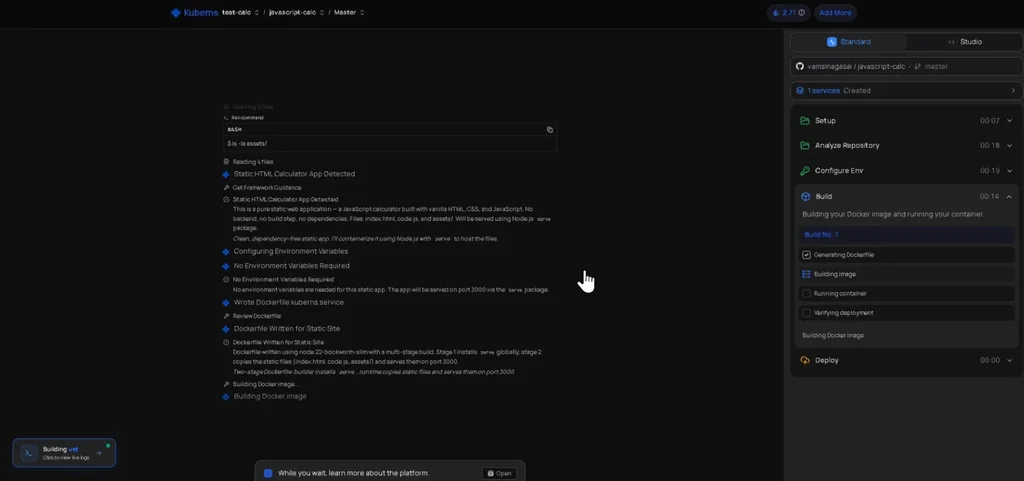
The useful part was that I did not have to begin by writing a Dockerfile or a deployment manifest. Kuberns inspected the repository and gave me a configuration to review. I still checked the build and start behaviour and supplied the application secrets because repository detection cannot determine private values that should never be committed to source control.
The main deployment issue was environment parity. A local .env file had provided values that were not present in the production environment.
The build information helped narrow the problem to configuration rather than application code. After adding the missing value through the environment settings and starting another deployment, the application could reach the backend with the expected configuration.
Developers comparing this type of workflow with a traditional platform can also review these Heroku alternatives for modern application deployment. The right choice depends on the workload, the infrastructure control required, and how much deployment configuration the team wants to own.
My verdict on Kuberns:
Kuberns was relevant because the project was not only a static frontend. It had backend and database requirements, which made deployment part of the engineering problem.
The most valuable part was having the application build, configuration, deployment activity, and runtime information in one workflow. It reduced the amount of infrastructure setup I needed to perform before I could test the application in a real environment.
Kuberns did not remove application-level responsibility. I still had to supply secrets, confirm the detected behavior, understand the database requirements, and test the live product. I would also evaluate a more infrastructure-focused service for a workload that required highly customized networking, unusual system packages, or direct control over every cloud resource.
I would consider it for a full-stack or complex backend project when I wanted to reduce the infrastructure work between a repository and a running application. I would still verify the detected configuration, secrets, logs, resource requirements, and application behavior after deployment.
What I learned from using the five tools together
The main lesson was that specialized tools were useful at different bottlenecks. v0 helped with the interface, Cursor with active implementation, Codex with a bounded engineering task, Snyk with security, and Kuberns with production deployment. Three lessons stood out.
Clear requirements mattered more than long prompts: The best results came from stating the desired behavior, constraints, and acceptance criteria. Adding more words without making the decision clearer did not improve the output.
Generated code still needed verification: The Stack Overflow survey found that concern about AI accuracy remains widespread among developers. My experience supports that concern. The tools were useful precisely because I reviewed their work, ran checks, and tested the application.
The handoffs still belonged to me: The v0 interface needed to fit the application architecture. Cursor’s code needed tests. Codex’s feature needed review. Snyk’s findings needed prioritization. The deployed application needed production verification.
The tools accelerated individual stages, but I remained responsible for the connections between them. If you are building the skill set behind that judgement rather than only the tool list, my guide on how to become an AI engineer covers the same ground from the career side.
Would I use all five again?
For a small internal portfolio, this stack would be excessive. For a UI-heavy full-stack application, the combination made more sense.
I would use:
- v0, when I needed to move quickly from requirements to an editable interface.
- Cursor for continuous, repository-aware development.
- Codex, for well-defined multi-step engineering work.
- Snyk, when the project used third-party packages or was moving toward production.
- Kuberns, when I needed to deploy a full-stack or complex backend project without spending most of my time on infrastructure configuration.
If I had to start with only two tools for this project, I would choose Cursor and Kuberns. Cursor addressed the largest share of daily implementation work, while Kuberns addressed the separate challenge of getting the full-stack application into a working production environment.
I would add the other tools when UI speed, delegated feature work, or dedicated security review became the larger bottleneck.
That is the standard I would use when evaluating any AI tool for developers in 2026: not whether it can produce an impressive demo, but whether it helps move a real project forward without hiding the decisions and risks a developer still needs to own.
If you want to test a stack like this without paying full price for every subscription, I keep the current tested AI software deals and the wider best AI tools lists updated as I work through them.
Frequently asked questions
What are the five best AI tools for developers in 2026?
For the workflow tested in this project, the five tools were v0 for UI creation, Cursor for active development, Codex for multi-step engineering tasks, Snyk for security scanning, and Kuberns for agentic deployment. The best selection depends on where a developer’s current workflow is slowest.
Can AI tools build an entire full-stack application?
AI tools can accelerate most stages, including interface generation, implementation, testing, review, and deployment. They do not remove the need for product decisions, architecture, security review, testing, and production ownership.
Related Posts
The 30 best AI SEO tools in 2026, tested with real money: what each costs, which ones track AI visibility and AI Mode, a...
30 AI writing tools tested across free, freemium and paid tiers, every link checked, plus which AI beats ChatGPT for wri...

I tested 60 free and freemium AI image generators and ranked them by real traffic and hands-on quality. Free tiers, limi...

Which AI Chrome extension should you install? 132 ranked on real Web Store install, rating and review data, with a pick ...

What Firefox AI actually does, how to enable or disable it, and every one of the 95 AI Firefox add-ons ranked on real da...

30 social media scheduling tools tested for small business: real pricing, every tool link checked September 2026, and th...