

The 40+ prompts below produce keyword ideas, intent buckets, clusters, personas, sentiment reads, competitor lists, and content outlines from ChatGPT (or any general model). They are the ones I keep saved and paste into every research session.
Use them alongside a real keyword tool for search volume and difficulty. ChatGPT does not know volume. It knows language, intent, and structure, which is where most keyword tools are weakest.
What ChatGPT is good and bad at for keyword work
Good. Generating variations, synonyms, LSI terms, sub-topics, question forms, intent classification, keyword clustering into content silos, translating keywords, extracting focus keywords from URLs, producing content outlines with target headings, inferring demographics and personas, and pattern-matching phrases your audience actually uses.
Bad. Search volume (rough guesses only), keyword difficulty, backlink data, domain authority, live SERP position, real-time trend data. Model knowledge is bounded by the training cutoff and hallucinates numeric metrics on demand.
The rule: use ChatGPT for language and structure, use Ahrefs or Semrush for numbers. Do not skip the numeric tool. Do not pretend ChatGPT knows CPC when it does not.
The 40+ prompts
Bracketed values `[like this]` are placeholders. Replace them with your topic, language, city, or list.
1. Generate keyword ideas.
Generate keyword ideas based on [keyword]2. Sub-topics under a keyword.
Generate a list of sub-topics related to [keyword]3. Technical terms in the niche.
Generate a list of technical terms related to [keyword]4. Alternative terms.
Generate a list of alternative terms for [keyword]5. Popular questions on a topic.
Generate a list of popular questions on [keyword]6. Target audiences with use cases.
Guess various and different target audiences for [keyword] topic with their use cases7. Related keywords (variant of #1, different phrasing yields different output).
Suggest related keywords to [keyword]8. LSI keywords.
Generate LSI keywords related to [keyword]9. Main problems in the topic.
Suggest main problems faced on [keyword] topic10. Convert problems to keyword phrases.
Convert the below listed problems into keyword ideas under topic [keyword]11. Related entities.
Suggest entities related to the [keyword]12. Singular to plural.
Convert the below list of keywords from singular to plural keywords13. Keywords in another language.
Generate a list of [language] keywords on [keyword]14. Keywords with specific intent.
Generate a list of [related, LSI or long-tail] keywords with [commercial, informational or navigational] intent about [keyword]15. Long-tail keywords.
Generate a list of long-tail keywords about [keyword]16. Location-specific keywords.
Generate a list of [related, LSI or long-tail] keywords to [keyword] for target city [city name]17. Filter irrelevant keywords.
Remove any keywords that are not related to [keyword] and provide list with valid keywords18. Categorize by intent.
Categorize the below keywords into categories (commercial, informational, transactional or navigational) based on their intent19. Cluster keywords into groups.
Keyword cluster the below provided list of keywords into relevant groups20. Extract keywords from a Wikipedia page.
Extract the keywords used in this Wikipedia page on [keyword] and its URL [url]21. Keywords with estimated search volume (rough).
Generate a list of keywords with their estimated search volume for [keyword] topic22. FAQ questions.
Generate FAQ questions on the topic [keyword]23. Extract keywords from text.
Analyze the following text and extract target keywords from text on topic [keyword]24. Translate a keyword list.
Translate the following keywords from English to [target language]25. Sentiment analysis on keywords.
Perform sentiment analysis on the below list of keywords and provide output in table26. Identify competitors.
Curate a table of top competitors for [keyword] and their URLs27. Extract focus keywords from URLs.
Extract focus keywords from the below list of webpage URLs and return results in table28. Find industry resources.
Suggest popular blogs, forums and websites related to [keyword]29. Keywords containing specific words.
Generate keywords for the topic [keyword] containing words [word1], [word2] and [word3]30. Keywords for a specific audience.
Generate list of keywords for [keyword] for [audience] users31. Demographics of searchers.
My keyword is [keyword], can you please use creativity and guess various demographics with facts of searchers who search for it?32. Guess search intent.
My keyword is [keyword], can you try to guess search intent?33. Synonyms.
Can you provide a list of synonyms based on [keyword]34. Estimated CPC (rough).
Generate list of keywords with CPC value for [keyword] topic35. Content outline with H2 and H3s.
Generate a list of outline with H2 and H3 headings for keyword [keyword]36. Historical perspective on a topic.
Provide historical perspective for [keyword] topic37. Trending keyword ideas.
Suggest trending keyword ideas for [keyword] topic38. Must-include words for topical relevance.
Suggest a list of must-include words when optimizing your blog post for [keyword] topic39. Remove keywords containing specific words.
Remove keywords from following list which contain [word1] and [word2], show only valid keywords40. Generate a specific count of keywords.
Generate [count] [long tail/related/lsi] keywords for [keyword]How to actually chain these prompts
Single prompts produce single lists. The value shows up when you chain them:
- Discover → Filter. Prompt 1 or 15 to generate 100 candidates, then prompt 17 to remove off-topic, then prompt 18 to categorize by intent.
- Discover → Cluster → Outline. Prompt 1 for the raw list, prompt 19 to cluster into content silos, prompt 35 on each cluster to produce a content outline.
- Problems → Keywords. Prompt 9 to surface pain points, then prompt 10 to turn each pain point into a keyword phrase. This produces far better long-tail keywords than prompt 15 alone.
- Competitors → Extraction. Prompt 26 to identify competitors, then prompt 27 with those competitor URLs to extract their focus keywords.
- Audience → Language. Prompt 6 for audience personas, then prompt 30 to generate keywords tailored to each persona’s search language.
The chained workflow beats every single prompt in the list.
Where the prompt library needs a real tool alongside it
Search volume and keyword difficulty. Every prompt that asks ChatGPT for numbers is estimation, not data.
If you are committing to a keyword, put a real tool on it. Ahrefs, Semrush, or the free Google Keyword Planner will give you what ChatGPT cannot: current volume, competition, and SERP position.
For a research layer that combines these prompts with real audience-language data, BuzzAbout pulls actual Reddit and YouTube posts around a topic and cites every insight. Copy those raw mentions into ChatGPT with any of the prompts above and you get keyword output grounded in real audience language rather than model priors.
The prompt-quality rule
A good prompt is mostly context, not instruction. The prompts above are starting shapes.
Add your positioning, your customer, your constraints, and one example of past work that performed. Same prompt with rich context outperforms a clever prompt with no context every time. My write-up on why AI outputs depend on prompts covers the context-first framing in more detail, and how to make ChatGPT write like a human covers the shape a prompt should take.
If you want a prompt generator that builds structured prompts using role + context + task + format + constraints, the free AI Prompt Generator exports the result as API JSON, and the AI Prompt Manager Chrome extension stores everything locally with version history so refined prompts do not disappear.
Related Posts

Agentic AI pentesting tools replay the original exploit after a patch ships, then try mutated payloads. Eight platforms ...

AI adoption statistics, sourced: 78% of companies say they use AI and only 21% have redesigned a workflow. Here is the h...

A free, cited AI glossary covering 264 machine learning and generative AI terms, with plain-English definitions and cros...

Real examples of artificial intelligence in digital marketing across content, SEO, ads, email and analytics, with what e...

AI marketing on Reddit: I pulled 239 threads across 7 subreddits. Marketers use AI daily and mostly dislike the products...
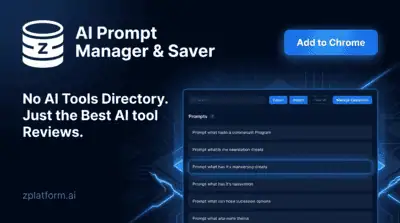
The AI prompt manager I built for Chrome and Firefox: save, tag, version and export your prompts locally. Free, no accou...