

Klap at a glance
| Field | Detail |
|---|---|
| Tool | Klap (klap.app), an AI tool that turns long videos into short vertical clips |
| Category | AI video repurposing for TikTok, Instagram Reels and YouTube Shorts |
| Best for | Creators, podcasters and marketers who want shorts from long recordings, webinars or interviews |
| Free plan | Free try on 1 video with no credit card. You can preview and edit the clips, but downloading and posting need a paid plan. |
| Paid plans | Basic $14, Pro $39 and Pro+ $94 a month, billed yearly, by monthly clip allowance. Checked 2026-10-30. |
| Verdict | A focused clipper. Try it on one real recording first, and pick a broader studio such as Spikes Studio if you also want scheduling and team workspaces in the same tool. |
What Klap does and who it is for
Klap takes a long video and cuts it into short, vertical clips ready for social feeds. Its homepage puts the pitch in one line: turn videos into viral shorts, creating TikToks, Reels and Shorts from long videos in one click. Klap says it has 3.5 million users and has made 8.5 million clips, which are the vendor’s own figures.
The use case is repurposing. You already have a podcast episode, a webinar, an interview or a tutorial, and you want the best moments pulled out and formatted for a phone screen without opening an editor. That makes it a fit for three groups:
- Creators who publish long YouTube videos and want a steady stream of shorts from them.
- Podcasters who need vertical clips with captions to promote each episode.
- Marketers who turn webinars and recorded talks into several short posts.
I built this review from Klap’s public pages and from Spikes Studio’s, all read on 2026-10-30. Where a claim is Klap’s, the text says so. The screenshots are captures of Klap’s own pages.
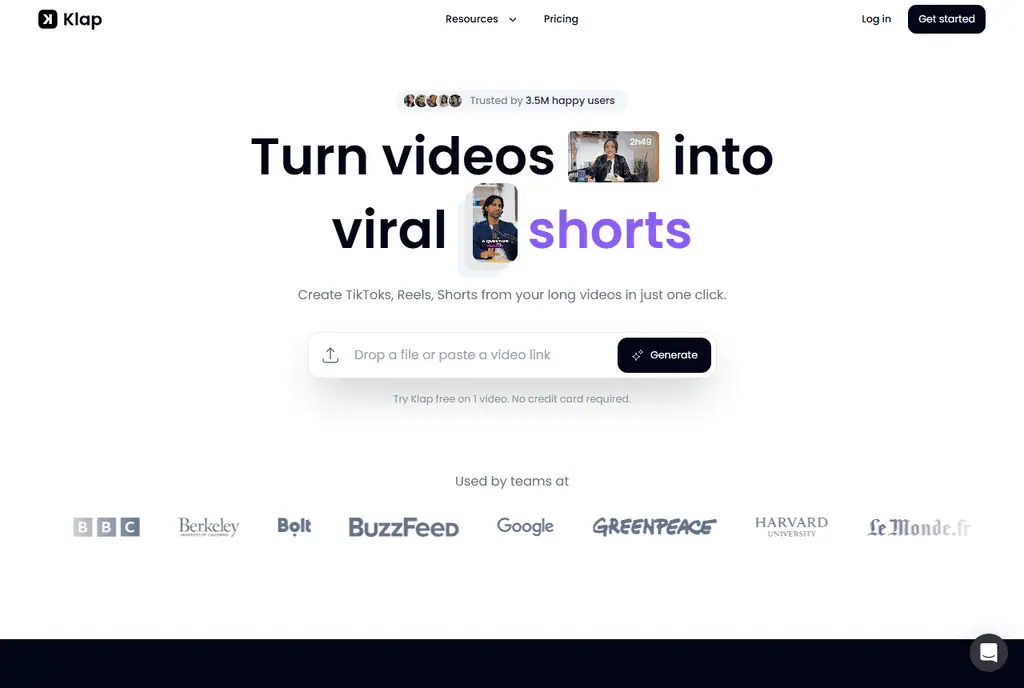
How Klap works, from a long video to clips
The homepage shows the whole flow in one box: drop a file or paste a video link, then press Generate. In order, the workflow is:
- Upload or link. Drop in a video file or paste a YouTube link.
- AI clip selection. Klap’s AI extracts the best topics from the video and edits them into short clips.
- Captions. Subtitles are added, with recommended captions you can adjust.
- Reframing. Auto reframing keeps the main subject in a vertical frame.
- Viral score. Each clip is scored for its potential to go viral.
- Preview, edit and export. You review the clips, adjust them, then export or share them.
Key features
- AI clip selection. Finds the strongest topics in a long recording and cuts them into clips.
- Auto reframing. Keeps the subject centred in vertical video. Klap also describes AI Reframe 2, which applies layouts such as split screen, screencasts and gaming.
- Captions. Subtitles plus recommended captions, in 52 languages for editing and transcription, per Klap.
- Customisation. Fonts, colours, logos and framing can be changed.
- Viral score. A score for each clip’s potential to go viral. Klap does not explain how it is calculated on the pages I read.
- Publish and schedule. Sharing and scheduling to TikTok, YouTube, Instagram and LinkedIn.
- Integrations. The footer links to an API, an MCP server and Zapier, Make and n8n integrations. I did not read their documentation.
Klap plans and costs
Klap’s pricing page says you only pay for the clips you generate. The three plans are priced by monthly clip allowance, and the figures below are the yearly-billed prices shown on the page. Monthly billing costs more, since the page labels the yearly option “Save 50%”. Please check the current page before you buy.
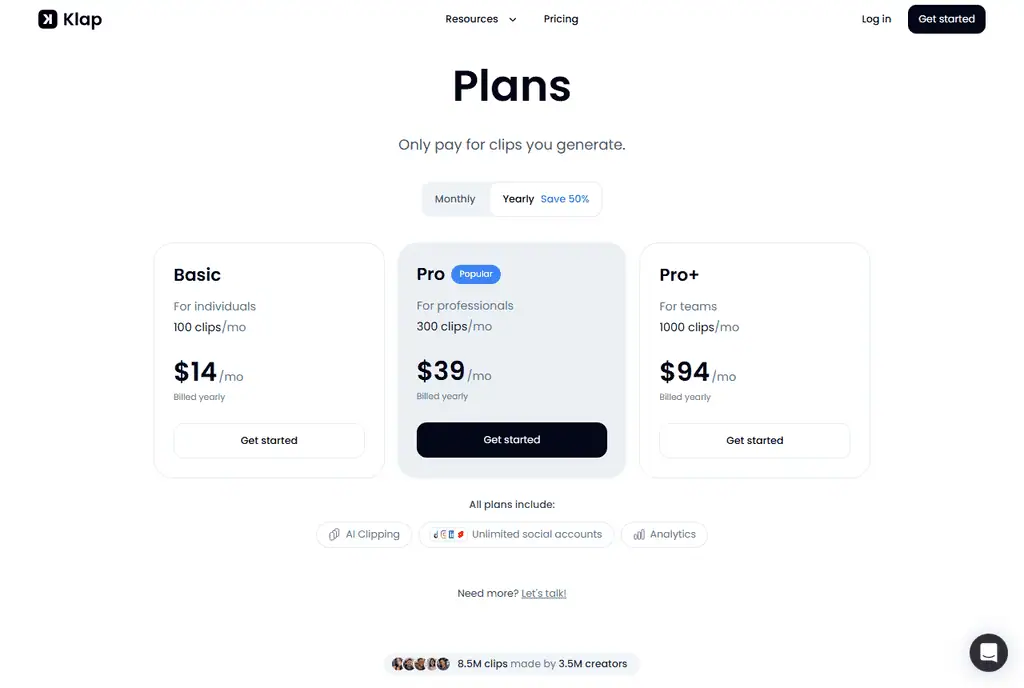
| Plan | Price | Clips a month | Aimed at |
|---|---|---|---|
| Basic | $14 a month, billed yearly | 100 | Individuals |
| Pro | $39 a month, billed yearly | 300 | Professionals |
| Pro+ | $94 a month, billed yearly | 1,000 | Teams |
All plans include AI clipping, unlimited social accounts and analytics. Paid exports carry no Klap branding. A larger need goes through the “Let’s talk” link on the page. The free try covers 1 video and no credit card, but downloading and posting need a paid plan, so you can judge the clips before paying and cannot publish from the free tier. Current prices are on Klap’s pricing page.
Klap vs Spikes Studio
Spikes Studio covers the same core job but sells itself as a broader studio: editing, social customisation, publishing, analytics and project management in one place. The table compares what each vendor states on its own pages, checked 2026-10-30. I have not compared the quality of the clips each produces.
| Klap | Spikes Studio | |
|---|---|---|
| Pitch | Long videos into shorts in one click | A complete social video studio |
| Clip selection | AI extracts the best topics | AI clip detection |
| Reframing | Auto reframing and AI Reframe 2 layouts | Auto reframe, listed on paid plans |
| Captions | Subtitles and recommended captions | Auto captions, with animated captions on higher plans |
| Virality score | Viral score on clips | AI curation with a virality score |
| Publishing | TikTok, YouTube, Instagram, LinkedIn | Scheduler for LinkedIn, TikTok, Facebook, YouTube |
| Languages | 52 for editing and transcription | 99+ for transcription |
| Free access | 1 video free, no card, no downloads | Free plan with a watermark, up to 30 minutes a month, no card |
| Pricing model | Tiers by monthly clip count | Tiers by speed, resolution and features, from $12.99 a month when checked |
| Extras | API, MCP server, Zapier, Make, n8n | Team workspaces, client management, brand templates |
Who should pick which
Pick Klap if the job is narrow and recurring: a long recording goes in, shorts come out, and you want to pay by the number of clips. The plan structure is easy to size, and the free try lets you test one real video.
Pick Spikes Studio if you want the clipper to sit inside a wider workflow, with a content calendar, analytics, branded templates and shared workspaces for a team or several clients, or if you work in languages beyond Klap’s 52. Its free plan puts a watermark on exports, while Klap’s free try does not let you download at all.
Neither choice is wrong. Run the same 20-minute recording through both free tiers and compare the clips you would actually post. For wider options on long-form editing, see our guides to agentic video editors for long-form footage and AI video editing tools for solo YouTubers.
Limits, and who should look elsewhere
- Clip quality is unproven here. I have not tested Klap’s picks against yours. Clip selection is the part that matters most, and only a trial on your own footage answers it.
- The viral score is a black box. Klap gives no detail on how it scores, so treat it as a sort order rather than a prediction.
- Limits are not published. I did not find a maximum video length or file size on the pages I read.
- Posting needs a paid plan. The free try lets you preview and edit but not download or post.
- The numbers are Klap’s. The user and clip counts are vendor claims.
Look elsewhere if you want a full timeline editor with manual control, or a tool built around footage with little speech. Klap’s own examples are podcasts, interviews and tutorials, so test a speech-light video on the free try before you commit.
Frequently asked questions
Is Klap free?
Partly. Klap lets you try one video free with no credit card, and you can preview and edit the clips. Downloading and posting need a paid plan.
Which platforms does Klap publish to?
Klap says you can share and schedule to TikTok, YouTube, Instagram and LinkedIn, and that every plan includes unlimited social accounts.
How much does Klap cost?
Plans are Basic at $14, Pro at $39 and Pro+ at $94 a month, billed yearly, with 100, 300 and 1,000 clips a month. Monthly billing costs more, so check klap.app/pricing for the current figures.
What is the difference between Klap and Spikes Studio?
Klap focuses on turning long videos into shorts and prices by clip count. Spikes Studio adds a broader studio around the clipper, with scheduling, analytics, templates and team workspaces. The table above lines up what each states.
Transparency note: this review is based on Klap’s public pages and Spikes Studio’s public pages, read on 2026-10-30. I have not run a test series, so I have not measured clip quality, processing speed or the limits of any plan, and vendor claims are labelled as such. The screenshots are captures of Klap’s own web pages. If anything changes, tell me and I will update the review.
Related Posts

I tested AgainstData on 355 pages of Gmail data. Bulk unsubscribe, personal data deletion requests, pricing, and whether...
AI-Text-Humanizer.com took a 132-word ChatGPT paragraph from 100% AI to 0% on ZeroGPT but flattens your voice. Buy the $...
AIscan24 is a free, no-signup AI detector: it caught pure ChatGPT text at 100% but scored my handwritten paragraph 80%. ...
Honest Aithenticate review after hands-on testing. Does this AI disclosure badge tool meet EU AI Act requirements? Prici...
Allavsoft review: a Windows and Mac video and music downloader with batch queues, 8K support and format conversion, from...

My hands-on Answer Socrates review covering all features, free plan limits, pricing, and how it compares to AlsoAsked. I...