



Verdict: Buy
What I Like
- Complete AI agent platform covering support, lead capture, e-commerce, and custom flows in one dashboard
- Fast training (5-10 minutes) via URL scraping, document uploads, or direct text
- Detailed analytics including sentiment analysis, top user intents, and resolution rates
- Studio flow builder enables WooCommerce checkout, appointment booking, and other multi-step automations within chat
- Broad platform support: WordPress, Shopify, WooCommerce, Wix, Squarespace, BigCommerce, and more
- Tested WooCommerce checkout flow works end to end within the chat interface
- Free trial available on all plans with no credit card required
What Is Missing
- Credit consumption is opaque and hard to estimate before real traffic data
- Studio requires real configuration time; custom flows take hours, not minutes
- Chatbot quality depends heavily on the quality of your training content
- Analytics like sentiment analysis and top intents need significant conversation volume to become useful
- Appointment booking template requires a separate Twilio integration and cost
- Essential tier lacks GPT-4, API/webhook access, and AI Helpdesk, limiting its usefulness
TL;DR: YourGPT is a no-code AI chatbot platform that goes well beyond basic chat widgets. It covers customer support, lead capture, e-commerce automation, and custom conversation flows without requiring any coding. The Professional plan at $79/month (annual) hits the right balance of features for most small business owners who are serious about automating customer interactions.
I have tested enough AI chatbot tools to know that most of them do one thing reasonably well and everything else poorly, a pattern I track across our AI tool reviews. You get a clean chat widget that sounds confident on demo day, then falls apart the moment a real customer asks anything off-script.
That skepticism is why I put YourGPT through a full walkthrough on my own website, alstonantony.com, before writing this review. I wanted to see how training actually worked on real content, whether the analytics told me anything useful, and whether the e-commerce angle was genuine or just marketing.
The short answer: YourGPT is more capable than most tools in this space. The long answer is below.
Watch the full video walkthrough before reading:
Key Takeaways
- YourGPT is a complete AI agent platform, not just a chat widget. It covers customer support, lead generation, e-commerce automation, and custom conversation flows in one dashboard.
- Training takes 5 to 10 minutes for most sites. You point it at your URLs and it scrapes, processes, and learns from your content automatically.
- The Studio flow builder is where things get interesting. Pre-built templates handle appointment booking, WooCommerce checkout within chat, and SMS/email verification.
- Pricing starts at $39/month (annual). The Professional tier at $79/month is the practical entry point if you need API access, GPT-4, or AI helpdesk features.
- The main limitation: you need to invest time into training data and flow design to get real business value. Out of the box, it sounds like a generic chatbot until you customize it properly.
What Is YourGPT?
YourGPT is a no-code AI automation platform built around the idea that a business should be able to deploy intelligent AI agents across its customer-facing channels without writing a single line of code, and for teams focused purely on support our CoSupport AI customer support platform review covers a dedicated alternative.
The platform sits somewhere between a simple chat widget (like Tidio or Crisp) and a full-blown AI automation suite (like Make or Zapier with an AI layer). It handles the chatbot creation, training, analytics, and conversation management in one place, and connects to external tools through APIs and built-in integrations, so it is worth seeing where it lands in our best AI chatbot tools roundup.
I have implemented YourGPT on alstonantony.com, so the observations in this review come from real usage on a live site, not a sandboxed demo.
The platform positions itself around four core use cases:
- Customer support automation: Answer FAQs, resolve common queries, and escalate to a human when needed
- Lead capture: Collect emails and contact details before users leave
- E-commerce assistance: Walk shoppers through product selection and complete orders within chat
- Business automation: Build multi-step conversation flows using the Studio feature
Whether it delivers on all four is what this review answers.
How to Create Your First AI Chatbot Agent
The setup process is cleaner than most tools in this category. Once you log in, you click “Create New Chatbot” and work through a setup sequence that covers language, layout, branding, and widget behavior.
The layout choice is meaningful. You pick between a tab format and a chat format. Tab format is what most modern AI chatbots use, where the chat interface opens in a panel with navigation options. Chat format is the classic popup bubble. For most business use cases, tab format looks more intentional.
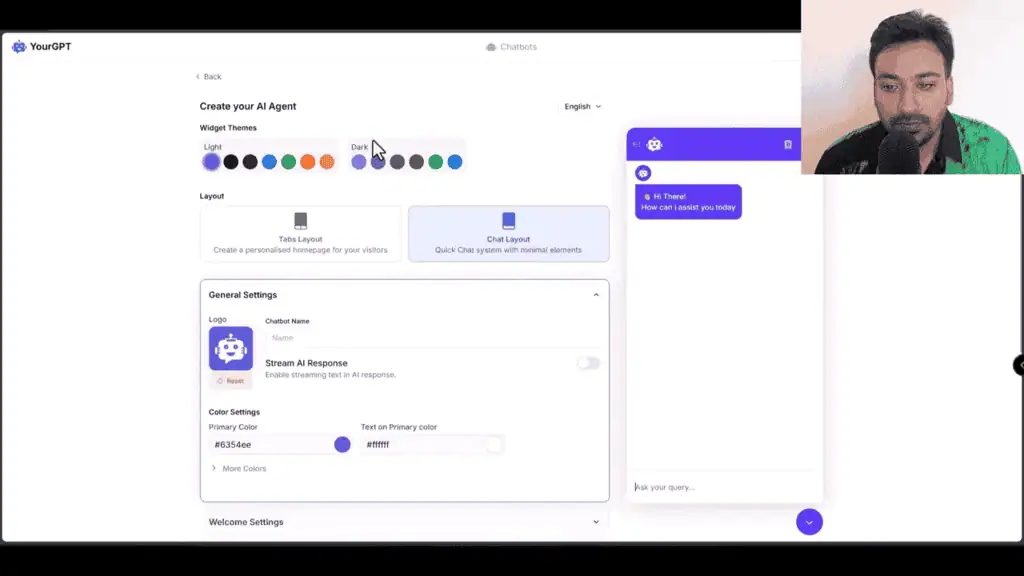
You upload a logo, set colors, write a welcome message, and configure whether you want users to attach files or use voice input. There is also a default questions section where you can create a menu of predefined questions with sub-questions. This is worth setting up properly. Without it, users face an empty text box and many of them will just close the chat.
The home screen editor adds another layer. Beyond the chat itself, you can configure:
- Social media profile links
- Action buttons for key pages
- Image and video cards (you can embed a welcome video here)
- A featured article section (pulls from the AI Helpdesk knowledge base once that is set up)
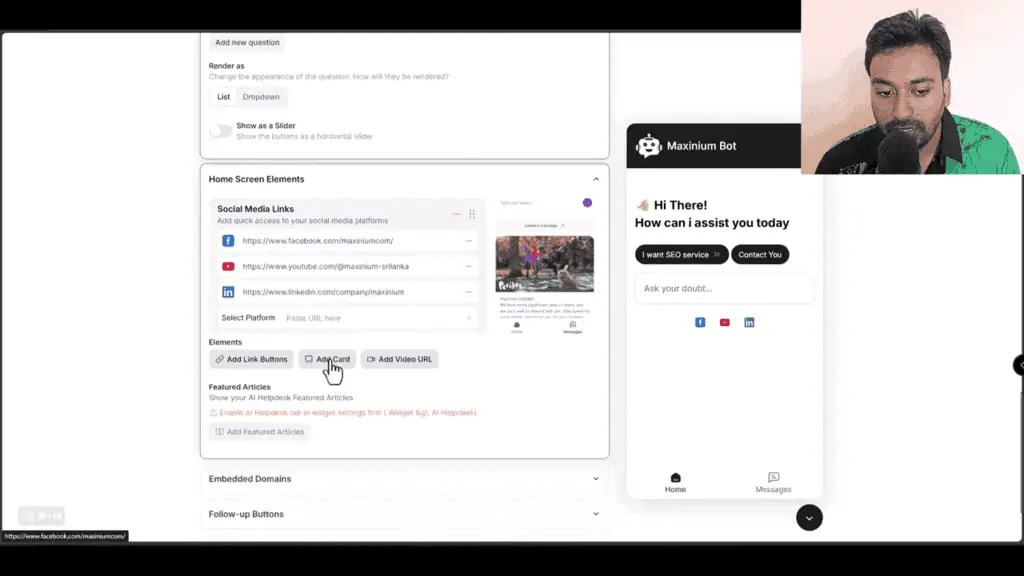
I tested the video embed by dropping in a YouTube link. It rendered immediately inside the chat widget. That is a useful feature if you want to put a product explainer or welcome video directly in front of users when they open the chat.
Training Your Chatbot: How Good Is the Data Ingestion?
Training is the make-or-break feature for any AI chatbot. A tool that cannot learn from your actual content produces generic responses that frustrate users and damage trust, and our AI how-to guides explain how RAG-based training works.
YourGPT lets you train from multiple sources:
- Website URLs (scrapes all linked pages automatically)
- Document uploads (PDF, Word, etc.)
- Direct text paste
- Auto-generated FAQ from a URL
- Google Drive, Dropbox, Slack, Discord, Intercom connections
The URL scraping is the most practical option for most users. You give it your domain, it pulls all the pages it can find, you select the ones that are relevant, and click start training. For my site, this took around 5 to 10 minutes before the chatbot could answer questions accurately.
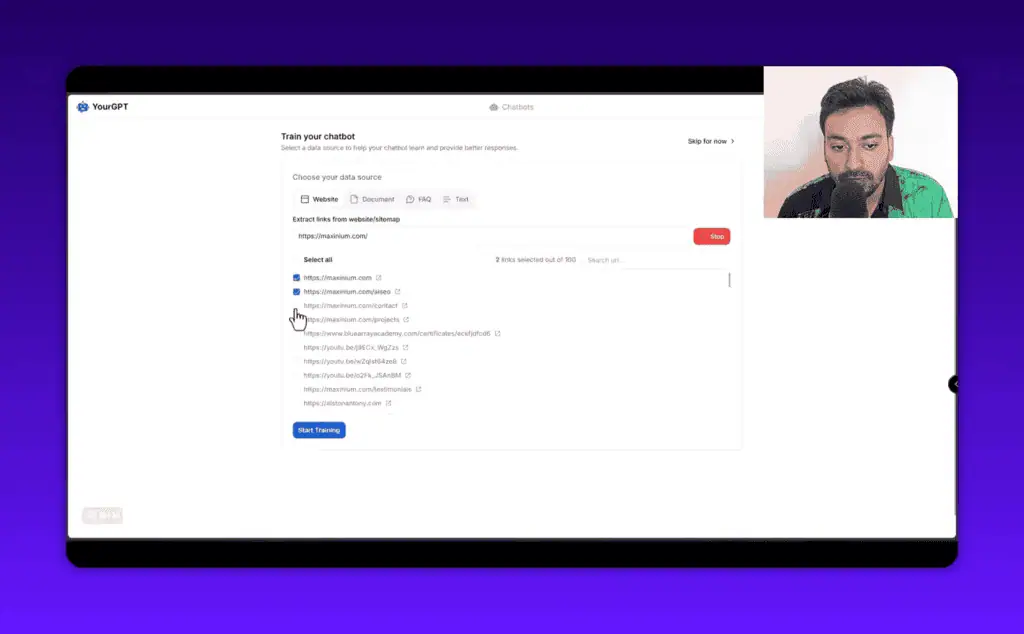
The OCR training option is worth noting for anyone with product catalogs or documentation stored as scanned PDFs. Most chatbot tools skip this entirely.
One thing I noticed: the quality of responses depends heavily on the quality of your training content. If your site has thin pages or vague product descriptions, the chatbot will produce vague answers. Garbage in, garbage out. This is not a YourGPT limitation specifically, it is how all RAG-based chatbots work. But it is worth setting expectations.
The AI Helpdesk feature sits alongside training and works differently. Instead of pulling raw content, it lets you create a structured knowledge base with articles that both users and the AI chatbot can reference. It is closer to a Zendesk-style knowledge base than a training dataset. Both work together: the AI uses its trained knowledge and can also surface relevant help articles when needed.
The Analytics Dashboard: What Can You Actually Track?
Most chatbot tools give you conversation counts and not much else. YourGPT’s analytics section is more detailed than I expected.
The overview dashboard shows:
- Total conversations and total visitors
- Positive and negative feedback ratios
- Traffic source breakdown
- Resolution rate percentage
- Top user intents (what people are actually asking about)
- Sentiment analysis across conversations
- AI Helpdesk performance metrics
- Customer satisfaction scores
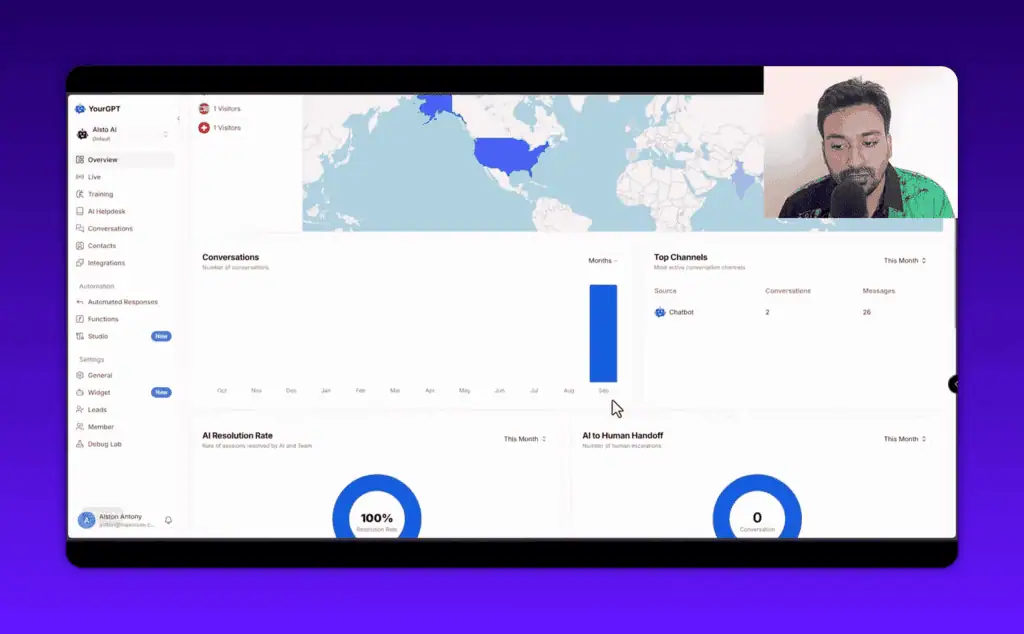
The top intents data is particularly useful. Once you have enough conversation volume, this section tells you what questions your users ask most frequently. That is direct product research for free. If 40% of your users ask a question your chatbot cannot answer well, you know exactly what to add to your training data.
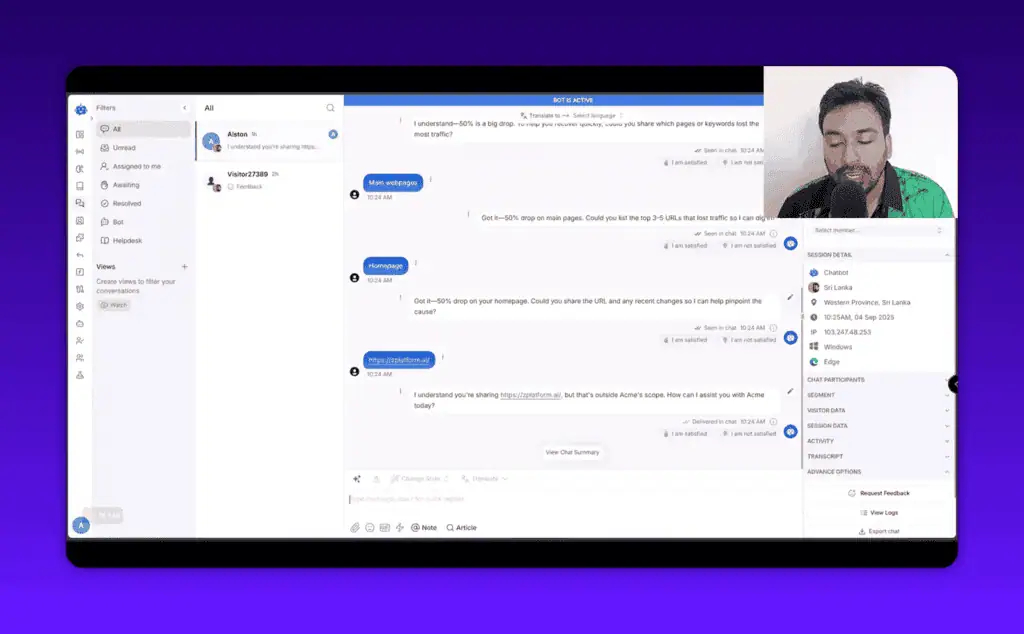
The conversation view goes deep. You can see individual sessions with timestamps, device data, IP location, and a full message history. There is also a chat summary feature that uses AI to generate a one-paragraph summary of what the user was trying to accomplish. In my test, the summary was accurate and genuinely useful for scanning conversations quickly.
Integration Options: WordPress, Shopify, and Beyond
YourGPT can be deployed through several methods, which matters if you are not running WordPress.
Deployment options include:
- Direct hosted URL (share a link to a standalone chat page)
- Embed script (copy/paste into any HTML page)
- iframe widget
- WordPress plugin (install the plugin, paste your UID)
- QR code
For WordPress users, the process is genuinely simple. Install the plugin from the WordPress plugin directory, add your chatbot UID, and the widget appears on your site. No API calls to configure manually.
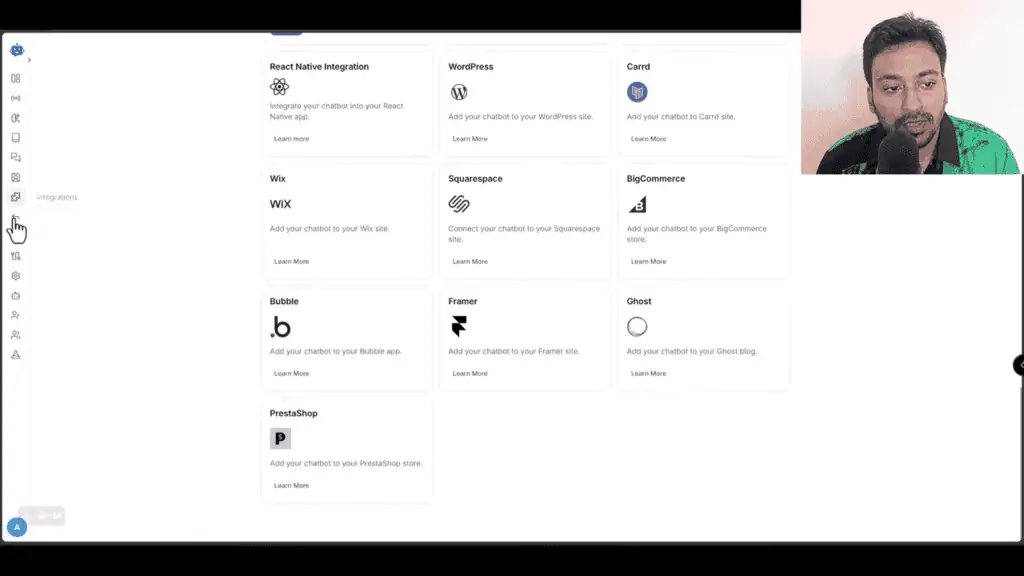
Platform support is broad: WordPress, Shopify, WooCommerce, Wix, Squarespace, BigCommerce, Bubble, Framer, PrestaShop. Most website builders are covered.
Beyond deployment, the function settings let you add capabilities to the chatbot that go past simple Q&A. The web search toggle is one of these. When enabled, the AI can search the web in real time rather than relying solely on training data. This is useful for questions about current events, competitor comparisons, or anything that changes frequently.
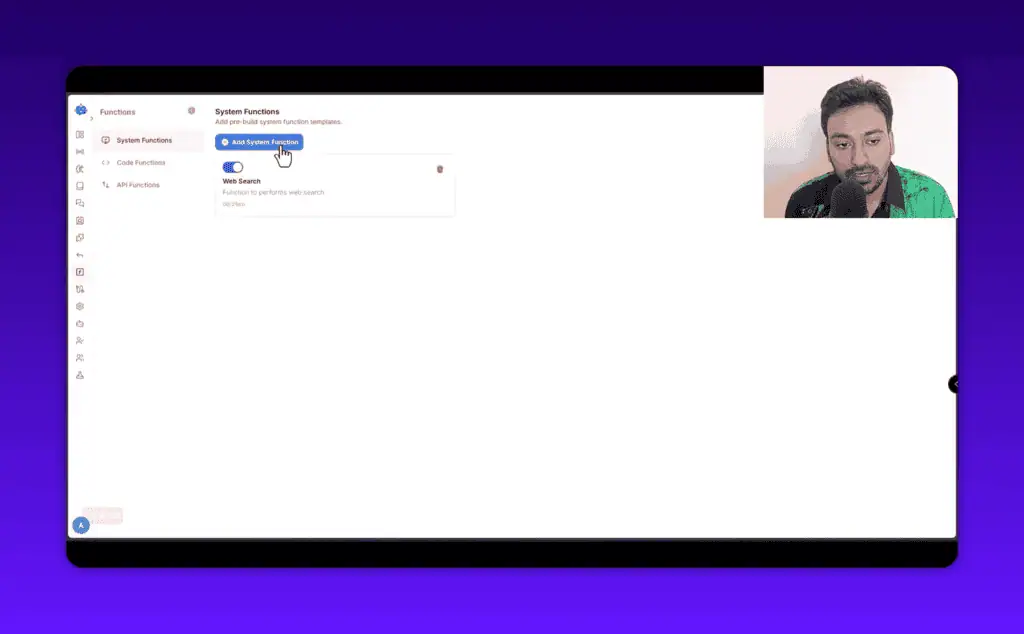
Other available functions include code execution (the AI can run code to answer technical queries) and external API calls, which connects YourGPT to CRMs, REST APIs, and other external systems.
Studio: Building Custom Conversation Flows
The Studio feature is the most differentiated part of YourGPT. This is where the platform moves from “good chatbot” to “business automation platform.”
Studio lets you build visual conversation flows, similar to a no-code automation builder but specifically designed for chat interactions. You define what happens at each step: show a message, ask a question, branch based on user input, call an API, trigger an email.
Pre-built templates make the entry point easier. Available templates include:
- Email verification (Twilio integration)
- SMS integration
- Appointment booking
- AI image generation within chat
- WooCommerce checkout automation (users can browse and buy without leaving the chat)
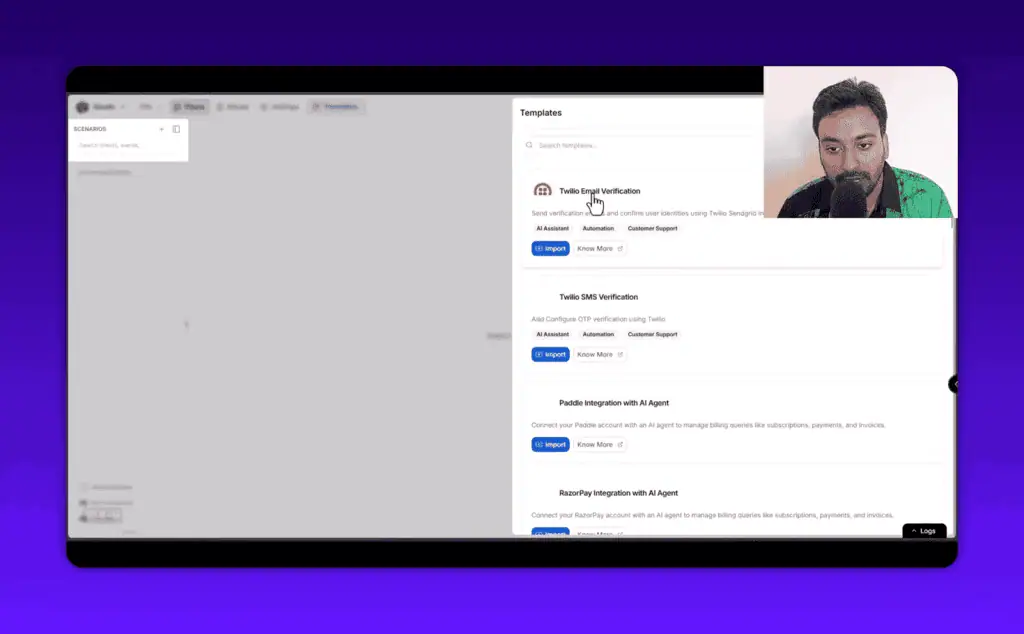
The WooCommerce checkout template is the most compelling for e-commerce operators. A customer opens the chat, asks about a product, and the AI can walk them through selection, add to cart, and complete the purchase entirely within the chat interface. I tested this and it worked, though it required careful configuration of the WooCommerce connection.
The Studio Copilot is an AI assistant built into the flow builder itself. You can ask it to help design a flow, debug a step, or explain what a component does. In my tests, it gave useful responses for straightforward questions about flow structure.
One honest note: the Studio feature has a learning curve. It is not difficult by technical standards, but it takes more than 30 minutes to build a reliable multi-step flow from scratch. The documentation goes deep, and the templates handle most common use cases. But if you want something custom, budget time for it.
Lead Capture and Settings Worth Configuring
The settings section contains a few configurations that are easy to miss but worth setting up early.
The lead pre-form is one of them. This lets you collect a user’s name and email address before the conversation starts. If someone is willing to identify themselves before chatting, they are a qualified lead by definition, and dedicated agents like the SourceLeader lead-gen agent take that capture further. This data flows into the Contacts section, where you can see each user’s full conversation history and send follow-up messages.
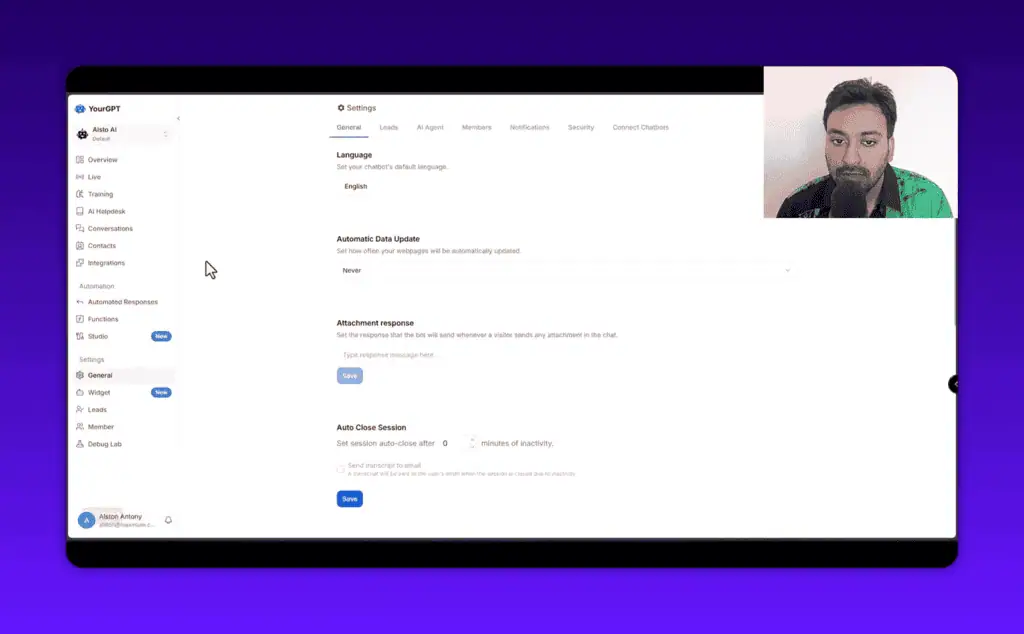
Team management lets you add operators with custom roles and permissions. You can configure which team members receive conversation assignment notifications by email, web push, or mobile app. This matters if you run a small team where different people handle different query types.
The human handoff feature connects to external chat systems via webhook. If your organization uses Intercom, Zendesk, or a custom support system, a user requesting a human can be seamlessly transferred. The chatbot does not need to be your only support channel, and pairing it with a hybrid service like the Joy AI answering service can cover live calls too. It works alongside existing tools.
YourGPT Pricing: What You Actually Pay
YourGPT has four pricing tiers. All prices below are billed annually, which gives roughly a 30% discount over monthly billing.
| Plan | Annual Price | Chatbots | Webpages | AI Credits | Notable Features |
|---|---|---|---|---|---|
| Essential | $39/month | 2 | 200 | 10M | Basic chatbot, unlimited integrations |
| Professional | $79/month | 5 | 500 | 30M | GPT-4, API/webhook, AI Helpdesk, lead gen, multi-language |
| Advanced | $349/month | 10 | 2,000 | 100M | o1 model, custom branding, advanced analytics, account manager |
| Enterprise | Custom | Custom | Custom | Custom | White-glove support, SSO, custom SLA |
Monthly billing rates are higher: $59/month for Essential, $129/month for Professional, and $499/month for Advanced.
For most small business owners and agency operators, the Professional plan at $79/month is the right starting point. The Essential plan lacks GPT-4 access, API/webhook support, and the AI Helpdesk. Those are not optional extras for serious deployments. They are the features that make the chatbot genuinely useful beyond basic FAQ answering.
The credit system (10M, 30M, 100M AI credits) deserves attention. Credits are consumed with each AI response. A typical conversation uses somewhere between a few thousand and tens of thousands of credits depending on length and complexity. For most small business deployments with moderate traffic, 10M credits per month is enough. If you are running high-volume customer support, check your projected conversation volume against the credit limits before choosing a plan.
There is a free trial available for all plans. No credit card is required to test the platform.
YourGPT for E-Commerce: The Most Interesting Use Case
The e-commerce angle deserves its own mention because it goes beyond what most chatbot tools offer.
Consider this scenario: a shopper lands on your WooCommerce store at 11pm. They have a question about a specific product variant. With a standard chatbot, they get a generic FAQ response and maybe a link to the product page. With YourGPT configured correctly, the chatbot can understand the query, confirm which variant they want, and complete the purchase entirely within the chat window.
That is a meaningful reduction in friction for e-commerce conversion. Someone who was willing to engage in chat but might have abandoned the purchase if redirected to a complex checkout flow can now complete the transaction in the same interface.
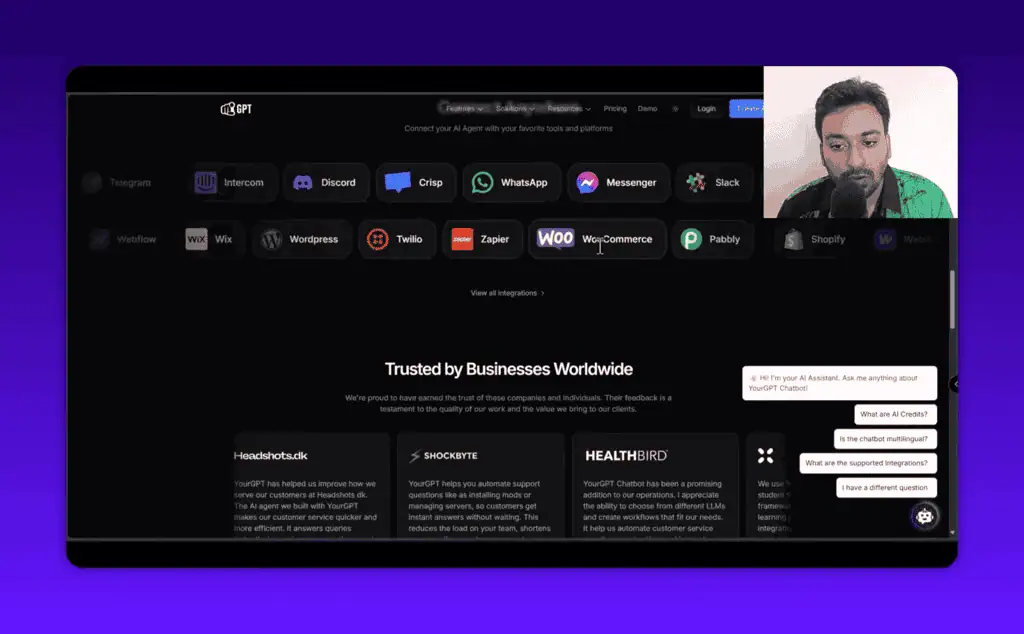
The Shopify equivalent works through a similar integration. This is not marketing copy from YourGPT’s homepage. I tested the WooCommerce flow during the video review linked above and confirmed that the order flow works end to end.
What Are the Downsides?
No review that skips the limitations is worth reading. Here are the honest gaps I found.
Credit consumption is opaque. It is not obvious how quickly you will burn through credits until you have real traffic data. Estimate conservatively before choosing a plan.
Studio requires real configuration time. The templates are useful, but building a reliable custom flow takes hours, not minutes. If you need a sophisticated e-commerce flow or a multi-step support workflow, plan for setup time.
Training quality is only as good as your content. If your site has thin, vague, or poorly structured content, the chatbot will produce equally thin and vague answers. You may need to spend time cleaning up your training data before the chatbot performs well.
The Analytics section needs more volume to be useful. Sentiment analysis and top intents require a significant number of conversations before the data becomes reliable. If you are just starting out, do not expect deep insights in the first few weeks.
No built-in appointment booking without Twilio. The appointment booking template requires a Twilio integration for SMS verification. That adds a separate account and cost if you do not already use Twilio.
Who Should Use YourGPT?
Good fit:
- Small business owners who want to automate customer support without hiring additional staff
- E-commerce operators running WooCommerce or Shopify who want to reduce cart abandonment through chat
- Agencies building chatbot solutions for clients across multiple platforms
- Founders who want lead capture without adding a separate form or CRM tool
- Developers who want to build custom conversation flows through the Studio feature
Not the right fit:
- Someone who needs a basic FAQ widget and does not want to configure anything: a simpler tool like Tidio handles that at lower cost
- Enterprise teams with complex compliance requirements or dedicated IT infrastructure: the Enterprise plan exists, but evaluate carefully
- Anyone who wants to set it up once and forget it: the chatbot improves with ongoing training updates and monitoring
YourGPT Alternatives
If YourGPT does not fit your situation, these are the main alternatives to consider.
Tidio ($29/month): Simpler chatbot tool, better for straightforward FAQ automation. Lacks Studio flows and deep e-commerce automation. Good for businesses that want a fast setup with minimal configuration.
Intercom (from $39/month): Enterprise-grade support platform with AI features. More polished, significantly more expensive, better suited for SaaS products with high support volume.
Chatbase ($19/month): Pure AI chatbot trained on your documents. No conversation flow builder, no e-commerce features. Right for simple knowledge-base deployments where customization is not needed.
Botpress (free tier available): Open-source conversation builder with deep flow customization. Requires technical knowledge. Better for developers who want full control.
YourGPT sits in the middle of this range: more capable than Tidio or Chatbase, more affordable than Intercom, and more accessible than Botpress for non-developers. Check out the best AI lifetime deals if you want one-time payment options in this category.
Final Verdict
YourGPT is a capable no-code AI platform that earns its positioning. The chatbot creation, training, and analytics are solid. The Studio flow builder is genuinely useful for e-commerce and multi-step automation. The integrations cover most website platforms without friction.
The honest qualifier: you get out what you put in. A YourGPT chatbot configured in 20 minutes with minimal training will perform like a chatbot configured in 20 minutes. One that has been properly trained, had its flows designed thoughtfully, and has been iterated on based on analytics data will perform meaningfully better.
Verdict: Buy for Professional tier if you are running an active business website and want to automate support and capture leads. Skip the Essential tier unless your only goal is basic FAQ automation.
Start your free trial at YourGPT here: https://alston.link/yourgpt (affiliate link) or the non-affiliate link at https://yourgpt.ai/
Note: I may earn a commission if you use the affiliate link above. I tested YourGPT on my own website with my own account before writing this review.
Browse more tested AI deals and AI lifetime deals on zplatform.ai.
Frequently Asked Questions
What is YourGPT and how does it work?
YourGPT is a no-code AI chatbot and automation platform. You create an AI agent, train it on your website content and documents, then deploy it on your site through an embed script or plugin. The AI uses your training data to answer user questions, capture leads, and can process e-commerce orders within the chat.
Can I integrate YourGPT Chatbot with my WordPress website?
Yes. YourGPT has a dedicated WordPress plugin. Install the plugin, copy your chatbot UID from the YourGPT dashboard, paste it into the plugin settings, and the chatbot appears on your site. No custom code is needed.
Can YourGPT Chatbot function as an AI helpdesk?
Yes, but this feature is available from the Professional plan upward. The AI Helpdesk module lets you create a structured knowledge base that both users and the AI can reference. It functions like a Zendesk-style knowledge base combined with an AI chatbot.
Does YourGPT Chatbot offer analytics for monitoring performance?
Yes. The analytics dashboard tracks total conversations, visitor counts, feedback ratios, resolution rates, top user intents, sentiment analysis, and customer satisfaction scores. The conversation view shows individual session details including device data, IP location, and AI-generated session summaries.
Can I create and test AI agents for free?
Yes. YourGPT offers a free trial across all plans. You can build and test a chatbot before committing to a paid plan.
Does YourGPT Chatbot support multiple languages?
Yes. The chatbot can respond in multiple languages and the settings include an auto-language detection option. Full multi-language support is available from the Professional tier.
What are the pricing options for YourGPT?
YourGPT offers four tiers: Essential ($39/month annual), Professional ($79/month annual), Advanced ($349/month annual), and Enterprise (custom). All plans include a free trial. Annual billing gives roughly 30% off compared to monthly rates.
Can I automate responses for common queries?
Yes. Beyond the trained AI responses, YourGPT has a separate automated responses section where you can set up fixed responses triggered by specific inputs. The Studio feature extends this further with visual conversation flow builders that can handle multi-step workflows.
Liked this review? Pin ZPlatform as your Preferred Source.
Pinning us tells Google to make our hands-on AI reviews, verified lifetime deals, and founder interviews more likely to appear prominently for you in Top Stories and eligible AI Search experiences (AI Mode, AI Overviews). Set it once, no account needed on our end.
- 500+ AI tools tested with real budgets
- Verified deals - no dead affiliate links
- Editor: Alston Antony, 15+ years in SaaS & SEO
 Opens Google · takes 2 seconds
Related Posts

I tested AgainstData on 355 pages of Gmail data. Here’s my honest review: bulk unsubscribe, personal data deletion reque...

I ran AI-Text-Humanizer.com through ZeroGPT and AIscan24 with real before and after scores. Here is what works, what it ...

I ran five text samples through AIscan24, including two I wrote by hand. One scored 80% AI. Here is what this free detec...

Starting August 2, 2026, the EU AI Act’s transparency provisions become enforceable. That means if your website uses AI-...

My hands-on Answer Socrates review covering all features, free plan limits, pricing, and how it compares to AlsoAsked. I...
“I’ve spent $4,200 on 118 AppSumo lifetime deals over 5 years. Here’s my honest review: what works, what fails, and whet...