


Verdict: Buy
What I Like
- Free version covers IndexNow (Bing and Yandex) fully
- Clean, simple WordPress integration
- IndexNow is safe to use at scale
- Pro SEO Stats dashboard is genuinely useful for client management
- Supports custom post types and WooCommerce products
- Active plugin with 40,000+ installs and strong reviews
What Is Missing
- Google Indexing API setup is complex and risky if misused
- Hit 403 errors during testing
- Pro pricing is on the higher end for a single-purpose plugin
- Google API misuse can lead to manual penalties
- WordPress-only, no support for Shopify or standalone sites
I manage 40+ WordPress sites. Getting new content indexed fast is something I think about constantly.
CrawlWP promises to solve that problem, automating indexing requests to Google, Bing, and Yandex every time you publish or update a post. It showed up on my radar when it launched a lifetime deal on Appsumo, and I installed it on my main site to put it through its paces.
Here is what I found after running it for several weeks, including the parts that did not go smoothly, the same hands-on standard I hold across all my AI tool reviews.
Quick Verdict: CrawlWP is a focused WordPress plugin that does one thing well: it tells search engines about your content the moment you publish. The free version handles IndexNow (Bing and Yandex) cleanly. The Pro version adds a GSC-powered SEO Stats dashboard and a bulk indexing interface. The Google Indexing API setup is more complex and I ran into real errors during my testing. Not for everyone, but genuinely useful if fast indexing is a pain point for your sites.
What Is CrawlWP and How Does It Work?
CrawlWP is a WordPress plugin that automatically notifies search engines whenever you publish, update, or delete content, and it sits neatly beside other plugins like the one in my WP Social Ninja review. Instead of waiting for Googlebot or Bingbot to crawl your site on their own schedule, the plugin sends an immediate indexing request so your content gets into search results faster.
It supports two main indexing mechanisms:
IndexNow is an open protocol supported by Bing and Yandex. When you publish a post, CrawlWP sends a ping with the URL and your API key. Bing and Yandex pick it up quickly. This protocol was designed for exactly this purpose, so using it in bulk is completely safe.
Google Indexing API is the more complicated option. Google originally built this API for job postings and live-stream content. Using it on regular blog posts is a gray area. Google has issued manual penalties to sites that abused bulk indexing via this API, so you need to be careful. CrawlWP gives you the tool. How you use it is your responsibility.
The plugin has 40,000+ active installs and 47+ five-star reviews on WordPress.org, which gives it solid credibility for a focused utility plugin, and a spot among the best AI plugins for WordPress.
Installing CrawlWP on WordPress
Installation is standard. Search for “CrawlWP” in your WordPress Add Plugins screen, install, and activate.
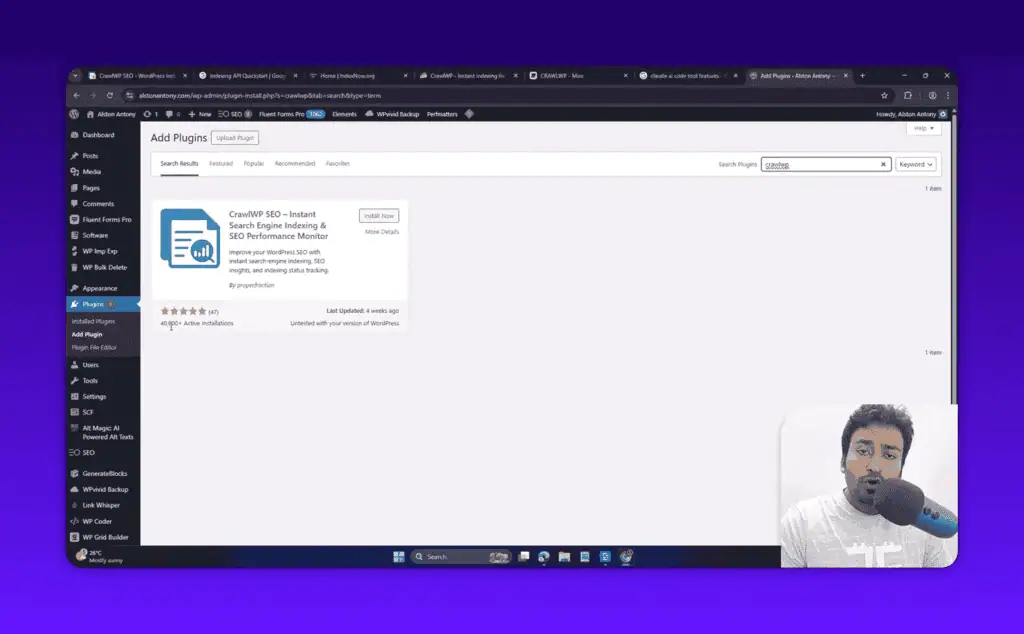
After activation, the plugin adds a CrawlWP menu in your WordPress admin sidebar. Settings are split across tabs: Indexing, IndexNow, Google, Yandex, and Logs.
CrawlWP Free Features
The free version covers more than you might expect.
Indexing Tab: Configure What Gets Submitted
The indexing tab is where you decide which content types CrawlWP tracks. You can enable or disable indexing for posts, pages, products (WooCommerce), and custom post types. There is also a toggle for taxonomies and a ping delay setting.
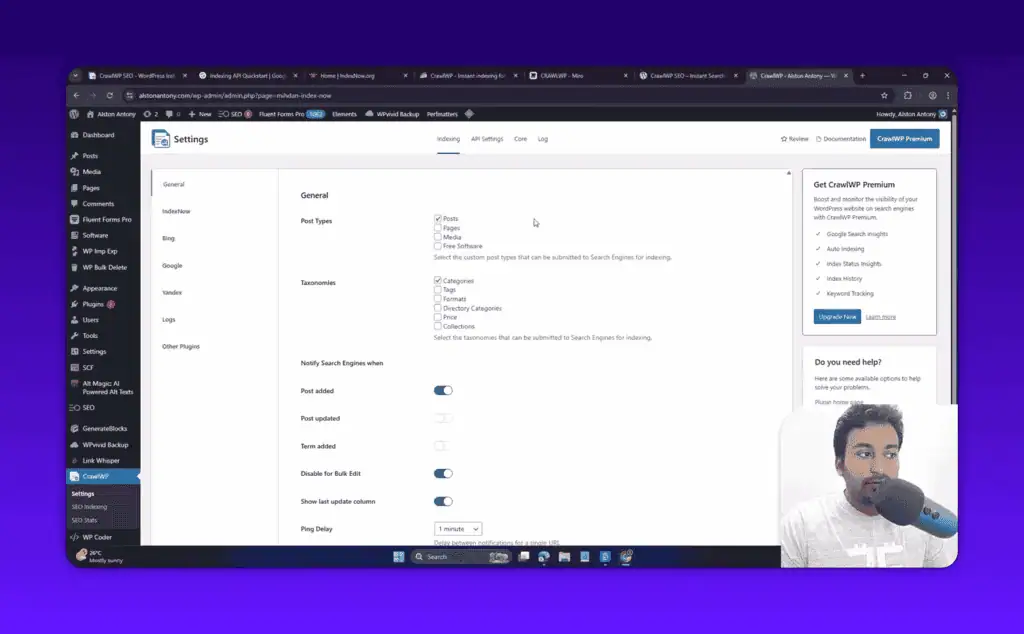
The ping delay controls how long the plugin waits before sending the indexing request after a publish or update. I recommend setting this to at least 2 minutes. That gives WordPress time to complete any post-publish processes before the URL gets pinged. Submitting a URL before your caching layer has served it once can cause search engines to receive an incomplete page.
IndexNow: The Safe Way to Get Indexed Fast
IndexNow is the feature you should use without hesitation. Enable it, paste your Bing Webmaster Tools API key, and save.
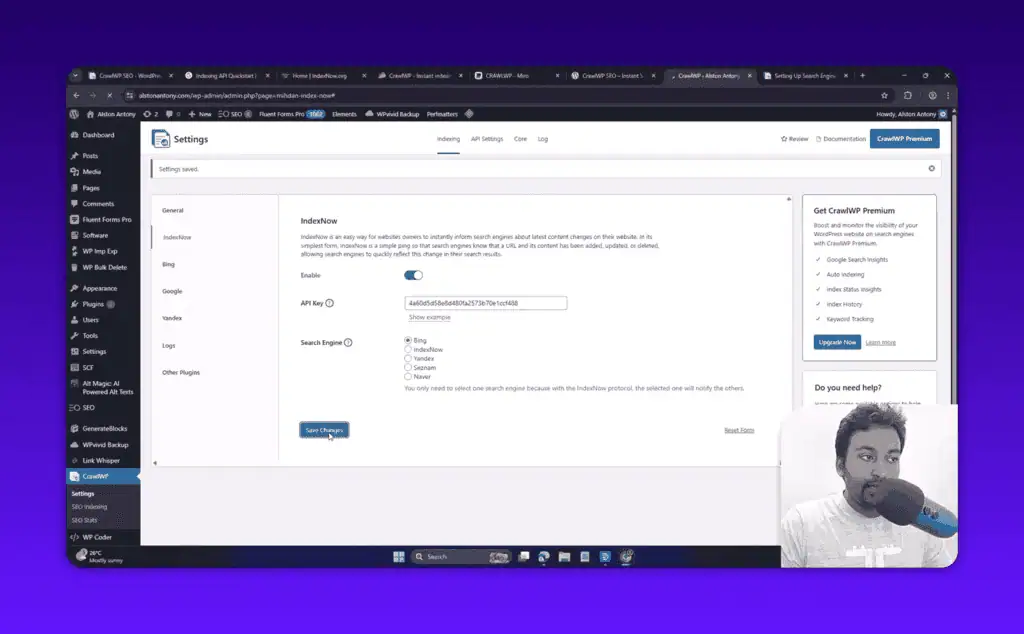
Every time you publish or update a post, CrawlWP sends a ping to Bing and Yandex via the IndexNow protocol. These search engines process it quickly. I have seen Bing pick up new pages within hours of publishing on sites running CrawlWP.
IndexNow was built to handle this use case at scale. You can safely automate it for your entire content library without worrying about penalties.
Google Indexing API: Powerful but Risky
The Google setup requires more work. You need to create a Google Cloud project, set up a service account, download a JSON key file, and add the service account as a verified owner in Google Search Console.
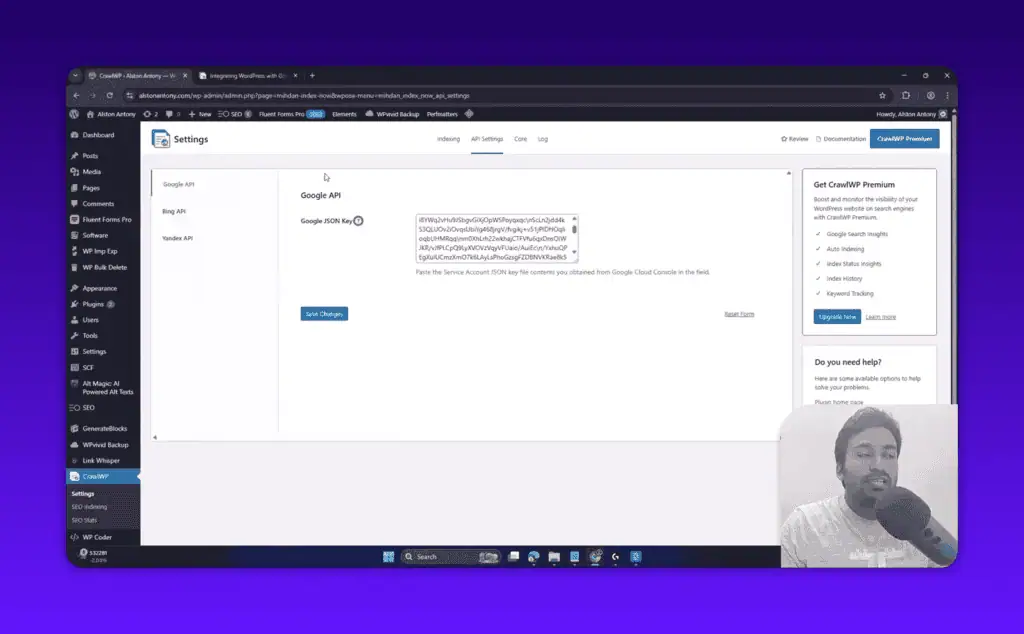
This is the honest part of my review: I ran into a 403 permission error during my testing. The plugin was stuck in “in progress” and the logs were not updating.
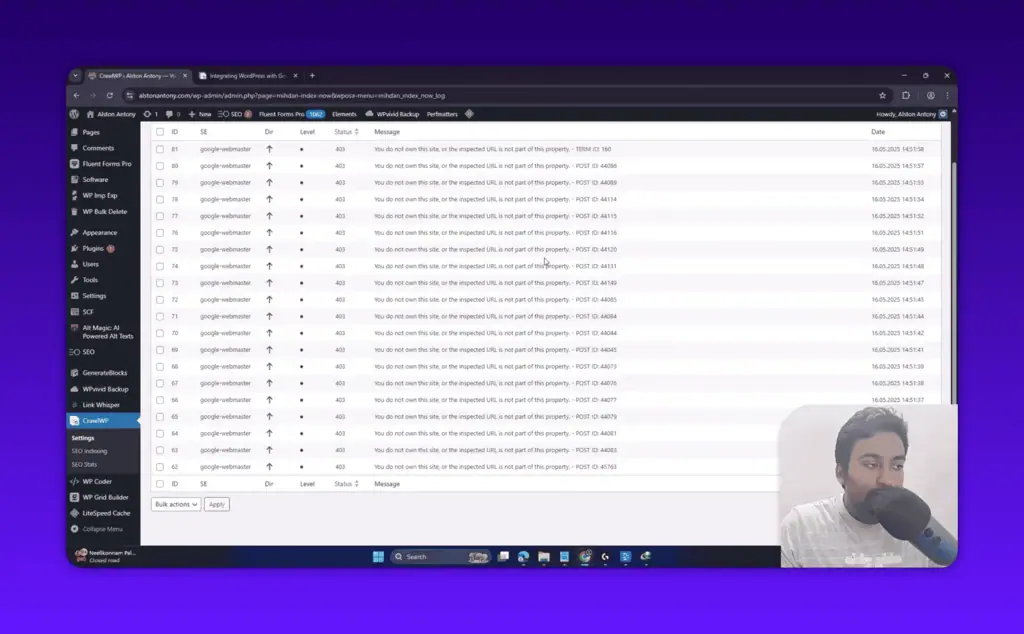
I am still troubleshooting whether this was a setup error on my end or a bug. I will update this review once I have an answer from the support team.
Even when it works correctly, I recommend using the Google Indexing API selectively. Use CrawlWP to identify which pages are not indexed, then manually submit those URLs via Google Search Console’s URL Inspection tool. That approach carries zero risk and Google explicitly supports it.
If you use the Google API in bulk for standard blog posts, you run the risk of a manual action from Google. CrawlWP gives you the capability but caution is the right operating posture here.
CrawlWP Pro Features
The Pro version adds two major upgrades that are genuinely useful, especially if you manage sites for clients.
SEO Stats Dashboard
The Pro SEO Stats dashboard pulls your Google Search Console data into WordPress and displays it in a clean graphical interface, similar to the GSC-connected workflow in my ClickRank AI review. You can see clicks, impressions, CTR trends, keyword performance, and top countries, all without leaving your WordPress admin.
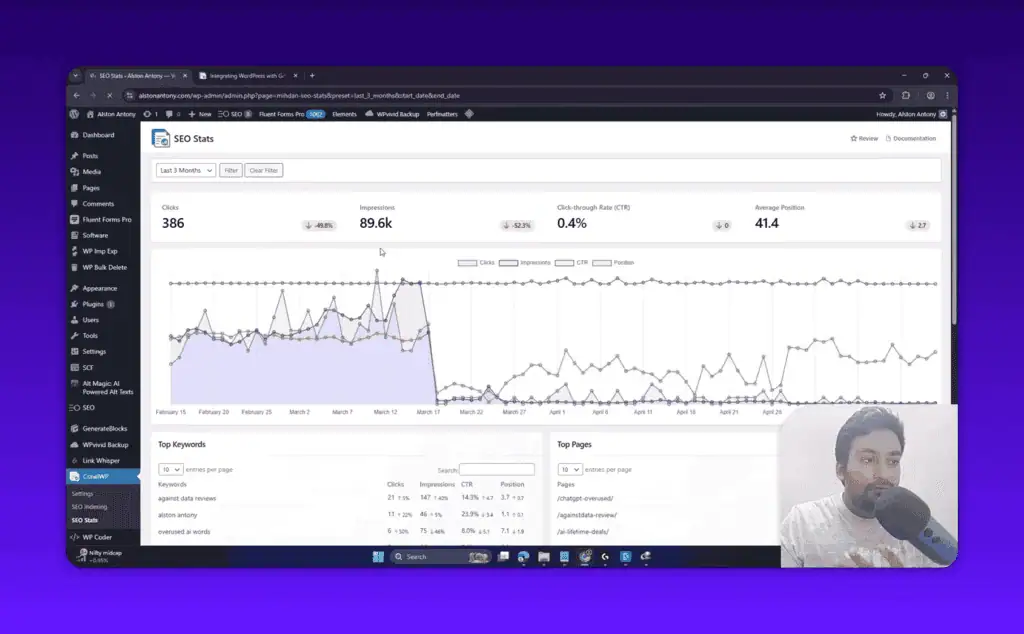
I used this on my site when I was analyzing my recovery from a March 2026 Google core update. My traffic dropped significantly that month and I was tracking the recovery closely. Having this data in WordPress alongside my content was genuinely convenient.
Two practical benefits of this dashboard over using Google Search Console directly:
First, if you manage sites for clients, you do not need to give them separate GSC access. They can view performance data right from their WordPress dashboard. That alone saves a lot of back-and-forth for agencies.
Second, the interface is faster and less cluttered than Google Search Console. The graphs load quickly and the most important metrics are front and center.
You can also search for specific keywords and filter by page type. I noticed the keyword filter sometimes returns empty results when you search for terms that are not in your GSC data, which is expected behavior, not a bug.
SEO Indexing Interface
The SEO Indexing screen shows all your posts and pages with their current indexing status: indexed, in progress, or not indexed. You can filter by post type, sort by status, and submit URLs for indexing individually or in bulk.
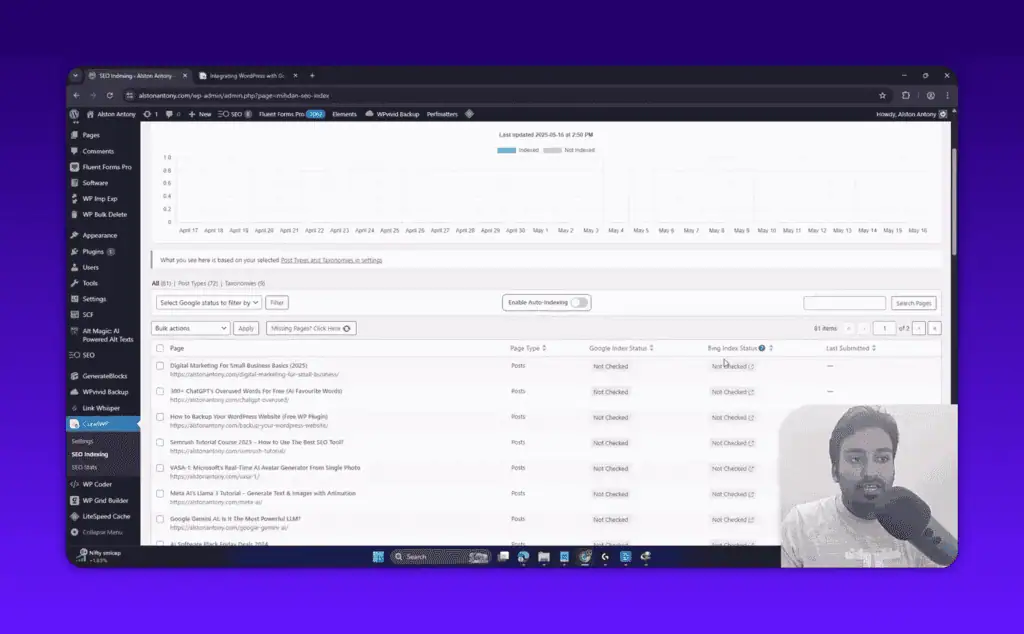
This is the most useful Pro feature for sites with large content libraries. Instead of going through GSC page by page, you get a consolidated view of your entire site’s index status in one place.
My recommendation on bulk submissions: keep batches under 10 to 20 URLs at a time, especially if you are doing this via the Google API. There is also an auto-indexing toggle that continuously monitors for unindexed content and queues it automatically.
CrawlWP Pricing
CrawlWP has a free version on WordPress.org and paid Pro plans.
Yearly Plans:
| Plan | Sites | Price |
|---|---|---|
| Standard | 1 | $59/year |
| Pro | 5 | $159/year |
| Agency | Unlimited | $259/year |
Lifetime Plans:
| Plan | Sites | Price |
|---|---|---|
| Standard | 1 | $359 one-time |
| Pro | 5 | $559 one-time |
| Agency | Unlimited | $759 one-time |
All paid plans include a 14-day money-back guarantee.
The Appsumo lifetime deal periodically offers better pricing than the official site. If you are a deal hunter, it is worth checking there first.
For most individual site owners, the Standard yearly plan at $59 covers everything you need. Agency owners managing multiple client sites will want the Agency plan. If you are cost-conscious and plan to use CrawlWP long-term, the lifetime options pay for themselves within 2 to 3 years.
Who Should Use CrawlWP?
CrawlWP makes the most sense in these situations:
New sites that need fast indexing. If you have just launched a site and need Google and Bing to discover your content quickly, CrawlWP automates what you would otherwise do manually via Google Search Console and Bing Webmaster Tools, a natural next step after spinning one up with an AI builder like the one in my StellarSites review.
Active publishers. If you publish several pieces of content per week across multiple sites, automating indexing requests saves meaningful time.
Agency owners and freelancers. The Pro SEO Stats dashboard is a real value-add for client reporting. Clients get search performance data in their WordPress dashboard without you granting and managing GSC access.
Large sites with indexing gaps. If your sitemap has hundreds or thousands of pages and you are not sure which ones Google has actually indexed, the SEO Indexing interface gives you the full picture.
Who should skip it: If you publish content infrequently on a single site, Google and Bing will find your content through normal crawling. CrawlWP solves a speed problem. If indexing speed is not a pain point for you, the free version is all you need and the Pro features will not justify the cost.
CrawlWP vs Alternatives
CrawlWP vs Manual GSC submission: Manual submission via Google Search Console URL Inspection is free and completely safe. The tradeoff is time. For a handful of pages per month, manual is fine. For prolific publishers with multiple sites, automation wins.
CrawlWP vs Rank Math / SEOPress indexing features: If you are already on a premium tier of Rank Math or SEOPress, check your existing plugin first, then weigh the wider field in my SEO tool alternatives hub. Both offer some indexing functionality as part of their premium suites. You may not need a dedicated plugin. CrawlWP’s edge is the dedicated indexing focus, the detailed log view, and the Pro SEO Indexing dashboard.
CrawlWP vs other indexing plugins: IndexNow is a free and open standard. You could configure it directly with Bing Webmaster Tools without a plugin. CrawlWP’s value is bundling IndexNow, the Google API, Yandex support, logging, and the SEO Stats dashboard into one clean interface.
Pros and Cons
Pros:
- Free version covers IndexNow (Bing and Yandex) fully
- Clean, simple WordPress integration
- IndexNow is safe to use at scale
- Pro SEO Stats dashboard is genuinely useful for client management
- Supports custom post types and WooCommerce products
- Active plugin with 40,000+ installs and strong reviews
Cons:
- Google Indexing API setup is complex and risky if misused
- I personally hit 403 errors during testing
- Pro pricing is on the higher end for a single-purpose plugin
- Google API misuse can lead to manual penalties
- WordPress-only, no support for Shopify or standalone sites
Frequently Asked Questions
Can I use CrawlWP on non-WordPress sites? No. CrawlWP is a WordPress plugin only.
Does CrawlWP guarantee my content will be indexed? No plugin can guarantee indexing. CrawlWP submits indexing requests, but Google makes the final decision on whether to index a page based on quality, crawl budget, and relevance signals.
Does CrawlWP slow down my WordPress site? No. Indexing pings happen asynchronously in the background. There is no impact on front-end page load times.
Is IndexNow safe to use in bulk? Yes. IndexNow was designed specifically for automated URL submission. Bing and Yandex support and encourage its use. You can safely run it across your entire content library.
Does CrawlWP work with WooCommerce? Yes. You can enable indexing for WooCommerce product post types from the indexing tab settings.
Can I use CrawlWP with page builders like Elementor or Divi? Yes. CrawlWP hooks into WordPress post save/update events regardless of which page builder you use.
Do I need technical skills to set up CrawlWP? For IndexNow, no. For the Google Indexing API, yes. The Google Cloud setup requires creating a service account and downloading a JSON key, which is a technical process.
Final Verdict
CrawlWP is a legitimate, well-built plugin that solves a real problem. The free version with IndexNow support is worth installing on any active WordPress site. Bing and Yandex indexing is fast and the setup takes under 5 minutes.
The Pro version is a worthwhile upgrade if you manage client sites and want GSC data in WordPress without the overhead of managing separate access, or if you run a large site and need to audit your indexing status at scale.
My honest take on the Google Indexing API: I hit errors during testing and I am cautious about recommending bulk use of it for standard blog content. Use it selectively, or use CrawlWP to find gaps and submit via GSC manually. That approach is risk-free.
If you are looking for a focused indexing plugin that automates the tedious parts of getting content into search results, CrawlWP is the right tool. The IndexNow support alone is worth installing the free version today.
Want to stay updated on tested AI and SEO tools? Browse the latest AI deals or check the AI tools lifetime deals hub for one-time pricing options.
Liked this review? Pin ZPlatform as your Preferred Source.
Pinning us tells Google to make our hands-on AI reviews, verified lifetime deals, and founder interviews more likely to appear prominently for you in Top Stories and eligible AI Search experiences (AI Mode, AI Overviews). Set it once, no account needed on our end.
- 500+ AI tools tested with real budgets
- Verified deals - no dead affiliate links
- Editor: Alston Antony, 15+ years in SaaS & SEO
 Opens Google · takes 2 seconds
Related Posts

I tested AgainstData on 355 pages of Gmail data. Here’s my honest review: bulk unsubscribe, personal data deletion reque...

I ran AI-Text-Humanizer.com through ZeroGPT and AIscan24 with real before and after scores. Here is what works, what it ...

I ran five text samples through AIscan24, including two I wrote by hand. One scored 80% AI. Here is what this free detec...

Starting August 2, 2026, the EU AI Act’s transparency provisions become enforceable. That means if your website uses AI-...

My hands-on Answer Socrates review covering all features, free plan limits, pricing, and how it compares to AlsoAsked. I...

“I’ve spent $4,200 on 118 AppSumo lifetime deals over 5 years. Here’s my honest review: what works, what fails, and whet...