

Verdict: Buy
StellarSites summary: price, refunds and who it suits
| Field | Detail |
|---|---|
| Tool | StellarSites, from StellarWP (a subsidiary of Liquid Web) |
| Category | Managed WordPress platform with an AI site wizard: Nexcess hosting, Cloudflare Enterprise CDN, KadenceWP themes, SolidWP security and performance, plus LearnDash, GiveWP, The Events Calendar or WooCommerce depending on your goals |
| Best use case | Small businesses, nonprofits and course creators who want a working WordPress site without assembling hosting, themes and plugins themselves |
| Price | From $15/month, scaling with the goals and plugins you select. Free trial: no, but the AI wizard is free to run and preview before you pay. 15-day money-back guarantee on monthly plans, 30-day on annual; annual billing is discounted |
| Verdict | Buy if you need one or more of StellarWP’s premium plugins; skip if you need SSH, WP-CLI or self-serve staging |
Most “AI website builders” are locked-down page editors dressed up with a chatbot, and that was my first reaction to StellarSites too. What changes the calculation is who is behind it: StellarWP, the company behind KadenceWP, SolidWP, LearnDash, GiveWP, and The Events Calendar. These are category leaders with hundreds of thousands of active installs each, and StellarSites is StellarWP’s attempt to bundle everything they own into a single managed WordPress product. I walked through the full AI wizard and reviewed the pricing stack; the hosting, performance and security details come from the platform’s documentation.
StellarWP’s plugins on managed hosting: what StellarSites is
StellarSites is a managed WordPress platform that handles hosting, themes, plugins, security, performance, backups, and AI-powered site generation in a single subscription. You pay one monthly fee and get a fully functional WordPress site without configuring anything manually.
The parent company is StellarWP, a subsidiary of Liquid Web, one of the most respected managed hosting providers in the space. StellarWP owns some of the most widely used WordPress plugins available, including LearnDash (the leading LMS plugin), GiveWP (used by thousands of nonprofits for donation collection), The Events Calendar, and Kadence, which powers both themes and the site builder. StellarSites is the product that bundles them with hosting; StellarWP is the company.
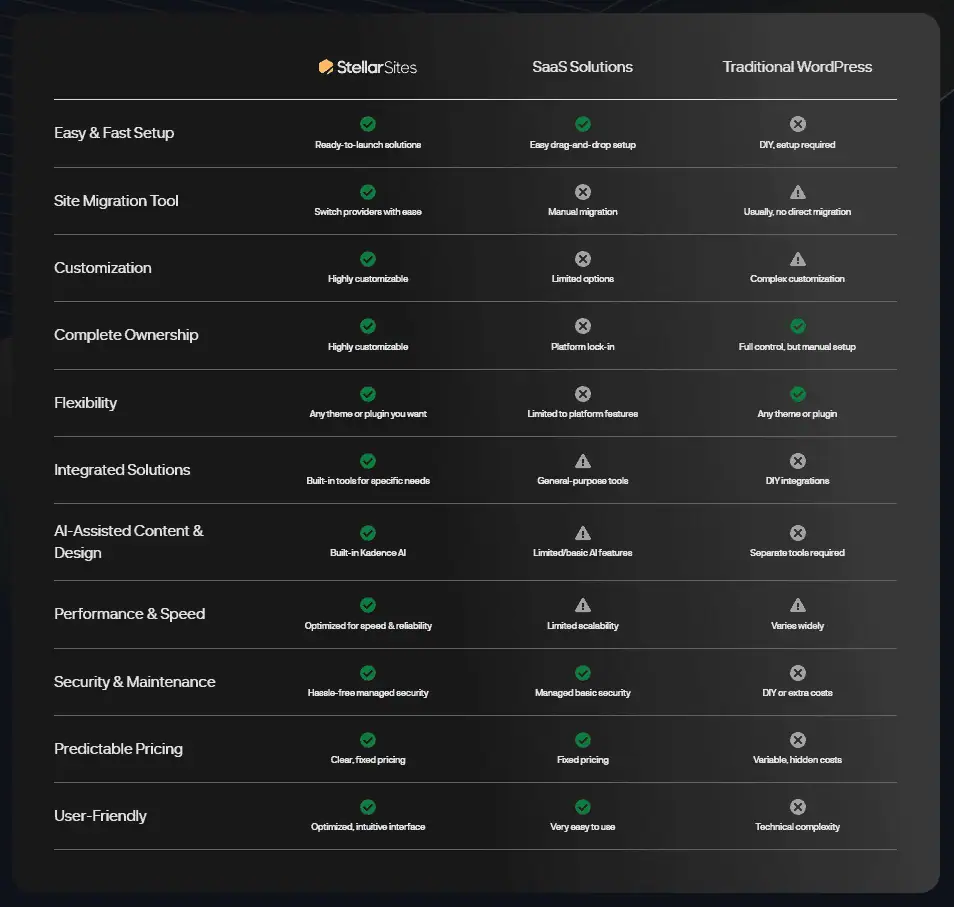
This is the core difference from Wix or Squarespace, which are proprietary. StellarSites runs on WordPress, so you get the full WordPress admin panel, you can install additional themes and plugins, and if you ever cancel, you export your site and take it with you. Instead of installing WordPress, choosing a theme, installing plugins, and configuring CDN and caching yourself, you answer six questions and StellarSites generates a working site draft, one of several AI builders in my roundup of the best AI tools.
Six questions to a draft site: the AI wizard
The wizard has six steps, and each one feeds information into the AI that generates your site. I walked through it completely, and it is one of the smoother onboarding flows I have seen in this category.
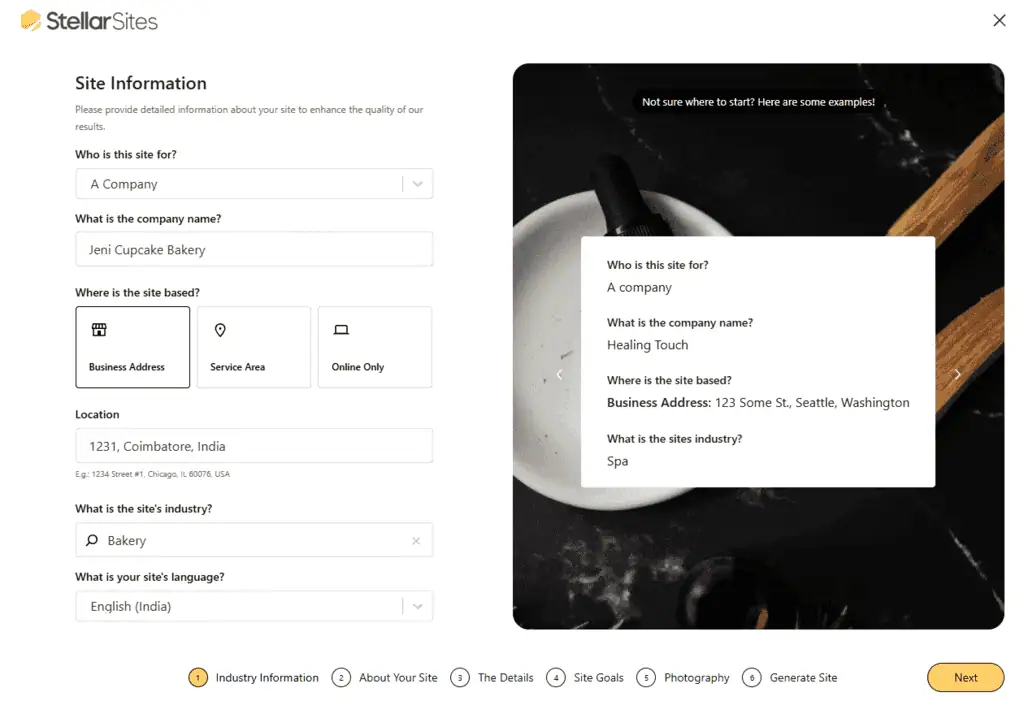
Step 1: Business type and name
You start by selecting the website type: company, personal, or nonprofit or community. Then you enter your business name and address, or mark it as an online-only operation. The AI uses this to set up your local SEO footprint in the generated content.
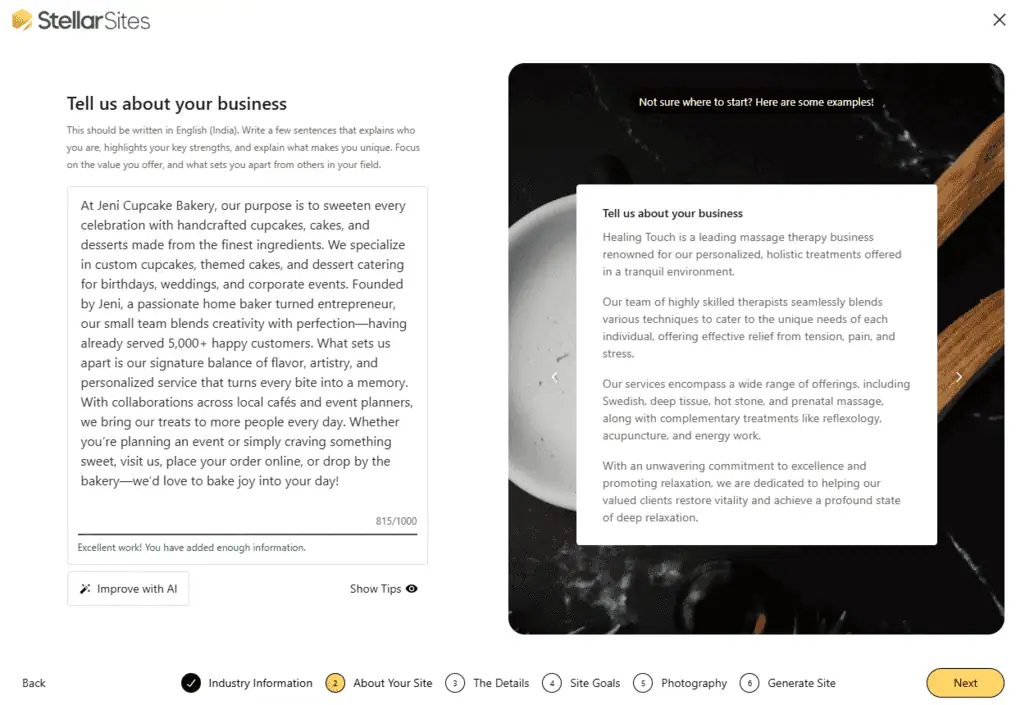
Step 2: Industry and business description
You choose your industry from a searchable dropdown, then enter a business description of up to 10,000 characters. There is a “Generate with AI” button here, but I would skip it: the AI-generated descriptions are generic and often inaccurate. Take 10 minutes and write something specific to your business, because the quality of the output site depends heavily on what you enter here. You also select a site language, and StellarSites supports multiple languages.
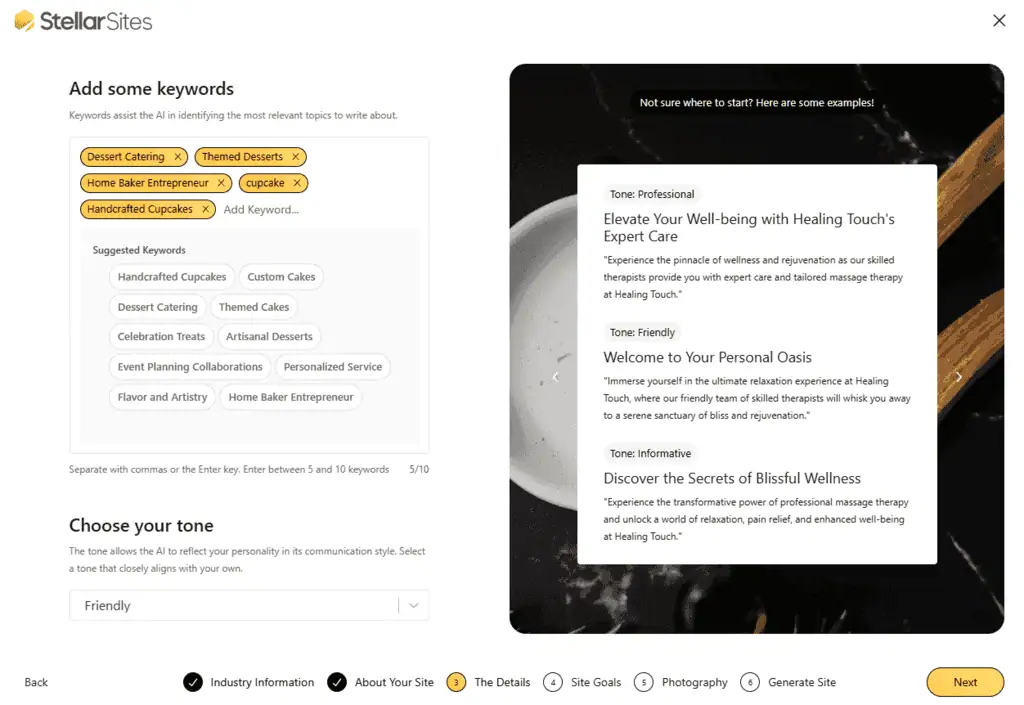
Step 3: Keywords and tone
Next you add up to 10 keywords. The wizard auto-suggests relevant keywords based on your industry selection, and you can accept them or type your own. Then you choose your brand tone: friendly, professional, conversational, trustworthy, funny, or persuasive. This sets the copywriting style the AI uses across all generated pages.
Step 4: Site goals and plugin selection
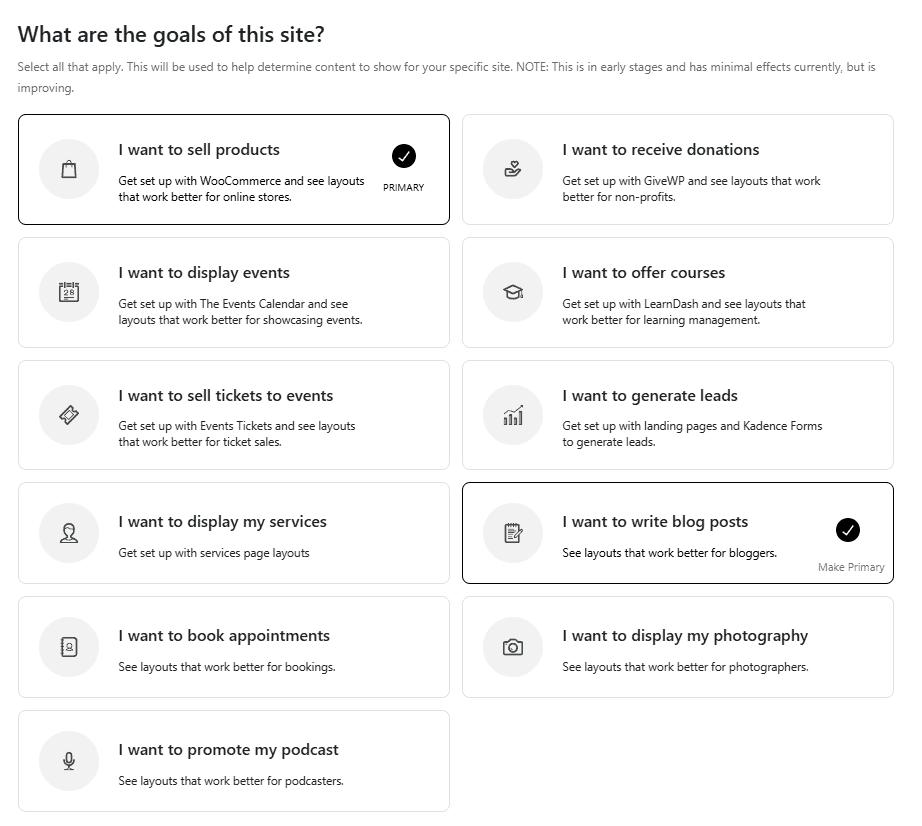
This is the most important step. StellarSites maps your goals to specific premium plugins it will install and configure automatically:
- Sell products? WooCommerce gets installed and preconfigured.
- Receive donations? GiveWP gets set up.
- Run events? The Events Calendar comes included.
- Offer online courses? LearnDash gets activated.
- Sell event tickets? Event Tickets plugin is added.
- Generate leads? Kadence Forms and landing pages get built.
- Display services, blog posts, booking, photography, or podcasting? Each goal has a matching feature set.
Whatever you select here feeds both the AI site generation and the pricing: each goal adds the relevant plugin license to your subscription, so selecting fewer goals keeps your price lower. You can also mark one goal as your primary focus, and the AI builds the homepage and primary navigation around it.
Shop plans also include StellarWP Pay, Flux Checkout, Kadence ShopKit, and Iconic plugins alongside WooCommerce, and to add an affiliate program on top of WooCommerce see my Solid Affiliate review.
Step 5: Images
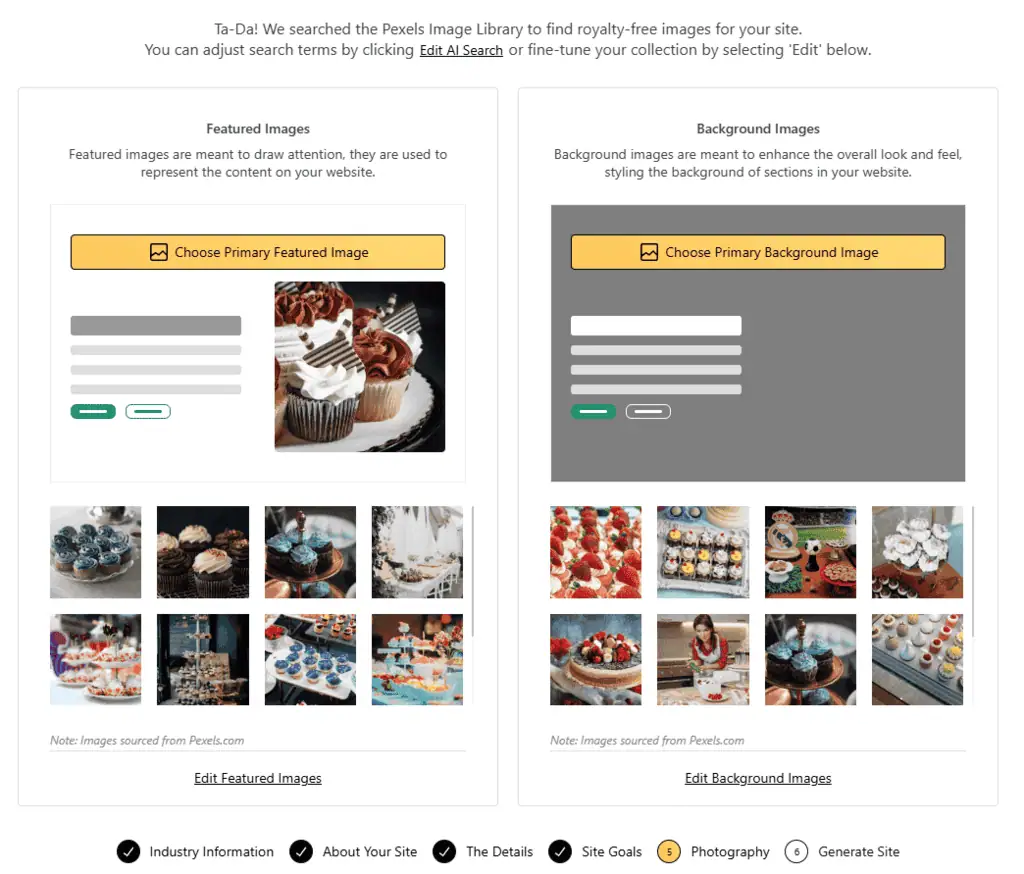
StellarSites pulls featured and background images from Pexels. You review the selection, swap any images you do not like, and approve the set, so your site has real photography from the first launch rather than blank placeholder boxes.
Step 6: Generate and review
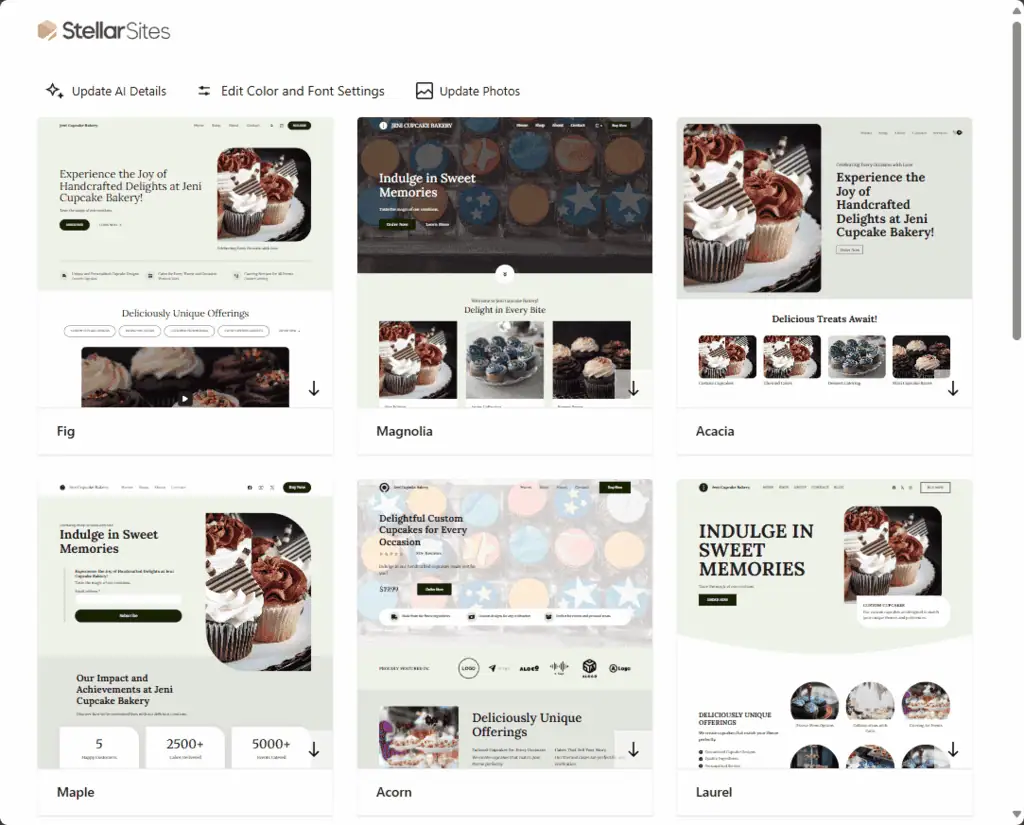
Enter your email, click generate, and wait. The AI builds 14 different design variations based on all your inputs. Each variation includes a homepage, about page, service pages, contact page, and whatever specialized pages match your goals (course catalog, donation page, event listings, and so on).
You can switch between designs, change colors, switch fonts, toggle between light and dark mode, and preview every generated page before committing. When you find the one you want, you click “Buy and Launch,” and only then does the wizard show the final price based on everything you selected and take payment. The output is not perfect, but it is a functional first draft that saves days of setup work.
What the monthly fee includes
Hosting infrastructure
StellarSites runs on Nexcess, Liquid Web’s managed WordPress hosting platform, which uses dedicated server infrastructure designed for WordPress workloads rather than shared hosting. Nexcess handles server maintenance and security patching behind the scenes, and auto-scaling means you do not need to manually upgrade your plan when the site starts getting real traffic.
Cloudflare Enterprise CDN is included at every tier. Most hosting providers offer Cloudflare integration, but the Enterprise plan includes image optimization, faster edge locations, and better DDoS protection than the free or paid Cloudflare plans most people use, and as a global edge network it serves content from locations close to your visitors wherever they are.
Performance
Performance optimization runs through SolidWP’s performance tools, which include page caching, browser caching, dynamic content optimization, compression, and Object Cache Pro with Redis. Getting this stack independently would require a premium Cloudflare subscription, an Object Cache Pro license (which runs around $95 per year), and a solid performance plugin, all configured together. StellarSites ships it preconfigured.
Security
Security comes through SolidWP Security Pro: brute force protection, two-factor authentication, file change detection, zero-day threat protection, and malware scanning. SolidWP’s security plugin has over 1 million active installs and is one of the more trusted names in WordPress security, part of the same plugin toolbox I test in reviews like my CrawlWP review. Add Cloudflare Enterprise’s WAF (web application firewall) and Liquid Web’s infrastructure-level protections, and you have a three-layer security setup without touching a configuration file.
Themes and design
All designs are built on KadenceWP, which StellarWP also owns. Kadence Blocks works inside the standard WordPress editor, so everything you build stays compatible with future WordPress updates rather than depending on a proprietary builder. The Kadence theme framework and blocks give you drag-and-drop design with full control over typography, colors, spacing, and layout. The Kadence AI credits included in the subscription can be used for ongoing content generation and design adjustments after the initial build.
Backups
Automatic daily backups are included with 30-day retention, and one-click rollbacks are available from the dashboard. Backups are retained for 30 days even after you cancel your subscription, which is a useful data protection detail if you decide to migrate.
Support
Support covers everything on the platform: hosting, WordPress, themes, plugins, and the AI site builder, through live chat, email, and a ticketing system in the dashboard. When something breaks on a self-managed WordPress site, you spend time working out whether the problem is the host, a plugin, a theme conflict, or a configuration issue. With StellarSites, you open one ticket.
Domains, migration and extra plugins
StellarSites does not include domain registration, but you can connect any domain you own: buy it from a registrar like Namecheap, point your DNS to StellarSites, and the support team walks you through the process. A free expert migration service is included if you are moving an existing WordPress site, covering your content, settings, theme, and plugin configurations. And because it is WordPress, you can install any additional plugins or themes, including social-proof tools like the one in my WP Social Ninja review.
StellarSites pricing against the DIY stack
Pricing starts at $15/month and scales based on which features and plugins you need. The wizard calculates the total from your goal selections, so the price you see at checkout reflects exactly what you configured.
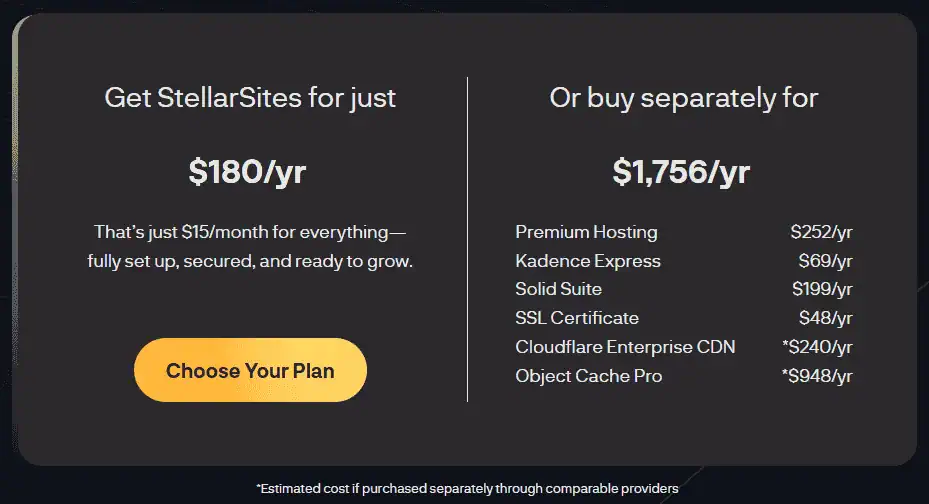
The annual plan comes with a discount over monthly billing. Monthly subscriptions include a 15-day money-back guarantee, and annual subscriptions a 30-day money-back guarantee. There is no free trial in the traditional sense, but the AI wizard is free: you can go through all six steps, generate your designs, and see the price before entering payment information.
To understand the value, compare what you would spend building the same stack independently:
| Component | Individual Cost |
|---|---|
| Kadence Theme Pro | ~$129/year |
| Kadence Blocks Pro | ~$99/year |
| SolidWP Security Pro | ~$99/year |
| LearnDash | ~$199/year |
| GiveWP Pro | ~$149/year |
| The Events Calendar Pro | ~$89/year |
| Object Cache Pro | ~$95/year |
| Nexcess Managed Hosting | ~$168/year |
| Cloudflare Pro | ~$240/year |
| Total | ~$1,267/year |
That is before accounting for your time configuring everything. The base price is a significant discount against those component costs, but only if you would use the components: the $1,267 total assumes you need LearnDash, GiveWP and The Events Calendar, and each goal you select raises the StellarSites price too.
Nonprofits, course creators and Wix leavers: who it suits
Small businesses that need a professional website and do not want to manage hosting, plugins, and security separately. StellarSites handles the technical layer so business owners can focus on their actual work.
Nonprofits that need donation capabilities through GiveWP. The plugin is already configured and included in the subscription, which removes the setup overhead that often makes nonprofits defer their online fundraising launch.
Freelancers and agencies who build client websites and want a repeatable, managed workflow. The AI wizard generates a credible first draft quickly, the Kadence page builder handles customization, one support contact covers every layer, and the centralized dashboard makes multi-site management practical.
Course creators who want to launch a learning platform using LearnDash without paying $199/year on top of hosting and other plugin costs.
Business owners moving off Squarespace or Wix who want more control over their site and WordPress flexibility, but are not ready to manage a traditional WordPress hosting setup from scratch.
Who should not use it: developers who need full server access, and businesses running highly complex, custom-built WordPress applications where plugin compatibility and server access matter for specific functionality. StellarSites is optimized for the most common WordPress use cases, not edge cases.
Where StellarSites gets in a developer’s way
- No server-level control. Technical users who want SSH access, WP-CLI, custom server configurations, or granular hosting controls will find StellarSites restrictive. If you run custom server-level configurations, you will hit walls quickly.
- Staging requires support involvement. You cannot create a staging environment from the WordPress dashboard yourself; you go through the support team. For agencies or developers who run staging workflows on every project, that is friction on every project.
- The combined product is still maturing. StellarWP’s individual plugins have long track records, but the StellarSites platform itself is newer, and some features experienced WordPress developers expect may not be self-serve yet.
- No published traffic ceiling. The Nexcess infrastructure auto-scales, but I have not stress-tested StellarSites with specific traffic numbers. For enterprise-scale ecommerce or course platforms, confirm hosting specifications with the support team before you commit.
- The AI description generator is weak. The “Generate with AI” copy in Step 2 is generic and often inaccurate, and the whole site draft inherits it if you accept it.
How it compares with Wix, Squarespace and self-managed WordPress
| Platform | Hosting | Owned Data | AI Generation | Price/Month |
|---|---|---|---|---|
| StellarSites | Included (Nexcess) | Yes (WordPress) | Yes | From $15 |
| Wix | Included | No (proprietary) | Yes | From $17 |
| Squarespace | Included | No (proprietary) | Limited | From $19 |
| WordPress.com Business | Included | Partial | No | From $25 |
| Kinsta + DIY WordPress | Separate | Yes | No | $30+ |
The key differentiator is full WordPress ownership at a bundled price point. Wix and Squarespace include hosting and have AI features, but you are locked into their platforms. Self-managed WordPress on Kinsta or WP Engine gives you full control, and it is the right pick if you need SSH and your own staging, but it requires managing plugins and themes separately, and the hosting alone costs more than StellarSites’ all-in price. Wix, Squarespace, WordPress.com and Kinsta prices checked on 25 September 2026.
Worth it if you need a StellarWP plugin, not if you need SSH
If you want a WordPress website without the technical overhead, and you need one or more of the premium plugins StellarWP owns (LearnDash, GiveWP, KadenceWP, SolidWP), StellarSites is worth buying, especially if you are also weighing my picks for the best AI WordPress plugins. The limits (server control, staging through support, a maturing platform) matter for developers and agencies that need server-level access, and much less for the business owners, freelancers, and nonprofits it is designed for.
The answer depends on what you would do instead. If your alternative is building the same stack yourself, StellarSites saves you money and setup time. If it is Wix or Squarespace, StellarSites gives you real WordPress ownership at a comparable price. If it is a premium managed WordPress host where you configure everything yourself, the decision comes down to how much you value not managing plugins and themes independently.
Start with the free AI wizard to see what your site would look like and what it would cost; five minutes in the wizard will tell you more than any review. For more verdicts, see my tool review library, and if you are comparing managed WordPress options, browse our best AI lifetime deals directory for alternatives worth evaluating alongside StellarSites.
Disclosure: Review Access, access was used to evaluate the StellarSites AI wizard and platform documentation. The verdict is independent.
Related Posts

I tested AgainstData on 355 pages of Gmail data. Bulk unsubscribe, personal data deletion requests, pricing, and whether...

AI-Text-Humanizer.com took a 132-word ChatGPT paragraph from 100% AI to 0% on ZeroGPT but flattens your voice. Buy the $...

AIscan24 is a free, no-signup AI detector: it caught pure ChatGPT text at 100% but scored my handwritten paragraph 80%. ...

Honest Aithenticate review after hands-on testing. Does this AI disclosure badge tool meet EU AI Act requirements? Prici...
Allavsoft review: a Windows and Mac video and music downloader with batch queues, 8K support and format conversion, from...

My hands-on Answer Socrates review covering all features, free plan limits, pricing, and how it compares to AlsoAsked. I...