



Verdict: Wait
What I Like
- Trusted development team with an established track record on WordPress
- All three features (feeds, reviews, chat) work in a single plugin and a single admin panel
- Setup takes under 10 minutes for any of the three features
- No coding required, all customization through point-and-click controls
- Shortcode-based publishing means it works with any page builder or theme
- Mobile responsive across all layout types
- Performance-conscious build with fast load times
- Lifetime deal pricing across all feature tiers
- Free version available to test before buying
What Is Missing
- Newer plugin with some early bugs at launch (minor, mostly cosmetic)
- Not a cheap plugin at $99-$499, and early-bird pricing will not last
- WordPress-only, no Shopify or HTML site support
- Social Chat is not native live chat; visitors get redirected to external platforms
- No content curation or syndication; cannot create WordPress posts from social content automatically
- Some review platforms and feed sources were still listed as coming soon at launch
Quick Verdict: WAIT if you need a proven, stable plugin. BUY if you trust the WPManageNinja team and want lifetime pricing before it disappears.
WP Social Ninja packs three things into one WordPress plugin: social media feeds, customer review aggregation, and a social chat widget. The team behind it built FluentCRM, Ninja Tables, and Fluent SMTP, so there is real credibility here. But this is a newer product, and when I first tested it, I hit a few small bugs.
I’ve been using tools from the WPManageNinja team for over seven years. Their products consistently ship clean and improve fast. That track record is the main reason I consider WP Social Ninja worth a serious look despite being newer.
This review covers every core feature with real screenshots, honest limitations, and exactly who should buy it right now, the same way we handle every entry in our AI tool reviews hub.
What Is WP Social Ninja?
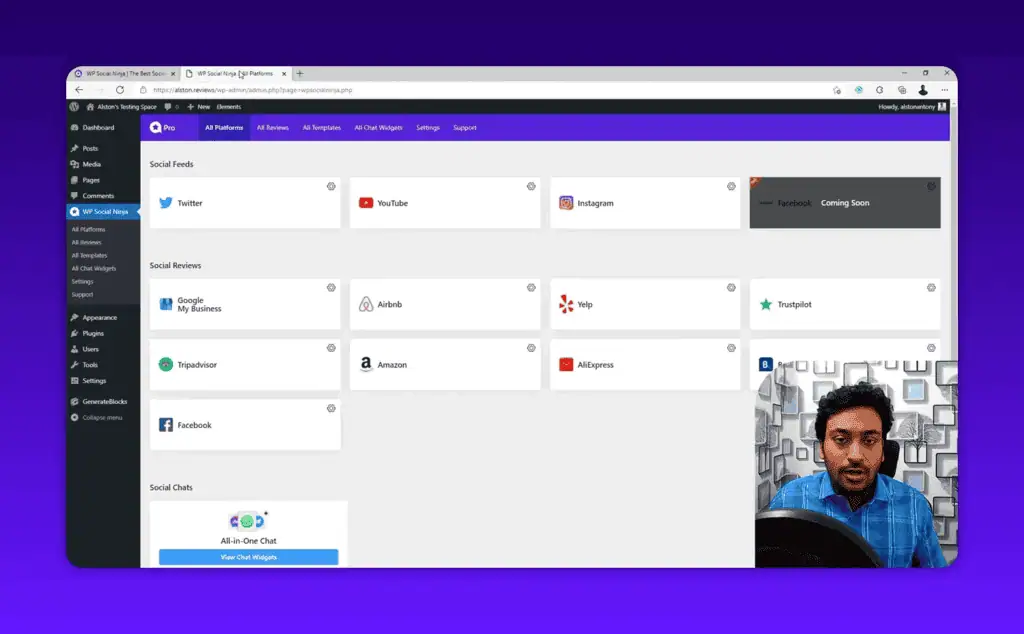
WP Social Ninja is a WordPress plugin that lets you embed social media content on your site without writing a single line of code. It pulls in three types of social content:
- Social Feeds: Display your Twitter (X), YouTube, or Instagram content directly on any WordPress page
- Social Reviews: Aggregate customer reviews from Google, Facebook, Trustpilot, TripAdvisor, Amazon, AliExpress, Booking.com, and Yelp
- Social Chat: Add a floating chat bubble that connects visitors to your preferred social messaging channels
The plugin is built by WPManageNinja, the same team behind FluentCRM, Ninja Tables, and Fluent SMTP, part of a wider wave of WordPress plugins we cover like the CrawlWP indexing plugin. All three of those tools are well-regarded in the WordPress community for shipping clean, performant code.
If you are looking for a free AI tools comparison, WP Social Ninja does have a free version on WordPress.org that covers the basics.
Who Is WP Social Ninja For?
WP Social Ninja makes the most sense for:
- Local businesses that want to display Google or Facebook reviews as social proof on their site
- Content creators who want to embed Twitter or Instagram feeds without a separate plugin
- Agencies managing multiple client sites who need one plugin to handle feeds, reviews, and chat
- E-commerce stores that want Amazon or Trustpilot reviews to appear on product pages
- Bloggers adding a WhatsApp or Telegram chat button for audience engagement
It is not the right fit if you want native live chat with a real inbox. The Social Chat feature redirects visitors to your social media profiles. There is no conversation history stored on your site.
Social Feeds: Embed Twitter, YouTube, and Instagram
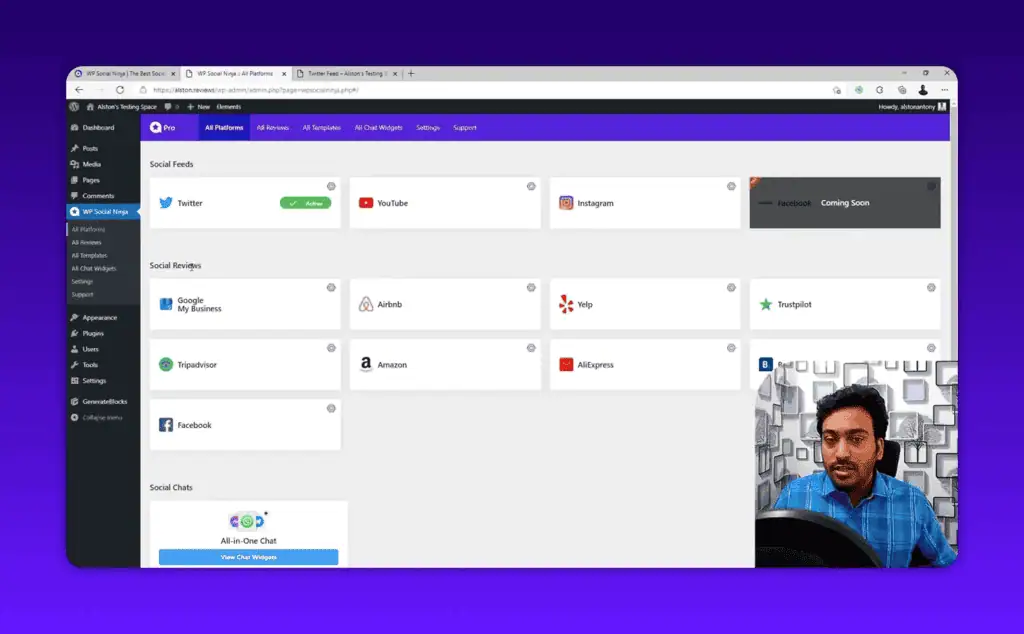
Social Feeds pulls content from your social accounts and displays it on your WordPress site. The setup is OAuth-based, meaning you authenticate through each platform’s login screen. No API key hunting required.
Supported platforms include Twitter (X), YouTube, and Instagram. Facebook feed support was listed as coming soon at launch.
Once connected, you create a template and choose a layout.
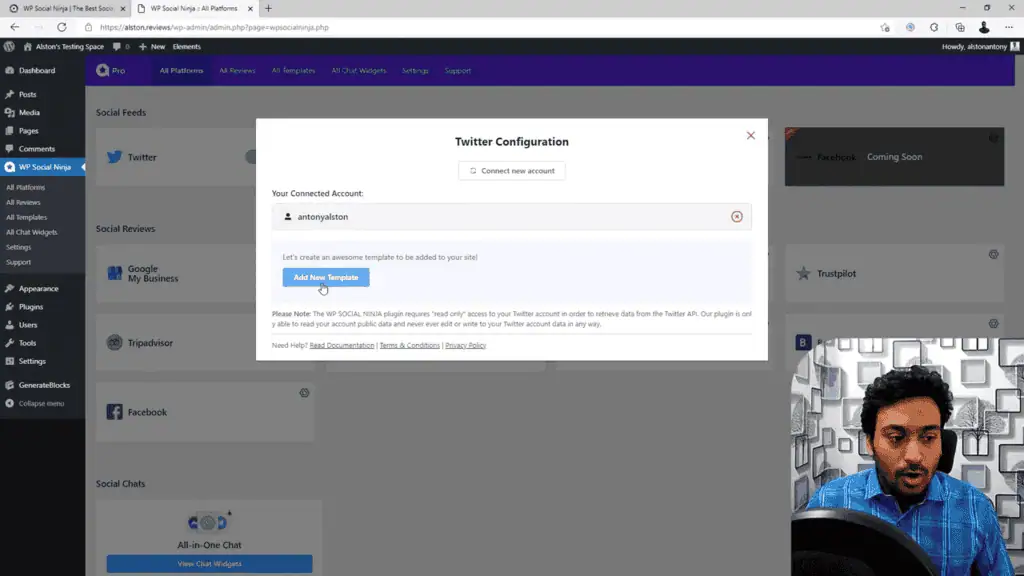
Three main layout options are available:
- Traditional list (chronological feed)
- Masonry grid (Pinterest-style, mixed heights)
- Carousel (horizontal scroll)
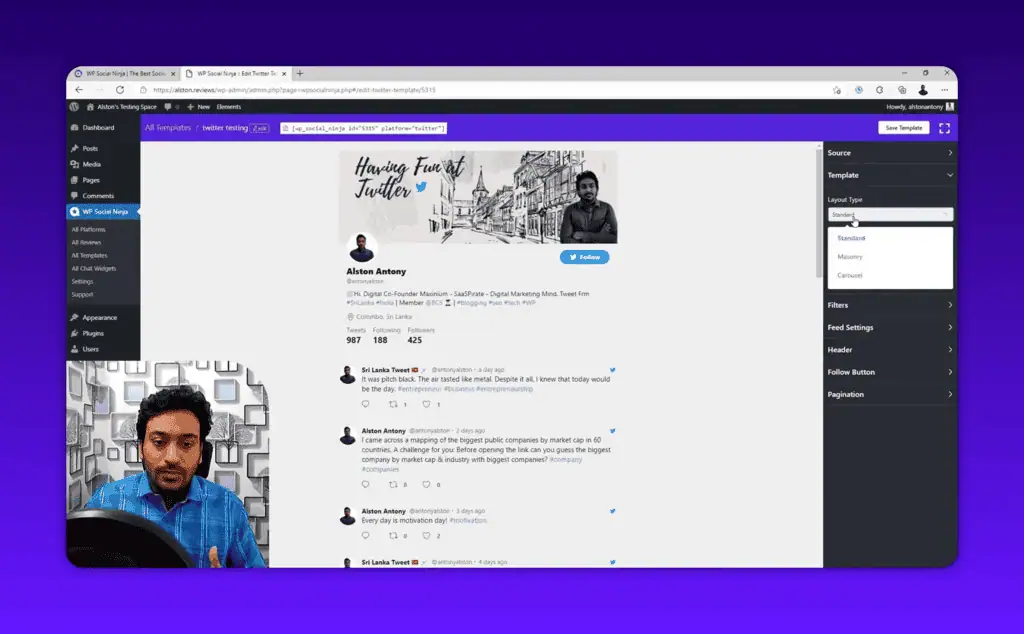
The live preview updates as you change settings, which is a genuinely useful UX touch. You can filter by hashtag, set how many posts to display, control the ordering, and toggle individual elements like the follow button, profile picture, and timestamps.
For pagination, you get two choices: a “Load More” button or infinite scroll. Both work cleanly.
To add the feed to a page, you copy a shortcode and paste it anywhere, including Gutenberg, Elementor, Divi, or the classic editor. No page builder dependency.
One limitation worth knowing: Social Feeds is embedding, not syndicating. You cannot use it to auto-create WordPress posts from your social content. It pulls and displays. That is all.
Social Reviews: Aggregate Reviews from 8+ Platforms
This is the feature most local businesses and e-commerce stores will buy WP Social Ninja for. It connects to review platforms and displays those reviews directly on your WordPress website.
Supported review sources include:
- Google My Business
- Trustpilot
- TripAdvisor
- Amazon
- AliExpress
- Booking.com
- Yelp
Setup works the same way as Social Feeds. You authenticate with the platform, select which business page or profile you want to pull from, then create a display template.
The real practical value here is review filtering. You can choose to display only 4-star and 5-star reviews, hide reviews without text, and control how many reviews appear before a “Load More” button kicks in. For businesses that receive occasional negative reviews, this filtering means you control exactly what social proof visitors see.
Layout options for Social Reviews include Grid (multiple column styles), Slider, and Masonry. The badge and notification layouts were coming soon at launch.
You can also display a rating summary header showing your overall score and total review count, along with a “Write a Review” button that links directly back to your review page on that platform. That combination works well for conversion: show your best reviews, then give visitors an easy path to add their own.
Each individual review card includes a clickable link back to the original review, so visitors can verify authenticity. That trust signal matters, especially for local businesses where Google reviews are a significant factor in purchase decisions.
Social Chat: Connect Visitors to Your Messaging Channels
Social Chat adds a floating widget to your site that visitors click to start a conversation through their preferred social messaging app.
Supported channels include:
- Facebook Messenger
- Telegram
- Slack
- Skype
- Phone (direct call)
- Viber
- Line
- Snapchat
The important clarification: this is not live chat. Clicking the widget opens the native app or website for whichever channel you have configured. There is no chat inbox inside your WordPress dashboard. If a visitor messages you on WhatsApp, you respond from WhatsApp. The plugin’s job is just connecting the two.
Whether that is a pro or a con depends entirely on your workflow. If you live on WhatsApp for customer communication, this is perfectly fine. If you want a centralised inbox where all conversations are logged and assigned to team members, you need a dedicated live chat tool instead.
You can create multiple chat widgets and assign them to specific pages. Your services page might show a sales-focused widget pointing to Facebook Messenger, while your support page shows one pointing to WhatsApp and email. The page targeting controls are straightforward.
Additional customization includes:
- Position control (bottom-left, bottom-right, top-left, top-right)
- Auto-open on page load option
- Welcome message with custom text and profile picture
- Online and offline scheduling based on business hours
- Brand color controls for the entire widget
- Priority settings if multiple widgets exist on the same page
During testing, the chat widget loaded fast and had minimal impact on page performance compared to installing a dedicated live chat plugin.
Pricing: Lifetime Deal or Free Version?
WP Social Ninja has a free version available on WordPress.org that covers basic feed and review functionality. For the full feature set, you need the Pro plan.
At launch, the Pro pricing was positioned as early-bird lifetime pricing:
| Plan | Sites | Price (Lifetime) |
|---|---|---|
| Personal | 1 site | $99 |
| Professional | 5 sites | $199 |
| Agency | 25 sites | $299 |
| Unlimited | Unlimited | $499 |
All paid plans include all features, priority support, and lifetime plugin updates. There are no feature restrictions between plans, only site count differences.
The plugin was launched on a lifetime deal model, meaning the team may switch to annual subscription pricing at some point. If you want the one-time payment option, buying during the early-bird window makes sense from a cost standpoint.
For comparison, a tool like Smash Balloon’s social feed plugins charges $49-$149 per year per plugin. WP Social Ninja covers feeds, reviews, and chat in one payment, one of the picks in our best AI tools for business lineup.
These lifetime deal options are the type of plays I track at the AI deals directory for similar SaaS tools.
Pros and Cons
What works well:
- Trusted development team with an established track record on WordPress
- All three features (feeds, reviews, chat) work in a single plugin and a single admin panel
- Setup takes under 10 minutes for any of the three features
- No coding required, all customization through point-and-click controls
- Shortcode-based publishing means it works with any page builder or theme
- Mobile responsive across all layout types
- Performance-conscious build with fast load times
- Lifetime deal pricing across all feature tiers
- Free version available to test before buying
What to watch out for:
- Newer plugin with some early bugs at launch (minor, mostly cosmetic)
- Not a cheap plugin at $99-$499, and early-bird pricing will not last
- WordPress-only, no Shopify or HTML site support
- Social Chat is not native live chat. Visitors get redirected to external platforms
- No content curation or syndication. You cannot create WordPress posts from social content automatically
- Some review platforms and feed sources were still listed as “coming soon” at launch
How WP Social Ninja Compares to Alternatives
Smash Balloon: The most established social feed plugin on WordPress. More mature and platform-tested, but it covers feeds only and charges per platform. No reviews or chat. Annual pricing adds up fast for multi-platform sites.
Tagembed: Covers social feeds and reviews, similar scope to WP Social Ninja. Cloud-based, so content loads from Tagembed’s servers rather than your hosting. Subscription-based pricing.
WP Review Pro: Focused specifically on custom reviews you manage manually. Better if you want to write and curate your own testimonials rather than pulling from external platforms.
Tidio / Crisp: If live chat with a real inbox is what you actually need, these are the right tools. WP Social Ninja’s chat feature is not a replacement for these.
For the combination of social feeds plus review aggregation plus a social chat widget in one plugin, WP Social Ninja is currently the most complete single solution in the WordPress ecosystem, and it ranks among our best AI WordPress plugins.
Free vs Pro: What’s the Difference?
The free version on WordPress.org gives you access to basic social feed and review functionality with limited platform connections and template options. It is enough to evaluate whether the plugin fits your site.
The Pro version adds:
- All supported platforms (the free version covers a subset)
- All template and layout styles
- Advanced filtering and customization controls
- Priority support
- All future plugin updates
If you are running a business site where reviews and social proof actually influence purchases, the free version will show you the concept but the Pro features are what make it genuinely useful.
Final Verdict: Should You Buy WP Social Ninja?
Buy if:
- You need social feeds, customer reviews from multiple platforms, and a social chat widget on your WordPress site
- You want one plugin for all three instead of three separate tools
- You trust the WPManageNinja team based on their other plugins
- The lifetime deal pricing is still available when you read this
Wait if:
- You need a rock-solid, fully mature plugin. Give it 6-12 months for bug fixes and more platform coverage
- You are primarily looking for live chat with a real inbox
Skip if:
- You are on Shopify, HTML, or any non-WordPress site
- You have no social media presence at all to pull content from
The WPManageNinja track record is the main reason I lean towards recommending this to the right buyer. These are not new developers figuring things out. FluentCRM and Ninja Tables are both in the top tier of their categories, much like the Solid Affiliate WooCommerce plugin in its niche. WP Social Ninja is applying the same team and technical approach to a different problem.
The feature set is genuinely useful for any business that runs social media accounts and wants that social proof visible on their site without installing four different plugins, and if you are still building that site our StellarSites AI WordPress builder review is a good next read.
Subscribe to the AI deals newsletter to get alerts when similar one-time pricing opportunities appear for WordPress and SaaS tools.
Frequently Asked Questions
Can WP Social Ninja pull reviews from multiple platforms at the same time? Yes. You can connect Google, Facebook, Trustpilot, Yelp, and other sources and display them together in a unified feed, or show separate feeds for each platform.
Does WP Social Ninja work with Elementor and Divi? Yes. The plugin uses shortcodes for display, which means it works with any page builder, including Elementor, Divi, Beaver Builder, and Gutenberg. No direct integration required.
Is there a free version? Yes. The free version is available on WordPress.org under the plugin name “WP Social Reviews.” It includes basic functionality with limited platform and template options.
Is WP Social Ninja the same as WP Social Reviews? WP Social Reviews was the original name of the free WordPress.org plugin. WP Social Ninja is the rebranded and expanded Pro version that added Social Feeds and Social Chat to the original reviews functionality.
Does the Social Chat feature work like Intercom or Tidio? No. WP Social Ninja’s Social Chat is not a live chat platform. It is a floating widget that redirects visitors to your chosen social messaging app (WhatsApp, Messenger, etc.). All conversation history stays on those external platforms. For a full live chat inbox, you need a separate tool.
How many sites can I use WP Social Ninja on? The Personal plan covers 1 site. The Professional plan covers 5 sites. The Agency plan covers 25 sites. The Unlimited plan covers unlimited sites. All plans include the same features.
Is WP Social Ninja GDPR compliant? The plugin relies on OAuth connections to third-party social platforms. GDPR compliance depends on the data each connected platform handles. Review each platform’s data policies and add appropriate cookie consent notices to your site.
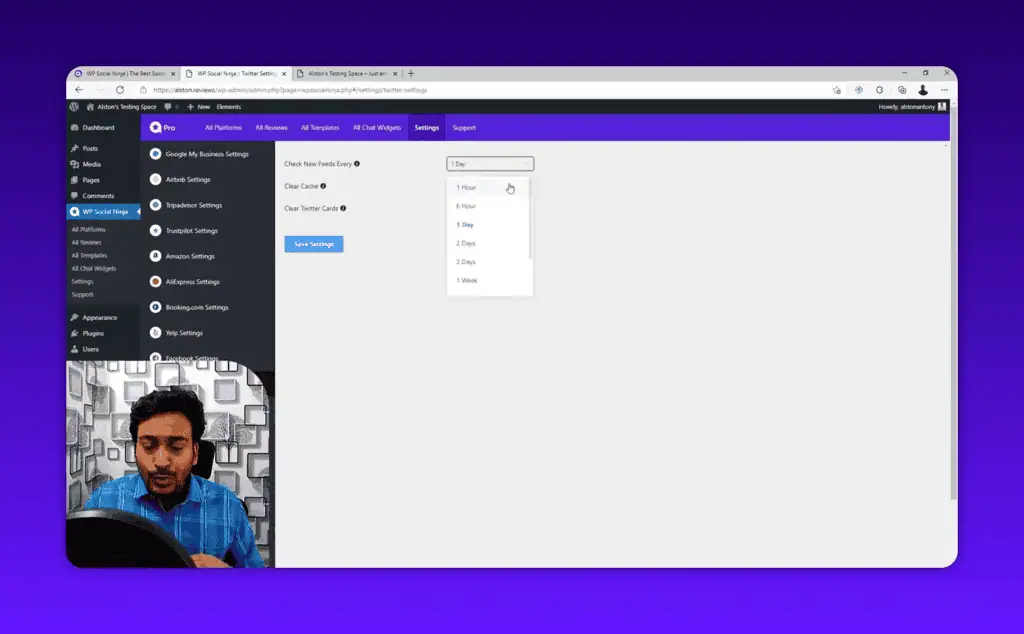
How often does WP Social Ninja refresh social feed content? You control the sync interval. You can set it to refresh as frequently as every hour or as infrequently as you prefer. More frequent refreshes mean more API calls to the connected platforms.
Liked this review? Pin ZPlatform as your Preferred Source.
Pinning us tells Google to make our hands-on AI reviews, verified lifetime deals, and founder interviews more likely to appear prominently for you in Top Stories and eligible AI Search experiences (AI Mode, AI Overviews). Set it once, no account needed on our end.
- 500+ AI tools tested with real budgets
- Verified deals - no dead affiliate links
- Editor: Alston Antony, 15+ years in SaaS & SEO
 Opens Google · takes 2 seconds
Related Posts

I tested AgainstData on 355 pages of Gmail data. Here’s my honest review: bulk unsubscribe, personal data deletion reque...

I ran AI-Text-Humanizer.com through ZeroGPT and AIscan24 with real before and after scores. Here is what works, what it ...

I ran five text samples through AIscan24, including two I wrote by hand. One scored 80% AI. Here is what this free detec...

Starting August 2, 2026, the EU AI Act’s transparency provisions become enforceable. That means if your website uses AI-...

My hands-on Answer Socrates review covering all features, free plan limits, pricing, and how it compares to AlsoAsked. I...

“I’ve spent $4,200 on 118 AppSumo lifetime deals over 5 years. Here’s my honest review: what works, what fails, and whet...