

Verdict: Buy
Humanize.io price, best use and verdict
| Field | Detail |
|---|---|
| Tool | Humanize.io |
| Category | AI humanizer, browser-based, with Light, Medium and Heavy rewrite modes |
| Best use case | Clearing GPTZero and lighter detectors on marketing copy you will still edit |
| Price | Free tier: 200 words a month, 2 uses a day, no signup, basic detectors only. Unlimited $29.99 a month, or $9.99 a month billed annually at $119.88. |
| Verdict | Worth the annual plan if GPTZero is your bar, not if you need Originality.ai |
Humanize.io is a browser-based AI humanizer that rewrites machine-generated text in Light, Medium or Heavy modes to read as human. In testing it cut GPTZero from 100% to 10% AI and Writer from 18% to 4%, but Originality.ai barely moved, from 100% to 98%. The free tier covers 200 words a month and targets only basic detectors; the paid tier adds a stronger model. Verdict: effective against most detectors, not against the strictest one.
Most AI humanizer tools promise the moon. “99% bypass rate.” “Undetectable AI content.” “Fool every detector on the market.” I’ve tested enough of these tools to know that those claims rarely survive contact with reality.
Related guide: Want to know which checkers a humanizer has to beat? See our hands-on ranking of the best AI detectors for 2026, tested for accuracy and false positives.
So when Humanize.io landed on my radar with its own bold promises, a 99.6% success rate claim, and a free tier that lets you test without signing up, I did what I always do for every Humanize.io review, I ran it through actual AI detectors to see whether it can truly bypass AI detection and checked the numbers myself.
In this Humanize.io review, I’ll walk you through the real test results, break down pricing, show you where this tool shines and where it falls short, and help you decide whether it’s worth adding to your content workflow. If you’re hunting for tested AI deals that deliver real value, this is the kind of honest breakdown you need before spending.
What is Humanize.io?
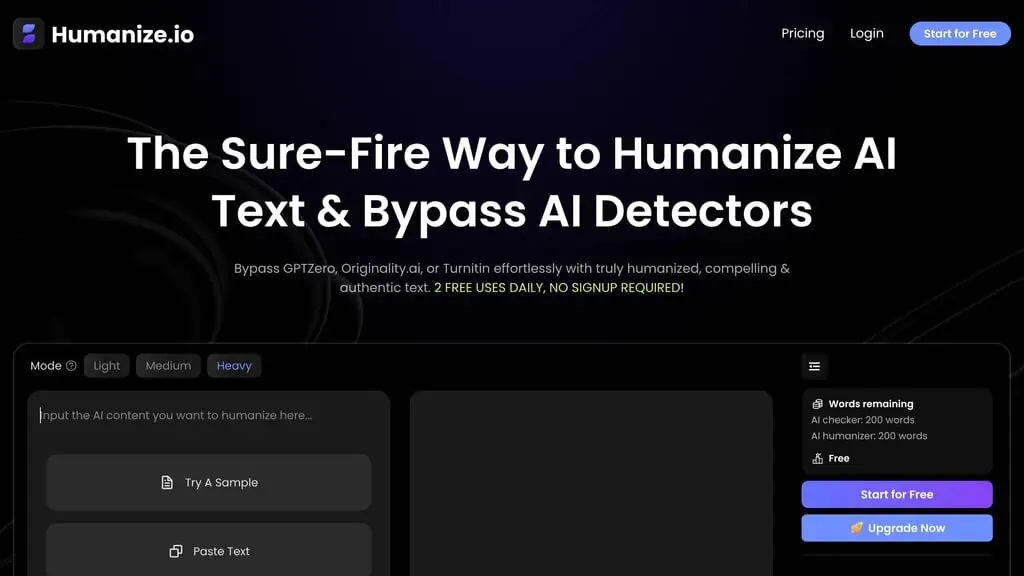
Humanize.io is an AI text humanizer that takes content generated by any AI writing tool like ChatGPT, Claude, or Gemini and rewrites it to sound more natural and human-written. If you need to humanize AI text quickly, that’s exactly the use case this tool is built for. The goal is to reduce the robotic patterns that AI detectors pick up on, things like predictable sentence structures, overused transition phrases, and that generic “AI voice” we all recognize by now.
The tool markets itself to two main groups: content creators who use AI to speed up their writing workflow, and students or professionals who need their AI-assisted drafts to read authentically. The platform claims over 2 million users, and while I can’t verify that number independently, the interface and feature set suggest this isn’t a fly-by-night operation.
How does Humanize.io work?
Using this AI text humanizer is dead simple. Three steps:
- Paste the AI text you want to humanize into the editor
- Select your humanization mode (Light, Medium, or Heavy)
- Click Humanize and wait a few seconds
The output appears in the right panel. You can then run a built-in AI detection scan to see how the humanized version scores across multiple detectors.
Light mode makes minimal changes, mostly adjusting sentence structure and replacing obvious AI patterns. Medium mode does more aggressive rewriting while trying to keep the original meaning intact. Heavy mode goes beyond basic paraphrasing and essentially rewrites your text from scratch, which delivers the most “human” output but also introduces the highest risk of meaning drift.
For most content marketing use cases, I found Medium mode to be the sweet spot. Light mode often wasn’t enough to fool detectors, and Heavy mode sometimes changed my intended meaning in ways I didn’t want.
When Priya, a freelance content writer I know, first tried the tool on a 1,500-word blog draft she’d generated with Claude, she ran it through Medium mode and then checked it against GPTZero. The score dropped from 95% AI to 12% AI. She was sold.
But when she ran the same output through Originality.ai, the score barely moved. That’s exactly the mixed reality I experienced too, and it’s the most important thing to understand about this tool before you buy.
My test results: Humanize.io vs 3 AI detectors
I generated a 500-word article using ChatGPT-4o about content marketing strategies. Then I ran the original and the Humanize.io output through three major detectors. Here are the raw numbers.
Original AI content (before Humanize.io)
| Detector | AI Score | Verdict |
|---|---|---|
| GPTZero | 100% AI | Flagged |
| Originality.ai | 100% AI | Flagged |
| Writer | 18% AI / 82% Human | Mostly Passed |
After Humanize.io (Medium mode)
| Detector | AI Score | Verdict |
|---|---|---|
| GPTZero | 10% AI | Passed |
| Originality.ai | 98% AI | Failed |
| Writer | 4% AI / 96% Human | Passed |
GPTZero and Writer cleared, Originality.ai did not
GPTZero: Massive improvement. A 90-point drop from 100% to 10% AI. This is genuinely impressive and means Humanize.io effectively defeated one of the most popular detectors on the market.
Writer: Strong result. Dropped from 18% to just 4% AI detection. Writer was already somewhat lenient with the original, but the humanized version cleared it convincingly.
Originality.ai: This is the problem. The score went from 100% to 98%. That is essentially no improvement. Originality.ai is widely considered the most aggressive AI detector available, and Humanize.io barely made a dent.
The takeaway is clear: Humanize.io works against most detectors but won’t produce completely undetectable AI content across the board. If your workflow only needs to pass GPTZero, Copyleaks, or Writer, this tool delivers. If you need to bypass Originality.ai consistently, you’ll need to do additional manual editing on top of the humanized output.
Ready to explore more AI tools that have been tested with real data? Check the full AI deals directory for honest verdicts on tools across every category.
Which plan produced these numbers, and why it matters
Humanize.io does not sell one humanizer at two prices. Its own plan comparison splits the product in two, and the split lands exactly on the detectors this test used.
The free plan advertises that it will “bypass basic AI detectors” and names Copyleaks, ZeroGPT and Sapling. The paid plan adds a “top-tier LLM for humanization” and says it bypasses “advanced AI detectors”, naming GPTZero, Originality 3.0 and Turnitin.
So the vendor is telling you, in its own pricing table, that beating Originality.ai is a paid-tier capability. That reframes the result above.
Passing GPTZero at 10% is a strong outcome on either tier. Failing Originality.ai at 98% is either expected behaviour on the free tier, or a direct miss against an advertised paid-tier claim, and those are very different findings.
The honest position: these numbers came from a Medium-mode run in April 2026 and the write-up did not record which plan was active, so I will not tell you which of those two readings applies. If you are evaluating Humanize.io for Originality.ai specifically, test it on the paid tier yourself inside the refund window rather than trusting either my figure or the vendor’s, because that is the one claim where the tier changes the answer.
One more line in that comparison deserves attention. Plagiarism-free output is listed as a paid-tier feature too, which is a strange thing to gate.
A humanizer works by paraphrasing ai-generated content, and paraphrasing is exactly the operation that can drift into reproducing source phrasing, so a guarantee that the rewritten text is original matters on every tier rather than only the paid one. If you are running free-tier output anywhere it will be checked for similarity as well as for AI, run it through a plagiarism checker yourself rather than assuming human-like phrasing is also original phrasing.
Worth holding alongside it: Humanize.io advertises a 99.6% success rate against detectors on its homepage. This test put it at two out of three. A single 500-word sample is not a refutation of a fleet-wide statistic, but it is a reminder that a 99.6% claim with no published methodology behind it is marketing rather than a measurement.
Five things Humanize.io does well
Any thorough Humanize.io review needs to cover what works. I want to be fair about where this tool genuinely adds value, because it does.
Readability improvement
Even setting aside the AI detection angle, Humanize.io makes AI-generated text read better. The output flows more naturally, uses more varied sentence structures, and strips out the predictable patterns that make AI content feel stale.
If you use ChatGPT or Claude regularly, you know that “AI voice.” The overly smooth transitions, the list-heavy structure, the safe and generic phrasing. Humanize.io addresses those patterns effectively.
Built-in multi-detector scanning
What makes Humanize.io slightly different from the dozen other humanizers I’ve tested is the built-in AI detector. Before and after you humanize your text, you can scan it against multiple detection engines, including GPTZero, Copyleaks, and Winston AI, directly inside the same interface.
You don’t need to tab between three different tools to check your results. That’s genuinely convenient.
User-friendly interface
No learning curve. Paste text, pick a mode, click a button. The interface is clean and responsive. Even someone who has never used an AI tool before could figure this out in under 60 seconds.
Multilingual support
The paid plan supports 30+ languages. If you create content in Spanish, French, Hindi, Mandarin, or other languages, this is a genuine advantage over competitors that only handle English well.
SEO keyword retention
One of my concerns with AI humanizers is that they’ll rewrite your text and strip out the keywords you carefully placed. Humanize.io does a reasonable job of maintaining keyword placement and density, especially in Light and Medium modes. Heavy mode is where keyword preservation starts to break down.
Where Humanize.io breaks: Originality.ai, Heavy mode and the free tier
Here’s where I need to be honest. If your primary goal is to bypass AI detection reliably, this tool has real limitations.
Originality.ai barely moves
As my tests showed, Humanize.io doesn’t reliably bypass Originality.ai. That matters because Originality.ai is the detector used by many publishers, editors, and content platforms to screen submissions. If you’re submitting guest posts, writing for clients who run Originality.ai checks, or working in environments with strict AI content policies, this tool alone won’t protect you.
Meaning drift in heavy mode
Heavy mode rewrites your text aggressively enough that the original meaning can shift. I noticed several instances where specific claims were softened, data points were paraphrased inaccurately, or the tone changed in ways I didn’t intend.
If you use Heavy mode, you need to re-read every paragraph carefully. That partially defeats the time-saving purpose.
Free tier is extremely limited
The free plan gives you 200 words per month. That’s enough for a single test paragraph, not for any real work. On top of that, the free tier only bypasses basic detectors.
The advanced detector bypass (GPTZero, Originality.ai, Turnitin) is locked behind the paid plan. So if you’re evaluating the tool, your free test won’t reflect the actual paid performance. If you’re looking for tools that deliver value without paywalls, check our list of free AI tools that actually work.
When Marcus, a marketing agency owner I spoke with, tried the free tier to evaluate the tool for his team, he ran a 200-word snippet through it and was underwhelmed. “The free version barely changed anything,” he told me.
It was only after he committed to the Unlimited plan that he saw the difference the top-tier LLM makes. That’s a frustrating evaluation experience, and Humanize.io should offer a better trial or at least be transparent that the free version uses a weaker model.
Not a replacement for editing
This is important. Humanize.io is a rewriting assistant, not a magic wand.
The output still needs a human editor to check facts, verify that the tone matches your brand voice, and ensure the content says what you actually want it to say. If you’re publishing the humanized output without reading it first, you’re making a mistake.
Is Humanize.io legit, and is it the site you think it is?
Humanize.io is a real, working product: the site resolves, the tool runs in the browser, it takes payment through a normal checkout, and it publishes terms, a refund policy and a privacy policy. The legitimacy question people are really asking is narrower than it sounds, and it is this: there are at least three live AI humanizers with nearly the same name, and most people cannot tell which one they used.
That is not a guess. The search data for this page is full of attempts to spell it: humaize io, humanie io, humanise io, humaniseio, humaniz io, humanize dot io, humanize i o, humanize.oi, humanized io, aihumanizeio. People are hunting for a tool they remember by sound rather than by domain.
Here is what each of those names resolves to, checked on 12 September 2026.
| Domain | What it is |
|---|---|
| humanize.io | The subject of this review. Tagline: free AI humanizer, unlimited, no signup. Free tier plus a $29.99/mo or $9.99/mo-annual Unlimited plan. |
| aihumanize.io | A separate, live product with a near-identical pitch. Not the same company, not the same tool, and frequently reviewed under the wrong name. |
| humanizeai.io | A third live product, also free-tier-led, redirecting to its www host. Again unrelated to the two above. |
| humanizer.io | Not a product. The domain is parked and returns a DreamHost “Site not found” page. |
| texthumanizer.ai | Does not resolve at all, despite appearing in competitor comparisons. |
Two practical consequences. If you read a review, a Reddit thread or a comparison table about “Humanize AI”, check the actual domain before you act on it, because there is a better than even chance it is about a different tool. And if you already paid for something and cannot find your account, check which of these you signed up to before concluding you were scammed, because the likeliest explanation by far is that you are logging into the wrong site.
One more thing to read carefully. The humanize.io domain was registered in May 2013, so any trust panel or whois lookup will show it as a decade-old domain, including the one on this page.
The AI humanizer product is nothing like that old, because the category is not: an aged domain here means the name was bought and repurposed, not that the tool has a ten-year track record. Domain age is a weak signal for AI tools generally, and a misleading one for this cluster.
For what it is worth, none of this is evidence against any of them. A crowded name space is what happens when a category gets hot and the obvious domains get bought. It is a reason to be careful about which tab you are in, not a reason to distrust the tools.
Humanize.io pricing: $29.99 a month, or $9.99 if you pay for a year
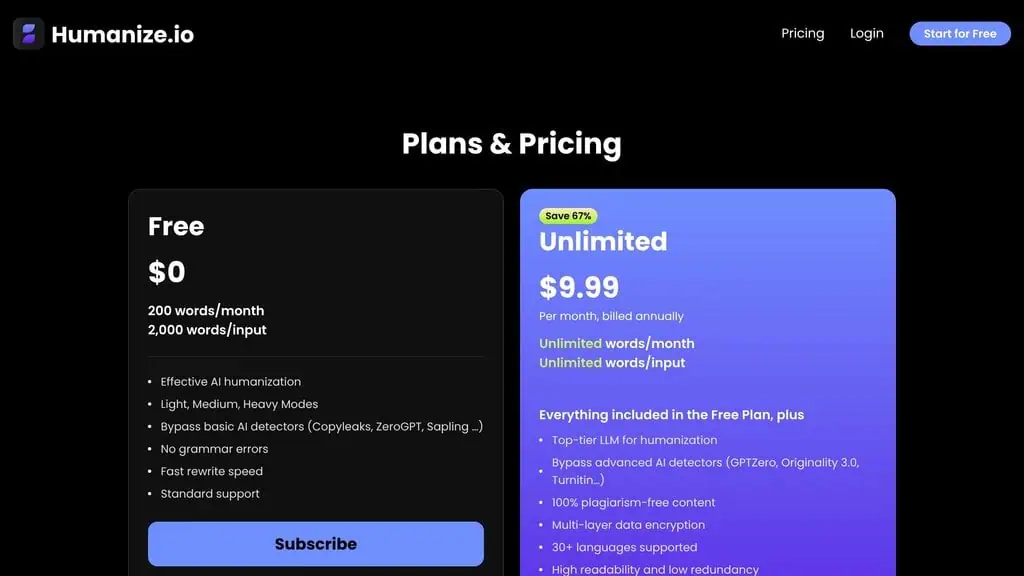
Here is the current pricing, read from Humanize.io’s pricing page on 12 September 2026:
| Plan | Monthly Price | Annual Price | Words/Month | Key Feature |
|---|---|---|---|---|
| Free | $0 | $0 | 200 words | Basic detector bypass only |
| Unlimited (Monthly) | $29.99 | - | Unlimited | Advanced detectors, top-tier LLM |
| Unlimited (Annual) | $9.99/month | $119.88/year | Unlimited | Same as monthly, 67% savings |
Read that table carefully, because the $9.99 figure quoted almost everywhere online, including in earlier versions of this review, is the annual rate.
Paying month to month costs $29.99, three times as much, and you only reach $9.99 by committing to $119.88 up front for twelve months. Checked 12 September 2026. The annual plan is the obvious choice if you plan to use this regularly. $119.88 per year for unlimited AI text humanization is reasonable pricing, especially compared to some competitors charging $49 to $79 per month for similar features.
At that price point, if you process even 10 to 15 articles per month, the cost per article is under $1. For content marketers, freelancers, and agencies producing AI-assisted content at scale, that math works.
The monthly plan at $29.99 is harder to justify unless you only need the tool for a single month. I’d recommend testing with the free tier, and if the results look promising for your specific use case, committing to the annual plan. For more ways to save on AI subscriptions, browse our AI discount deals.
Looking for more AI tools that save money on content workflows? Browse the best AI lifetime deals for one-time payment alternatives.
What happens to the text you paste in?
This is the gap in Humanize.io’s documentation, and it is worth knowing before you paste anything sensitive.
The privacy policy is competent boilerplate about personal information: it commits to encryption of payment details, storage on access-restricted servers, deletion on request, retention only as long as necessary, and no selling or renting of personal data to third parties. All fine, all standard.
What it does not address anywhere is the content you submit for humanization. There is no statement that your text is not retained, no stated retention period for it, and no commitment that it will not be used to improve or train the models. Compare that with competitors who state plainly that documents are never stored and never used for training; Humanize.io simply does not make the claim either way.
One related detail from the plan comparison: “multi-layer data encryption” is listed as a paid-tier feature. Whatever that means in practice, the vendor is drawing a line between what free and paying users get on security, which is unusual enough to notice.
None of that implies misuse. It means the question is unanswered, so treat the free tier in particular as a public tool: fine for a blog draft, wrong for client-confidential material, unpublished research or anything under NDA.
Who Humanize.io is for, and who should skip it
Content marketers and bloggers who use AI to draft articles and want to clean up the output for readability and bypass AI detection from common tools. If your primary concern is making AI text sound natural rather than fooling enterprise-grade detectors, this is a solid pick.
Freelance writers who use AI as a drafting assistant and need to humanize AI text before submitting to ensure their work doesn’t get flagged by common detection tools like GPTZero or Copyleaks.
Agencies producing high volumes of AI-assisted content who need a fast, affordable way to humanize output before the final editing pass.
Non-English content creators who need humanization in languages beyond English. The 30+ language support is a genuine differentiator.
Skip it if Originality.ai or Turnitin is the bar
Anyone submitting content to publishers or platforms that use Originality.ai as their primary detector. Humanize.io doesn’t reliably bypass it, and you risk rejection.
Academic users who need to bypass Turnitin. While the paid plan claims Turnitin bypass capability, the inconsistent results against Originality.ai make me skeptical of any “guaranteed bypass” claim. The ethical questions around academic AI detection bypass are a separate conversation entirely, but from a pure performance standpoint, I wouldn’t bet my grade on it.
Humanize.io vs manual editing: Which is faster?
I timed both approaches on a 1,000-word AI-generated article.
| Method | Time | GPTZero Score After |
|---|---|---|
| Manual editing (rewrite AI patterns by hand) | 25 minutes | 15% AI |
| Humanize.io Medium mode + quick review | 8 minutes | 10% AI |
| Humanize.io Heavy mode + meaning check | 14 minutes | 8% AI |
Humanize.io with Medium mode plus a quick review pass was roughly three times faster than manual editing and produced a slightly better detection score. That is a real productivity win. The Heavy mode result was marginally better on detection but took longer because I needed to verify that the meaning stayed intact.
For high-volume workflows, the time savings compound quickly. If you process 20 articles per month, you are saving roughly 5 to 6 hours compared to manual AI-pattern editing. At $9.99/month, that is a strong return on investment.
Why Humanize.io is a buy, with one detector caveat
Verdict: Buy (with expectations set correctly)
After completing this Humanize.io review, my verdict is clear: this is a genuinely useful AI text humanizer that delivers on most of its promises. It makes AI content read more naturally, it beats popular detectors like GPTZero and Writer convincingly, the built-in multi-detector scanning is a time-saver, and the $9.99/month annual pricing is fair for unlimited usage.
Where it falls short is against advanced detectors like Originality.ai. If bypassing that specific detector is your primary need, Humanize.io alone won’t get you there. You’ll still need manual editing on top.
My recommendation: if you create AI-assisted content regularly and want a fast, affordable way to humanize AI text and pass common AI detection checks, Humanize.io is worth the $9.99/month annual plan. Use it as one step in your editing workflow, not as the only step.
Tools don’t replace editing. They speed it up. And as this Humanize.io review shows, this particular tool does that well.
Want honest AI tool verdicts delivered weekly? Subscribe for AI deal alerts and never overpay for tools that underdeliver.
FAQs
Does Humanize.io actually bypass AI detectors?
It can bypass AI detection from most common tools, but not all of them. In my testing, it successfully reduced AI detection scores on GPTZero (from 100% to 10%) and Writer (from 18% to 4%).
However, it failed to bypass Originality.ai, which still flagged the humanized content at 98% AI confidence. Results vary by detector and content type.
Is the Humanize.io free plan worth using?
Only for a quick test. The free plan limits you to 200 words per month and only uses basic humanization.
The advanced detector bypass features require the Unlimited plan. If you want to evaluate the tool properly, the free tier won’t give you an accurate picture of what the paid version can do.
How much does Humanize.io cost?
The Unlimited plan costs $29.99/month if billed monthly, or $9.99/month ($119.88/year) if billed annually. There is also a free plan limited to 200 words per month. The annual plan offers the best value at a 67% discount over monthly billing.
Is Humanize.io safe for academic use?
I wouldn’t recommend relying on it for academic submissions. While the paid plan claims to bypass Turnitin, the inconsistent performance against other advanced detectors raises concerns about reliability. Beyond detection, most academic institutions have policies against using AI humanizers, and getting caught carries serious consequences.
Which humanization mode should I use: Light, Medium or heavy?
Medium mode is the best balance between effectiveness and accuracy. Light mode often doesn’t change enough to beat detectors.
Heavy mode rewrites too aggressively and can alter your intended meaning. Start with Medium, check the results, and only use Heavy if Medium isn’t sufficient for your specific content.
How does Humanize.io compare to other AI humanizers?
As an AI text humanizer, Humanize.io sits in the mid-to-upper range of tools I’ve tested. The built-in multi-detector scanning is a feature most competitors lack.
Pricing is competitive at $9.99/month annually. The main weakness compared to top-tier alternatives is the Originality.ai bypass performance. For casual and content marketing use cases, it’s one of the better options available.
Can Humanize.io handle non-English content?
Yes. The Unlimited plan supports 30+ languages including Spanish, French, Mandarin, Hindi, and more.
I didn’t test every language, but the English humanization quality suggests the underlying model is capable. If you work in multilingual content, this is worth testing in your target language before committing. Hopefully this Humanize.io review helps you make that call.
Does Humanize.io preserve SEO keywords?
Mostly, yes. In Light and Medium modes, keyword placement and density stayed reasonably intact.
Heavy mode tends to rewrite more freely, which can move or remove keywords you placed intentionally. If SEO is important to your content (and it should be), stick with Medium mode and verify your keyword placement after humanization.
Pricing and company details: see the Humanize.io profile.
Related Posts

I tested AgainstData on 355 pages of Gmail data. Bulk unsubscribe, personal data deletion requests, pricing, and whether...

AI-Text-Humanizer.com took a 132-word ChatGPT paragraph from 100% AI to 0% on ZeroGPT but flattens your voice. Buy the $...

AIscan24 is a free, no-signup AI detector: it caught pure ChatGPT text at 100% but scored my handwritten paragraph 80%. ...

Honest Aithenticate review after hands-on testing. Does this AI disclosure badge tool meet EU AI Act requirements? Prici...

My hands-on Answer Socrates review covering all features, free plan limits, pricing, and how it compares to AlsoAsked. I...

I’ve spent $4,200 on 118 AppSumo lifetime deals over 5 years. Here’s my honest review: what works, what fails, and wheth...