

Propshift at a glance
| Field | Detail |
|---|---|
| What it is | Propshift, an AI tool that turns a property listing and its photos into a narrated social video (script, AI voice, word-by-word subtitles and music), then makes new ones on a weekly schedule |
| Built for | Real estate agents, teams and brokerages posting listings to Instagram, TikTok, YouTube Shorts, Facebook, LinkedIn and X |
| Price | Free plan: one listing, up to 7 videos, with a small watermark. Paid plans from $19 a month billed yearly ($29 monthly) up to $119 a month for 10 listings; Team $179 and Agency $239 a month. Checked 27 November 2026. |
| Time to first video | About 7 minutes from a blank account to a finished reel in my test, 3 of them rendering |
| Formats | 9:16, 3:4, 4:5 and 1:1 |
| Best for | Agents who want a steady stream of listing reels without filming or editing, and who will check each video before it goes out |
| Not for | Anyone who needs a cinematic tour, a refund if it disappoints, or auto-posting without paying first |
| My score | 7.5 out of 10. Fast and well thought out; the photo-to-line matching and script variety need a human check. |
I tested Propshift on 27 November 2026 on an Agency account Propshift gave me free of charge for testing, with no payment attached. That access did not buy a positive review, and the faults below are in it. I may earn a commission if you sign up through my link, at no extra cost to you.
What I tested and what I did not. I created a listing with the “Import from Listing” feature, uploaded 10 photos, rendered two videos and went through every settings tab, the content plan and the reels library. To keep real homes and real agents out of this review, the property is invented (418 Coral Ridge Way, Naples, FL, $1,895,000) and the photos are free-licence images from Unsplash. They come from different houses, which makes the photo-matching test slightly harder than a real listing would. I watched the videos frame by frame for subtitles and photo matching, but I did not grade the voice by ear; listen to the samples on Propshift’s homepage before you decide. Auto-posting was not tested because it is locked until a first payment.
What Propshift does
Propshift is a listing-video generator that runs on autopilot. You give it a property (address, price, beds, baths, square footage, description) and at least six photos. It writes a short script from those facts, reads it with an AI voice, picks and orders the photos to match the lines, and renders a vertical reel with motion, subtitles, an info bar and music. It also writes a caption and hashtags.
The part Propshift leans on hardest is the content plan. Tick the weekdays a property should be featured, and on each of those days it renders a new video of that listing with a different script and “theme” (Grand Tour, Lifestyle and Vibes, Investment Angle and so on). On paid plans it can post those videos to your social accounts as well. Its own pitch is that the product is the stream of videos, not the single one.
Propshift is operated by Slashbit LLC in Fort Lauderdale, Florida.
Adding a listing: the import worked first time
New Property offers two ways in: “Import from Listing” and “Enter Manually”. The import asks you to open a listing on Zillow, Homes.com or another site, select the whole page (Ctrl+A), copy it and paste it into one box. Rather than paste someone’s real listing, I wrote my own messy listing page text, complete with menu links, an estimated payment line and “Schools | Nearby homes | Price history” clutter.
About 20 seconds after I clicked “Extract & Continue”, the form came back filled in: a title (“New Construction Modern Villa at 418 Coral Ridge Way”), the street address, city, state and ZIP.
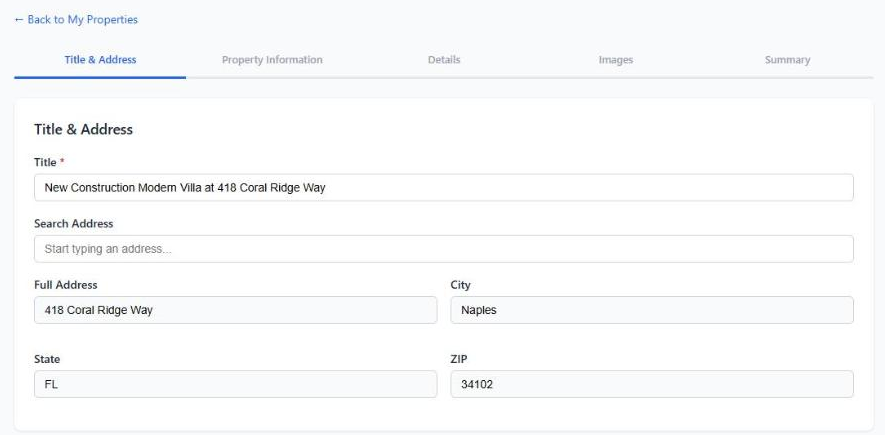
The first step after the import. Everything here came from the pasted text.
The details step was just as clean. Property type, price ($1,895,000), 4 bedrooms, 3.5 bathrooms, 3,420 square feet, year built, lot size and parking all came across correctly, the clutter was ignored, and it wrote seven highlights (“Heated saltwater pool”, “No HOA”, “10 minutes to beach and Fifth Avenue”) plus a set of key-value details. The only empty field was Stories, which my text never stated.
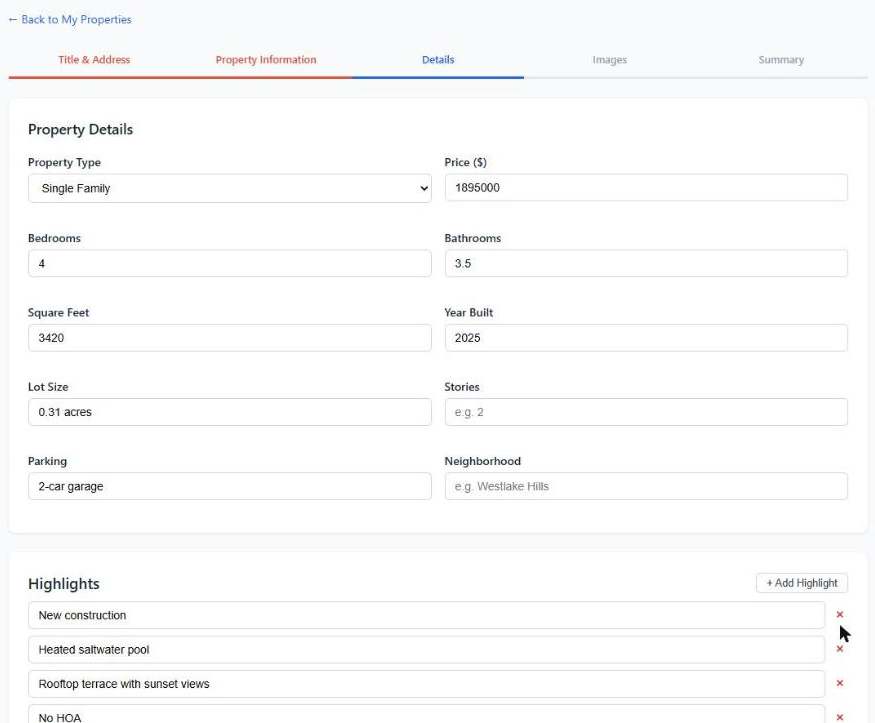
Extracted details and highlights. I changed nothing on this screen.
Photos come next. Six is the minimum and Propshift suggests 10 to 20. My 10 photos (three exteriors, living room, kitchen, dining room, two bedrooms, a bathroom and a home office) uploaded one at a time in about 50 seconds. Each gets an optional caption field and up and down arrows to reorder it.
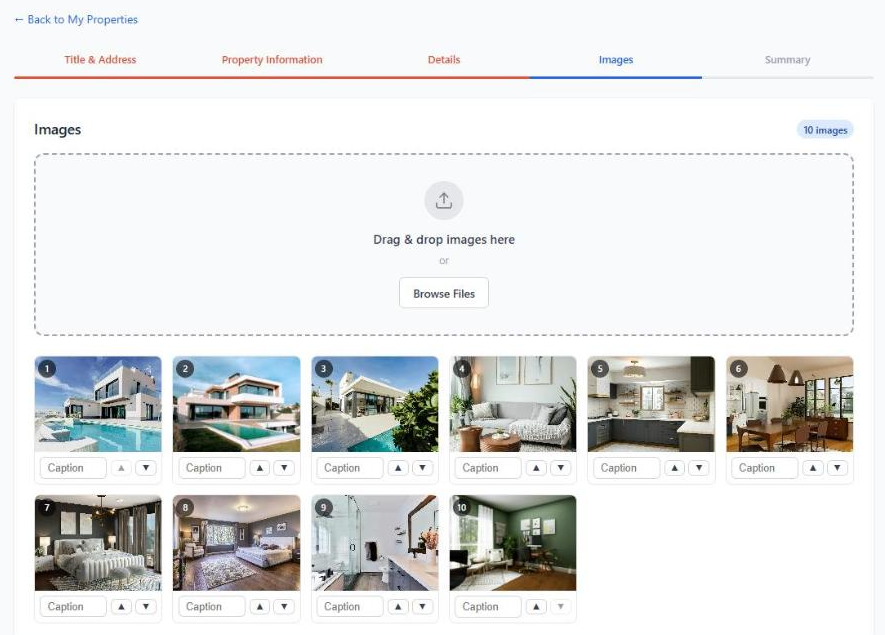
Ten photos uploaded, in the order I picked.
After a summary screen and “Create Property”, Propshift goes straight to an activation screen: “Automatically post for me” on Monday, Tuesday and Wednesday (recommended), or “I’ll post manually”. I picked manual, because auto-posting is locked on this account, and clicked “Start Automatic Content”. It answered “Your content engine is now running. Your first video will be generated within the hour.”
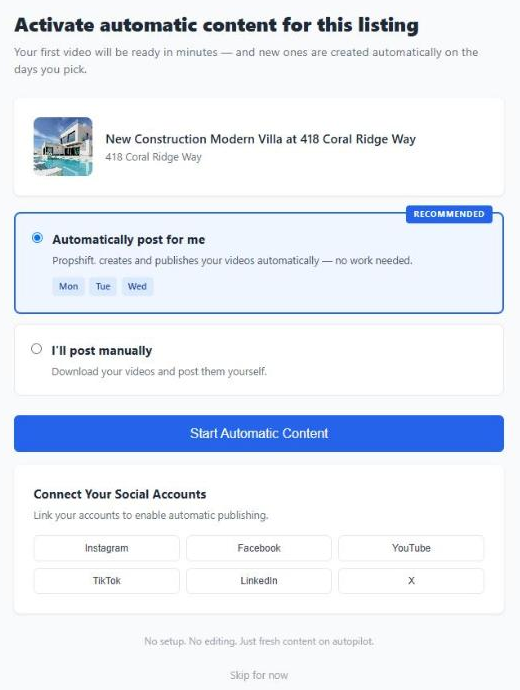
The activation screen. The social buttons below it stay locked until a first payment.
That message was not quite true for my choice. When I opened the content plan afterwards, the listing had zero days ticked. The manual path does not schedule anything, so nothing would have been “generated within the hour”. I ticked Monday, Friday and Saturday by hand and saved. If you pick manual posting, check the content plan.
Making the first video: 3 minutes, not 5 to 10
On the property page, “Create Video” then “New Video” opens a live progress page with six steps: writing the script, generating the voice, analysing the images, selecting the best images, optimising them and rendering.
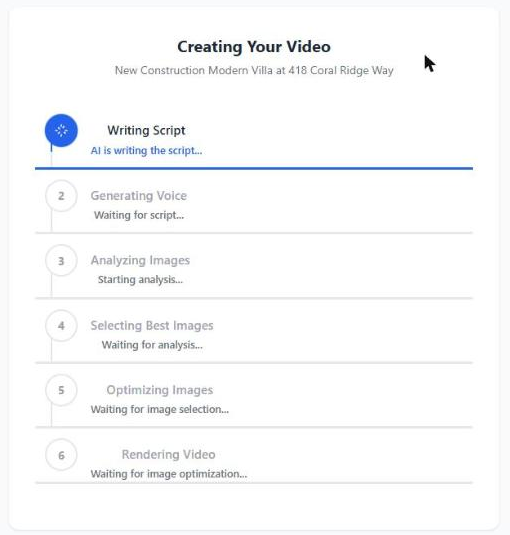
The progress page a few seconds after I clicked New Video.
The first five steps finished in about two minutes and the render in about one more. My first video was ready roughly 3 minutes after I clicked, against the 5 to 10 minutes Propshift’s own test guide told me to expect. The second took about 2.5 minutes, including a short “Waiting for render worker” pause. You can close the tab; Propshift says it emails you when a video is ready.
The finished reel page holds the video, the generated caption and hashtags with copy buttons, “Download MP4”, “Generate Public Link” to share it with someone who has no account, and “Export in other format” for 4:5 and 1:1 versions with the same script, voice and photos.
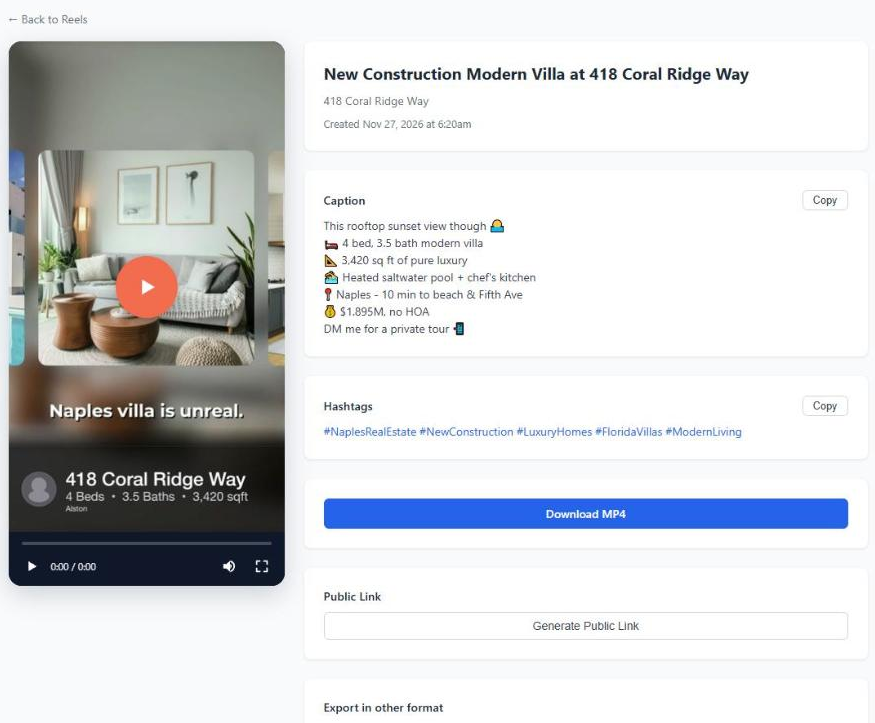
The finished reel page for my first video.
I clicked the 4:5 export, but the browser tab froze at that moment and the export never appeared in my reels list, so I cannot confirm that it works.
What the video got right, and where it slipped
The first video is 28 seconds long, rendered at 1440 by 2560 pixels, and used the “Grand Tour” theme with a carousel layout: one photo centred, with the neighbouring photos peeking in from the sides over a blurred background. The script, read from the subtitles, went roughly like this: “Okay, stop scrolling. This brand new Naples villa is unreal”, then the open-plan living and chef’s kitchen, “Four beds, three bathrooms, plus a home office”, “The primary bathroom? Total spa vibes”, sliding doors to the lanai, “a rooftop terrace made for sunsets”, ten minutes to the beach, and “$1.9 million. DM me!”
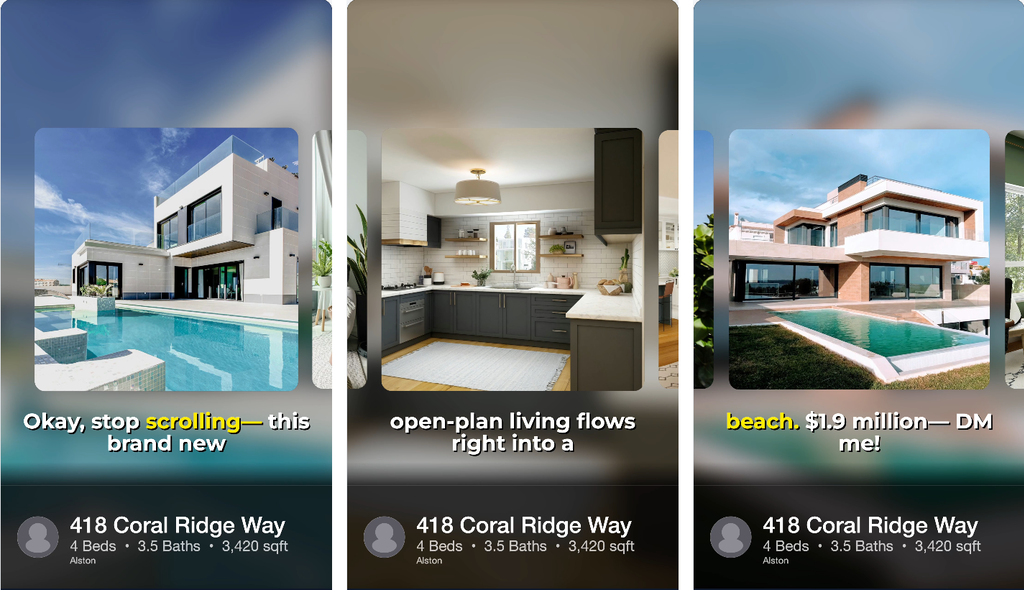
Frames at 1, 7.5 and 23 seconds from my first video. Subtitles highlight one word at a time.
What it got right. Every fact in the script came from the listing data, and none were invented. Most lines landed on the right photo: the kitchen photo played under “open-plan living flows right into a chef’s kitchen”, the bathroom under the spa line, and the pool exterior under the opening hook. The subtitles are readable, word-by-word with a yellow highlight, and the info bar shows the address, beds, baths and square footage.
Where it slipped.
- The home office photo played after the narration ended. The line mentioning the office ran over the bathroom photo, and the office photo filled the last two seconds with no words.
- It rounded the price. $1,895,000 became “$1.9 million” in the voice-over. That is normal speech, but some agents will want the exact figure, and the caption on one video kept “$1.895M” while the voice-over rounded it.
- The second video matched photos more loosely. It used the “Lifestyle and Vibes” theme with a full-frame layout (“Saturday morning, coffee in hand…”). “Rooftop terrace catching the sunset” played over the living room, and “No HOA. This is Naples living” over a bedroom. With only 10 photos and no rooftop photo, some of that is my test set, but it is worth checking before you post.
- The captions were nearly the same twice. Both videos’ captions opened with the same line, “This rooftop sunset view though”, and listed the same facts in the same order. The scripts differed; the captions did not. Propshift’s guide says each video is written fresh, so expect fresher scripts than captions.
- The info bar shows your account name and a grey avatar until you fill in Branding. Mine showed “Alston” under an empty profile circle. Set up your photo, brokerage and phone first.
Settings: 16 layouts, 12 themes and 100 voices
Settings changes how every future video looks, with a live preview at the top, across five tabs.
- Subtitles: eight fonts (Montserrat, Oswald, Poppins, Raleway, Bebas Neue, Anton, Playfair Display, Lato), no shadow, outline or drop shadow, normal or all caps, 3 to 6 words on screen at once, colours, and optional emoji overlays.
- Video: the output format (9:16, 3:4, 4:5, 1:1), a “Depth Camera Move” that moves your photos with depth instead of a flat zoom, and 16 image layouts plus Random (Fill, Letterbox Blur, Square, Polaroid Stack, Stat Card, three carousels, Filmstrip, Ken Burns Split, Card Flip, Mosaic Reveal, Picture in Picture, Push Slide, Split Shear and Split Flap).
- Themes: 12 script angles rotated automatically, and you can switch off any you do not want.
- Voice: 100 voices, 50 female and 50 male, filterable by age, accent (American, British, Southern US, Latin American, African American, Australian, Canadian, Midwest and more) and style.
- Music: only two tracks, “West Coast” (chill) and “New Frontier” (upbeat), or no music.
- Branding: logo, profile photo, a contact bar with name, brokerage and phone, and a choice to hide the info bar on 9:16 videos, where Instagram and TikTok cover that area with their own buttons.
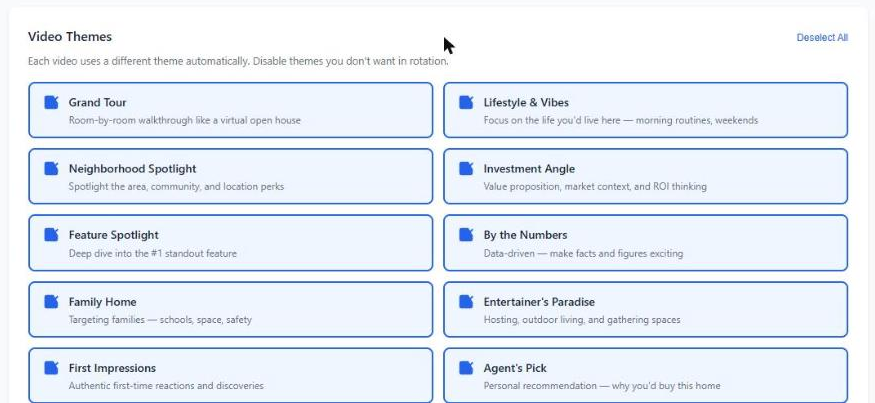
The Video Themes panel. Each video picks one from the ticked list.
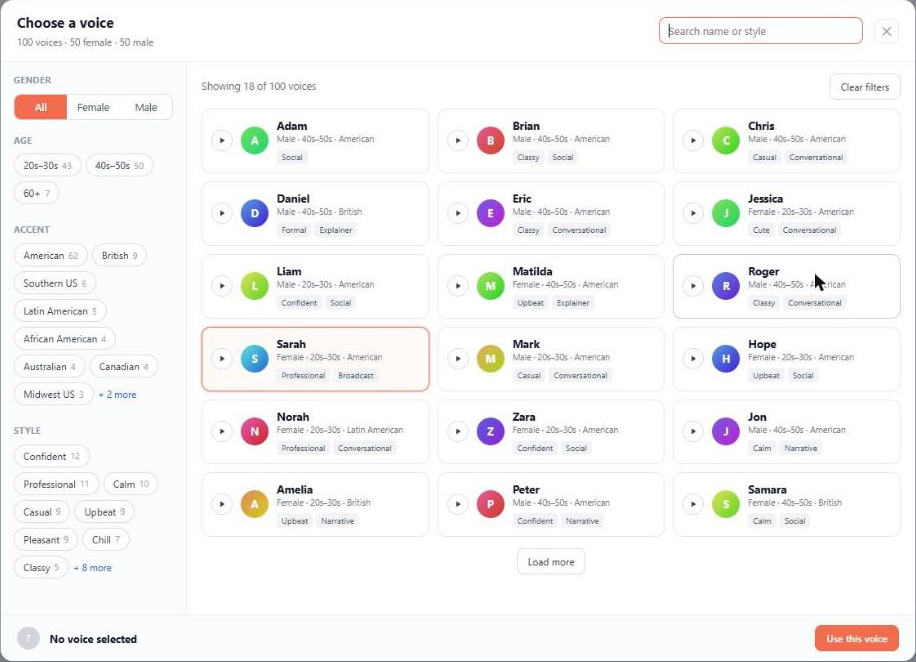
The voice picker on my Agency test account, showing 100 voices.
Two of those numbers do not match Propshift’s marketing. The pricing page lists “All 12 themes, 10 voices, 16 animations” on paid plans, and the partner page also says 10 voices. My Agency account showed 100. Either the voice library grew and the site has not caught up, or the larger library is for higher plans; ask before you choose a plan for the voices.
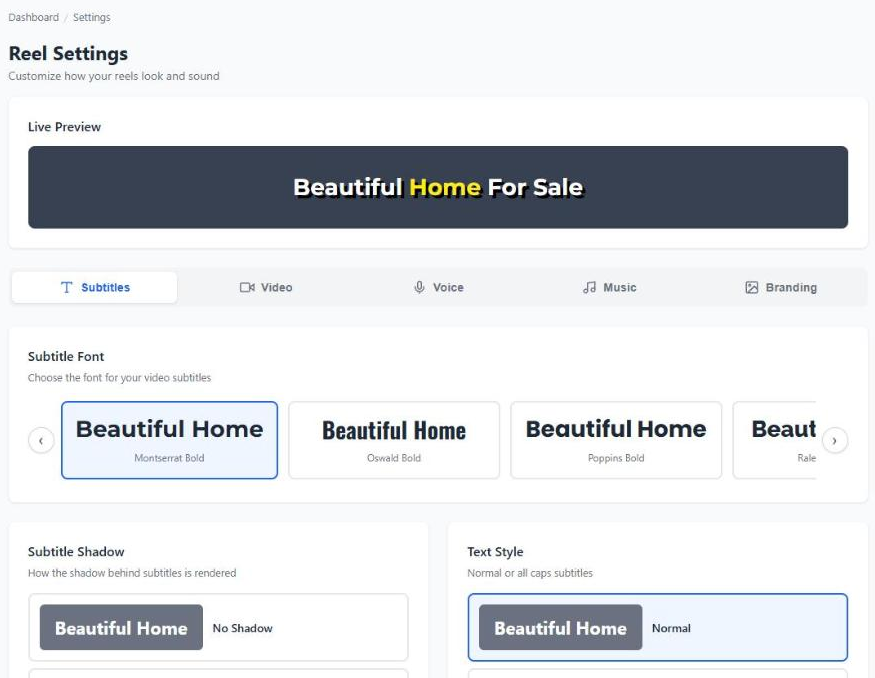
The Subtitles tab with its live preview.
The music library is the thin spot. Two tracks rotated across a stream of videos for the same listing will start to sound the same quickly, and there is no upload option for your own track.
The content plan and the reels library
The content plan is a simple grid: one row per property, a checkbox for each weekday, and a running count against the recommended three days per property. “Auto-Assign” spreads the days for you. On each ticked day Propshift renders a new video for that property and emails you.
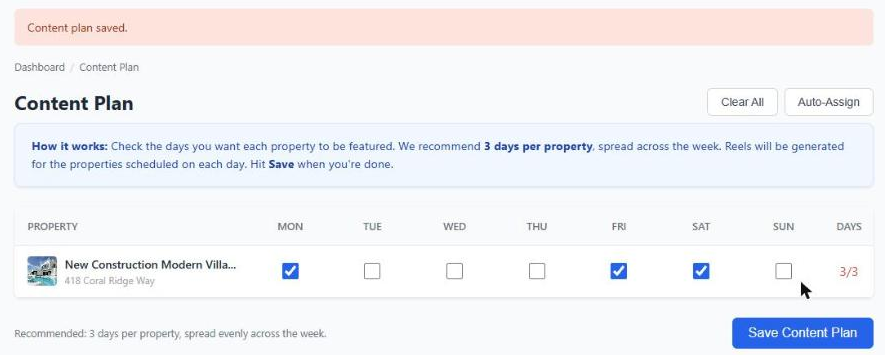
My content plan after I ticked three days by hand.
The reels library groups videos by day and labels each with its format and theme, which makes it easy to see the variety a listing is getting.
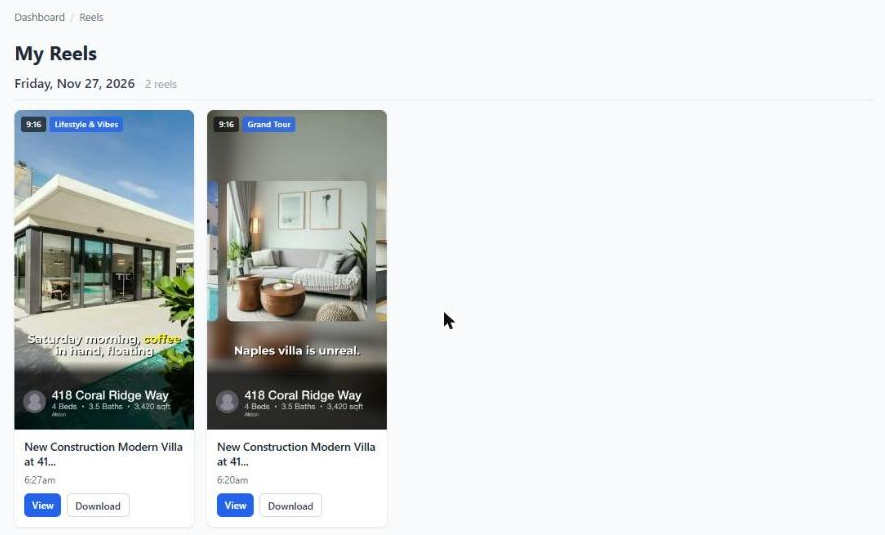
Both test videos of the same listing, with different themes and layouts.
Auto-posting to Instagram, Facebook, TikTok, YouTube, LinkedIn and X is listed on the Social Accounts page, but on my account it said “Channels unlock with your first payment”. That also applies during a paid plan’s 14-day trial: the videos and schedule run, but nothing posts until the first charge goes through. The Analytics page, which reports impressions, reach, views, likes, comments, shares, saves and clicks, is empty until accounts are connected.
Propshift pricing, checked 27 November 2026
| Plan | Yearly billing | Monthly billing | Listings | Videos a month | Notes |
|---|---|---|---|---|---|
| Free | $0 | $0 | 1 | Up to 7 in total | Small watermark (removal $9 a video), 4 themes, no card |
| Solo | $19 | $29 | 1 | Up to 13 | Posted for you |
| Starter | $29 | $39 | 2 | Up to 26 | |
| Growth | $59 | $69 | 5 | Up to 65 | Auto-posting to 3 channels, all themes, analytics |
| Professional | $99 | $119 | 10 | Up to 130 | Priority processing |
| Team | Not listed | $179 | Not listed | Not listed | Price from the affiliates page |
| Agency | Not listed | $239 | 20 | Not listed | My test plan, as shown on its billing page |
Propshift works out the per-video cost on each plan, from about $1.46 on Solo down to about $0.76 on Professional, assuming you use every video.
Two terms matter more than the prices:
- The paid trial needs a card. Paid plans start with 14 days free, but a credit card is required. The free plan needs no card.
- There are no refunds. The refund policy says all purchases are final and non-refundable except for duplicate or incorrect charges, or where the law requires it. Cancelling stops the next renewal. Use the free plan to judge the videos before you pay.
Where Propshift falls short
These are the conditions under which I would expect a bad result, from my test and Propshift’s own terms.
- You post without watching the video. Lines and photos drifted apart in both of my videos, and the office photo ended up after the narration. A 28-second check before posting catches it.
- Your listing has few photos of the features the script mentions. The script talks about whatever is in the listing data. If the rooftop terrace is in the description but not in the photos, a different room plays under it.
- Your photos are dark or low resolution. Propshift’s own guide says photo quality decides video quality.
- You want a cinematic tour. This is motion over still photos, built for social feeds. It is not a walkthrough video or a drone shoot.
- You need exact figures spoken. The voice-over rounds the price.
- You choose manual posting and expect the schedule to run. On my account that left the content plan empty.
- You want to try auto-posting before paying. Channels unlock only after the first payment, and there is no refund afterwards.
- You need music variety. Two tracks.
Who should use Propshift, and who should not
Use it if you are an agent or a small team with active listings, you post to Instagram or TikTok (or know you should), and you have 10 to 20 decent photos per listing. It suits agents whose problem is consistency rather than quality: the content plan turns one listing into three videos a week with no editing. Agencies serving several agents can look at its Studio programme, which lets them run Propshift for clients under their own brand.
Skip it if you sell one or two homes a year (the free plan’s seven videos may be all you need), you want a filmed tour, or you cannot commit to checking each video before it posts. Also skip the paid plans until you have rendered a few free videos of your own listing, because there is no refund.
Propshift alternatives
| Tool | What it is | Price, checked 27 November 2026 | Switch if |
|---|---|---|---|
| Animoto | General template-based video maker with real estate templates | Free with watermark; Basic €7 a month and Pro €14 a month billed yearly, as shown to us in euros | You want to edit each video yourself, add your own music or stock footage, and do not need auto-written scripts |
| A local videographer | Filmed listing tour, often with drone footage | Quoted per shoot; Propshift itself declines to state a typical figure because rates vary by market | The listing is high-end enough to justify a real walkthrough, or you need footage of spaces photos cannot show |
For a single high-value listing, a filmed tour and a few Propshift reels are not either-or: the reels keep the listing in the feed between bigger posts.
The Propshift affiliate program
Propshift runs a partner program for coaches, creators and others who reach real estate agents. The terms on its affiliates page as of 27 November 2026:
- 30% of every payment a referred agent makes for 12 months, rising to 35% for every agent after your fourth paying customer.
- Your audience gets 10% off with your link or code, and the commission is calculated after that discount.
- A 90-day cookie, and codes that do not expire.
- Paid monthly by PayPal or bank transfer from $50.
Compare it with other recurring programs in our AI affiliate programs directory.
My verdict after testing Propshift
I would give Propshift 7.5 out of 10.
It does the job it promises faster than it says it will. From a blank account, I had a listing imported, 10 photos uploaded and a finished 28-second reel in about 7 minutes, and the import pulled every fact out of messy pasted text without a single correction. The settings are deeper than I expected for the price: 16 layouts, 12 themes, 100 voices on my account and real branding controls. At $19 to $29 a month for one listing, it costs less than a single videographer visit.
The weak spots are the ones that matter when nobody watches the video before it posts. Photos and lines drifted apart in both videos, the second more than the first; the captions repeated themselves; the price was rounded; and the manual-posting path left my schedule empty while telling me the engine was running. Add two music tracks, auto-posting locked behind payment and a no-refund policy, and the sensible way to use Propshift is with a quick review step, not full autopilot.
My advice: start on the free plan with a real listing and 15 or more good photos, fill in Branding first, render three videos, and watch each one with the sound on. If the voice and matching are good enough for your market, Solo or Starter is cheap enough to justify itself with a single extra lead.
Frequently asked questions
Is Propshift free?
Yes, for one listing. The free plan makes up to 7 videos with a small watermark and four themes, and needs no credit card. Paid plans start at $19 a month billed yearly, and their 14-day trial needs a card.
How long does Propshift take to make a video?
My two videos took about 3 and 2.5 minutes from clicking “New Video” to a finished reel. Propshift’s own guide says to expect 5 to 10 minutes, and it emails you when a video is ready.
Can Propshift post to Instagram and TikTok automatically?
Yes, on paid plans. It connects Instagram, Facebook, TikTok, YouTube, LinkedIn and X, but the connection unlocks only after your first payment, so it does not work during the free plan or before a trial converts.
Related Posts

I tested AgainstData on 355 pages of Gmail data. Bulk unsubscribe, personal data deletion requests, pricing, and whether...
AI-Text-Humanizer.com took a 132-word ChatGPT paragraph from 100% AI to 0% on ZeroGPT but flattens your voice. Buy the $...
AIscan24 is a free, no-signup AI detector: it caught pure ChatGPT text at 100% but scored my handwritten paragraph 80%. ...
Honest Aithenticate review after hands-on testing. Does this AI disclosure badge tool meet EU AI Act requirements? Prici...
Allavsoft review: a Windows and Mac video and music downloader with batch queues, 8K support and format conversion, from...

My hands-on Answer Socrates review covering all features, free plan limits, pricing, and how it compares to AlsoAsked. I...