

Sales Agent OS at a glance
| Field | Detail |
|---|---|
| What it is | Sales Agent OS, a downloadable kit of about 35 Markdown files that turns your own AI app (ChatGPT, Claude, Gemini, Grok or Copilot) into an AI cold email sales team |
| Price | $499 one-time. The sales page says all sales are final, with no refunds. Checked 2026-11-26. |
| Type | A zip of instructions, not hosted software and not a sending tool |
| Setup time | 1 to 2 days, plus about 2 weeks of warmup if you use new mailboxes |
| Outside tools | About $200 to $300 a month on the kit’s default stack, plus your AI plan (the vendor’s estimate) |
| Version I tested | 3.0, dated 15 November 2026, run on Grok Bot |
| Best for | Owners who already have an AI app, a warmed inbox and a way to find emails, and who will read every draft |
| Not for | Anyone who wants a push-button sequencer that mails a bought list without review |
| My score | 8 out of 10, as an operating system for a careful first outbound campaign |
I tested Sales Agent OS on 23 November 2026 and re-checked the inbox on 25 and 26 November. I ran it for saasaffiliate.net, a directory of SaaS affiliate programs that I own, and I paid nothing extra for tools. I may earn a commission if you buy through my link, at no extra cost to you.
The score covers the process, not the revenue. One reply from 34 outreach emails is too small a sample to judge reply quality, and no sale can be tied to the campaign yet.
What I tested and what I did not. Finding leads, verifying them, and writing and sending emails: tested. Reply handling: partly tested, from one reply (I drafted an answer and sent it myself). CRM updates: not tested. The morning brief: written by hand on Day 3 and Day 4, not installed as a scheduled job. The checker agent: the vendor describes it, but its file is not in the v3.0 zip, so I checked drafts against the kit’s writing rules instead.
What Sales Agent OS is
Sales Agent OS is a downloadable AI sales agent kit: it turns a chat app into an AI agent that follows one outbound workflow, from finding a prospect to a morning report. You run it inside ChatGPT, Claude, Gemini, Grok or Copilot, and that app becomes your AI SDR for cold email: lead generation, verification, writing, sending, and in later phases replies, CRM updates and a morning brief. Under the hood it is a zip of Markdown files, roughly 35 files and 12,000 words, about 41 KB. There is no installer, no hosted app and no dashboard; `status.md` and the review log are the nearest thing to one. The outreach automation lives in your AI app and your inbox, not in the kit.
It is written for one owner working with one AI agent, not for a sales team. A different product shares the name “Agent OS”: a coding framework for AI-assisted software development. This review is about the $499 sales kit at salesagentos.com, not that one.
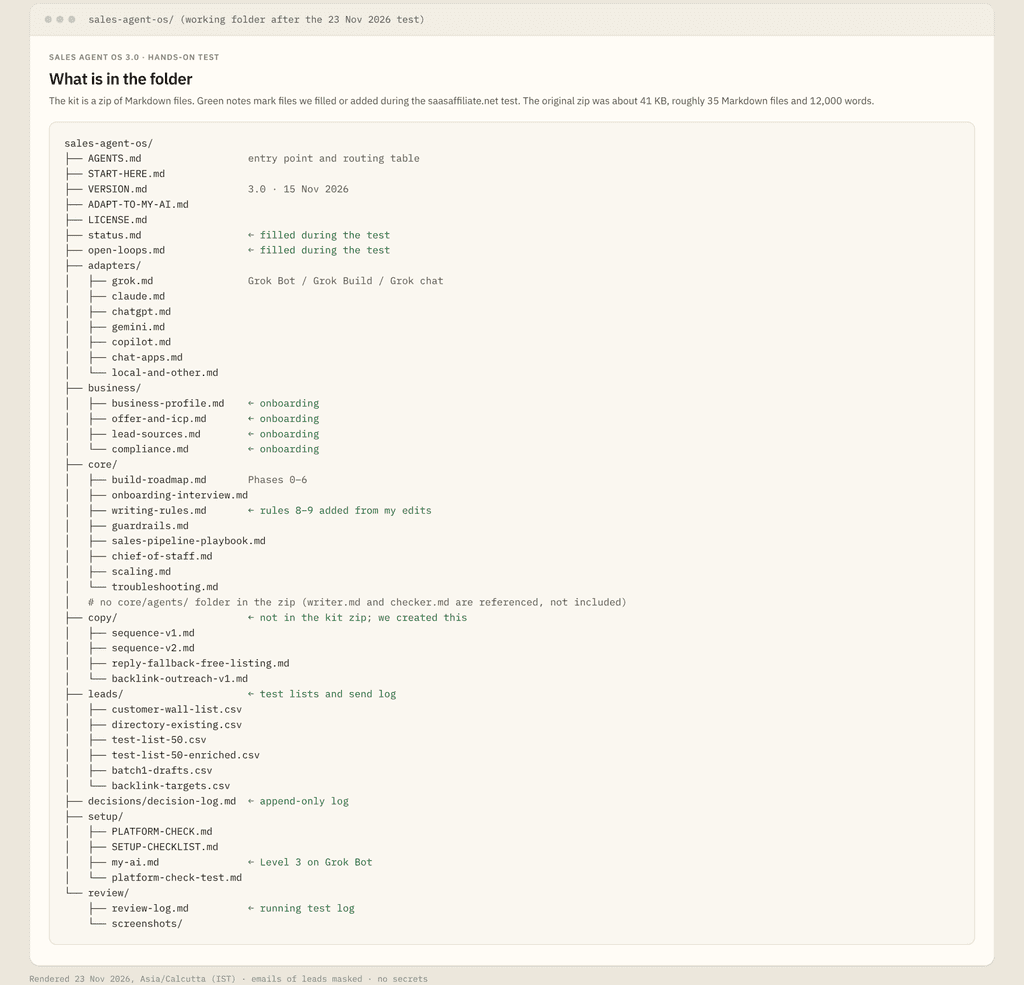
The working folder after the test. Green notes mark files we filled or added.
`AGENTS.md` is the entry point and routing table. The assistant persona defaults to “Chief” (I renamed mine Sales Agent OS during onboarding). Every session is supposed to start by reading `setup/my-ai.md` and `status.md`, then only the file that matches the question. Decisions, memory and briefs are append-only. When files disagree, the owner in the current conversation wins, then `status.md`, then the guardrails, then the decision log.
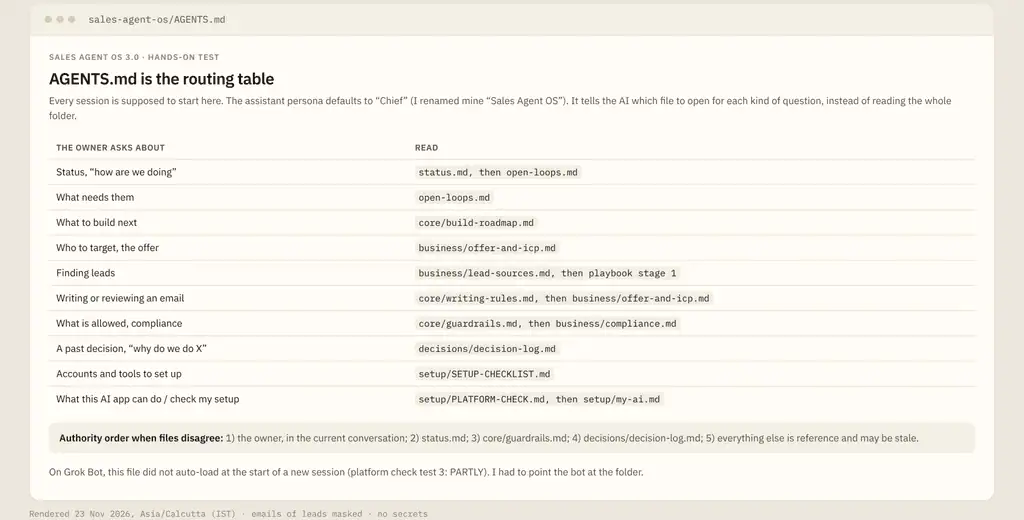
The routing table in `AGENTS.md`. On Grok Bot this file did not auto-load at the start of a new session.
The kit is organised around a build roadmap, Phases 0 to 6. The standing rule is to build the smallest version that works this week, log it, then do the next piece.
| Phase | What it is for | When the kit says it happens |
|---|---|---|
| 0 | Know the business: onboarding interview, profile, offer, one number | Day 1 |
| 1 | First 50-lead list from one source, you review 10 at random, then enrich | Week 1 |
| 2 | A 3-email sequence you edit; every edit becomes a writing rule. New sending domains and warmup if you need them | Week 1 to 2 |
| 3 | First sends, slowly. You check the first batch once | Week 2 to 3 |
| 4 | Reply handling, do-not-contact, CRM at the first positive reply | Week 3 to 4 |
| 5 | Scheduled list refill and a weekly review | Month 2 |
| 6 | More segments and volume, once email is proven | Month 3 and on |
There is also a platform check (`setup/PLATFORM-CHECK.md`) with 10 tests. It records what your AI app can do, then sets an automation level: Level 1 (chat only), Level 2, or Level 3 (files, schedules and connected apps). Guides in `adapters/` cover ChatGPT, Claude, Gemini, Grok, Copilot, chat-only apps and local agents.
Three guardrails matter before you start:
- You check the first batch of emails once. After that, the kit is designed to send inside the written rules.
- Never cold send from your main business domain. Buy look-alike sending domains and warm them for about two weeks.
- No made-up facts or numbers in copy. Claims have to come from a written, approved list. The AI should not buy tools, send cold email or delete data without your OK.
How to set up Sales Agent OS on Grok Bot
After you buy, you download a zip. This is the step-by-step path I followed, using the kit’s Grok adapter. For ChatGPT, Claude or Gemini, follow the matching guide in `adapters/`; the steps have the same shape.
- Give the zip to a Grok Bot. The adapter says to create a bot, name it what you will call the assistant, attach `sales-agent-os.zip`, and ask it to unzip the folder to `/workspace/sales-agent-os`. One friction to expect: my zip extracted with no read permission on folders, so we had to fix permissions before the files were readable.
- Type `start here`. That phrase is in `START-HERE.md`. It runs the platform check first (about 10 minutes), then the onboarding interview (about 20 minutes).
- Let the platform check finish. Mine ran on the morning of 23 November 2026. Tests 1, 2, 4, 5, 6, 7, 8, 9 and 10 passed. Test 3 was only partly met: Grok Bot does not auto-load `AGENTS.md` at the start of a new session, so you have to point it at the folder. A one-off scheduled test fired at 07:55:29 IST, a few minutes late. The result was recorded as Level 3, full agent.
- Answer the onboarding interview in plain words. “I don’t know yet” is an allowed answer. My real decisions: the offer was a $49 Premium listing on saasaffiliate.net, the goal was $500 to $1,000 a month within 12 months, sending was from my warmed Google Workspace inbox, lead data came from Tomba.io, and the budget for new tools was $0.
- Work through the first build phases. After onboarding, the kit writes the four business files, then proposes Week 1: one lead source, a 50-lead list, a 10-row review, enrichment, a 3-email draft you edit, then drafts in your inbox before anything is sent.
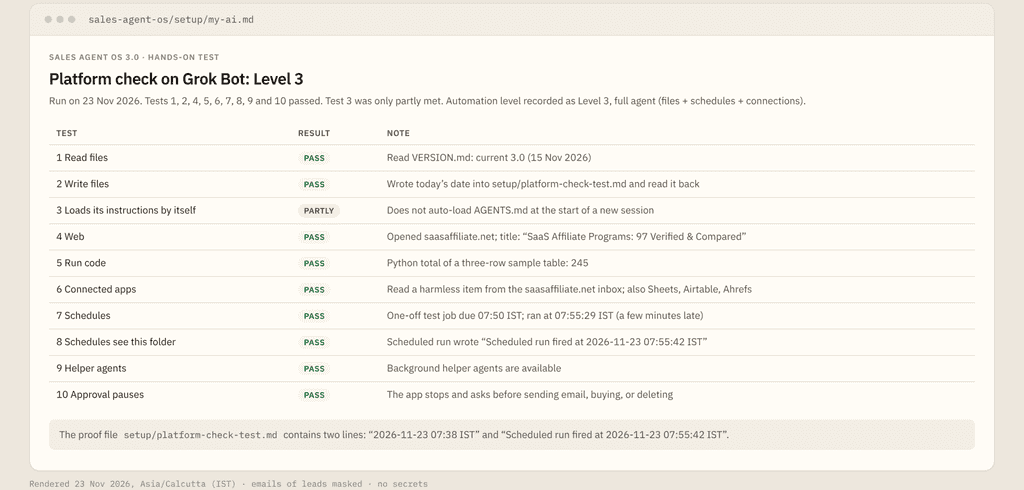
Platform check results, recorded in `setup/my-ai.md`. Level 3, with test 3 only partly met.
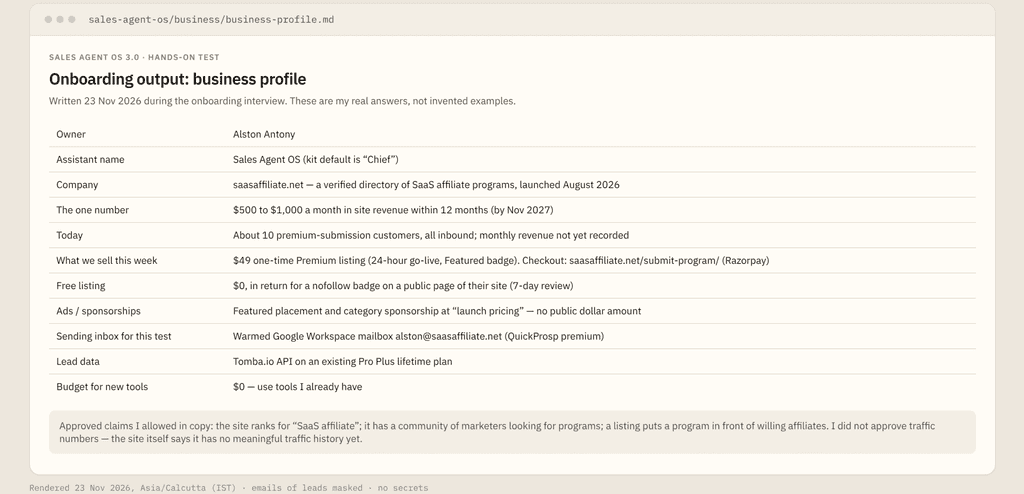
The business profile written from my interview answers on 23 November 2026.
I have not tried the kit with Claude Code or another local agent, only the Grok adapter. The kit’s own setup checklist still plans 1 to 2 days of focused setup, and about 2 weeks of mailbox warmup if you are buying new sending domains. I skipped new domains for this test because I already had a warmed inbox. That is a logged exception, not the kit’s default advice.
My Sales Agent OS test: 50 leads, 32 emails, $0 extra
These are the headline figures from the day, not campaign results.
| Figure | What it covers |
|---|---|
| 32 | Sales emails sent, 15:57 to 16:14 IST, 0 send failures |
| 2 | Backlink outreach emails sent, both to send-ready contacts, at 16:53 IST |
| 32 of 50 | Leads that were send-ready, meaning verified named contacts |
| $0 | Extra tool spend: I used the Tomba plan, inbox and Ahrefs workspace I already had |
The offer and the approved claims
The live submit page, as of 23 November 2026, sells a $49 one-time Premium listing (24-hour go-live, Featured badge, no subscription) and a free listing in return for a nofollow badge on a public page of the company’s site. Featured placement and category sponsorship are at launch pricing with no public dollar amount, so Week 1 stayed on the $49 listing.
The claims I allowed in the emails were that the site ranks for “SaaS affiliate”, that it has a community of marketers looking for programs, and that a listing puts a program in front of willing affiliates. I did not approve traffic numbers, because the site launched in August 2026 and has no meaningful traffic history yet. That approved-facts-only rule is one of the better parts of the kit.
The wall list and the 50 leads
The kit says past customers are never cold emailed. My payment account is shared across several sites and I could not cleanly tag a $49 payment on this one, so the wall list was built from the public directory instead: 8 programs with a Premium or Featured badge. I have about 10 premium buyers, so two may still be missing from that list. The 97 existing directory listings were saved and excluded too.
The first lead source was the public PartnerStack marketplace. The page held 405 active programs in its own data, plus a 405-URL sitemap. That was more plumbing than the kit’s “browse one directory” wording suggests, but it was still a free source. I excluded 27 companies already on the directory or the wall list, and 18 stand-in or request-program rows. Fifty were kept: 36 recently launched founder programs, 13 partnership managers at established SaaS companies, and 1 affiliate-tool vendor.
I reviewed 10 rows at random, approved the sample, and told the AI to find their emails with Tomba. No emails had been looked up before that, and nothing had been sent.
Enrichment with Tomba
On the 50-lead file, Tomba found verified-valid named contacts for 32. The rest split as 11 generic inboxes only, 3 named contacts that were not send-ready (2 invalid, 1 unknown) and 4 with no email. Credits used: 91 search and 63 verification, at $0 extra on a Tomba Pro Plus lifetime plan I already had.
A second pass tried to recover names from websites. That is worth doing, but a naive name parser also invented contacts from page chrome, including “Privacy Policy”. One of those was briefly marked send-ready and had to be reversed by hand. The lesson I would keep: only a verified named person is send-ready, and a scraped title is not proof of a real name.
My edits became writing rules
The kit tells the AI to draft a 3-email sequence for the best buyer type, then turn every owner edit into a rule in `core/writing-rules.md`. Sequence v1 was drafted at 11:36 IST for the $49 Premium listing, under 100 words, with a postal footer and an unsubscribe line. The call to action was the submit page, not a sales call, because checkout is self-serve and I have no booking link. The kit’s example ask is a short call, which does not fit this offer.
The playbook also tells you to use `core/agents/writer.md` and `core/agents/checker.md`. Those files are not in the zip, and there is no `copy/` folder in the kit either, so we created one and saved the sequence there.
My edit to sequence v1 at 15:42 IST was two sentences: do not write “labelled as paid”, call it a Premium listing, and offer the free badge or link-back option only when a lead cannot pay. Those two sentences became writing rules 8 and 9. Sequence v2 was rewritten from them. Email 2 no longer offered the free listing, and a short reply-only fallback was written for leads who say they will not or cannot pay.
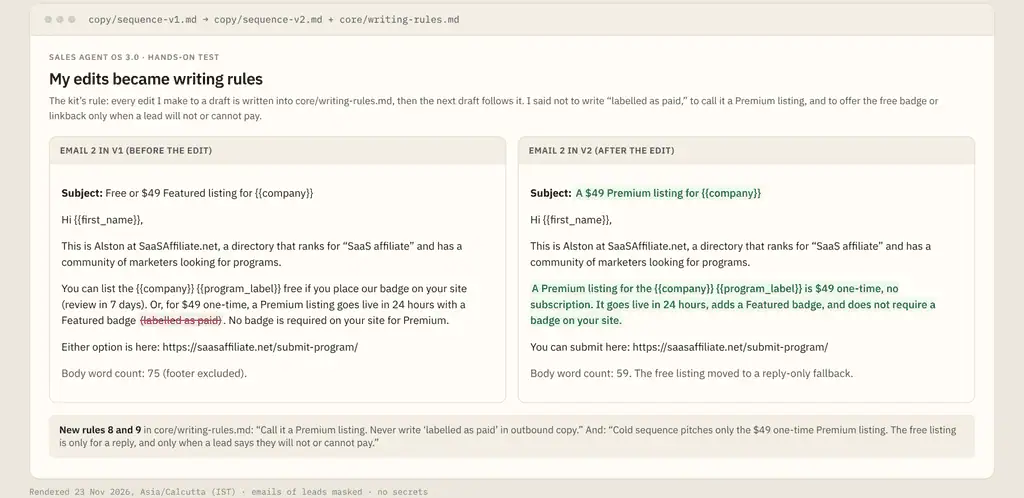
Email 2 before and after my edit. The struck text is the phrase I rejected. The free listing left the cold sequence and became a reply-only fallback.
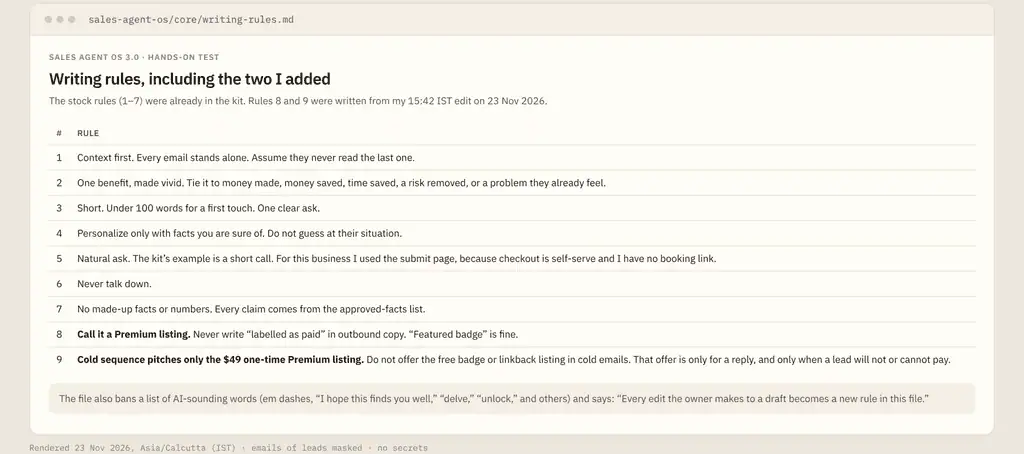
The writing rules file after my edits were added as rules 8 and 9 at 15:42 IST.
Sending the 32 emails
At 15:54 IST I approved sequence v2 and asked for Email 1 for the 32 send-ready leads to be put into my saasaffiliate.net drafts. The wall list, the existing directory and duplicate recipients were re-checked first, and none were skipped. All 32 drafts landed in the warmed inbox, unsent. After I said “you can send it directly”, all 32 existing drafts were sent unchanged, one at a time, about 31 to 38 seconds apart. The first send was at 15:57:56 IST and the last at 16:14:39 IST. All 32 were verified in the Sent folder, with no failures. Emails 2 and 3 had not been sent or drafted at that point.
This is still an exception to the kit’s advice. It wants new look-alike domains and a sending tool such as Smartlead or Instantly, and it says not to cold send from the main business domain. I used a warmed inbox on saasaffiliate.net because that was the point of this test, and I kept my other sites out of it. I would not treat that as the recommended setup for someone starting from zero.
Backlink outreach, and where the data ran out
After the sales batch, I asked the kit to find sites linking to competing affiliate directories with Ahrefs, then draft outreach for mentions of saasaffiliate.net. The connected Ahrefs workspace had already used 800,000 of 800,000 paid units, so paid competitor, SERP and referring-domain calls failed with API units left: 0. The kit did not invent a link-intersect result it could not see. The fallback was public search and page fetches, plus the free Domain Rating tool at 0 units.
Eight competing SaaS affiliate-program directories formed the comparison set. The shortlist was 27 pages on 23 domains, mostly roundups and directory-submission guides. Tomba found a verified, relevant-role contact for only 2 of the 23 domains, so I sent both backlink Email 1s, unchanged, from the same warmed inbox. Publisher sites were a weaker fit than the PartnerStack founder list. That work used the same kit habits as the sales test: approved claims only, writing rules, a wall around my own network, and no send until I said so.
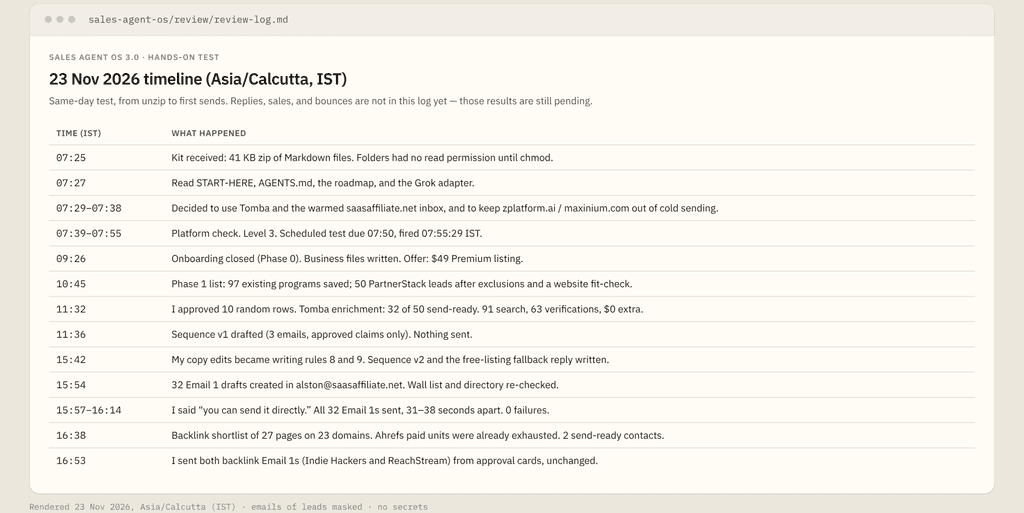
The day’s timeline, taken from the running review log. All times are Asia/Calcutta (IST).
Results after three days
I checked the inbox on 25 November at 16:50 IST and again on 26 November at 11:15 IST, against the 32 sales emails and 2 backlink emails.
| Result | Sales batch | Backlink batch |
|---|---|---|
| Sent on 23 November | 32 | 2 |
| Hard bounces | 2 | 0 |
| Bounce rate | 6.25% (2 of 32) | 0% |
| Delivered | 30 | 2 |
| Human replies | 1 | 0 |
| Reply rate | 3.3% of delivered (1 of 30) | 0% |
| Unsubscribes | 0 | 0 |
| Auto-replies or out of office | 0 | 0 |
| Attributable $49 payments | 0 | n/a |
The two hard bounces came a few minutes after the sends, both “address not found”, and those addresses went on the do-not-contact list. The one human reply came that evening from a partnerships manager at one of the companies, who said the company focuses on performance-based partnerships and asked whether we support a performance-based model. That is a question, not a no and not an unsubscribe. I read the $49 Premium listing as a one-time directory listing, drafted a clarifying reply for my approval, and sent it on 25 November at 16:43 IST. There has been no further answer. The sequence for that lead stays stopped.
Because 6.25% is over the kit’s 5% bounce pause, I have not sent sales Email 2 or backlink Email 2. Sales Email 2 would otherwise have been due on 26 November for the 29 quiet leads, at 15 to 20 a day. The copy is queued in the leads folder, and nothing has been sent or drafted.
No $49 Premium listing payment can be tied to the 34 outreach leads. Two inbound submissions in that inbox came from outside the outreach list, so I am not counting them as campaign results. Until payments and later replies are in, treat any claim about what this kit made me as incomplete. I will update this review after a further check around 30 November.
What the sales page promises and what was in the zip
The homepage headline reads “A full sales team. No payroll.” salesagentos.com sells the kit as a full sales team of agents that find leads, find emails, write, send from many inboxes and book meetings, in an eight-step loop: find, enrich, verify, write, send, reply, CRM, brief. The playbook in the zip follows that loop step by step. The agents are prompts the AI builds with you, not ready-made files: `core/agents/` is empty in v3.0. The product description says a checker agent reviews every draft before it goes out. The playbook describes that agent, but `core/agents/checker.md` is not in the zip, so I could not verify it as a separate agent.
I went back through every file in the kit and the sales page and counted 68 features. I have used 33 fully and 10 in part. 18 are not tested yet, 2 are logged exceptions, and 5 do not apply to a Grok Bot test. Coverage is unchanged since Day 3, because no new feature was tested.
- Replies and the CRM. The kit describes a reply agent that checks the inbox a few times a day and sorts each reply as positive, question, no, unsubscribe, out of office or wrong person. Positive replies get a short drafted answer, a call offer and a hot-lead alert the same day. A “no” or unsubscribe means stop and add to a do-not-contact list. A CRM record (a Google Sheet, in my case) starts only at the first positive reply. What I did on Day 3: I classified every thread for the 34 sends, added the bounced addresses to a do-not-contact list, stopped the sequence for the replying lead and wrote a proposed answer. I did not create a CRM record, because a question is not a sale.
- The morning brief and scheduled jobs. `setup/schedules.md` lists five jobs: a morning brief on weekdays at 7:00, a reply check every 2 hours from 8:00 to 18:00, a list refill daily at 6:00, a weekly review on Mondays at 8:00 and a platform re-check on the 1st of each month. None of the five is installed. I wrote two morning briefs by hand from live inbox numbers, on 25 and 26 November.
- Decision rules. The kit gives the assistant one rule: if a step is reversible and inside the guardrail fence, do it, log it and tell me; if it is irreversible or at the fence, stop and ask. In practice, lead lists, CSV files and copy drafts happened without a question. Every Gmail draft and every send waited for me. Each step rewrote `status.md` and appended a timed line to the decision log with how to undo it.
- Housekeeping rules. API keys stay in one secrets location, never in prompts or files. Long jobs save in chunks, and nothing runs on GitHub Actions. One thing I have not done yet: the Grok adapter suggests a weekly routine that zips the folder to a cloud drive, because the folder is the system’s memory.
- The vendor’s own numbers. The example brief and the “3 to 4 interested buyers a day” on the sales page are the vendor’s own October 2026 figures. My test cannot confirm or refute them.
How much Sales Agent OS costs
Sales Agent OS pricing is simple: the kit is $499 one-time from Sales Agent OS. The sales page says all sales are final, with no refunds, and that the outside tools are paid to those companies, not to the vendor. On the default stack, plan on $499 plus about $200 to $300 a month, plus your AI plan.
| Item | Kit’s default lean stack | What I used in this test |
|---|---|---|
| The kit itself | $499 one-time download | Version 3.0 zip |
| Cold sending tool | Smartlead or Instantly | Existing warmed Google Workspace inbox, warmed with QuickProsp premium |
| Sending domains | 2 to 3 look-alike domains, about $10 to $15 per domain per year | No new domains; I sent from saasaffiliate.net, a logged exception |
| Mailboxes | 2 to 3 per domain, about $7 per mailbox per month; the checklist example is 6 mailboxes | 1 existing mailbox |
| Lead data | Apollo, $99 a month, once free sources prove the targeting | Tomba.io Pro Plus lifetime plan I already had |
| Verification | MillionVerifier (prepaid, cents per 100), ZeroBounce as backup | Tomba verifier, 63 credits on the 50-lead file |
| System email | AgentMail, free tier | Connected Gmail |
| CRM | Connect a CRM, or start with a Google Sheet | A Google Sheet, with the working lists in `leads/` |
| Monthly tool budget | About $200 to $300 a month, plus your AI plan; $350 to $450 for a heavy-use AI plan | $0 extra for this test |
The left column comes from the kit’s setup checklist, which says its prices came from a live build in October 2026 and should be confirmed before buying. The right column is what I used on 23 November 2026. My extra tool spend was $0 because I reused tools I already had, so confirm the current price at checkout.
Where Sales Agent OS can go wrong
Each of these is a condition under which the kit gave me friction or a worse result.
- The zip is unreadable at first. The folders had no read permission until we fixed it. That was the first thing that happened, and a non-technical buyer could stall there.
- `AGENTS.md` is the source of truth but does not auto-load on Grok Bot. You have to point a new session at the folder every time.
- The agent files are missing. The playbook refers to `writer.md`, `checker.md` and a `copy/` folder, and none of them were in the zip. You or the AI build them.
- The $200 to $300 a month budget assumes you buy the default stack. If you reuse tools you already pay for, as I did, the extra cost can be zero. If you start from nothing, it cannot.
- Lead sourcing takes more work than the wording suggests. PartnerStack’s public marketplace is a large JavaScript app, and the website fit-check over-trusts keyword matches, so a second manual pass was required. Tomba often returns only a generic inbox for newer domains, and only 2 of 23 backlink domains were send-ready.
- The data tools can run out. The connected Ahrefs workspace was already out of paid units, so the backlink step could not do a true referring-domain search. Units reset on 26 November at 05:30 IST, and a free usage check that morning showed the workspace at 1,563 of 800,000 units used. I have not re-run the research.
- Gmail creates and sends one draft at a time. Thirty-two sends with a short gap took about 17 minutes. That is slower than a sequencer, but each send was an already-approved draft.
- I bent the deliverability rules. I sent 32 cold emails from the site’s own domain, which the kit advises against. I sent 34 emails from one mailbox on day one, where the kit starts a warm mailbox at about 15 to 20 a day. And 7 of the 32 sales addresses verified valid but sit on accept-all domains, which the kit says to treat as risky. The result was a 6.25% bounce rate on the sales batch, over the kit’s 5% pause, so I stopped further sends.
- Compliance is yours. The compliance file covers CAN-SPAM in the US (a real postal address, a working unsubscribe, honest subject lines) and warns that Canada, the UK and the EU are stricter. Every email I sent carried my postal address and a reply-unsubscribe line. What the logs do not show is a per-lead country check before the 32 sends. I did not set geography limits in onboarding, so the default was B2B worldwide. If you sell into Canada, the UK or the EU, make that check part of every load. This is not legal advice.
- No refunds, calls or coaching. The sales page says so, and the kit’s fix-it guide is the support.
Sales Agent OS alternatives
I did not test other products for this review, so this is a map of the options, not a ranking. Tool prices are the kit’s own October 2026 figures, read from its setup checklist on 23 November 2026 and not checked independently.
| Option | What you get | Price | Switch to it when |
|---|---|---|---|
| Sales Agent OS | A one-time playbook that makes your own AI app the operator of the whole outbound loop | $499 one-time | You want written guardrails and a build order, and you will do the setup |
| A cold email sending tool alone (Smartlead or Instantly) | Mailbox rotation, pacing and follow-ups | Smartlead Pro $96 a month, per the kit | You need sending at volume more than you need onboarding, an offer file and writing rules |
| A lead database (Apollo, or Tomba as I used) | Names and emails for AI lead lists | Apollo $99 a month, per the kit | You only need to find people; it does not write, send or decide |
| A hosted AI SDR service | Someone else’s software runs outreach for you | Varies; I have not tested one | You want it to run without you, and accept that your rules and data live in their product |
| Your own prompts in ChatGPT, Claude or Gemini | Nothing extra beyond your AI plan | Your AI plan | You will write your own guardrails, phases and logs |
For other hands-on tests of AI tools, see the ZPlatform AI reviews hub.
Should you buy Sales Agent OS?
A good fit if:
- You sell by outbound email and will do the interview and edit the first sequence.
- You want written guardrails more than a bundled mailer.
- You already have, or will set up, an inbox and a lead tool.
- You have been tempted to let an AI invent proof, mail a raw scrape, or skip a customer wall list. The kit blocks all three.
A poor fit if:
- You want a push-button sender that buys a list and mails it without you.
- You need a CRM, a sequencer or a lead database included. The kit coordinates those tools; it does not provide them.
- You will not review copy, or you expect `AGENTS.md` to load itself in every Grok Bot session.
- You think the kit replaces Ahrefs, Tomba or a warmed mailbox.
My verdict is 8 out of 10 as an operating system for running a careful first outbound campaign. What I can score is the process. In one day the kit took me from an unzipped folder to a written offer, a 50-lead test list, verified contacts, a three-email sequence I had edited, and a first batch of 32 emails sent from a warmed inbox, with no new tool spend. The guardrails were the useful part: they stopped invented traffic numbers, kept my other business domains out of cold sending, and turned two short edits of mine into standing writing rules.
It is not a sending tool, not a CRM and not a lead database. It is a Markdown operating system that tells an AI app how to run outbound sales with you, one agentic workflow at a time. If you already have an AI app, an inbox and a way to find emails, that is enough to test it. The two points that cost it marks are the missing agent files and the partly tested reply and CRM half, and the first outcome, one reply and no sale yet, does not say whether the campaign will pay back. If you want to run the same test on your own business, you can get Sales Agent OS for $499 one-time. If you want a hosted AI SDR that runs without you, skip it.
Frequently asked questions
Is Sales Agent OS software I install?
No. It is a folder of Markdown files that you open in an AI app such as ChatGPT, Claude, Gemini, Grok or Copilot. The AI is supposed to become the operator of that folder, so you still bring an inbox or sending tool and a lead source.
Does Sales Agent OS work with ChatGPT and Claude?
The kit ships setup guides for ChatGPT, Claude, Gemini, Grok, Copilot, chat-only apps and local models. I tested it only on Grok Bot, at automation Level 3, with one caveat: `AGENTS.md` did not auto-load at session start.
Did Sales Agent OS make any sales?
Not yet. As of 26 November 2026, 11:15 IST, the 32 sales emails produced 30 delivered, 2 hard bounces, 1 human reply (a question) and no attributable $49 payments. Follow-ups are on hold because the bounce rate is over the kit’s 5% pause.
Is cold email allowed?
The vendor says B2B cold email is allowed in many places, with rules such as CAN-SPAM in the US and GDPR in Europe, and the kit writes a compliance file during onboarding. That is the vendor’s position, not legal advice, so check the rules for each country you email.
Transparency note: I tested Sales Agent OS version 3.0 (15 November 2026) on 23 November 2026 and re-checked the inbox on 25 and 26 November, using Grok Bot and my saasaffiliate.net business. The screenshots are renders of the kit’s files and my test logs, with lead details left out. The Sales Agent OS links are affiliate links, and I may earn a commission if you buy through them, at no extra cost to you. The results are early and I will update them after a further check. If anything changes, tell me and I will update the review.
Related Posts

I tested AgainstData on 355 pages of Gmail data. Bulk unsubscribe, personal data deletion requests, pricing, and whether...
AI-Text-Humanizer.com took a 132-word ChatGPT paragraph from 100% AI to 0% on ZeroGPT but flattens your voice. Buy the $...
AIscan24 is a free, no-signup AI detector: it caught pure ChatGPT text at 100% but scored my handwritten paragraph 80%. ...
Honest Aithenticate review after hands-on testing. Does this AI disclosure badge tool meet EU AI Act requirements? Prici...
Allavsoft review: a Windows and Mac video and music downloader with batch queues, 8K support and format conversion, from...

My hands-on Answer Socrates review covering all features, free plan limits, pricing, and how it compares to AlsoAsked. I...