

The best VPN for ChatGPT keeps your connection private on public networks without getting your IP address blocked. ExpressVPN, NordVPN and Surfshark are the three with a dedicated IP option and a large server network. A VPN won’t make your chats private from OpenAI, and it can’t legitimately open ChatGPT in a country where OpenAI doesn’t offer it.
I’m Alston Antony. I’ve bought and tested 500+ AI and SaaS tools with my own money, but I have not run these seven VPNs against ChatGPT, so this compares price, features and what OpenAI says about VPNs, not speed tests. Everything below comes from each VPN’s own pricing pages and OpenAI’s help center, checked on 25 November 2026. It isn’t legal or security advice.
No VPN paid for a place on this list, and every link is a plain, non-affiliate link. VPN prices are mostly Black Friday promotions in euros, so the figures that matter are the ones after the first term, which I show in the cost section. I haven’t measured speed, so I don’t name the fastest VPN.
Which VPNs are worth using with ChatGPT in 2026?
Seven VPN providers passed one test: a pricing page I could read for what you get and what it costs. Six have a dedicated or static IP option, which matters because shared VPN addresses can get flagged by OpenAI’s Cloudflare layer. The table shows the facts that decide which ChatGPT VPN fits.
| VPN | Dedicated or static IP | Devices | Servers | Intro price on a long plan | Month-to-month |
|---|---|---|---|---|---|
| ExpressVPN | Add-on; included in Express Pro | 10 on Basic | 113 countries | €2.39/mo (Basic, 28 months) | Not shown |
| NordVPN | Add-on | Up to 10 | 6,900+ in 225+ locations | Price page blocked me | Not retrieved |
| Surfshark | Add-on, 20 locations | Unlimited | 4,500+ in 100 countries | €2.49/mo (27 months) | Not shown |
| Proton VPN | Not found on its pricing page | 10 | 20,000+ in 140+ countries | €2.99/mo (Plus, 12 months) | €9.99/mo |
| CyberGhost | Add-on | 7 | 100+ countries | €1.59/mo (28 months) | €11.99/mo |
| Private Internet Access | Add-on | Unlimited | 113 countries | €1.39/mo (40 months) | €11.69/mo |
| Windscribe | Static IP offered | Not stated | 69 countries, 112 cities | $5.75/mo (yearly) | $9.00/mo |
Prices checked 25 November 2026 on each VPN’s own site, in the currency each page showed me. Most of these are time-limited Black Friday offers, so treat the intro column as a snapshot.
Why use a VPN with ChatGPT, and do you actually need one?
Most ChatGPT users don’t need to use a VPN, because ChatGPT without a VPN works the same on a home network. ChatGPT already encrypts your connection with HTTPS, so a VPN adds little on a home network. A good VPN earns its place on public Wi-Fi, when you travel inside supported countries, or when you want your internet provider and network owner to see less of your traffic.
A VPN, short for virtual private network, builds an encrypted tunnel between your device and a VPN server. Your internet provider and the owner of the network then see scrambled traffic instead of the sites you visit. Good apps add a kill switch and DNS leak protection, so VPN traffic can’t leak if the VPN connection drops, and so your Domain Name System lookups don’t slip outside the tunnel. That is the whole job: it protects the connection, not your ChatGPT account.
Three honest reasons to use one, whether you want to access ChatGPT at a cafe or on the road:
- Public Wi-Fi. A VPN encrypts everything between your device and the VPN server, which helps in cafes, hotels and airports. For how attackers use open networks, see how hackers use AI.
- Less visibility for your network. Your employer, school or internet provider can see that you connected to a VPN, but not what you did inside it.
- Travel. Keeping the same protected connection abroad lets you access ChatGPT the way you do at home, as long as you stay in a country OpenAI supports.
What a VPN does not do is just as important. ChatGPT works the same with or without one, apart from the blocking risk, and a VPN doesn’t hide your AI prompts from OpenAI, and it doesn’t change which country OpenAI treats you as being in for support purposes.
Why does ChatGPT block some VPN connections, networks and countries?
Yes, ChatGPT works with a VPN in most cases, but it can block one because OpenAI’s Cloudflare layer treats some VPN addresses as suspicious. OpenAI’s help center says VPNs can trigger a block “as they mask your original IP, which can be identified as suspicious,” and that an IP from a high-risk area may also be blocked. The block is about the address, not about VPNs as such. When ChatGPT is blocked on a VPN, a different server in a supported country may work again, which is a fix for a VPN connection, not a way around a region.
The mechanics are simple. A shared VPN server puts many users behind one IP address. If a few of them behave like bots, the address gets flagged for everyone, and you see “Sorry, you have been blocked” or a “Verify you are human” check.
I saw a version of this first-hand. When I loaded OpenAI’s help pages from a data-center connection, which is not a VPN but looks similar to a site’s defenses, I got a Cloudflare “Verify you are human” page instead of the article. Data-center addresses are exactly what VPN servers use.
Two vendors say the same thing about shared addresses. NordVPN’s own page notes that if someone abuses a shared IP it can get flagged or blocked. Private Internet Access says its dedicated IP “helps you avoid CAPTCHAs” and circumvent blocklists. A dedicated IP gives you an address only you use, which makes a flag less likely, though neither vendor promises ChatGPT will accept it.
The best VPN for ChatGPT: 7 options, one by one
To get the best VPN for ChatGPT, pick by what fails you most: blocks, price after the first term, or device count. These seven are the best VPNs I could verify for ChatGPT users, ordered roughly by how many ChatGPT-relevant features each page lists, not by speed, which I haven’t measured.
ExpressVPN: dedicated IP option and a bundled AI chatbot
ExpressVPN sells three plans. Basic covers 10 devices, Advanced 12 and Express Pro 14, with a dedicated IP included only in Express Pro and available as an add-on on the other two. Its pricing page also lists ExpressAI, a “private AI chatbot,” with daily credits on every plan.
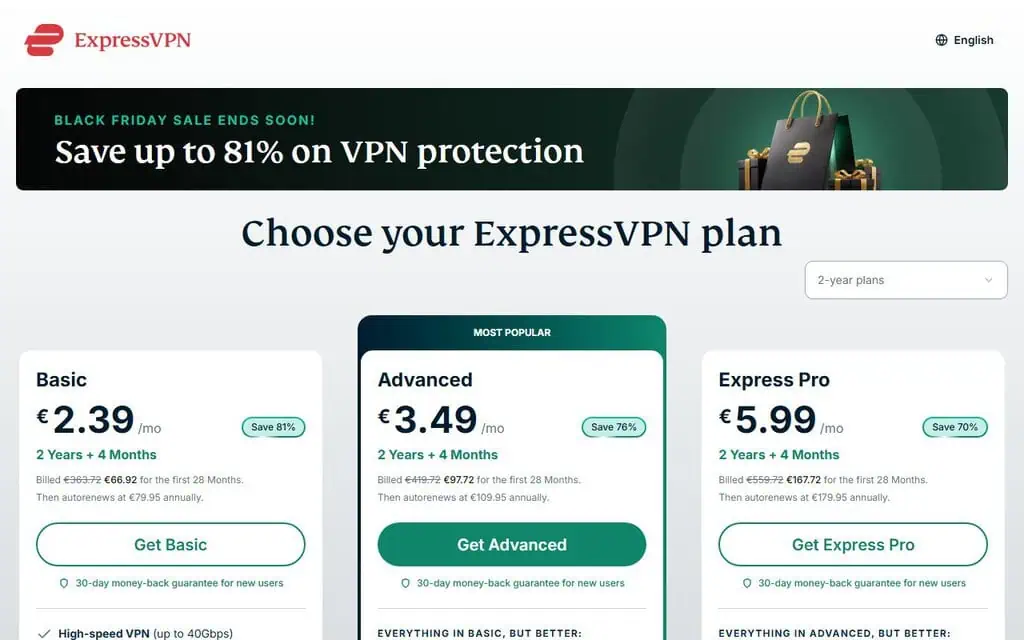
The catch is the renewal. Basic’s €2.39 a month is for 28 months and then renews at €79.95 a year, which is about €6.66 a month.
- Pricing (checked 25 Nov): Basic €2.39/mo (€66.92 for 28 months, then €79.95/yr). Advanced €3.49/mo, then €109.95/yr. Express Pro €5.99/mo, then €179.95/yr. 30-day guarantee for new users.
- Best for: people who want a dedicated IP in the top plan and an AI chatbot bundled in.
NordVPN: the biggest server list I could verify
NordVPN lists 6,900+ servers in 225+ locations, up to 10 devices at once and a 30-day money-back guarantee. A dedicated IP is an add-on, and its page explains why shared addresses can get flagged.
It also has the audit record I could source. A report on its sixth Deloitte no-logs assurance engagement, completed on 12 December 2025, is on Tom’s Guide.
I couldn’t load NordVPN’s pricing page, because its Cloudflare check stopped my browser, so I’m not quoting a price. Check the page yourself before you buy.
- Pricing (checked 25 Nov): not retrieved. A Black Friday banner offered 78% off plus 3 extra months.
- Best for: people who want a long audit history and a big server network.
Surfshark: unlimited devices and a dedicated IP in 20 locations
Surfshark‘s plans cover unlimited devices and include Bypasser, its name for split tunneling, plus a dedicated IP available in 20 locations. It lists 4,500+ servers in 100 countries and an “audited no-logs policy,” which is its own wording.
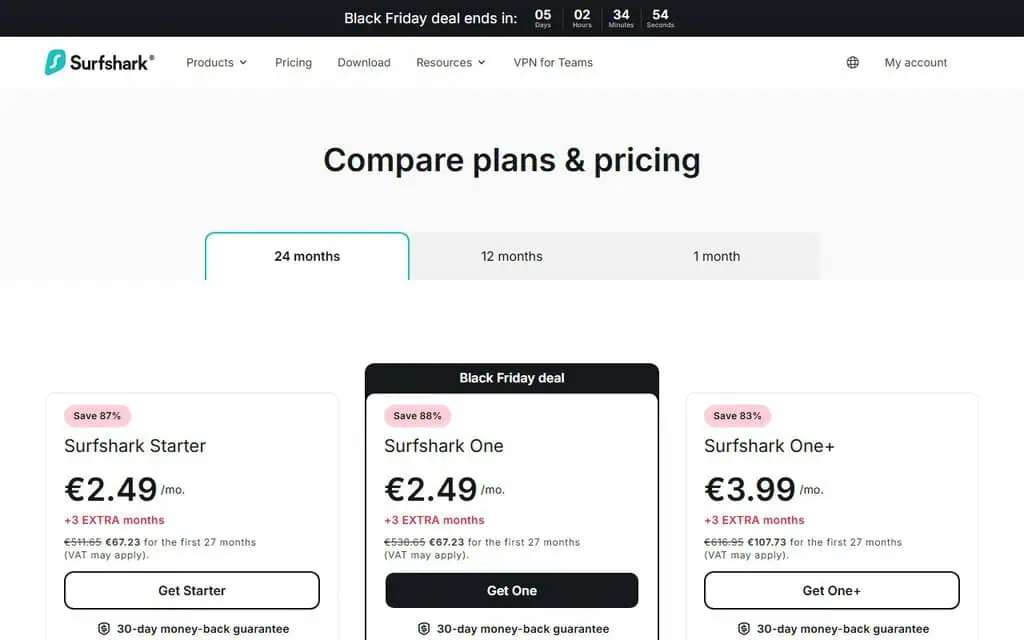
Starter and One both showed €2.49 a month on a 24-month term with 3 extra months, billed as €67.23 for 27 months. One+ is €3.99. The page didn’t show the renewal price in the part I read.
- Pricing (checked 25 Nov): Starter and One €2.49/mo, One+ €3.99/mo, all with 30-day money-back. Renewal not shown.
- Best for: households with many devices.
Proton VPN: a real free plan and a privacy-first pitch
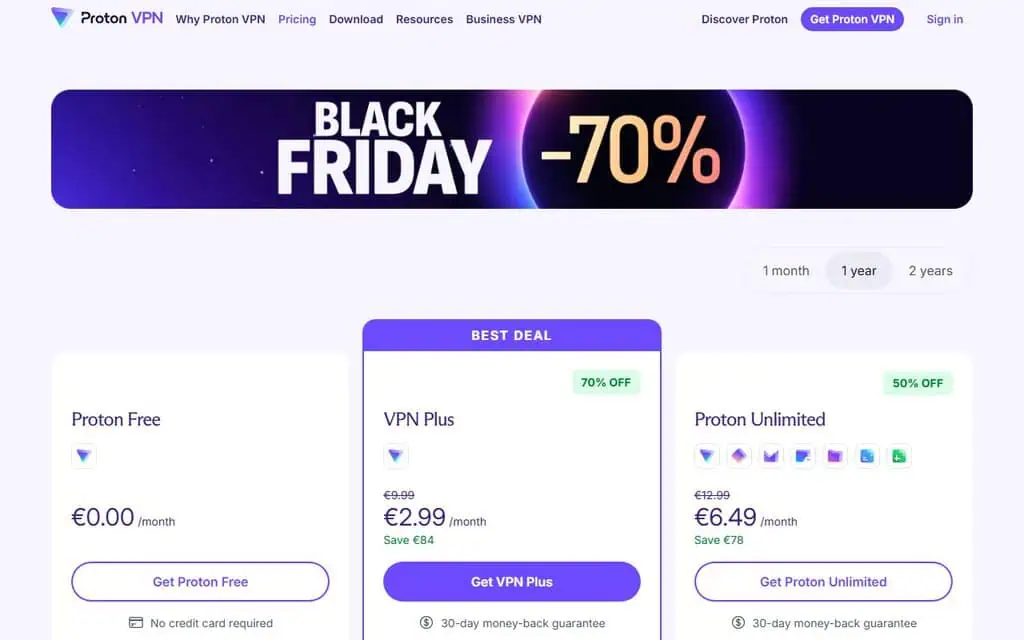
Proton VPN has a free plan, which is rare. It covers one device and 10 countries chosen at random. Plus covers 10 devices across 20,000+ servers in 140+ countries. I did not find a dedicated IP option on its pricing page.
A report on its fourth consecutive no-logs audit, by Securitum in August 2025, is on TechRadar.
- Pricing (checked 25 Nov): Plus €9.99/mo month-to-month; €2.99/mo on the 1-year Black Friday deal (€35.88 first year, then €83.88/yr). Unlimited €6.49/mo (first year €77.88, then €119.88). Free €0.
- Best for: trying a VPN without paying, or keeping a privacy-focused provider.
CyberGhost: the lowest long-plan price, with a kill switch
CyberGhost lists 7 simultaneous connections, servers in 100+ countries, split tunneling, an automatic kill switch and a “certified no-logs policy” (its wording). A dedicated IP is a paid add-on.

Its long plan is the cheapest I saw: €1.59 a month, billed as €44.52 for the first two years and renewing at €44.52 a year. Month to month it is €11.99.
- Pricing (checked 25 Nov): 2 years + 4 months €1.59/mo; 6 months €6.99/mo; 1 month €11.99. 45-day guarantee on long plans, 14 days on monthly.
- Best for: low-cost long plans when seven devices is enough.
Private Internet Access: unlimited devices and open source
Private Internet Access lists unlimited devices, servers in 113 countries, RAM-only servers and a fully open-source client. Its dedicated IP add-on is aimed at avoiding CAPTCHAs.
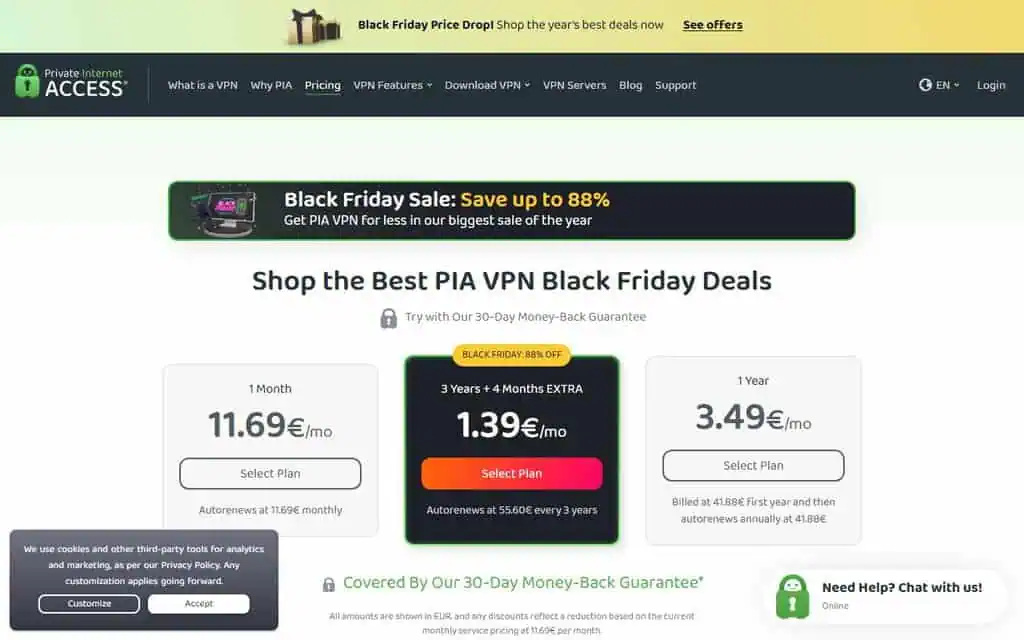
Its 3-year plan was €1.39 a month and renews at €55.60 every three years, about €1.54 a month. The one-year plan is €3.49 a month and renews at the same price.
- Pricing (checked 25 Nov): 1 month €11.69; 1 year €3.49/mo; 3 years + 4 months €1.39/mo. 30-day guarantee for new subscribers.
- Best for: people who want unlimited devices and a long plan that doesn’t jump at renewal.
Windscribe: month-to-month in dollars, with a static IP
Windscribe lists 69 countries and 112 cities, OpenVPN, IKEv2 and WireGuard configs, a built-in ad and tracker blocker, and a static IP option. Pro is $9.00 a month or $69 a year ($5.75 a month), and a “Build a plan” option charges $1.00 per location per month.
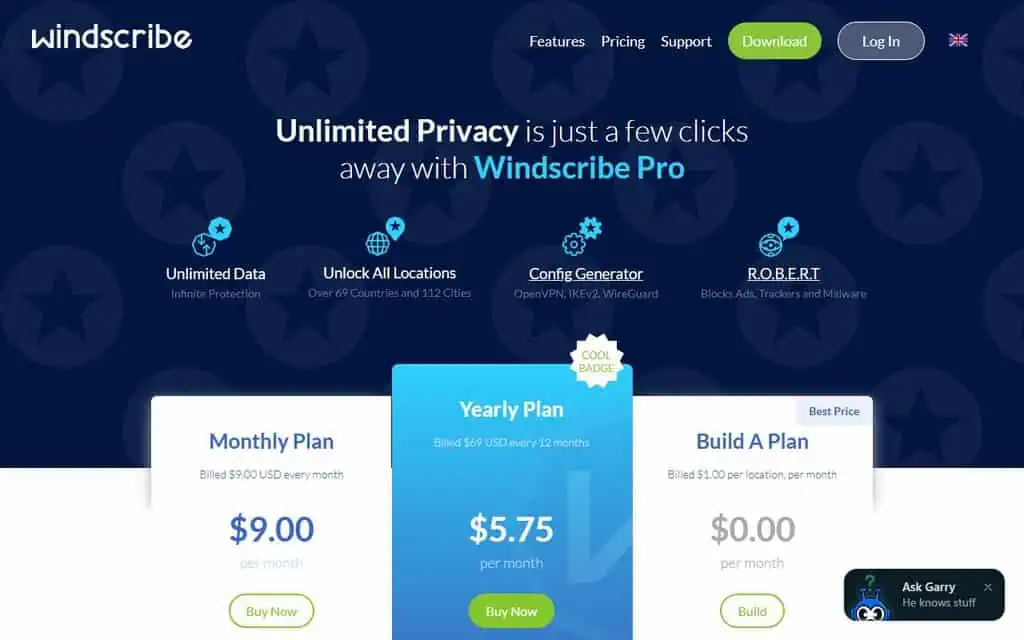
- Pricing (checked 25 Nov): Pro $9.00/mo or $69/yr; Build a plan $1.00 per location per month; a free plan exists.
- Best for: people who prefer dollar prices and shorter commitments.
How do you choose the best VPN for ChatGPT?
For ChatGPT users, a dedicated or static IP matters most, because a flagged shared address is the most common failure. After that, check the kill switch, the device count and whether you can cancel without a long contract. Server counts and speed claims matter less for text chat.
A short checklist:
- A dedicated or static IP option. It is the best defence against shared-IP blocks, and it is an add-on at most of these vendors.
- A kill switch. If the VPN drops, your traffic should stop instead of leaking. CyberGhost lists an automatic one.
- Device count. Seven (CyberGhost) to unlimited (Surfshark, Private Internet Access).
- Split tunneling. CyberGhost and Surfshark list it, which lets you route only the browser through the VPN.
- Audit evidence. NordVPN and Proton VPN have audit reports I could find. Treat “no-logs” as a claim until an independent party has checked it.
What these VPNs cost after the first term
The long-plan price is a promotion, and several VPNs renew at two or three times it. Compare the renewal, not the banner. ExpressVPN Basic goes from €2.39 to about €6.66 a month, and Proton VPN Plus from €2.99 to about €6.99. Private Internet Access barely moves.
| VPN and plan | Intro price | Renewal, per month | What changes |
|---|---|---|---|
| ExpressVPN Basic | €2.39 | About €6.66 (€79.95/yr) | About 2.8 times |
| Proton VPN Plus | €2.99 | About €6.99 (€83.88/yr) | About 2.3 times |
| CyberGhost 2-year | €1.59 | About €3.71 (€44.52/yr) | About 2.3 times |
| Private Internet Access 1-year | €3.49 | €3.49 (€41.88/yr) | No change |
| Private Internet Access 3-year | €1.39 | About €1.54 (€55.60 per 3 yrs) | About 1.1 times |
| Windscribe Pro | $5.75 yearly | $9.00 monthly | Choice of term |
| Surfshark One | €2.49 | Not shown | Check at checkout |
| NordVPN | Not retrieved | Not retrieved | Check at checkout |
Renewal figures are my arithmetic from each page’s annual price. Before you pay, check the renewal price and the cancel path, and set a reminder.
Can you use a free VPN with ChatGPT, and is it safe?
Free VPNs exist, but they come with limits or a business model you should understand. Proton VPN’s free plan covers one device and 10 randomly chosen countries, and Windscribe offers a free tier. Those are reputable providers, but a free plan usually means fewer locations and slower, shared servers.
A free VPN service has to pay for its servers somehow, while a premium VPN pays for them with your subscription. The danger is with unknown free VPN apps. A VPN service sees all your traffic, so a provider that doesn’t charge you has to pay for servers some other way, and that can mean ads, tracking or selling data. I’d only use a free plan from a company that also sells a paid one, and I’d avoid anonymous free apps. A shared free server is also the kind of address ChatGPT is likeliest to block.
Does a VPN make your ChatGPT chats private, and can law enforcement see through it?
No. A VPN hides your traffic from your network and your internet provider, but you are still logged in to ChatGPT. OpenAI still sees your account, your prompts and your replies. A VPN changes who can see the route, not what the destination knows.
The same logic answers the question people ask about law enforcement. A VPN stops your provider and the sites you visit from seeing where a connection comes from, but the VPN company can see it, and a provider can be ordered to hand over what it holds. That is why a verified no-logs policy matters, and why I treat audits as evidence rather than as a promise. I’m not a lawyer, so check your local rules.
If privacy from OpenAI is your goal, a VPN is the wrong tool for an AI chat like ChatGPT. Check ChatGPT’s own data controls instead, and keep sensitive details out of prompts.
Can a VPN unblock ChatGPT in a country where it isn’t supported?
No, and it is the use I’d steer you away from. If ChatGPT is unavailable where you live, or restricted access to ChatGPT is the reason you want a VPN, the answer doesn’t change: the countries where ChatGPT is available are OpenAI’s decision, not your VPN’s. OpenAI publishes a list of supported countries and territories, so access to ChatGPT depends on where you are, and it says that accessing its services outside that list “may result in your account being blocked or suspended.” Its help article lists the list at more than 200 entries, and it doesn’t include places such as China, Russia or Iran.
OpenAI also notes it doesn’t publish a separate list of unsupported places. If a location isn’t on the list, the API isn’t available there. A VPN can make your traffic appear to come from somewhere else, but the rule is about where you actually are.
The same error can appear for people in supported countries. OpenAI says you can see “OpenAI’s services are not available in your country” after using your device in an unsupported region and returning home, and suggests clearing your cache and cookies or trying another browser.
How do you fix ChatGPT errors when you’re on a VPN?
Start by turning the VPN off and trying again. OpenAI’s own steps for the “Sorry, you have been blocked” error are to turn off VPNs, change your location to a lower-risk one and wait, since temporary blocks lift when Cloudflare stops seeing suspicious activity.
Then try these, in order, to use a VPN with ChatGPT without constant blocks:
- Disconnect and reload. If ChatGPT loads, the VPN address was the issue, and you may not need to use a VPN on that network.
- Switch server. Pick a different server in the same supported country, because a neighbouring address may not be flagged. VPN IP addresses are shared, so another server means another set of neighbours.
- Try a dedicated or static IP. If you use ChatGPT daily on a VPN, it is the most reliable fix.
- Clear cookies and try another browser. This also clears the “not available in your country” error after travel.
- Wait. Temporary blocks expire.
Quick answers about using a VPN with ChatGPT
Which VPN is best for ChatGPT?
No single VPN wins on every count. ExpressVPN, NordVPN and Surfshark offer a dedicated IP option and large server networks, Proton VPN has a free plan, and Private Internet Access pairs unlimited devices with a flat renewal price. Choose by what fails you most: blocks, renewal cost or device limits.
Does a VPN affect ChatGPT?
Yes, mainly through your IP address. A shared VPN address can look suspicious to OpenAI’s Cloudflare layer, which can trigger a “Sorry, you have been blocked” page. Your account, prompts and replies work the same, and a VPN doesn’t change what OpenAI stores about your conversations.
Can you access ChatGPT from anywhere with a VPN?
No. OpenAI lists the countries and territories it supports and says access outside that list “may result in your account being blocked or suspended.” A VPN changes where your traffic appears to come from, not where you physically are, so it isn’t a safe way around a region limit.
Is a free VPN safe for ChatGPT?
Only from a reputable provider. Proton VPN’s free plan covers one device and 10 randomly chosen countries, and Windscribe has a free tier. Unknown free apps can see all your traffic and may fund themselves with ads or data sales, and shared free servers are the likeliest to be blocked.
Do VPNs make ChatGPT chats anonymous?
No. A VPN encrypts the route between your device and the VPN server, which helps on public Wi-Fi. You still sign in to ChatGPT, so OpenAI still sees your account and prompts. For private conversations, use ChatGPT’s data controls and leave sensitive details out.
Which VPN features help most with ChatGPT?
A dedicated or static IP, a kill switch and enough device slots. ExpressVPN, NordVPN, Surfshark, CyberGhost, Private Internet Access and Windscribe all list a dedicated or static IP option, and CyberGhost lists an automatic kill switch. Check the renewal price before you pay.
The same VPN question comes up for the other big assistants, so I wrote a guide to the best VPN for Claude and best VPN for Meta AI too.
If you want a second opinion on tools beyond ChatGPT, I publish tested AI tool reviews, a set of ChatGPT alternatives and a growing list of best AI tools. You can get new ones by email, and our affiliate disclosure explains how the site is funded.
Nothing here is legal, security or privacy advice. VPN laws and OpenAI’s terms differ by country and change, so check the rules where you live before you rely on a VPN.
Product profiles: ChatGPT.
Related Posts

The 32 best AI SEO tools in 2026, most tested with real money: what each costs, which ones track AI visibility and AI Mo...

30 AI writing tools tested across free, freemium and paid tiers, every link checked, plus which AI beats ChatGPT for wri...

I tested 60 free and freemium AI image generators and ranked them by real traffic and hands-on quality. Free tiers, limi...

31 social media scheduling tools tested for small business: real pricing, every tool link checked September 2026, and th...

The AI tools for developers I used to build a full-stack app: v0, Cursor, Codex, Snyk and Kuberns. Where each helped, an...

The best agentic video editors for long-form footage are Invideo Editor, Descript, Premiere Pro, Gling AI and CapCut, co...