

What Fashion Diffusion AI costs and who should test it
| Field | Detail |
|---|---|
| Tool | Fashion Diffusion AI |
| Category | AI fashion design and product photography platform |
| Best use case | Small apparel brands and e-commerce sellers producing on-model and flat-lay product imagery without booking a photoshoot |
| Price | Free tier: no. Free credits on signup, amount not published, no card required. Paid plans $12 (100 image credits), $29, $59 and $199 per month. Yearly billing gives 2 months free |
| Watch out for | Its credit allowances are smaller than rival platforms at the same price |
| Verdict | Test it on the free signup credits, then price the same work at The New Black before you subscribe |
Here is the thing that made this review worth writing. The product summary circulating for Fashion Diffusion AI describes four pillars: AI Shoots, AI Restyle, Sketch-to-Render, and Pro Tools. Go to the website today and the four studios are labelled AI Fashion Design, AI Photoshoot, AI Model Generator and AI Video Generator.
An entire studio, video, is missing from the older framing. So are the iOS and Android apps.
That isn’t a scandal. It is a young product that has moved fast and left its own marketing copy behind on the directories. But it tells you something useful about how to read anything written about this tool, including the specification sheets on the AI directories, which still carry the retired four-pillar language word for word.
My default mode with any tool is doubt. I have bought and tested more than 500 AI, SEO and SaaS tools with my own money, and the pattern that costs people the most is trusting a spec sheet that stopped being true two releases ago. So everything below was checked against the vendor’s own live pages on 18 August 2026, and where a claim could not be checked, this review says so rather than repeating it.
A disclosure before anything else: I have not run Fashion Diffusion AI on my own garments. This review is built on the company’s live product pages, its pricing page, its terms of service, its official YouTube channel, competitor pricing pages, and Ahrefs data, all checked on 18 August 2026.
Where you see a capability described here, it is what the platform documents, not what I measured. I flag the difference every time it matters. That is the same standard I apply to every review on this site, and if you want the reasoning behind it, I keep the working notes on my personal site.
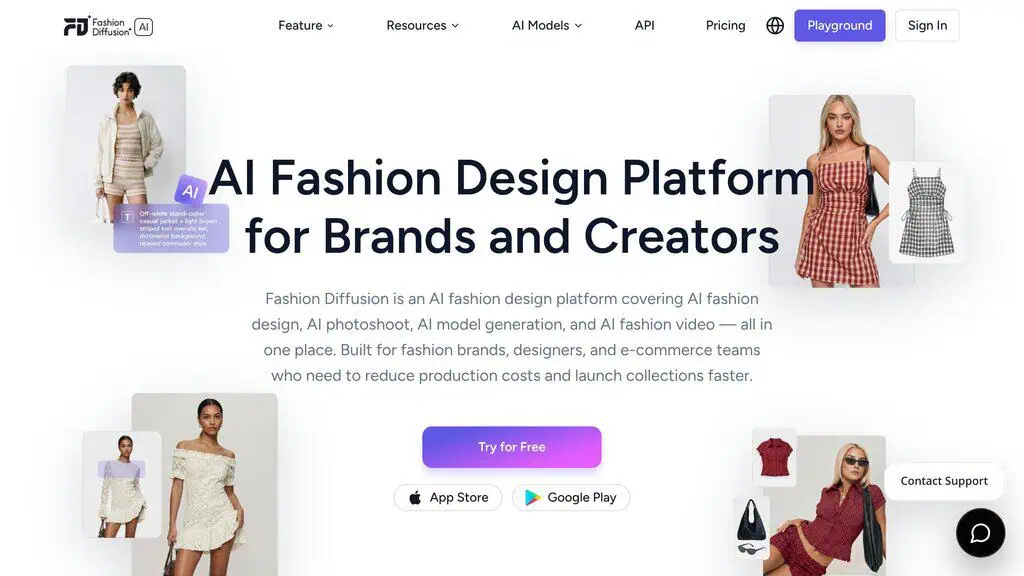
Fashion Diffusion AI explained: four studios, and why it is not Midjourney
Fashion Diffusion AI is a fashion-specific visual production platform. That phrase is doing real work, so it is worth unpacking against the two things people usually assume it means.
It isn’t garment engineering software. There is no pattern grading, no measurement spec, no fabric physics simulation you could hand to a factory. CLO 3D and Browzwear do that job. This does pictures.
It’s also not a general AI image generator with a fashion prompt library, and that distinction is the one worth answering before any of the pricing matters. Plenty of people asking about AI fashion tools already pay for a general image generator and want to know whether they need a second subscription.
| Fashion Diffusion AI | General image generator | |
|---|---|---|
| Starting point | A real garment you upload | A text prompt |
| Garment fidelity | Preserving your product is the design goal | Produces a plausible garment, not yours |
| Fashion-specific tools | Pattern extraction, fabric application, flat lay, technical-flat rendering | None |
| Model control | Structured controls for gender, age, skin tone, body type | Prompt wording only |
| Best at | Product imagery for a garment that exists | Concepts, mood boards, ideas |
| Commercial terms | User owns outputs, stated explicitly | Varies by platform and tier |
The distinction that matters is fidelity to a real product. A general generator will give you a beautiful jacket. It won’t give you your jacket, with your buttons and your lining and your logo placement, which makes it useless for a product listing and excellent for a mood board.
So they aren’t really competitors. If your work is concepting and inspiration, a general tool is cheaper and more flexible, and our roundup of free AI image generators covers the credible free options.
If your work is turning garments you already own into listing images, a general generator can’t do the job at any price. The same split shows up in adjacent verticals, which is why AI interior design tools exist separately from general generators too.
One place they overlap is people. If all you need is a realistic human face for a brand asset rather than a garment on a body, the free AI portrait generators will do it for nothing. And if the word “diffusion” in the product name is doing more work than you would like, our AI glossary explains what a diffusion model actually is.
What the four studios actually contain
| Studio | What it produces | Named tools inside it |
|---|---|---|
| AI Fashion Design | Concepts, renders, fabrics, prints | AI Outfit Generator, Style Innovation, Text to Sketch, Image to Sketch, Sketch to Render, Apply Fabric, Recolor, AI Inpainting, Seamless Pattern, Pattern Extractor |
| AI Photoshoot | On-model and product imagery | Virtual Try-On, Mix & Match, Lookbook, Plus-Size Preview, Flat Lay Generator, Product Detail Shots, Change Background, Text to Background, Remove Background, Upscale |
| AI Model Generator | The person wearing the garment | AI Model Generator, Swap Face |
| AI Video Generator | Short-form campaign clips | AI Fashion Video |
That is roughly 25 named tools, and the breadth is the genuine argument for the platform. Most fashion businesses currently stitch these design workflows together from three or four unrelated products. Stitching this together from separate products means a background remover here, an upscaler there, and a try-on tool somewhere else, each with its own credit system.
From upload to 4K export: how a generation runs
The actual flow across the platform’s four studios:
- Upload a source image. The tools accept PNG, JPG and WebP. For video, JPG, PNG and JPEG. The garment should be clearly visible against a clean background, and the vendor’s own guidance says front-facing shots produce the most accurate results.
- Pick the studio that matches the job.
- Describe what you want in plain language. Model attributes, fabric, colourway, background or motion, depending on the tool.
- Generate. Each output consumes credits. The company says most model generations finish in under two minutes, varying with prompt complexity and platform load.
- Refine or re-run. Inpainting, recolour, background change and upscaling are separate tools you chain onto a result.
- Export. Downloads run up to 4K on every paid plan, with 1080p video.
The underlying model family is not disclosed. Fashion Diffusion states publicly that it is built on a dataset of more than a million annotated fashion images, but it never says whether that sits on top of an open model family such as Stable Diffusion or something trained in house. It publishes no architecture detail and no benchmark figures either, which is the single biggest gap in its technical documentation.
How new is it, and why that matters
Fashion Diffusion first appeared on the major AI directories in April 2026. Ahrefs shows the domain holding 271 organic keywords and roughly 1,384 monthly organic visits in the US as of 18 August 2026. Those are the numbers of a product that is four months into its life, not an established vendor.
For a lifetime deal that would be a red flag. For a monthly subscription you can cancel, it matters less.
But it does mean two things: the feature set will keep moving, and there is not yet a body of independent evidence about how the output holds up across a few hundred SKUs. Treat any review of this tool, including this one, as a snapshot.
Fashion Diffusion AI suits small sellers and designers, not catalogue teams
Fashion Diffusion AI is best for:
- Small e-commerce apparel sellers. If you are listing 20 to 50 SKUs and a studio day is out of reach, $12 gets you 100 on-model or flat-lay images that meet marketplace listing conventions.
- Independent fashion designers presenting concepts. Sketch-to-render puts a photorealistic garment in front of a client or a buyer before a sample exists, early in the design process rather than after it.
- Textile developers and content creators working with brands and agencies. The Pattern Extractor and seamless repeat tools are genuinely fashion-specific and have no equivalent in a general image generator.
- Brands testing colourways and fabrics before sampling. Applying a swatch digitally costs one credit. A physical sample costs considerably more, whatever the vendor’s exact percentage claim turns out to be.
Fashion Diffusion AI is not for:
- Anyone needing production-accurate specifications. This produces pictures, not tech packs, graded patterns, or measurements a factory can cut from.
- Brands whose garments carry logos, slogans or fine embroidery. Diffusion models reconstruct rather than copy, and small text is where they break first. Test yours before committing.
- High-volume catalogue teams on a tight budget. At 320 credits for $29, the credit economics are the weakest part of the offer, and the comparison table below shows why.
- Editorial and campaign photography with a creative direction. A generated model does not take direction, and a lookbook that needs a point of view still needs a photographer.
Apple-only refund terms, thin credits and other risks before you pay
- The published terms of service govern Apple in-app purchases, not the web subscriptions the site sells. Every payment, cancellation and refund clause routes through Apple ID and Apple Media Services, and the document states the operator does not directly process refunds. The website meanwhile sells $12 to $199 monthly web plans marked “Cancel anytime”. There is no web refund policy in the terms at all.
- Liability is capped at USD $100 and the platform is supplied “as is” with no warranty covering output accuracy. If a generated image misrepresents a product you shipped, that exposure is yours.
- The free allowance is undocumented. Several product pages promise free credits on signup with no card required, but no page states how many. You can’t plan a trial around a number nobody publishes.
- Credits buy less here than at direct rivals. Fashion Diffusion charges roughly $0.09 per credit on its most popular plan. The New Black charges roughly $0.07 for the same kind of output.
- Every headline savings figure is a vendor claim with no published methodology. The 30% sample cost reduction, the 12% sell-through lift and the “95% faster and cheaper” line have no study, sample size or date attached to them anywhere on the site.
- The product is roughly four months old and its independent review base is very thin, so there is little third-party evidence yet about how it performs on real catalogues over time.
The New Black, FASHN AI and Botika: when to switch
The New Black, FASHN AI and Botika are the fashion-specific swaps.
| Alternative | Price | Pick it instead when |
|---|---|---|
| The New Black | $15/mo for 200 credits, up to $195/mo for 3,000 | You want the same fashion-specific toolset and materially more output per dollar |
| FASHN AI | Free 10 credits, then $19/mo for 200 credits | You want a published free allowance and per-credit top-ups at $0.10 |
| Botika | From $46/mo billed annually, credits allocated yearly | You want human retouching rounds on top of the AI output |
| General image generators | Free tiers upward | Your work is mood boards and concepts rather than a real garment you have to keep accurate |
The seven Fashion Diffusion AI tools that do the real work
Twenty-five tools is a lot of surface area, and most of them are small utilities. These are the ones that decide whether the platform earns its place in a workflow.
Virtual Try-On: flat-lay in, on-model out
This is the headline feature and the one most people arrive for. You upload a garment image, pick an AI model, and get an on-model photograph.
The documented inputs are flat-lay photos and ghost mannequin images. Supported categories run to tops, dresses, outerwear, bottoms, full outfits, shoes, bags and accessories, which is broader than most rival try-on tools, several of which handle upper-body garments only. You can place the same garment on several models in one session, which is the actual e-commerce use case: one shot, four demographics, four listings.
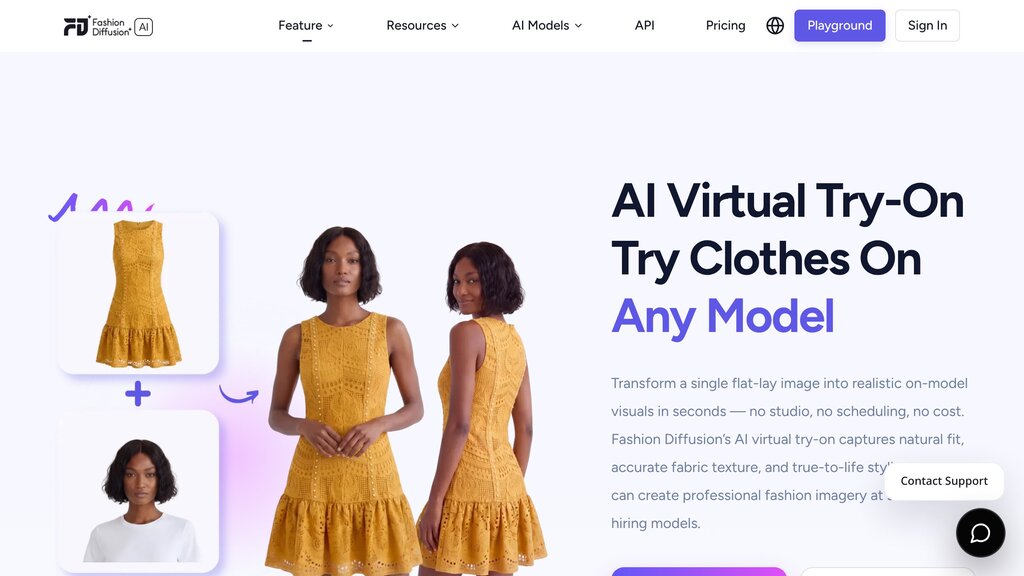
Where I would push back is the accuracy claim. Fashion Diffusion states its try-on output preserves the garment’s actual appearance rather than producing a generic overlay, and that results are “suitable for direct use in product listings and campaign content without additional retouching”. That’s an unusually strong claim for diffusion-based try-on, and no independent benchmark supports it yet.
Every diffusion system has the same weak spots: printed text, logos, buttonholes, and the exact placement of a pocket. Run your own worst garment through it on the free credits before you believe the no-retouching part.
AI Model Generator: the one people confuse with try-on
These two tools are opposites, and the platform explains the distinction better than most of its competitors do.
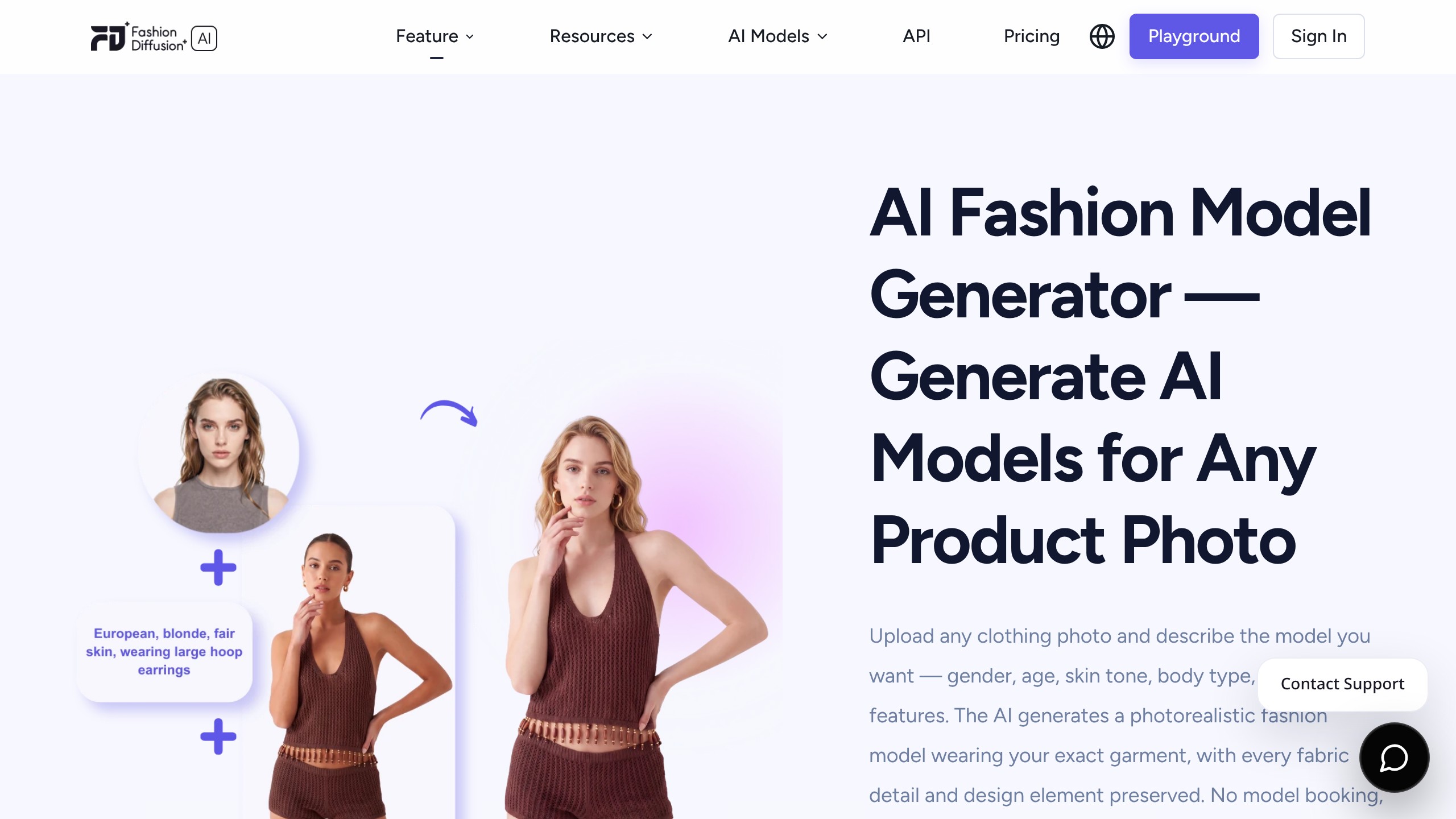
Virtual Try-On keeps the model and changes the clothing. The AI Model Generator keeps the clothing and changes the model. Use the first when you have a model shot and a rail of garments. Use the second when you have one garment and need it on four different people.
The controls for AI model generation cover gender, age, skin tone, body type and facial features, written as a plain description rather than picked from a dropdown. You can spin up several model variations of the same garment, which is how AI fashion models are meant to earn their keep: one upload, several markets. There is a Plus-Size Preview tool alongside it, which matters given how routinely AI fashion tools default to one body type.
The open question the documentation does not answer is model consistency across sessions. Selling a collection means the same face across 30 listings.
The site describes generating regional model variants and maintaining consistent photography, but never states whether a generated model can be saved and recalled as a fixed identity. If you are building a catalogue, ask support that question before you subscribe, because it is the difference between a usable brand model and 30 strangers.
Sketch-to-Render: the strongest case for the platform
Upload a fashion sketch or line drawing, describe the fabric and colour, and get a photorealistic garment back. It accepts hand-drawn sketches photographed or scanned, digital line drawings, technical flats, and sketches generated by the platform’s own text-to-sketch tool. Clean line art gives the most accurate results, though the vendor says rough drafts work when the written description carries more of the detail.
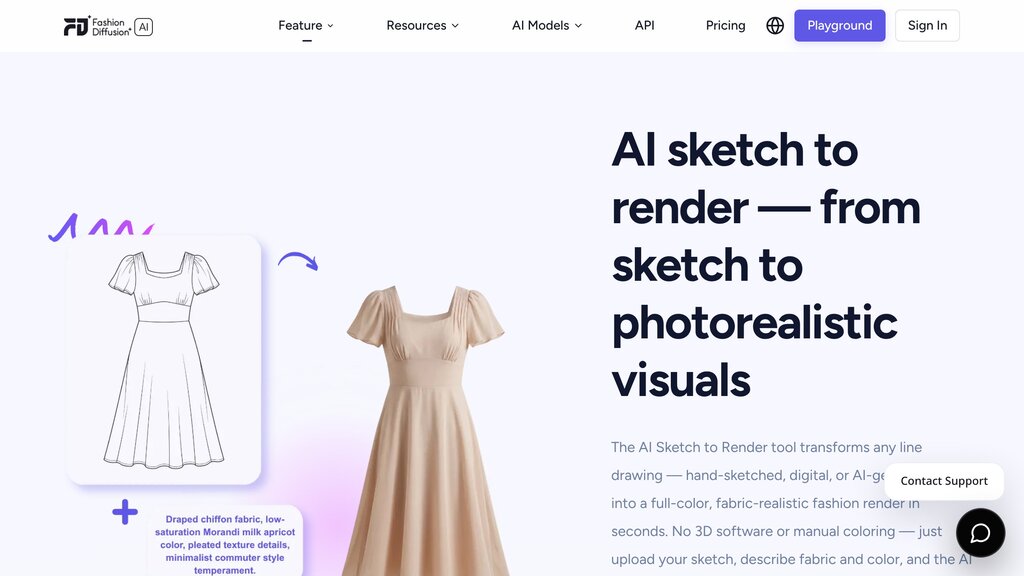
The company positions this against Photoshop and CLO 3D, and the comparison is fair as far as it goes. Photoshop means hours of manual colouring and lighting.
CLO 3D means a real learning curve and a real licence fee. This is minutes and a sentence.
What it doesn’t do is replace either one. A render is a picture of a garment that does not exist yet, produced by a model guessing how that fabric would fall.
It’s excellent for a client conversation, a buyer meeting or a range review. It isn’t a construction document, and the moment somebody treats a render as a spec, a sample comes back wrong.
AI restyle: apply fabric and recolor
These two do the “what if” work. Upload a swatch, a scanned textile or a print, and apply it to a garment reference. Recolor does the same for colourways.
The practical value is straightforward. Testing eight colourways digitally costs eight credits, which is under $1 on the Creator plan.
Getting eight physical samples made costs a great deal more and takes weeks. Even if you distrust the vendor’s 30% sampling reduction figure, and you should, the direction of that argument is sound.
AI Pattern Extractor: the genuinely unusual one
Upload a garment photo with a visible print, and the tool isolates the print as a clean, reusable asset. Three steps: upload, choose a background colour, download. The output is described as editable, and it feeds into the seamless repeat generator for fabric development.
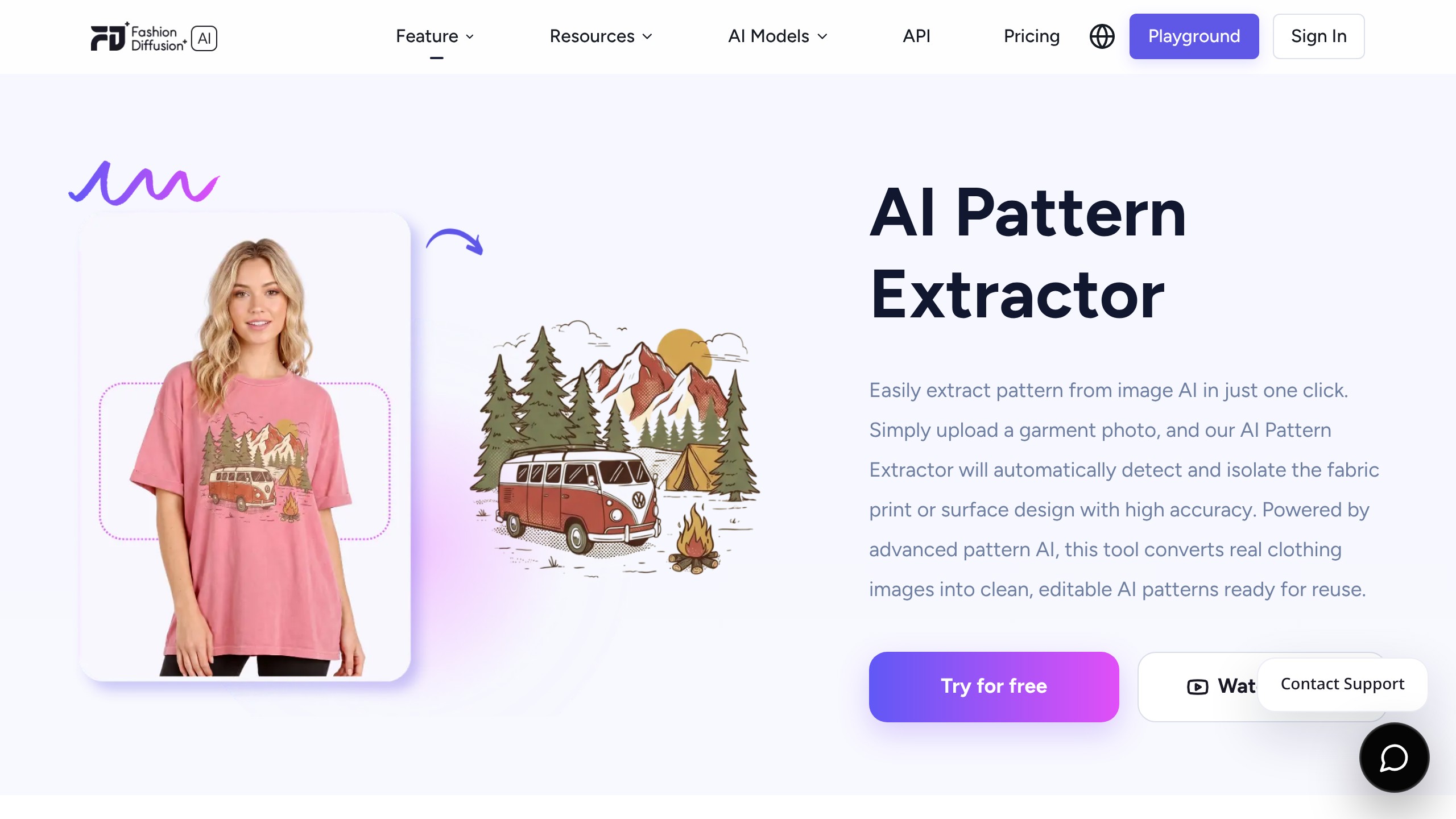
This is the tool with no real equivalent in a general image generator, and it’s worth flagging one thing the marketing doesn’t: extracting a print from a garment photograph is trivially easy to do with somebody else’s copyrighted print. The terms put that risk squarely on you.
Clause 3.2 requires you to warrant that you own or have obtained all rights to anything you upload. Extract your own prints and archive pieces, not a competitor’s.
Flat Lay Generator: the e-commerce workhorse
Upload a garment on a model, on a hanger or against any background, and get a clean top-down flat lay. It handles tops, dresses, jackets, trousers, knitwear, outerwear and accessories, and the vendor says structured garments like tailoring produce the cleanest results.
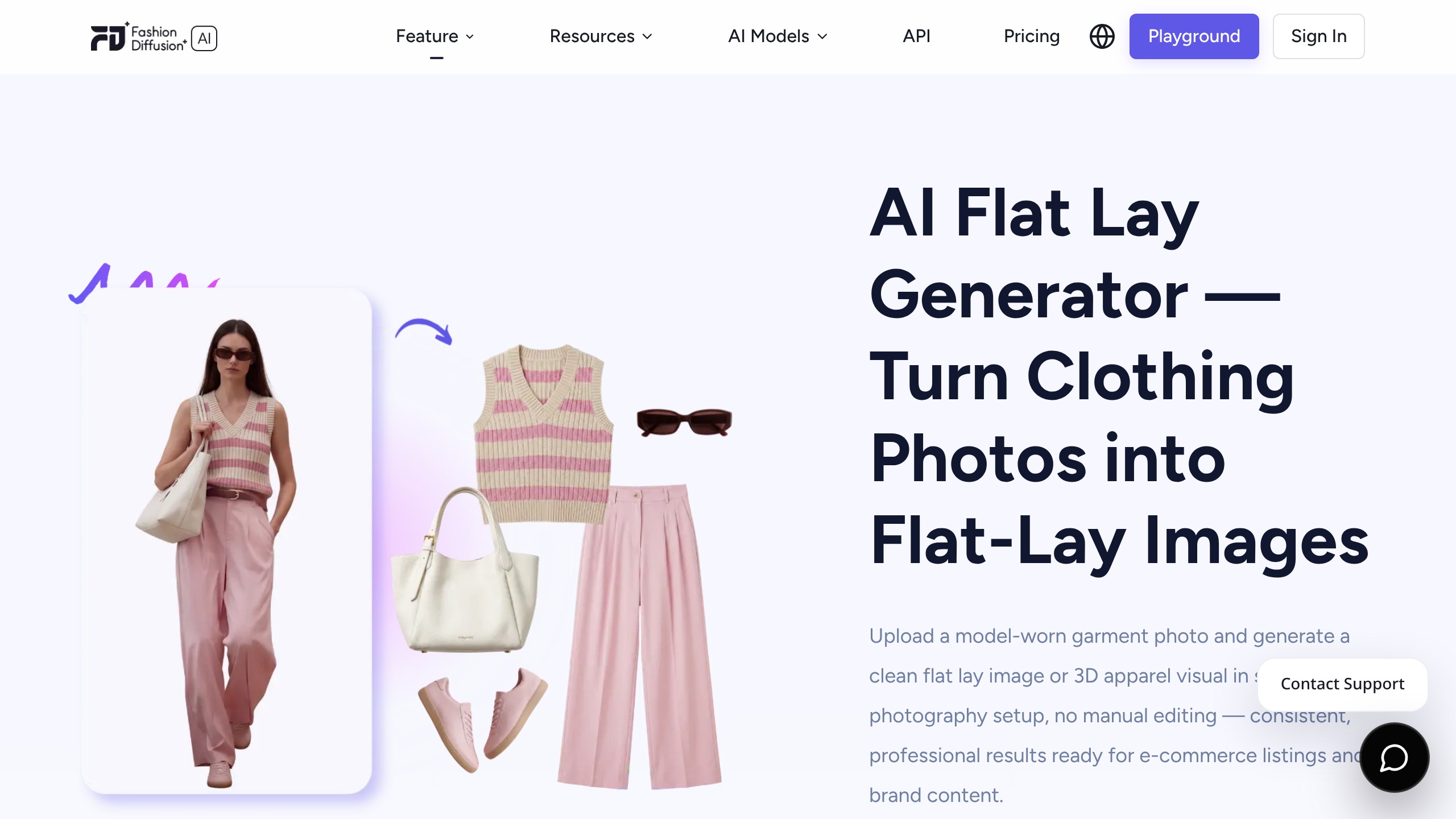
For a small brand producing professional product images at volume, this is the tool that most directly replaces a studio day. Two claims here are worth knowing about.
First, Fashion Diffusion says the outputs meet Amazon, Shopify and Etsy image requirements, with clean white or transparent backgrounds. Second, it supports bulk generation across a catalogue, which is the feature that separates a toy from a production tool when you have 300 SKUs. Neither claim is independently verified, but both are specific enough to test cheaply on a handful of credits.
AI Fashion Video: the newest studio
Upload a still, describe the motion you want, get a short clip for TikTok, Reels or a product page. Output is 1080p on every paid plan. The company’s own tutorial content focuses on motion control, directing how a model moves rather than accepting whatever the model produces.
That video is Fashion Diffusion’s own Motion Control tutorial, and it is the clearest public demonstration of the video studio in action. Worth watching before you spend credits here, because video generation is where costs climb fastest across every platform in this category. If short-form video is the main job, compare this against the dedicated options in our roundup of free AI video generators before committing.
How much does Fashion Diffusion AI cost, and is there a free version?
There’s no free plan. There are free credits on signup with no credit card required, and the number is not published anywhere on the site.
Four monthly plans, verified on the pricing page on 25 September 2026:
| Plan | Monthly | Credits/month | Cost per credit | Credit Bank Max |
|---|---|---|---|---|
| Starter | $12 | 100 | $0.12 | 300 |
| Creator | $29 | 320 | $0.09 | 960 |
| Pro | $59 | 760 | $0.08 | 2,280 |
| Studio | $199 | 2,800 | $0.07 | 8,400 |
Prices checked on 25 September 2026.
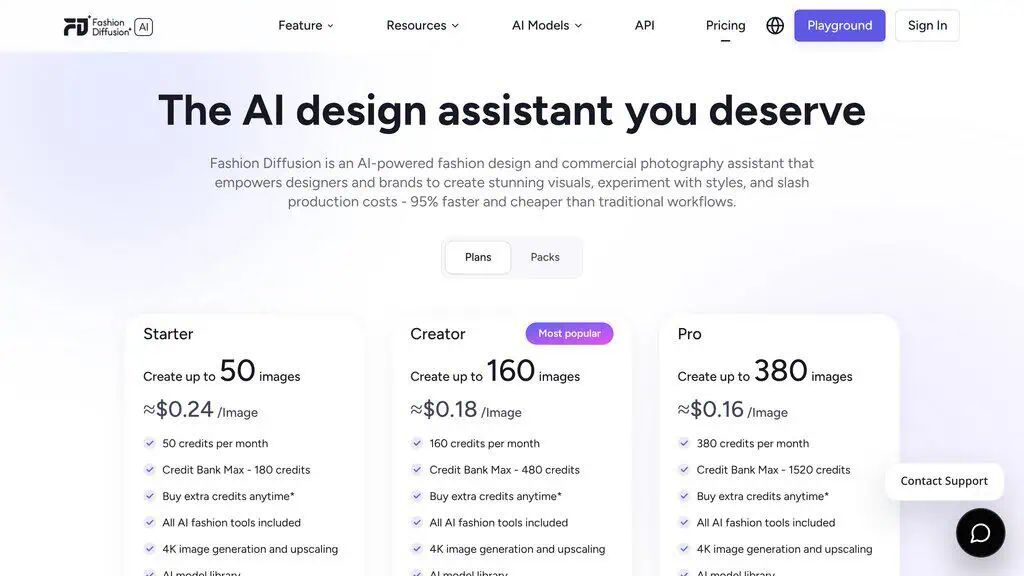
Annual billing gives two months free. There is a separate Packs tab for one-time credit purchases, useful if your production is seasonal rather than monthly. “Credit Bank Max” is the ceiling on unused credits you can accumulate, so rolling over is capped.
The genuinely good news is that nothing is gated behind a higher tier. All AI fashion tools, 4K image generation and upscaling, the AI model library, 1080p video and developer API access are on the $12 Starter plan exactly as they are on the $199 Studio plan.
You are buying volume, not features. That is unusual and it is consumer-friendly, and it means the cheapest plan is a legitimate way to evaluate the whole platform.
Where the credit economics fall down
Now the part that should change your decision. Here is the same money spent at three fashion-specific platforms, all verified on 25 September 2026:
| Platform | Entry plan | Credits | Cost per credit |
|---|---|---|---|
| Fashion Diffusion AI | $12/mo | 100 | $0.12 |
| The New Black | $15/mo | 200 | $0.075 |
| FASHN AI | $19/mo | 200 | $0.095 |
For $3 more per month than Fashion Diffusion’s Starter plan, The New Black gives you twice the images. The gap narrows at higher tiers, but it holds.
At around $30 a month, Fashion Diffusion gives 320 credits and The New Black gives 500. At the top, $199 buys 2,800 credits here and $195 buys 3,000 there.
There is a further detail worth noticing. The New Black uses the identical “Credit Bank Max” terminology, the same four-tier structure, and the same two-months-free annual discount.
That is an unusual phrase to arrive at independently. I can’t tell you what the relationship between these two products is, and I’m not going to guess, but the pricing architecture is close enough that comparing them directly is easy and worth ten minutes of your time.
FASHN, meanwhile, publishes what Fashion Diffusion does not: a stated free allowance of 10 credits, and top-ups at a fixed $0.10 per credit valid for 12 months.
None of this makes Fashion Diffusion a bad buy at $12. It makes it a tool you should price against its two closest rivals before you scale up.
The same arithmetic applies to any subscription: I once audited my own software stack and found three AI writing tools with overlapping features and an email platform I had forgotten I was paying for. If you are about to add a fifth image tool to your stack, the question is not whether this one is good.
It is whether it beats the one you already pay for. Our lifetime deals hub is worth a look first, since a one-time payment changes that maths entirely.
Can you use the images commercially?
Yes, and this is one of the clearest parts of the documentation. Clause 2.3 of the terms of service states that all designs, images, videos and text generated by the platform are owned by the user, who retains full rights and licences to use the outputs, subject to applicable law.
That is unambiguous and better than several competitors manage. The counterpart obligation is clause 3.2: you warrant that you hold the rights to everything you upload. Your own garments and your own prints are fine. A competitor’s lookbook is not.
Where Fashion Diffusion AI’s advertised savings stop being verifiable
Four numbers appear across Fashion Diffusion’s homepage and every directory listing that has copied it:
- Save 3 to 5 hours per design, and reduce design time overall
- Reduce sample costs by 30%
- Save up to 3 months per year
- Increase sell-through by 12%
The pricing page adds a fifth: “95% faster and cheaper than traditional workflows.”
None of them carries a study, a sample size, a methodology, a date, or a named customer. I looked for the source on the site and there isn’t one.
This is not me calling the vendor dishonest. Directionally, most of these claims are plausible: digital colourway testing genuinely is cheaper than physical sampling, and generating an image genuinely is faster than booking a studio. The problem is the precision.
“Increase sell-through by 12%” is a specific measured-sounding figure, and sell-through depends on price, product, season, channel and merchandising far more than on who shot the photograph. A figure that specific either comes from a study you can read, or it doesn’t mean anything.
What makes this worth a section rather than a footnote is what happens next. These four numbers now appear on multiple AI directory listings presented as the product’s “pros”, stripped of any attribution. A marketing claim went in one end and came out the other as a third-party fact. ProgressiveRobot’s write-up is the one independent piece of coverage that flags this, noting that most of the time, cost and sell-through figures on the site are vendor claims rather than independently validated benchmarks.
I have an unreasonable amount of sympathy for anyone who gets caught by this, because I was. As a teenager I burned through about $300 of my savings on pay-to-click sites, survey schemes and paid courses, every one of them advertising a specific, confident number.
The lesson wasn’t that numbers lie. It was that a number with no method behind it is just a sentence wearing a suit.
So here is the practical version. Ignore all five figures.
Take your own worst-case garment, run it through the free credits, count how long it takes and what you would have paid a photographer. That is your number, and it is the only one that applies to your catalogue.
Can Fashion Diffusion AI replace a fashion photoshoot or a designer?
It can replace some photoshoots. It cannot replace a designer, and the honest answer differs sharply depending on which job you mean.
Where it genuinely substitutes for photography: standard e-commerce product photos and AI fashion photography. This is where costly photoshoots are easiest to cut, and where photoshoot costs fall fastest.
On-model shots of a simple garment, flat lays, ghost mannequin style listings, background variants, and size or demographic variants of a shot you already have. This is repetitive, high-volume, low-creativity work with a well-defined output, and it is exactly what these models are good at.
It also scales model imagery across a catalogue in a way a studio simply cannot. If you are an independent seller who has been photographing garments on a clothes rail against a bedsheet, the output here will beat what you have.
Where photography still wins: anything with a creative direction. Campaign work, editorial, lookbooks with a mood, location shoots, and any product whose appeal is in the detail, which means the beading, the hand-finishing, the weave. A photographer solves problems on set. A prompt can’t.
Where it does not touch the designer’s job at all: the actual design decisions. Fashion Diffusion generates a visual of a garment.
It doesn’t decide the silhouette is wrong for the season, or that the price point will not carry that fabric, or which three of your eleven concepts should go into the range. Its own FAQ says as much, describing the platform as a creative assistant rather than a replacement, which is a more honest framing than the homepage’s savings numbers.
The closest parallel I have from my own stack is AI writing tools. The good ones match a brand voice convincingly, and they still miss the specific quirks that make writing sound like a person.
I’ve never published one unedited. The pattern here is the same: the tool removes the repetitive middle of the work, and the judgement at both ends stays with you.
What you still have to check before publishing an AI garment image
The ethics conversation around AI in fashion usually gets abstract quickly. Here is the concrete version, the things that can actually cause you a problem:
- Accuracy to the physical product. If the render shows a drape, a sheen or a shade your garment does not have, you have a returns problem and, depending on your market, a consumer protection problem.
- Disclosure. Several markets are moving toward requiring that AI-generated model imagery be labelled. Check the rules where you sell rather than where you are.
- The models displacing real work. Generating a model instead of booking one has an obvious effect on the people who used to get booked. That’s a business decision, not a technical one, and it is worth making deliberately rather than by default.
- Body representation. Diversity controls and a Plus-Size Preview tool exist, which is more than many rivals offer. Using them is still a choice somebody has to make.
- Rights on what you upload. Clause 3.2 again. The extraction tools make it very easy to lift somebody else’s print.
The practical first step with Fashion Diffusion AI
Fashion Diffusion AI does one thing better than most of the field: it covers the whole fashion visual workflow in one place, from a line drawing to a print extraction to an on-model shot to a video clip, and it puts every one of those tools on the cheapest $12 plan rather than gating them behind an upgrade. For an independent seller or a small brand photographing garments on a rail at home, that is a real step up, and the commercial terms are cleaner than several rivals manage.
Two things should temper it. The credit allowance is the weakest in its category, and The New Black offers a near-identical toolset at roughly 60% of the cost per image on the entry plan, a gap that narrows to under 10% on the top tiers. And every savings figure the company advertises is unsourced, which means the only honest way to size the benefit is to measure it on your own products.
So the practical first step isn’t a subscription. Sign up for the free credits, take the single most awkward garment you sell, the one with a logo or a print or a fussy neckline, and run it through Virtual Try-On and Flat Lay. That one test tells you more than this entire review.
If the output holds up, $12 a month is a fair price to keep testing. If it doesn’t, you’ve lost nothing, and you already know which two rivals to price next.
If you want the honest verdict on tools like this before you spend anything, subscribe for the weekly roundup, or browse what else has been tested in the best AI tools collection. I reply to every question that comes in.
Common questions about Fashion Diffusion AI
What is Fashion Diffusion AI?
Fashion Diffusion AI is an AI fashion design and product photography platform for apparel brands, designers and e-commerce teams. It converts garment photos, fabric swatches and sketches into on-model images, flat lays, colourway variations, extracted prints and short videos across four studios, priced from $12 per month.
Is Fashion Diffusion AI free?
There is no permanently free plan. Fashion Diffusion gives free credits when you sign up, with no credit card required, but it does not publish how many credits that is on any product page. Paid plans start at $12 per month for 100 credits and run to $199 per month for 2,800.
Can Fashion Diffusion AI generate virtual fashion models?
Yes. The AI Model Generator creates photorealistic fashion models around a garment you upload, with controls for gender, age, skin tone, body type and facial features, plus a separate Plus-Size Preview tool.
The company says most generations finish in under two minutes. Whether a specific model can be saved and reused consistently across a catalogue is not documented.
Can Fashion Diffusion AI change the colour or fabric of clothing?
Yes. Recolor changes colourways and Apply Fabric maps an uploaded swatch, textile scan or print onto a garment reference while keeping the garment’s construction. Both are aimed at testing options before physical sampling, and both cost credits per generation like every other tool on the platform.
Can Fashion Diffusion AI turn sketches into realistic fashion images?
Yes. Sketch-to-Render accepts hand-drawn sketches that have been photographed or scanned, digital line drawings and technical flats, then renders them as photorealistic garments from a written fabric and colour description.
Clean line art produces the most accurate results. The output is a presentation visual, not a production specification.
Does Fashion Diffusion AI support virtual try-on?
Yes, and it is the platform’s most-promoted tool. Upload a flat-lay or ghost mannequin image, choose an AI model, and it renders the garment on that model. Supported categories include tops, dresses, outerwear, bottoms, full outfits, shoes, bags and accessories, and one garment can be placed on several models in a session.
Can Fashion Diffusion AI images be used commercially?
Yes. The terms of service state that all content generated on the platform is owned by the user, who retains full rights and licences subject to applicable law. The corresponding requirement is that you must own or have secured the rights to everything you upload, which matters most when using the pattern extraction tools.
Can Fashion Diffusion AI replace fashion photoshoots?
It can replace routine e-commerce product photography: on-model shots of straightforward garments, flat lays and background or demographic variants. It does not replace campaign, editorial or location photography, where creative direction is the point, and it cannot be relied on for garments whose value sits in fine detail such as logos, small text or hand-finishing.
Transparency note. Disclosure tag: Deal Notification. Fashion Diffusion AI has not been personally tested for this review. Everything above is sourced from the vendor’s own product pages, its pricing page, its terms of service, its official YouTube channel, published competitor pricing, and Ahrefs data.
All figures were checked on 18 August 2026, and prices again on 25 September 2026. No payment or free access was provided in exchange for this review, and no vendor had sight of it before publication.
Related Posts

I tested AgainstData on 355 pages of Gmail data. Bulk unsubscribe, personal data deletion requests, pricing, and whether...

AI-Text-Humanizer.com took a 132-word ChatGPT paragraph from 100% AI to 0% on ZeroGPT but flattens your voice. Buy the $...
AIscan24 is a free, no-signup AI detector: it caught pure ChatGPT text at 100% but scored my handwritten paragraph 80%. ...

Honest Aithenticate review after hands-on testing. Does this AI disclosure badge tool meet EU AI Act requirements? Prici...

My hands-on Answer Socrates review covering all features, free plan limits, pricing, and how it compares to AlsoAsked. I...

I’ve spent $4,200 on 118 AppSumo lifetime deals over 5 years. Here’s my honest review: what works, what fails, and wheth...