

Password Protected: free sitewide, $59.99 a year for Pro
| Field | Detail |
|---|---|
| Tool | Password Protected (passwordprotectedwp.com) |
| Category | WordPress content protection plugin, password gating rather than membership. Locks a whole site, posts, pages, categories, WooCommerce products or part of a page. More than 300,000 active installs on WordPress.org |
| Best use case | Locking a staging site, a client portfolio, or a handful of premium pages without building a membership system |
| Price | Free version on WordPress.org: yes. Pro from $59.99/year (1 site), $79.99/year (3 sites), $99.99/year (10 sites), $599.99 lifetime for unlimited sites. No free trial, 14-day refund. Checked August 16, 2026 |
| Verdict | Install the free version today, and buy Pro only if sitewide locking is genuinely not enough. A shared password identifies nobody, so this is content gating, not access control |
What this review is based on: I have not run a full deployment of the Pro version on a production site. Everything below comes from the plugin’s public pages, its pricing page, its WordPress.org listing and readme, and competitor pricing pages, all checked on August 16, 2026. Where a number is the vendor’s own claim rather than something publicly verifiable, I say so.
A password plugin that stays out of the membership business
Most WordPress content protection plugins want to sell you a membership platform. You arrive wanting to hide one staging site, and you leave with user accounts, subscription levels, drip schedules, and a database of members you never asked for. Password Protected does not do that, and it is the main reason I ended up liking it. I have owned and managed 100+ websites and work at Brainstorm Force, the team behind Astra with its 7M+ active installs, so I have watched a lot of plugins try to be more than the job requires. This one puts a password in front of something, logs who tried, and gets out of the way.
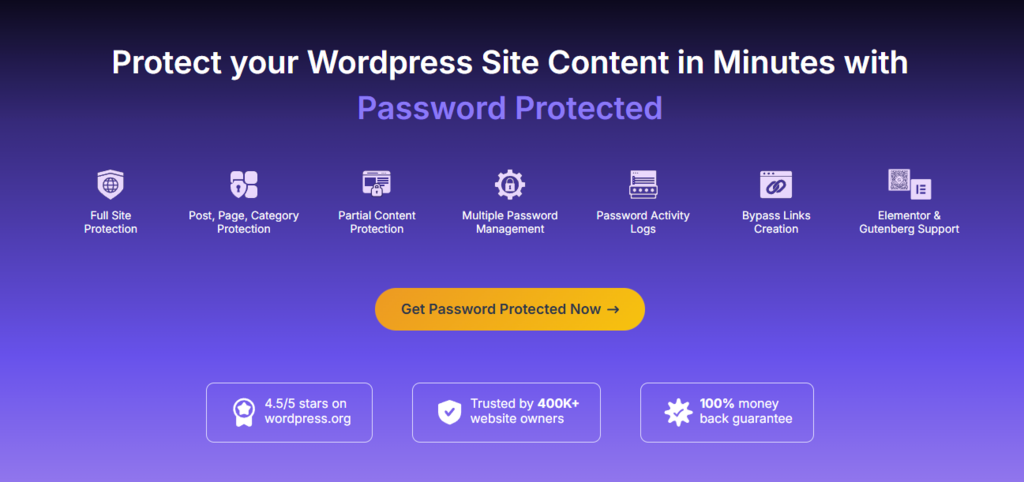
It covers full site protection, individual posts and pages, categories and taxonomies, custom post types including WooCommerce products, the WordPress admin area, and partial sections inside a single page. The free version on WordPress.org sits at more than 300,000 active installs with a 4.4 out of 5 rating from 139 reviews. Version 2.8.4 shipped on July 30, 2026, tested against WordPress 7.0.4, requiring WordPress 4.9.6 and PHP 5.6 as a floor. It is widely deployed, and it is actively maintained rather than parked.
The plugin is published by Saad Iqbal and maintained commercially by WPExperts.io, with the paid product sold through passwordprotectedwp.com. Support links on the marketing site point to Objects WS, which is the same commercial operation under a different entity name. There is a published roadmap and public documentation, both better signals than most plugin vendors at this price offer.
From request to lock screen: how it works
Password Protected intercepts the page request before WordPress renders the content, checks for a valid password cookie, and serves a lock screen instead of the page when that cookie is missing.
- You choose a scope. Sitewide is the free option. Pro adds individual posts and pages, custom post types including WooCommerce products, categories and taxonomy archives, the WordPress admin area, and partial sections inside a page.
- You create one or more passwords for that scope. Pro allows several passwords for the same content, each with its own expiry date and usage limit.
- A visitor hits the protected URL and gets the lock screen. Pro includes a real-time customizer for the background, logo and colours, plus optional Google reCAPTCHA v2 and v3, hCaptcha or Cloudflare Turnstile on the form.
- A correct password sets a cookie and unlocks the scope. Whitelisted user roles and whitelisted IP addresses skip the screen entirely, and administrators can be given passwordless access so they never lock themselves out.
- Everything is logged. The activity log records IP address, browser and timestamp for each attempt, exports to CSV, and emails a weekly summary of login attempts.
- Bypass links skip step 3. Pro generates a unique URL that unlocks a post, page, product, category or the whole site without typing anything.
What the free version actually gives you
This is the part that decides whether you spend anything at all. The free plugin includes:
- Sitewide password protection with a master password
- Passwordless admin access, so administrators are never locked out
- Google reCAPTCHA v2 and v3 on the password form
- IP address whitelisting
- Detailed activity logs with IP, browser and timestamp
- Weekly password attempt reporting
- Feed access options and an allow-administrators toggle
For the single most common use case in this category, hiding a site during a build or a redesign, that list is complete. You do not need the paid version, and you should not buy it until the free one has failed you at something specific.
How much does Password Protected cost?
Password Protected costs $59.99 per year for one site, $79.99 for three, and $99.99 for ten, with a $599.99 one-time payment for unlimited sites. All prices were checked directly on the pricing page on August 16, 2026.
| Plan | Price | Sites | What it adds |
|---|---|---|---|
| Free | $0 | Unlimited | Sitewide protection, passwordless admin access, reCAPTCHA, IP whitelisting, activity logs |
| Basic | $59.99/year | 1 | Post type protection, user role whitelisting, login attempt limits, weekly activity reports |
| Professional | $79.99/year | 3 | Everything in Basic plus bypass links, individual page and post protection, page exclusions, hCaptcha and Turnstile |
| Business | $99.99/year | 10 | Everything in Professional plus partial content protection, Gravity Forms, category and taxonomy protection, WP-Admin protection, multiple passwords, multisite, lock screen customizer |
| Lifetime | $599.99 one-time | Unlimited | All Business features, no renewal |
Annual plans include one year of updates and priority support. There is no free trial on the paid version, only a 14-day money-back guarantee, which is the same window MemberPress and Passster both offer.
The headline prices make Basic look like the cheap option, but the number that matters is what each plan costs per site:
Two things about this table are worth saying plainly. First, the features most people upgrade for, partial content protection and category locking, sit in the top annual tier at $99.99 rather than in Basic.
Second, if you manage more than ten sites, the annual ladder stops helping you and the $599.99 lifetime becomes the only sensible option. Whether a one-time payment beats a yearly one depends on how long you will keep using it, and you can run those numbers yourself with our free SaaS vs lifetime deal calculator.
The features that justify the Pro upgrade
Not all of the Pro list earns its money. Three parts of it do.
Partial content protection. A shortcode wraps a section rather than a page, so the teaser stays public and indexable while the paid part is gated. This is the feature that turns a blog post into a lead magnet without splitting it into two URLs, and it is the strongest single reason to go to Business. Native support inside Elementor, Gutenberg and Beaver Builder means you can lock a block or widget without your layout collapsing around the gap.
Bypass links. A unique URL that unlocks content with no password entry. In practice this is the feature you will use most with clients, because clients lose passwords and do not lose links. Pair it with an expiry date and a usage limit and it stops being a permanent backdoor.
Multiple passwords with expiry and usage limits. One password for the client, one for their legal reviewer, one for the contractor, each expiring on its own schedule. This is the closest the plugin gets to real access control, and it is the honest workaround for the fact that passwords do not identify anyone.
The Gravity Forms integration deserves a mention too, because it quietly turns the plugin into a commercial tool: collect an email or take a payment, and the bypass link goes out automatically. If your WooCommerce store is the thing you are gating, our roundup of WordPress plugins every store owner should know about covers what else should be running alongside it.
Everything else, the lock screen customizer, the CSV import and export of passwords, the multisite network controls, is competent and not decisive.
Password protection is not the same as access control
This is the distinction that decides whether you should be looking at this plugin at all.
A password gate answers one question: does this visitor know the string? It does not know who they are, cannot tell two people apart, cannot revoke one person’s access, and cannot stop the string being forwarded. Once you share a password with a group, you have shared it with everyone that group will ever talk to.
An access control system answers a different question: is this specific account allowed? That needs user accounts, which means a membership plugin such as MemberPress, with recurring payments, drip scheduling and the ability to revoke one member without affecting anyone else. That also means more setup, more surface area and more money.
Password Protected is firmly in the first category, and it is honest about that. Multiple passwords, expiry dates, usage limits and IP whitelisting all narrow the blast radius, but they do not change the model. So the buying question is “is a password the right control for this content”. For a staging site, a client preview, a portfolio, or a lead magnet, it clearly is. For anything you would be genuinely damaged by leaking, it is not, and no amount of plugin features fixes that.
Shared passwords and rounded numbers: the weak spots
Where it fails in use
- One leak means changing the password for everyone. Everyone who gets in is anonymous. The activity log records IP addresses, which narrows an investigation but does not prevent the leak.
- Bypass links are secret URLs, with the usual failure mode. Anything that unlocks content by being visited will eventually be forwarded, pasted into a shared inbox, or leak through a referrer header. Set expiry dates and usage limits on them rather than treating them as permanent.
- Locking a page removes it from search. If the page currently earns organic traffic, protecting it costs you that traffic, and no plugin setting changes that. Partial content protection is the safer option, because the public teaser stays crawlable.
- Previously public content stays cached. If you lock a page that Google already indexed, the snippet and any cached copy persist for a while after the lock goes up. Plan for a delay between switching protection on and the content disappearing from search results.
Where the marketing runs ahead of the data
The homepage says “4.5/5 stars on wordpress.org” and “Trusted by 400K+ website owners”. WordPress.org says 4.4 out of 5 and 300,000 or more active installs. The gap is small and entirely unnecessary: 300,000 installs and a 4.4 rating is a strong position to argue from, and rounding it makes a reader who checks trust the rest of the page slightly less.
The review base is also thin for a plugin this size: 139 ratings against 300,000 active installs, with 11 of those at one star, and the support forum showed only 2 threads at the time of checking. That is not damning, but it is a small evidence base to lean on.
The lifetime anchor price is theatre. $599.99 struck through against $4,499.99 is not a price anyone has paid, and the homepage advertises “up to 75% off” while the pricing page says “save up to 87%”. Judge the $599.99 on whether unlimited sites forever is worth $599.99 to you, and ignore the number next to it.
Finally, the tier documentation. The features page labels several capabilities “Free & Pro” that the WordPress.org readme marks as Pro-only, and the pricing table gates bypass links to Professional and category protection to Business. If you are buying for one specific feature, confirm it against the pricing table, not the features page, and be ready to use the 14-day refund if it lands in a tier above the one you bought.
Agencies and small gated sites yes, membership sellers no
Password Protected is best for:
- Agencies and freelancers showing work in progress. A staging site or an unfinished client build needs one password and nothing else. The free version does this in about two minutes, and passwordless admin access means you never fight your own lock screen.
- Anyone gating a small number of premium pages. A pricing sheet, a research PDF, a members-only guide. Multiple passwords with expiry dates give you enough control without a membership plugin and its database of user accounts.
- WooCommerce stores running private or wholesale catalogues. Custom post type and category protection covers products and product categories, which generic password plugins tend to miss. Category protection sits in the Business tier, not Basic.
- Site owners who want an audit trail. The activity log with IP, browser and timestamp, plus CSV export, is more than most plugins in this category ship, and it is the difference between suspecting a password leaked and proving it.
Password Protected is not for:
- Selling recurring access to content. There are no user accounts, no subscriptions, no drip scheduling and no per-member billing. That is a membership plugin’s job.
- Anything that needs real security guarantees. A password shared with 40 people is a password shared with the internet. If the content genuinely must not leak, gating it behind a shared string is the wrong control.
- Large agencies on the annual plans. Site limits of 1, 3 and 10 are tight for the price. Past roughly 10 sites the maths pushes you straight to the $599.99 lifetime, which is a different size of decision.
How I would test it in an afternoon
If you want an answer rather than an opinion, this takes about two hours.
- Install the free version on a staging site and turn on sitewide protection. Time how long it takes to get a working lock screen. If the free version solves your problem here, stop. You are done and it cost nothing.
- Log out completely and try to reach the site three ways. Direct URL, a Google cached result, and the RSS feed. The feed is the one people forget, and the free version has a setting for it.
- Check the activity log after those attempts. Confirm it captured your IP, browser and timestamp, and export the CSV. If the log is the reason you are buying, verify it before you pay.
- Write down the one feature that made you consider Pro. Partial content, category locking, bypass links, WP-Admin protection. One feature, named.
- Find that feature in the pricing table, not the features page. Confirm which tier it is actually in. This is where the tier documentation mismatch will cost you money if you skip it.
- Buy that tier and test the feature within 14 days. The refund window is your trial. Use it deliberately rather than discovering on day 20 that the shortcode does not do what you assumed.
Four alternatives, and the only real competitor
Only Passster is a direct competitor. WordPress core is the free floor you should check first, MemberPress is the ceiling you graduate to when passwords stop being enough, and SeedProd solves an adjacent problem that people often try to solve with a password plugin.
| Alternative | Price | Pick it instead when |
|---|---|---|
| WordPress built-in password protection | Free, already in core | You need to lock one or two posts, accept the default form, and want no plugin at all |
| Passster | Free core plugin on WordPress.org, paid from $49/year for 1 site or $149 lifetime | You want partial content locking on a single site at the lowest paid entry price |
| MemberPress | From $199.50/year, no free version | You are selling recurring access and need real user accounts, drip content and billing |
| SeedProd | Free core plugin on WordPress.org, paid from $79/year for 1 site | The actual job is a coming soon or maintenance page during a build, not ongoing content gating |
If you want the broader picture of what else is worth installing, our data report on the best AI WordPress plugins ranks 119 of them on installs, maintenance and a real CVE audit.
Verdict: free for staging sites, Business for partial locking
Verdict: yes for the free version, and yes for Business if you specifically need partial content or category locking.
I came to this expecting a thin freemium wrapper around a WordPress core feature, and that is not what it is. The free version does a complete job of the most common use case, and the paid version adds granularity that does not exist in core; the partial content shortcode in particular solves a real content marketing problem. 300,000 or more active installs and a July 2026 update tell you it is maintained and widely deployed, which is most of what you need to know about plugin risk.
The reservations are about presentation rather than product: the rounded install count and star rating, the theatrical lifetime anchor, and tier documentation that contradicts itself. That is why this is a warm recommendation rather than an unqualified one, and all three are things you work around by reading the pricing table and using the 14-day window as a trial. The tier ladder is the other lesson: Basic at $59.99 buys none of the features people upgrade for, so the real choice is free, Business at $99.99, or the $599.99 lifetime if you run more than ten sites and plan to for several years.
For more verdicts made this way before you spend, browse our library of tested tool reviews, or check the current AI deals and lifetime offers if you are trying to cut what you pay for software every month.
Transparency note: Password Protected did not pay for or review this article, and the links to their site and to competitor sites are not affiliate links. I have not run the Pro version on a production site, so every claim above is sourced from the plugin’s public pages, its WordPress.org listing and competitor pricing pages as checked on August 16, 2026, or clearly labelled as the vendor’s own marketing. If I deploy it properly, I will update this review with the real numbers. Found something out of date? Tell me and I will fix it.
Related Posts

I tested AgainstData on 355 pages of Gmail data. Bulk unsubscribe, personal data deletion requests, pricing, and whether...

AI-Text-Humanizer.com took a 132-word ChatGPT paragraph from 100% AI to 0% on ZeroGPT but flattens your voice. Buy the $...
AIscan24 is a free, no-signup AI detector: it caught pure ChatGPT text at 100% but scored my handwritten paragraph 80%. ...

Honest Aithenticate review after hands-on testing. Does this AI disclosure badge tool meet EU AI Act requirements? Prici...

My hands-on Answer Socrates review covering all features, free plan limits, pricing, and how it compares to AlsoAsked. I...

I’ve spent $4,200 on 118 AppSumo lifetime deals over 5 years. Here’s my honest review: what works, what fails, and wheth...